ServletContext对象
问题:Request 解决了一次请求内的数据共享问题,session解决了 用户不同请求的数据共享问题,那么不同的用户的数据 共享该怎么办呢?
解决:使用ServletContext对象
作用:解决了不同用户的数据共享问题
原理:ServletContext 对象由服务器进行创建,一个项目只有一个对象。不管在项目的任意位置进行获取得到的都是同一个对象,那 么不同用户发起的请求获取到的也就是同一个对象了,该对象由 用户共同拥有。
特点:服务器进行创建
用户共享
一个项目只有一个
生命周期:服务器启动到服务器关闭
作用域:项目内
使用:获取 ServletContext对象
使用作用域进行共享数据流转
获取web.xml中的全局配置
获取webroot下项目资源流对象
获取webroot下资源绝对路径
案例:网页浏览器次数统计
//第一种方式(常用)
ServletContext sc=this.getServletContext();
//第二种方式
ServletContext sc2=this.getServletConfig().getServletContext();
//第三种方式(常用)
ServletContext sc3=req.getSession().getServletContext();
public class ServletContextServlet extends HttpServlet {
	@Override
	protected void service(HttpServletRequest req, HttpServletResponse resp)
			throws ServletException, IOException {
		//获取servletContext对象
			//第一种方式
			ServletContext sc=this.getServletContext();
			//第二种方式
			ServletContext sc2=this.getServletConfig().getServletContext();
			//第三种方式
			ServletContext sc3=req.getSession().getServletContext();
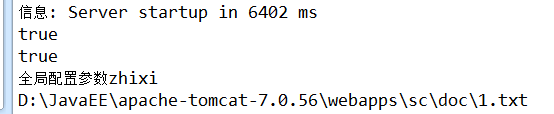
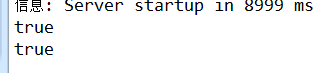
			System.out.println(sc==sc2);
			System.out.println(sc==sc3);

	}
}
* ServletContext对象学习:
* 问题:
* 不同的用户使用相同的数据
* 解决:
* ServletContext对象
* 特点:
* 服务器创建
* 用户共享
* 作用域:
* 整个项目内
* 生命周期:
* 服务器启动到服务器关闭
* 使用:
* 获取ServletContext对象
* //第一种方式:
ServletContext sc=this.getServletContext();
//第二种方式:
ServletContext sc2=this.getServletConfig().getServletContext();
//第三种方式:
ServletContext sc3=req.getSession().getServletContext();
* 使用ServletContext对象完成数据共享
* //数据存储
* sc.setAttribute(String name, Object value);
* //数据获取
* sc.getAttribute("str") 返回的是Object类型
* 注意:
* 不同的用户可以给ServletContext对象进行数据的存取。
* 获取的数据不存在返回null。
* 获取项目中web.xml文件中的全局配置数据
* sc.getInitParameter(String name); 根据键的名字返回web.xml中配置的全局数据的值,返回String类型。
* 如果数据不存在返回null。
* sc.getInitParameterNames();返回键名的枚举
* 配置方式:注意 一组<context-param>标签只能存储一组键值对数据,多组可以声明多个 <context-param>进行存储。
* <context-param>
<param-name>name</param-name>
<param-value>zhangsan</param-value>
</context-param>
作用:将静态数据和代码进行解耦。
获取项目webroot下的资源的绝对路径。
String path=sc.getRealPath(String path);
获取的路径为项目根目录,path参数为项目根目录中的路径
获取webroot下的资源的流对象
InputStream is = sc.getResourceAsStream(String path);
注意:
此种方式只能获取项目根目录下的资源流对象,class文件的流对象需要使用类加载器获取。
path参数为项目根目录中的路径
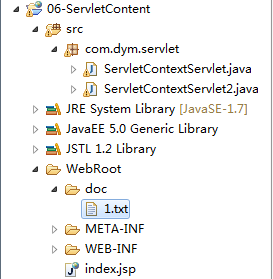
ServletContextServlet.java
package com.dym.servlet;
import java.io.IOException;
import java.io.InputStream;
import javax.servlet.ServletContext;
import javax.servlet.ServletException;
import javax.servlet.http.HttpServlet;
import javax.servlet.http.HttpServletRequest;
import javax.servlet.http.HttpServletResponse;
public class ServletContextServlet extends HttpServlet {
@Override
protected void service(HttpServletRequest req, HttpServletResponse resp)
throws ServletException, IOException {
//获取servletContext对象
//第一种方式(常用)
ServletContext sc=this.getServletContext();
//第二种方式
ServletContext sc2=this.getServletConfig().getServletContext();
//第三种方式(常用)
ServletContext sc3=req.getSession().getServletContext();
System.out.println(sc==sc2);
System.out.println(sc==sc3);
//使用ServletContext对象完成数据共享
//数据存储
sc.setAttribute("str", "ServletContext对象学习");
//获取项目web.xml的全局配置数据
String str=sc.getInitParameter("name");
System.out.println("全局配置参数"+str);
//获取项目根目录下的资源的绝对路径
String path=sc.getRealPath("/doc/1.txt");
System.out.println(path);
//获取项目根目录下资源的流对象
InputStream is=sc.getResourceAsStream("/doc/1.txt");
}
}
web.xml
<?xml version="1.0" encoding="UTF-8"?>
<web-app xmlns:xsi="http://www.w3.org/2001/XMLSchema-instance" xmlns="http://java.sun.com/xml/ns/javaee" xsi:schemaLocation="http://java.sun.com/xml/ns/javaee http://java.sun.com/xml/ns/javaee/web-app_2_5.xsd" id="WebApp_ID" version="2.5">
	<!--全局配置数据 -->
	<context-param>
		<param-name>name</param-name>
		<param-value>zhixi</param-value>
	</context-param>
  <display-name>06-ServletContent</display-name>
  <servlet>
    <description>This is the description of my J2EE component</description>
    <display-name>This is the display name of my J2EE component</display-name>
    <servlet-name>ServletContextServlet</servlet-name>
    <servlet-class>com.dym.servlet.ServletContextServlet</servlet-class>
  </servlet>
  <servlet>
    <description>This is the description of my J2EE component</description>
    <display-name>This is the display name of my J2EE component</display-name>
    <servlet-name>ServletContextServlet2</servlet-name>
    <servlet-class>com.dym.servlet.ServletContextServlet2</servlet-class>
  </servlet>


  <servlet-mapping>
    <servlet-name>ServletContextServlet</servlet-name>
    <url-pattern>/context</url-pattern>
  </servlet-mapping>
  <servlet-mapping>
    <servlet-name>ServletContextServlet2</servlet-name>
    <url-pattern>/context2</url-pattern>
  </servlet-mapping>
  <welcome-file-list>
    <welcome-file>index.html</welcome-file>
    <welcome-file>index.htm</welcome-file>
    <welcome-file>index.jsp</welcome-file>
    <welcome-file>default.html</welcome-file>
    <welcome-file>default.htm</welcome-file>
    <welcome-file>default.jsp</welcome-file>
  </welcome-file-list>
</web-app>
ServletContextServlet2.java
package com.dym.servlet;

import java.io.IOException;

import javax.servlet.ServletContext;
import javax.servlet.ServletException;
import javax.servlet.http.HttpServlet;
import javax.servlet.http.HttpServletRequest;
import javax.servlet.http.HttpServletResponse;

public class ServletContextServlet2 extends HttpServlet {
	@Override
	protected void service(HttpServletRequest arg0, HttpServletResponse arg1)
			throws ServletException, IOException {
		//创建ServletContext对象
			ServletContext sc=this.getServletContext();
		//获取数据
			System.out.println("ServletContextServlet2.service()"+sc.getAttribute("str"));

	}
}