SpringBoot 2.7.2 分模块整合 activiti 7.1.0.M6
项目背景
在实习期间,博主接触到了单位的OA系统,但是由于单位与开发方之间没有充分协商(单位的OA系统是有外包公司开发的),所以有一些遗留问题,比如部分流程没有开发,博主这次从单位领导处得到了开发单位盖章审批流程的任务,下面把使用SpringBoot分模块整合activiti版本的过程梳理,希望能给大家提供借鉴和启发。
项目架构
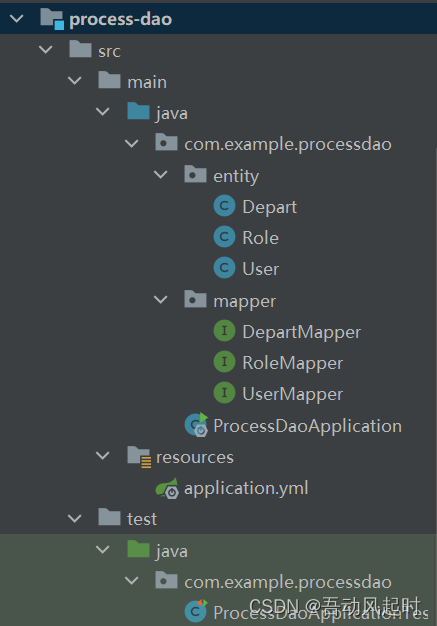
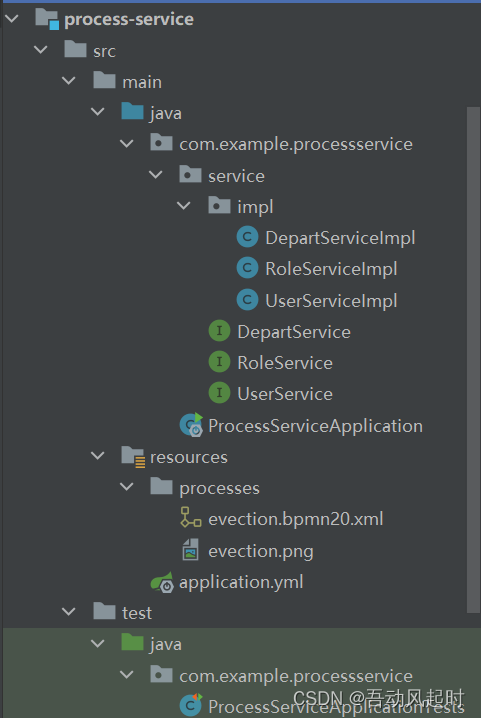
项目由一个process-dao模块(用于数据层)和一个process-service模块(用于服务层)以及一个聚合模块process构成(聚合模块用于dao和service同时构建),其中process-service模块还引用了activiti的依赖,这里activiti作为流程引擎操纵单位服务器上的activiti数据库,而自己编写的process-dao模块操作单位服务器上的process_db数据库
如果不需要进行分模块开发,那么只需要按照本博文中的process-service配置依赖即可,但是还需要在pom文件中引入process-dao中的所有依赖
process-dao
process-service
process
聚合模块中没有任何内容,只有一个pom文件
版本一览
使用SpringBoot整合其他项目,最重要的就是版本管理,因为一个starter包里面包含了很多依赖,非常容易发生依赖的冲突,以下是不会发生冲突的依赖版本
选用activiti 7.1.0.M6的原因是,其中使用的mybatis版本是3.5.0,更老的activiti版本使用的mybatis版本在maven中央仓库中甚至无法找到,由于我们还需要使用mybatis-plus进行开发,mybatis-plus中也含有mybatis,所以只能提升activiti的版本来适应mybatis-plus
如果在运行启动类的时候出现调用了不存在方法(method does not exist之类的,忘记了)的异常,一般是因为依赖冲突,新版本需要的函数在老版本中无法找到,需要在pom文件中解决依赖冲突,这里推荐maven helper插件帮助解决依赖冲突
process-dao模块
<?xml version="1.0" encoding="UTF-8"?>
<project xmlns="http://maven.apache.org/POM/4.0.0" xmlns:xsi="http://www.w3.org/2001/XMLSchema-instance"
         xsi:schemaLocation="http://maven.apache.org/POM/4.0.0 https://maven.apache.org/xsd/maven-4.0.0.xsd">
    <modelVersion>4.0.0</modelVersion>
    <parent>
        <groupId>org.springframework.boot</groupId>
        <artifactId>spring-boot-starter-parent</artifactId>
        <version>2.7.2</version>
        <relativePath/> <!-- lookup parent from repository -->
    </parent>
    <groupId>com.example</groupId>
    <artifactId>process-dao</artifactId>
    <version>0.0.1-SNAPSHOT</version>
    <name>process-dao</name>
    <description>process-dao</description>
    <properties>
        <java.version>1.8</java.version>
    </properties>
    <dependencies>
        <dependency>
            <groupId>org.springframework.boot</groupId>
            <artifactId>spring-boot-starter-web</artifactId>
        </dependency>

        <dependency>
            <groupId>mysql</groupId>
            <artifactId>mysql-connector-java</artifactId>
            <scope>runtime</scope>
        </dependency>
        <dependency>
            <groupId>org.springframework.boot</groupId>
            <artifactId>spring-boot-starter-test</artifactId>
            <scope>test</scope>
        </dependency>

        <dependency>
            <groupId>org.projectlombok</groupId>
            <artifactId>lombok</artifactId>
        </dependency>

        <dependency>
            <groupId>commons-lang</groupId>
            <artifactId>commons-lang</artifactId>
            <version>2.6</version>
        </dependency>

<!--        因为是数据层的模块,所以需要引入mybatis-plus的依赖-->
        <dependency>
            <groupId>com.baomidou</groupId>
            <artifactId>mybatis-plus-boot-starter</artifactId>
            <version>3.1.0</version>
        </dependency>

    </dependencies>

    <build>
        <plugins>
            <plugin>
                <groupId>org.springframework.boot</groupId>
                <artifactId>spring-boot-maven-plugin</artifactId>
            </plugin>
        </plugins>
    </build>

</project>
process-service模块
<?xml version="1.0" encoding="UTF-8"?>
<project xmlns="http://maven.apache.org/POM/4.0.0" xmlns:xsi="http://www.w3.org/2001/XMLSchema-instance"
         xsi:schemaLocation="http://maven.apache.org/POM/4.0.0 https://maven.apache.org/xsd/maven-4.0.0.xsd">
    <modelVersion>4.0.0</modelVersion>
    <parent>
        <groupId>org.springframework.boot</groupId>
        <artifactId>spring-boot-starter-parent</artifactId>
        <version>2.7.2</version>
        <relativePath/> <!-- lookup parent from repository -->
    </parent>
    <groupId>com.example</groupId>
    <artifactId>process-service</artifactId>
    <version>0.0.1-SNAPSHOT</version>
    <name>process-service</name>
    <description>process-service</description>
    <properties>
        <java.version>1.8</java.version>
    </properties>
    <dependencies>
<!--        引入自建模块的依赖-->
<!--        引入process-dao模块的依赖-->
        <dependency>
            <groupId>com.example</groupId>
            <artifactId>process-dao</artifactId>
            <version>0.0.1-SNAPSHOT</version>
        </dependency>
<!--        引入activiti依赖-->
        <dependency>
            <groupId>org.activiti</groupId>
            <artifactId>activiti-spring-boot-starter</artifactId>
            <version>7.1.0.M6</version>
        </dependency>

        <dependency>
            <groupId>org.springframework.boot</groupId>
            <artifactId>spring-boot-starter-test</artifactId>
        </dependency>

        <dependency>
            <groupId>org.springframework.boot</groupId>
            <artifactId>spring-boot-starter-security</artifactId>
        </dependency>
    </dependencies>

    <build>
        <plugins>
            <plugin>
                <groupId>org.springframework.boot</groupId>
                <artifactId>spring-boot-maven-plugin</artifactId>
            </plugin>
        </plugins>
    </build>

</project>
注意,process-service中很多依赖没有再次引入,这是靠了maven的依赖传递机制,善用可以很好地避免依赖冲突问题
process聚合模块
<?xml version="1.0" encoding="UTF-8"?>
<project xmlns="http://maven.apache.org/POM/4.0.0"
         xmlns:xsi="http://www.w3.org/2001/XMLSchema-instance"
         xsi:schemaLocation="http://maven.apache.org/POM/4.0.0 http://maven.apache.org/xsd/maven-4.0.0.xsd">
    <modelVersion>4.0.0</modelVersion>

    <groupId>com.example</groupId>
    <artifactId>process</artifactId>
    <version>1.0-SNAPSHOT</version>
    <packaging>pom</packaging>

    <properties>
        <maven.compiler.source>8</maven.compiler.source>
        <maven.compiler.target>8</maven.compiler.target>
    </properties>

    <modules>
        <module>../process-dao</module>
        <module>../process-service</module>
    </modules>

</project>
配置yml文件
由于dao和activiti操作不同的数据库,所以分别配置yml文件
process-service中的yml文件
因为activiti就在process-service模块中,所以就是进行activiti的数据库配置(?是出现乱码,不用在意,可以直接复制,运行正常)
spring:
  datasource:
    url: jdbc:mysql://配置域名/配置数据库名称?useUnicode=true&characterEncoding=utf8&nullCatalogMeansCurrent=true&serverTimezone=GMT
    username: 配置用户名
    password: 配置密码
    driver-class-name: com.mysql.cj.jdbc.Driver
  activiti:
    #1.flase?????activiti????????????????????????????????????
    #2.true? activiti????????????????????????????
    #3.create_drop? ?activiti??????????????????????????????
    #4.drop-create? ?activiti?????????????????????????????
    database-schema-update: true
    #????????? activiti7????????????? ?????????
    db-history-used: true
    #?????? ?????????none, activity, audit, full
    #none???????????????????????????????
    #activity?????none?????????????????????
    #audit??activity??????????????????????????audit?history?????
    #full??????????????????audit???????????????????????????????????
    history-level: full
    #???????????resources??processes?????????
    check-process-definitions: false
process-dao中的yml文件
spring:
  datasource:
    url: jdbc:mysql://配置域名/配置数据库名称?useUnicode=true&characterEncoding=utf8&nullCatalogMeansCurrent=true&serverTimezone=GMT
    username: 配置用户名
    password: 配置密码
    driver-class-name: com.mysql.cj.jdbc.Driver
检查ApplicationContext
完成了配置之后,可以检查启动类是否可以正常运行了,但是要注意,activiti在process-service中,所以可以完成bean的创建,但是dao是另一个模块,如果不配置注解,SpringBoot是无法扫描到并创建bean的,所以会报error creating bean的异常,解决方案如下
首先在dao模块中设置注解,使得SpringBoot可以识别该类,@Mapper注解

然后在service中设置扫描注解,去扫描dao模块下的类,创建bean
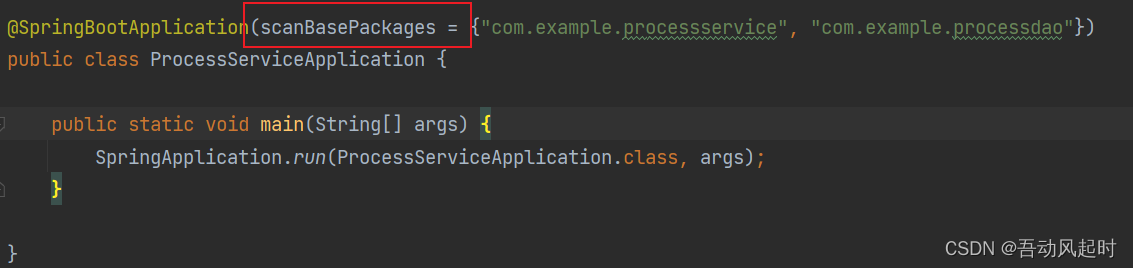
运行启动类,启动成功
结语
至此已完成环境搭建,创建流程文件和调用相应方法部署流程,启动流程实例等可参考其他activiti教程,感谢阅读