路径漫游简介
路径漫游在OSG中即为视点或者模型按照我们自己设定的路径进行漫游的一种方法,原本在OsgViewer中就有,在第一次按键盘小写“z”开始记录动画路径,大写"Z"保存路径文件,当我们用指定的物体按照自定的路径进行运动,此时也就称为路径动画,本质都是相同的。
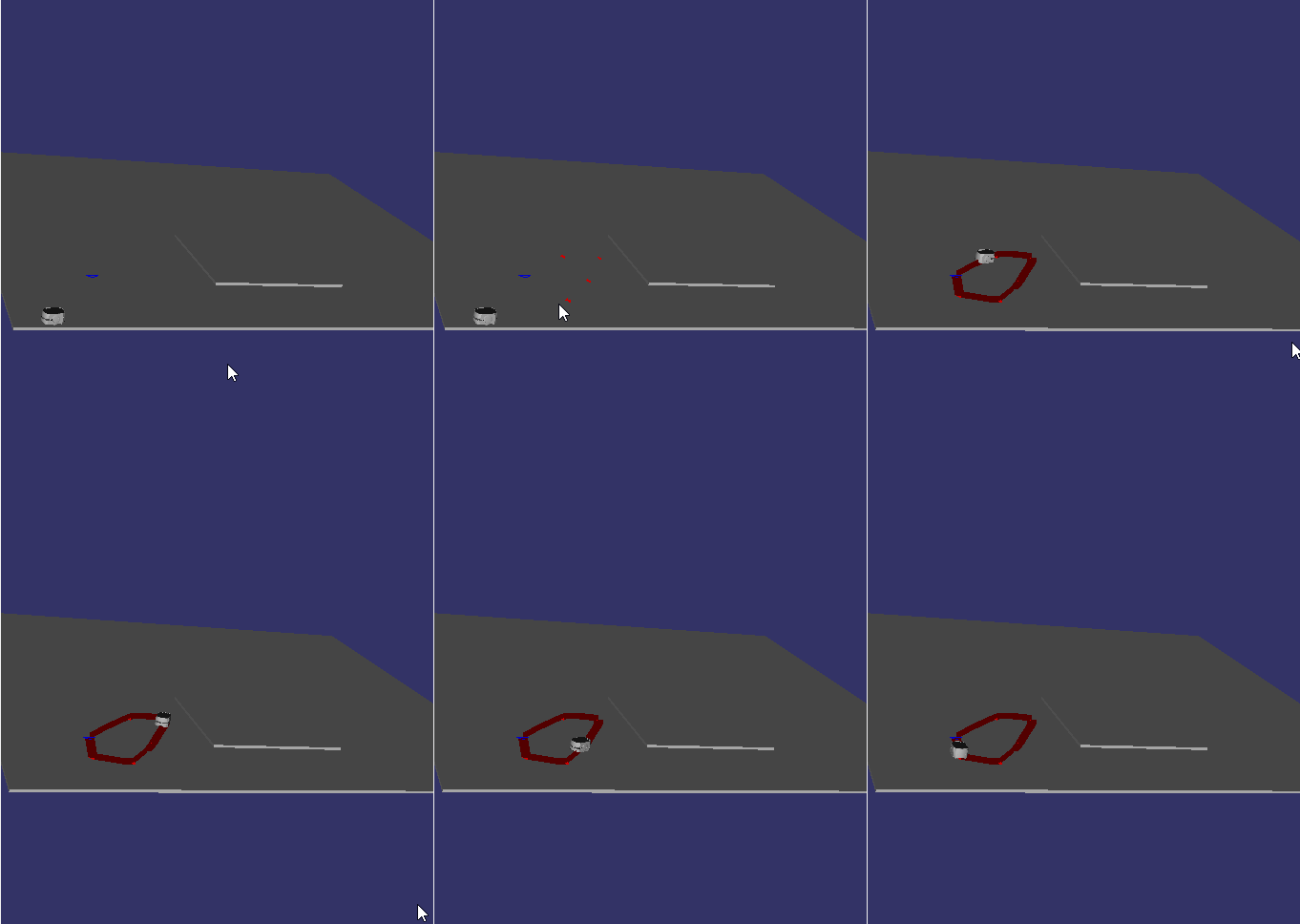
现在通过屏幕取点实现小车按照给定点进行路径漫游运动一周的代码:
操作流程
1.点击路径编辑,开始屏幕取点,第一个点与其余点区分。
2.取点完毕后用Cardinal算法连接点生成路径示意图
3.点击开始仿真,此时生成并读取路径文件[路径文件格式:时间+坐标位置[vec3]+旋转矩阵]
4.读取路径文件,开始仿真
5.想擦除错误操作,重复进行原的操作即可
主要用到的方法
PICK取点
1)自定义新类继承osgGA::GUIEventHandler
2)同样还是重载成员函数handle()执行自定义相关的操作都要用上
virual bool handle (const GUIEventAdapter &,GUIActionAdapter &)
3)获取场景数据根节点,从场景中进行相交计算
viewer->computeIntersections(ea.getX(),ea.getY(),intersections)
4)图形绘制
5)路径相关信息计算:时间,点与点的距离方向
6)利用osg::AnimationPath按照插值的方式生成路径
7)Cardinal算法连接点生成光滑曲线
pathHandler.h
#include <osgUtil/Optimizer>
#include <osgDB/ReadFile>
#include <osgViewer/Viewer>
#include <osg/Material>
#include <osg/Geode>
#include <osg/BlendFunc>
#include <osg/Depth>
#include <osg/Projection>
#include <osg/MatrixTransform>
#include <osg/Camera>
#include <osg/io_utils>
#include <osg/Point>
#include <osg/AnimationPath>
#include <osgText/Text>
#include <osg/LineWidth>
#include <sstream>
#include <osg/Group>
#include <osg/PositionAttitudeTransform>
#include <osgUtil/IntersectVisitor>
//PathHandler由于它是从osgGA::GUIEventHandler派生而来,所以它拥有处理事件的能力
//一切的处理都在handle当中
class PathHandler:public osgGA::GUIEventHandler
{
public:
	PathHandler();

	bool handle(const osgGA::GUIEventAdapter &ea,  osgGA::GUIActionAdapter&aa);
	//取点主要函数
	virtual void pick(osgViewer::Viewer *viewer, const osgGA::GUIEventAdapter&ea);
	//第一个点正方形图标
	osg::Group* DrawFirstNode(osg::Vec3f position);
	//画其他点自定义
	osg::Node* DrawCtrlPoints(osg::Vec3f position);
	//场景过大则放大比例
	int SelectSize(int s);
	//是否取点
	void setPick(bool pick);
	bool getPick();
	//根据所取的点,形成路径
	osg::AnimationPath *CreatePath(std::string pathName);
	//路径总长度
	double GetAllDistance();
	//运行时间
	float GetRunTime(osg::Vec3 res, osg::Vec3 des);
	//每米多少秒走完
	void setSecondsPerMeter(double sec);
	//得到设置的值
	double getSecondsPerMeter();
	//创建一条曲线说明路径
	osg::Node *CreateCardinal(void);
	void Cardinal(osg::ref_ptr<osg::Vec3Array>temp);
	float GetCoeffident(float p0, float p1, float p2, float p3, float t);
	//使用曲线
	void pushCardinal();
	//得到所有的控制点组结点
	osg::Group *getCtrlPointsGroup();
	//清除所有点线;
	void clearpoint();
	//是否开启PICK
	bool m_bPick;
	//是否第一次点击,用来判断是否应该画正方形
	bool m_bFirstPush;
	osg::ref_ptr<osg::Vec3Array> point;//向量数组
	osg::ref_ptr<osg::Group> ctrlPoints;
	int size;
	double sec;
	osgViewer::Viewer *mv;
	bool    _isPaused;
	bool stop_signal;//消除信号
	osg::ref_ptr<osg::Node>cardinal_Node;//存储线Node
	~PathHandler();
};
//找节点的代码
class findGeoNamedNode :
	public osg::NodeVisitor
{
public:
	findGeoNamedNode();
	findGeoNamedNode(const std::string name) :
		osg::NodeVisitor(TRAVERSE_ALL_CHILDREN) //Set traverse mode
	{
		resultNode = NULL;
		this->name = name;
		result_GNode = NULL;
	}

	virtual void apply(osg::Node &searchNode)
	{
		if (searchNode.getName() == name)
		{
			osg::Geode* dynamicTry = dynamic_cast<osg::Geode*>(& searchNode);
			osg::Geometry* dynamicTry_G = dynamic_cast<osg::Geometry*>(&searchNode);
			if (dynamicTry)
			{
				resultNode = dynamicTry;
			}
			if (dynamicTry_G)
			{
				result_GNode = dynamicTry_G;
			}
		}
		traverse(searchNode);
	}

	osg::Geode* getNode()
	{
		return resultNode;
	}
	osg::Geometry * getGNode()
	{
		return result_GNode;
	}
private:
	osg::Geode* resultNode;
	std::string name;
	osg::Geometry* result_GNode;

};
pathHandler.cpp
#include "PathHandler.h"


PathHandler *path_handler;
PathHandler::PathHandler() :m_bPick(false), m_bFirstPush(false), size(50.0), sec(0.001), stop_signal(false)
{
	//所有关键点分配时间
	point = new osg::Vec3Array;//申请内存
	path_handler = this;

}
void PathHandler::setSecondsPerMeter(double s)
{
	//设置每米用多少秒走完默认0.9秒
	sec = s;
}
//得到每米多少秒走完
double PathHandler::getSecondsPerMeter()
{
	return sec;
}
//处理
bool PathHandler::handle(const osgGA::GUIEventAdapter &ea, osgGA::GUIActionAdapter&aa)
{
	osgViewer::Viewer* viewer = dynamic_cast<osgViewer::Viewer*>(&aa);
	if (!viewer) return false;
	osg::ref_ptr<osg::Group> group = dynamic_cast<osg::Group*>(viewer->getSceneData());//先获取场景类总结点
	switch (ea.getEventType())
	{
		//如果是单击
	case(osgGA::GUIEventAdapter::PUSH):
	{//m_bPIck打开?
		if (ea.getButton() == 1)//1左3右
		{

			if (m_bPick)
			{
				//viewer有效的前提下,传入Viewer,开启pick,
				mv = dynamic_cast<osgViewer::Viewer *>(&aa);
				if (mv)
				{
					pick(mv, ea);
					return false;
				}
			}

		}

		}
		default: return false;
	}
}
//关键PICK
void PathHandler::pick(osgViewer::Viewer *viewer, const osgGA::GUIEventAdapter&ea)
{
	//结果集
	osgUtil::LineSegmentIntersector::Intersections intersections;
	//所有场景数据根节点
	osg::Group *root = dynamic_cast<osg::Group*>(viewer->getSceneData());
	//无数据返回
	if (!root)
	{
		return;
	}
	//相交计算
	if (viewer->computeIntersections(ea.getX(),ea.getY(),intersections))
	{
		osgUtil::LineSegmentIntersector::Intersections::iterator hitr = intersections.begin();
		osg::Vec3f temp(hitr->getWorldIntersectPoint());//相交世界坐标

		if (stop_signal )
		{
			ctrlPoints->removeChildren(0,point->size());
			ctrlPoints->setNodeMask(1);
			stop_signal = false;
		}
		//第一次点击
		if (!m_bFirstPush)
		{
			//关键点清空
			point->clear();
			//压入50米
			point->push_back(osg::Vec3f(temp.x(), temp.y(), 50));
			//画第一个控制点
			ctrlPoints = DrawFirstNode(temp);
			//控制点view内显示
			root->addChild(ctrlPoints.get());
			//第一次点击完毕
			m_bFirstPush = true;

		}
		else
		{
			//不为第一个点点击,则为蓝色图标
			point->push_back(osg::Vec3f(temp.x(),temp.y(),50));
			//加入场景
			ctrlPoints->addChild(DrawCtrlPoints(temp));
		}


	}

}

osg::Group *PathHandler::DrawFirstNode(osg::Vec3f position)
{

	osg::Group *root = new osg::Group();
	//设置几何节点正方形绘制
	osg::Geode *pyramidGeode = new osg::Geode();
	osg::Geometry*pyramidGeometry = new osg::Geometry();
	//可画几何节点加入
	pyramidGeode->addDrawable(pyramidGeometry);
	root->addChild(pyramidGeode);
	//正方形四点
	osg::ref_ptr<osg::Vec3Array>trangle = new osg::Vec3Array;
	trangle->push_back(osg::Vec3(position.x() - 4 * size, position.y(), 50));
	trangle->push_back(osg::Vec3(position.x(), position.y()-4*size, 50));
	trangle->push_back(osg::Vec3(position.x()+4*size, position.y(), 50));
	trangle->push_back(osg::Vec3(position.x() + 4 * size, position.y(), 50));
	trangle->push_back(osg::Vec3(position.x() , position.y() + 4 * size, 50));
	//场景中的geometry关联
	pyramidGeometry->setVertexArray(trangle.get());
	//设置所画格式
osg::DrawElementsUInt *pyramidBase = new osg::DrawElementsUInt(osg::PrimitiveSet::LINE_LOOP,0);
//0是起点顶点,为了保证合适的背面剔除,顶点的顺序应当是逆时针方向
pyramidBase->push_back(3);
pyramidBase->push_back(2);
pyramidBase->push_back(1);
pyramidBase->push_back(0);
pyramidGeometry->addPrimitiveSet(pyramidBase);
osg::Vec4Array* colors = new osg::Vec4Array;
colors->push_back(osg::Vec4(0.0f,0.0f,1.0f, 1.0f)); //RGBA深蓝
//颜色关联
pyramidGeometry->setColorArray(colors);
pyramidGeometry->setColorBinding(osg::Geometry::BIND_OVERALL);

return root;

}
//蓝色图标
osg::Node* PathHandler::DrawCtrlPoints(osg::Vec3f position)
{
	osg::Group *root = new osg::Group();
	//设置点的大小
	osg::ref_ptr<osg::Point>pointsize = new osg::Point;
	//设置点大
	pointsize->setSize(50);
	root->getOrCreateStateSet()->setAttributeAndModes(pointsize.get(), osg::StateAttribute::ON);
	//设置几何节点
	osg::Geode *pyramidGeode = new osg::Geode();
	osg::Geometry *pyramidGeometry = new osg::Geometry();
	//可画几何节点加入
	pyramidGeode->addDrawable(pyramidGeometry);
	root->addChild(pyramidGeode);
	//图标顶点值
	osg::ref_ptr<osg::Vec3Array>trangle = new osg::Vec3Array;
	trangle->push_back(osg::Vec3(position.x() - 2* size, position.y(), 50));
	trangle->push_back(osg::Vec3(position.x() - 0.5 * size, position.y()-1.5*size, 50));
	trangle->push_back(osg::Vec3(position.x() - 0.5 * size, position.y() - 3.5*size, 50));
	trangle->push_back(osg::Vec3(position.x() - 0.5 * size, position.y() - 1.5*size, 50));
	trangle->push_back(osg::Vec3(position.x() , position.y() - 4.0*size, 50));
	trangle->push_back(osg::Vec3(position.x()+0.5*size, position.y() - 3.5*size, 50));
	trangle->push_back(osg::Vec3(position.x() + 0.5*size, position.y() - 3.5*size, 50));
	trangle->push_back(osg::Vec3(position.x() + 2.0*size, position.y() , 50));
	trangle->push_back(osg::Vec3(position.x() + 0.5*size, position.y()+1.5*size, 50));
	trangle->push_back(osg::Vec3(position.x() + 0.5*size, position.y() + 1.5*size,50));
	trangle->push_back(osg::Vec3(position.x() + 0.5*size, position.y() + 3.5*size, 50));
	trangle->push_back(osg::Vec3(position.x() , position.y() + 4*size, 3));
	trangle->push_back(osg::Vec3(position.x()-0.5*size, position.y() + 3.5 * size, 50));
	trangle->push_back(osg::Vec3(position.x() - 0.5*size, position.y() + 1.5 * size, 50));
	pyramidGeometry->setVertexArray(trangle.get());
	osg::DrawElementsUInt *pyramidBase = new osg::DrawElementsUInt(osg::PrimitiveSet::POLYGON, 0);
	pyramidBase->push_back(11);
	pyramidBase->push_back(10);
	pyramidBase->push_back(9);
	pyramidBase->push_back(8);
	pyramidBase->push_back(7);
	pyramidBase->push_back(6);
	pyramidBase->push_back(5);
	pyramidBase->push_back(4);
	pyramidBase->push_back(3);
	pyramidBase->push_back(2);
	pyramidBase->push_back(1);
	pyramidBase->push_back(0);
	pyramidGeometry->addPrimitiveSet(pyramidBase);
	//颜色设置
	osg::Vec4Array* colors = new osg::Vec4Array;
	colors->push_back(osg::Vec4(1.0f, 0.0f, 0.0f, 1.0f)); //index 0 red
	//颜色关联
	pyramidGeometry->setColorArray(colors);
	pyramidGeometry->setColorBinding(osg::Geometry::BIND_OVERALL);

	return (osg::Node*)root;

}
int PathHandler::SelectSize(int s)
{
	size = 10 * s;
	return size;
}
//pick开关
void PathHandler::setPick(bool pick)
{
	m_bPick = pick;
}
//得到pick
bool PathHandler::getPick()
{
	 return m_bPick;
}
osg::AnimationPath *PathHandler::CreatePath(std::string pathName)
{
	//设置路径的总循环时间
	double looptime = sec * GetAllDistance();
	//加入两个关键点
	//std::vector<osg::Vec3>::iterator iter = point->end();
	std::vector<osg::Vec3>::iterator iter;
	std::vector<osg::Vec3>::iterator iter_circular = point->begin();
	std::vector<osg::Vec3>::iterator iter2;
	point->push_back(osg::Vec3((*iter_circular).x(),
		(*iter_circular).y(), (*iter_circular).z()));//形成封闭回环

	iter = point->end();
	iter--;
	iter2 = --iter;
	iter++;
	 //iter = point->end();
	point->push_back(osg::Vec3((*iter).x() - (*iter2).x(),
		(*iter).y() - (*iter2).y(), (*iter).z() - (*iter2).z()));//这里内存变了


	//返回path
	osg::AnimationPath *animationPath = new osg::AnimationPath;
	animationPath->setLoopMode(osg::AnimationPath::NO_LOOPING);
	//设置多少个关键点
	int numSamples = point->size();
	//未用
	float yaw = 0.0f;
	float yaw_delta = 0.5;

	float roll = osg::inDegrees(0.0f);//相机才是90
	double time = 0.0f;
	double time_delta = looptime / (double)numSamples;
	float angle = 0.0;
	iter = point->begin();
	//iter_circular = point->begin();
	//处理各个点
	for (int i = 1;i<numSamples;++i,iter++)
	{
		osg::Vec3 position(*iter);
		iter++;
		if (iter!=point->end())
		{

			//朝向判断(两点与x轴夹角)
			if ((*iter).x()>position.x())
			{
				angle = 1.57 - atan(((*iter).y() - position.y()) / ((*iter).x() - position.x()));
				if (angle<0)
				{
					angle = 1.57 + angle;
				}
			}
			//另一种
			if ((*iter).x() <position.x())
			{
				angle = -(1.57 + atan(((*iter).y() - position.y()) / ((*iter).x() - position.x())));//这里概率
				if (angle >0 )
				{
					angle = -(1.57 - angle);
				}
			}
			//X=x


		};
		//旋转
		osg::Quat rotation(osg::Quat(roll, osg::Vec3(1.0, 0.0, 0.0))*osg::Quat(-angle, osg::Vec3(0.0, 0.0, 1.0)));
		//最后开始插入PATH,把关键点与时间一起
		animationPath->insert(time, osg::AnimationPath::ControlPoint(position, rotation));
		time += GetRunTime(position, *iter);
		iter--;
	}
	//输出路径文件
	std::ofstream fout(pathName.c_str());
	animationPath->write(fout);
	fout.close();
	//返回animationPath
	return animationPath;

}
//压入点路径长度
double PathHandler::GetAllDistance()
{
	float distant = 0.0;
	osg::Vec3Array::iterator iter = point->begin();
	const int size = point->size();
	if (size<=1)
	{
		return 0;
	}
	else
	{
		for (int i = 0; i < size - 1; i++, iter++)//这里错算了
		{
			osg::Vec3 temp = *iter;
			iter++;
			//两点距离
			distant += sqrt((temp.x() - (*iter).x())*(temp.x() - (*iter).x()) +
				((temp).y() - (*iter).y())*(temp.y() - (*iter).y()));
			iter--;
		};
	}
	return distant;
}
float PathHandler::GetRunTime(osg::Vec3 res, osg::Vec3 des)
{
	float distant = sqrt((des.x() - res.x())*(des.x() - res.x()) + (des.y() - res.y())*(des.y() - res.y()));//改了
	double init = sec;
	return (init*distant);//速度快慢可以改这里
}
//创建Cardinal曲线
osg::Node *PathHandler::CreateCardinal(void)
{
	osg::ref_ptr<osg::Vec3Array>allPoints = new osg::Vec3Array;
	Cardinal(allPoints.get());
	osg::Group *root = new osg::Group;

	//线宽

	osg::ref_ptr<osg::LineWidth>LineSize = new osg::LineWidth;
	LineSize->setWidth(20.0);
	root->getOrCreateStateSet()->setAttributeAndModes(LineSize.get(), osg::StateAttribute::ON);
	//同样还是几何节点
	osg::Geode *lineGeode = new osg::Geode();
	osg::Geometry*lineGeometry = new osg::Geometry();

	lineGeode->addChild(lineGeometry);
	root->addChild(lineGeode);
	//同样还是点加入画区
	lineGeometry->setVertexArray(allPoints.get());
	//画的格式
	osg::DrawElementsUInt *lineBase = new osg::DrawElementsUInt(osg::PrimitiveSet::LINE_LOOP, 0);
	for (int i = 0; i < (int)(allPoints->size());i++)
	{
		lineBase->push_back(i);
	}
	lineGeometry->addPrimitiveSet(lineBase);
	//颜色
	osg::Vec4Array* colors = new osg::Vec4Array;
	colors->push_back(osg::Vec4(0.4f, 0.0f, 0.0f, 0.5f));
	//颜色关联
	lineGeometry->setColorArray(colors);
	lineGeometry->setColorBinding(osg::Geometry::BIND_OVERALL);
	return (osg::Node*)root;
}
void PathHandler::Cardinal(osg::ref_ptr<osg::Vec3Array>temp)
{
	//一头一尾
	std::vector<osg::Vec3>::iterator iter = point->begin();
	osg::ref_ptr <osg::Vec3Array>CtrlTwo = new osg::Vec3Array;
	CtrlTwo->push_back(osg::Vec3((*iter).x() - 1, (*iter).y() - 1, (*iter).z()));//构造pk-1
	CtrlTwo->insert(++(CtrlTwo->begin()), point->begin(), point->end());//pend-1

	iter = point->end();
	iter--;
	CtrlTwo->push_back(osg::Vec3((*iter).x() - 1, (*iter).y() - 1, (*iter).z()));
	iter = CtrlTwo->begin();
	for (;iter!=CtrlTwo->end();*iter++)
	{
		osg::Vec3 p0 = *iter++;
		osg::Vec3 p1 = *iter++;
		osg::Vec3 p2 = *iter++;
		if (iter ==CtrlTwo->end())
		{
			return;
		}
		osg::Vec3 p3 = *iter;
		iter--;
		iter--;
		iter--;
		float t = 0;
		for (;t<=1;t=t+0.1)
		{
			temp->push_back(osg::Vec3(GetCoeffident(p0.x(), p1.x(), p2.x(), p3.x(), t), GetCoeffident(p0.y(), p1.y(), p2.y(), p3.y(), t), 50));
		}
	}

}

float PathHandler::GetCoeffident(float p0, float p1, float p2, float p3, float t)
{
	float d = p1;
	float c = 0.5*(1 - t)*(p2 - p0);
	float a = 0.5*(t-1)*p0+p1*(1.5+0.5*t)-(1.5+0.5*t)*p2+0.5*(1-t)*p3;
	float b = p2 - a - d - c;
	return (a*t*t*t + b * t*t + c * t + d);


}
//压入cardinal节点
void PathHandler::pushCardinal()
{
	osg::Group *root = mv->getSceneData()->asGroup();
	//root->addChild(CreateCardinal());

	cardinal_Node = CreateCardinal();
	root->addChild(cardinal_Node);
}
//得到所有控制点所绘制node,隐藏用。
osg::Group *PathHandler::getCtrlPointsGroup()
{
	return ctrlPoints.get();
}
PathHandler::~PathHandler()
{
}
void PathHandler::clearpoint()
{
	if (stop_signal)
	{
		ctrlPoints->setNodeMask(0);
		cardinal_Node->setNodeMask(0);//曲线关键加在View_node和绘制曲线之中
	}
}
排坑
1.在动画执行过程中不能进行信息交互相关操作所以我们还需要是把它看作是动画来处理。[用多线程来解决]
2.不得不说nodepath真是个不太让人喜欢的东西,在intersection每个交点元素为一个vector从0->最后,是交集中从大到小的射线发生相交的node,vector最后一个元素为被选中的物体[Geode],但是我们如果用的自己的模型就可能不是这样了。[自己做拖拽器就被这样的问题坑了]
3.在处理模型高亮的问题上lemon_haha的处理方法挺好的,刚开始我用的节点setname做的发现有问题,用他的方法主体代码多写一些但是还是问题不大,也可用上面代码的的findnode
4.按键控制中static变量发挥了他的神奇的用处,声明在函数中,解决了我的按键+回调函数传值异常的情况
。
大概就先记录这么多把后面陆续给出多线程和模型碰撞检测的代码吧~