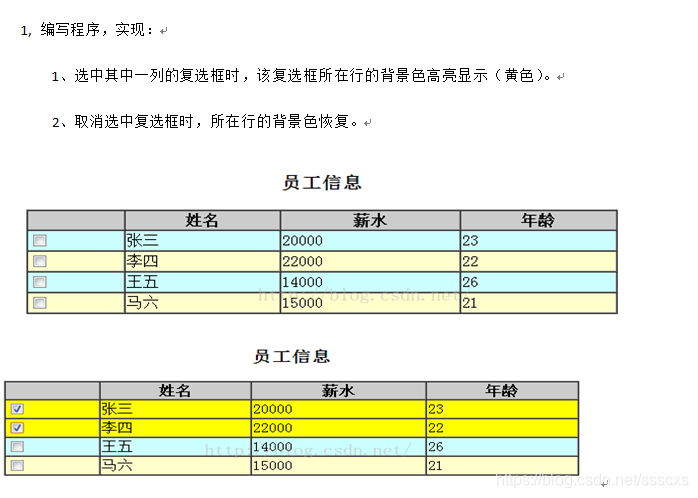
css代码
` <style >
       table,td{
           border: 1px solid #000;
           border-collapse: collapse;
       }
        thead{
            background-color: darkgray;
        }
        td{
            width: 70px;
            height: 20px;
        }
        .even{
            background-color: aqua;
        }
        .odd{
            background-color: khaki;
        }
        .checked{
            background-color: yellow;
        }
    </style>
<table >
    <thead>
    <tr>
        <td></td>
        <td>姓名</td>
        <td>薪水</td>
        <td>年龄</td>
    </tr>
    </thead>
    <tr >
        <td><input type="checkbox"/></td>
        <td>张三</td>
        <td>20000</td>
        <td>23</td>
    </tr>
    <tr >
        <td><input type="checkbox"/></td>
        <td>李四</td>
        <td>22000</td>
        <td>22</td>
    </tr>
    <tr >
        <td><input type="checkbox"/></td>
        <td>王五</td>
        <td>14000</td>
        <td>26</td>
    </tr>
    <tr>
        <td><input type="checkbox"/></td>
        <td>马六</td>
        <td>15000</td>
        <td>21</td>
    </tr>
</table>

<script type="text/javascript">
    $(function(){
        $("tbody>tr:even").addClass("even");
        $("tbody>tr:odd").addClass("odd");
        $(":checkbox").on("click",function () {
            if ($(this).is(":checked")){
                $(this).parent().parent().toggleClass("checked");
            }else {
                $(this).parent().parent().toggleClass("checked");
            }
        });
    });
</script>
版权声明:本文为ssscxs原创文章,遵循CC 4.0 BY-SA版权协议,转载请附上原文出处链接和本声明。