注:开发工具使用的是HBuilder X
1、在项目根目录中创建 store 文件夹,专门用来存放 vuex 相关的模块
2、在 store 目录上鼠标右键,选择 新建 -> js文件,新建 store.js 文件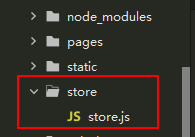
3、在 store.js 中按照如下 4 个步骤初始化 Store 的实例对象:
// 1. 导入 Vue 和 Vuex
import Vue from 'vue'
import Vuex from 'vuex'

// 2. 将 Vuex 安装为 Vue 的插件
Vue.use(Vuex)

// 3. 创建 Store 的实例对象
const store = new Vuex.Store({
  // TODO:挂载 store 模块
  modules: {},
})

// 4. 向外共享 Store 的实例对象
export default store
3、在 main.js 中导入 store 实例对象并挂载到 Vue 的实例上:
// 1. 导入 store 的实例对象
import store from './store/store.js'

// 省略其它代码...

const app = new Vue({
  ...App,
  // 2. 将 store 挂载到 Vue 实例上
  store,
})
app.$mount()
按照以上方法完成配置
版权声明:本文为qq_38188228原创文章,遵循CC 4.0 BY-SA版权协议,转载请附上原文出处链接和本声明。