目录
一、技术点介绍
1. 技术点介绍 前端:Freemarker、LayUI、jQuery
2. 后端:SpringBoot、MyBatisPlus、Lombok
3. 中间件:RabbitMQ、Redis(redisson)
4. 分布式协调框架:zookeeper
二、学习目标
1.安全优化:隐藏秒杀地址、验证码、接口限流
2.服务优化:RabbitMQ消息队列、接口优化、分布式锁
3.页面优化:缓存、静态化分离 4.分布式会话:用户登录、共享session
5.功能开发:商品列表、商品详情、秒杀、订单详情 6.系统压测:JMeter入门、自定义变量、压测
三、如何设计一个秒杀系统
秒杀,对我们来说,都不是一个陌生的东西。每年的双11,618以及时下流行的直播等等。 秒杀然而,这对于我们系统而言是一个巨大的考验。
那么,如何才能更好地理解秒杀呢?我觉得作为一个程序员,你首先要从高维度出发,从整体上思考问题。
在我看来,秒杀其实主要解决两个问题,一个是并发读,一个是并发写。并发读的核心优化理念是尽量减少用户
到服务端来“读”数据,或者让他们读更少的数据;并发写的处理原则也一样,他要求我们在数据库层面独立出来 一个库,做特殊的处理。
另外,我们还要针对秒杀系统做一个保护,针对意料之外的情况设计兜底方案,以防止最坏 的情况发生。
其实,秒杀的整体架构可以概括为“稳、准、快”几个关键字
稳:整个系统架构要满足高可用,流量符合预期时肯定要稳定,就是超出预期时也同样不能掉链子,你 要保证秒杀活动顺利完成,即秒杀商品顺利地卖出去,这个是最基本的前提。
准:秒杀10台小米手机,那就只能成交10件,多一台少一台都不行。一旦库存不对,那平台就要承担损失, 所以准就是要求保证数据的一致性。
快:系统的性能足够高,否则你怎么支撑这么大的流量呢?不光是服务端要做极致的性能优化,而且在整个 请求链路上都要做协同的优化,每个地方快一点,整个系统就完美了。
四、项目环境搭建
1.1 配置数据库及表
构建数据库,其中里面有五张表,用户表、订单表、商品表、秒杀订单表、秒杀商品表

1.2 创建SpringBoot项目并配置POM
pom依赖:
spring-boot-starter-freemarker
spring-boot-starter-web
mysql-connector-java 5.1.44
lombok
<!-- mybatis plus依赖 -->
mybatis-plus-boot-starter 3.4.0
mybatis-plus-generator 3.4.0
<!-- hariki连接池 -->
HikariCP
<!-- MD5依赖 -->
commons-codec
commons-lang3 3.6
<!-- valid验证依赖 -->
spring-boot-starter-validation
<!-- redis -->
spring-boot-starter-data-redis
1.3 配置application.yml
1 添加数据库及连接池配置
2 添加freemarker配置
3 添加mybatis-plus配置
4 添加logging日志配置
记得把自己的项目名以及数据库名称改掉
server:
  port: 8090
spring:
  datasource:
    url: jdbc:mysql://localhost:3306/t271?useSSL=false&useUnicode=true&useJDBCCompliantTimezoneShift=true&useLegacyDatetimeCode=false&serverTimezone=UTC&characterEncoding=UTF8
    driver-class-name: com.mysql.jdbc.Driver
    password: 123
    username: root
    hikari:
      # 最小空闲连接数量
      minimum-idle: 5
      # 空闲连接存活最大时间,默认600000(10分钟)
      idle-timeout: 180000
      # 连接池最大连接数,默认是10
      maximum-pool-size: 10
      # 此属性控制从池返回的连接的默认自动提交行为,默认值:true
      auto-commit: true
      # 连接池名称
      pool-name: MyHikariCP
      # 此属性控制池中连接的最长生命周期,值0表示无限生命周期,默认1800000即30分钟
      max-lifetime: 1800000
      # 数据库连接超时时间,默认30秒,即30000
      connection-timeout: 30000
  freemarker:
    #设置编码格式
    charset: UTF-8
    #后缀
    suffix: .ftl
    #文档类型
    content-type: text/html
    #模板前端
    template-loader-path: classpath:/templates/
    #启用模板
    enabled: true
  mvc:
    static-path-pattern: /static/**
#mybatis-plus配置
mybatis-plus:
  #所对应的 XML 文件位置
  mapper-locations: classpath*:/mapper/*Mapper.xml
  #别名包扫描路径
  type-aliases-package: com.zking.killgoods271.model
  configuration:
    #驼峰命名规则
    map-underscore-to-camel-case: true
#日志配置
logging:
  level:
    com.zking.seckilling.mapper: debug
1.5 使用Mybatis-plus反向生成代码
创建一个genetator包:
创建一个CodeGenerator类
CodeGenerator类内容如下:
package com.zking.killgoods271.generator;

import com.baomidou.mybatisplus.core.exceptions.MybatisPlusException;
import com.baomidou.mybatisplus.core.toolkit.StringPool;
import com.baomidou.mybatisplus.core.toolkit.StringUtils;
import com.baomidou.mybatisplus.generator.AutoGenerator;
import com.baomidou.mybatisplus.generator.InjectionConfig;
import com.baomidou.mybatisplus.generator.config.*;
import com.baomidou.mybatisplus.generator.config.po.TableInfo;
import com.baomidou.mybatisplus.generator.config.rules.NamingStrategy;
import com.baomidou.mybatisplus.generator.engine.FreemarkerTemplateEngine;

import java.util.ArrayList;
import java.util.List;
import java.util.Scanner;

public class CodeGenerator {

    /**
     * <p>
     * 读取控制台内容
     * </p>
     */
    public static String scanner(String tip) {
        Scanner scanner = new Scanner(System.in);
        StringBuilder help = new StringBuilder();
        help.append("请输入" + tip + ":");
        System.out.println(help.toString());
        if (scanner.hasNext()) {
            String ipt = scanner.next();
            if (StringUtils.isNotBlank(ipt)) {
                return ipt;
            }
        }
        throw new MybatisPlusException("请输入正确的" + tip + "!");
    }

    public static void main(String[] args) {
        // 代码生成器
        AutoGenerator mpg = new AutoGenerator();

        // 全局配置
        GlobalConfig gc = new GlobalConfig();
        String projectPath = System.getProperty("user.dir");
        gc.setOutputDir(projectPath + "/src/main/java");
        gc.setAuthor("zsy");
        gc.setOpen(false);
        gc.setBaseColumnList(true);
        gc.setBaseResultMap(true);
        // gc.setSwagger2(true); 实体属性 Swagger2 注解
        mpg.setGlobalConfig(gc);

        // 数据源配置
        DataSourceConfig dsc = new DataSourceConfig();
        dsc.setUrl("jdbc:mysql://localhost:3306/t271?useUnicode=true&useSSL=false&characterEncoding=utf8");
        // dsc.setSchemaName("public");
        dsc.setDriverName("com.mysql.jdbc.Driver");
        dsc.setUsername("root");
        dsc.setPassword("123");
        mpg.setDataSource(dsc);

        // 包配置
        PackageConfig pc = new PackageConfig();
        //pc.setModuleName(scanner("模块名"));
        pc.setParent("com.zking.killgoods271");
        //设置包名
        pc.setEntity("model");
        mpg.setPackageInfo(pc);

        // 自定义配置
        InjectionConfig cfg = new InjectionConfig() {
            @Override
            public void initMap() {
                // to do nothing
            }
        };

        // 如果模板引擎是 freemarker
        String templatePath = "/templates/mybatis-generator/mapper2.xml.ftl";
        // 如果模板引擎是 velocity
        // String templatePath = "/templates/mapper.xml.vm";

        // 自定义输出配置
        List<FileOutConfig> focList = new ArrayList<>();
        // 自定义配置会被优先输出
        focList.add(new FileOutConfig(templatePath) {
            @Override
            public String outputFile(TableInfo tableInfo) {
                // 自定义输出文件名 , 如果你 Entity 设置了前后缀、此处注意 xml 的名称会跟着发生变化!!
                return projectPath + "/src/main/resources/mapper/" + pc.getModuleName()
                        + "/" + tableInfo.getEntityName() + "Mapper" + StringPool.DOT_XML;
            }
        });
        /*
        cfg.setFileCreate(new IFileCreate() {
            @Override
            public boolean isCreate(ConfigBuilder configBuilder, FileType fileType, String filePath) {
                // 判断自定义文件夹是否需要创建
                checkDir("调用默认方法创建的目录,自定义目录用");
                if (fileType == FileType.MAPPER) {
                    // 已经生成 mapper 文件判断存在,不想重新生成返回 false
                    return !new File(filePath).exists();
                }
                // 允许生成模板文件
                return true;
            }
        });
        */
        cfg.setFileOutConfigList(focList);
        mpg.setCfg(cfg);

        // 配置模板
        TemplateConfig templateConfig = new TemplateConfig();

        // 配置自定义输出模板
        //指定自定义模板路径,注意不要带上.ftl/.vm, 会根据使用的模板引擎自动识别
        templateConfig.setMapper("templates/mybatis-generator/mapper2.java");
        templateConfig.setEntity("templates/mybatis-generator/entity2.java");
        templateConfig.setService("templates/mybatis-generator/service2.java");
        templateConfig.setServiceImpl("templates/mybatis-generator/serviceImpl2.java");
        templateConfig.setController("templates/mybatis-generator/controller2.java");
        templateConfig.setXml(null);
        mpg.setTemplate(templateConfig);

        // 策略配置
        StrategyConfig strategy = new StrategyConfig();
        strategy.setNaming(NamingStrategy.underline_to_camel);
        strategy.setColumnNaming(NamingStrategy.underline_to_camel);
        //strategy.setSuperEntityClass("你自己的父类实体,没有就不用设置!");
        strategy.setEntityLombokModel(true);
        strategy.setRestControllerStyle(true);
        strategy.setEntitySerialVersionUID(false);
        // 公共父类
        //strategy.setSuperControllerClass("你自己的父类控制器,没有就不用设置!");
        // 写于父类中的公共字段
        strategy.setSuperEntityColumns("id");
        strategy.setInclude(scanner("表名,多个英文逗号分割").split(","));
        strategy.setControllerMappingHyphenStyle(true);
        strategy.setTablePrefix("t_");
        mpg.setStrategy(strategy);
        mpg.setTemplateEngine(new FreemarkerTemplateEngine());
        mpg.execute();
    }
}
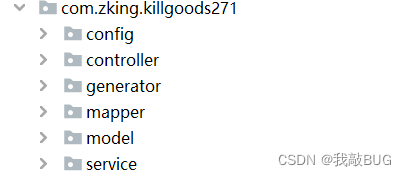
运行此类会自动生成对应的文件:
1.6 用户登陆的业务逻辑
1)构建用户登录页面
通过ajax方式提交用户登录信息
2)创建UserController类实现用户登录
2.1)构建UserVo,定义mobile和password属性
2.2)创建UserController类
2.3)定义userLogin(UserVo userVo,HttpServletRequest req,HttpServletResponse resp)
2.4)定义响应封装类JsonResponseBody和JsonResponseStatus
2.5)在IUserService中定义userLogin(UserVo userVo),并返回JsonResponseBody
2.5.1)判断mobile和password是否为空
2.5.2)判断mobile格式是否正确
2.5.3)根据用户手机号码查询用户是否存在
2.5.4)校验账号
2.5.5)校验密码
2.6)全局异常处理
2.6.1)创建BusinessException
2.6.2)创建GlobalExceptionHandler
2.6.3)修改userLogin中的异常处理方式
2.7)自定义注解参数校验(JSR303)
2.7.1)创建自定义注解IsMobile
2.7.2)创建自定义校验规则类MobileValidator
2.7.3)在UserVo类的mobile属性中使用IsMobile注解2.8)两次MD5加密
2.8.1)创建MD5Utils工具类,讲解加密流程
2.8.2)创建导入md5.js用于前端加密
2.8.3)修改UserServiceImpl中的userLogin方法的密码校验方式