有一堆数据点的坐标,想得到最外侧的轮廓信息(非图像,图像请去看cv2的相关函数)
;示意图如下所示:
import numpy as np
points = np.random.rand(100, 2)  ###创建100个原始数据

希望能得到最外围的轮廓,如图所示:
请注意!!!!
图片中有凹进去的区域存在
如果确认图片是凸图案,则可以用scipy 包中的ConvexHull实现:
from scipy.spatial import ConvexHull
hull = ConvexHull(points)  ###计算外接凸图案的边界点
import matplotlib.pyplot as plt
plt.plot(points[:,0], points[:,1], 'o')
# plot convex hull polygon
plt.plot(points[hull.vertices,0], points[hull.vertices,1], 'r ', lw=4)
# plot convex full vertices
hull1=hull.vertices.tolist()
hull1.append(hull1[0])
# plt.plot(points[hull.vertices[0],0], points[hull.vertices[0],1], 'ro')
plt.plot(points[hull1,0], points[hull1,1], 'r--^',lw=2)
此时,画出的图形是:(只最大边界,不能展示凹进去细节部分)
所以,此时需要一个新的数学模型 alpha shape,直接上代码:
import alphashape
from descartes import PolygonPatch

alpha_shape = alphashape.alphashape(points,3)
###这里的3 是alpha vlue ,数字越大,代表拟合性越好
fig, ax = plt.subplots()
ax.scatter(*zip(*points))
ax.add_patch(PolygonPatch(alpha_shape, alpha=0.3))
输出为: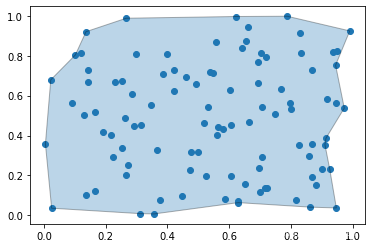
当我们改变 alpha values 时,分别设置 1 ,3, 10,看下效果:
alpha_shape = alphashape.alphashape(points,1)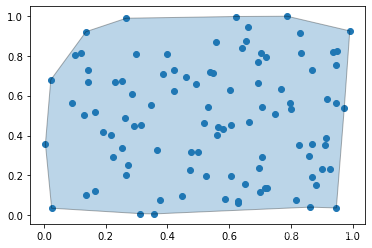
alpha_shape = alphashape.alphashape(points,3)
alpha_shape = alphashape.alphashape(points,10)
也可以不输入:
alpha_shape = alphashape.alphashape(points)
据说是可以得到最佳模型,但是跑起来好慢呀,截至发稿,还没跑出来!!!
版权声明:本文为Janine_1991原创文章,遵循CC 4.0 BY-SA版权协议,转载请附上原文出处链接和本声明。