view.post() 使用目的
- 获取View的属性
- 子线程处理耗时任务,并抛到主线程执行
view.post()分析
- 首先在onCreate()方法中使用post()方法
override fun onCreate(savedInstanceState: Bundle?) {
    Log.d(TAG, "onCreate")
    super.onCreate(savedInstanceState)
    setContentView(R.layout.activity_main)
    btn1.post {
        btn1.text = "wjx"
    }
}
- 下面看下post()方法的实现:
/**
* <p>Causes the Runnable to be added to the message queue.
* The runnable will be run on the user interface thread.</p>
* @param action The Runnable that will be executed.
*
* @return Returns true if the Runnable was successfully placed in to the
*         message queue.  Returns false on failure, usually because the
*         looper processing the message queue is exiting.
* @see #postDelayed
* @see #removeCallbacks
*/
public boolean post(Runnable action) {
    // mAttachInfo
    final AttachInfo attachInfo = mAttachInfo;
    if (attachInfo != null) {
        return attachInfo.mHandler.post(action);
    }

    // Postpone the runnable until we know on which thread it needs to run.
    // Assume that the runnable will be successfully placed after attach.
    getRunQueue().post(action);
    return true;
}
- 从上面的代码可以看出 attachInfo会影响当前的执行流程,attachInfo在view.onAttachToWIndow之后被赋值,若attachInfo不为空,则直接使用Handler将当前的runnable抛到将Handler实例化的线程中去,而当前这个Handler是在AttachInfo初始化的地方被赋值,而 mAttachInfo只有在dispatchAttachedToWindow中被赋值,所以我们需要关注的是dispatchAttachedToWindow在哪里被调用。
@UnsupportedAppUsage(maxTargetSdk = Build.VERSION_CODES.P)
void dispatchAttachedToWindow(AttachInfo info, int visibility) {
    mAttachInfo = info;
    if (mOverlay != null) {
        mOverlay.getOverlayView().dispatchAttachedToWindow(info, visibility);
    }
        ....
}
- 当attachInfo == null的时候,会调用getRunQueue()方法获取一个Runnable队列,封装成一个HandlerActionQueue,这个HandlerActionQueue就是包含所有的runnable的队列
/**
* Returns the queue of runnable for this view.
*
* @return the queue of runnables for this view
*/
private HandlerActionQueue getRunQueue() {
    if (mRunQueue == null) {
        mRunQueue = new HandlerActionQueue();
    }
    return mRunQueue;
}
- HandlerActionQueue代码如下:注释描述:当前view的handler没有attach的时候,view中的runnable作业就会被挂起,知道view被附着到window上才会被调用
/**
* Class used to enqueue pending work from Views when no Handler is attached.
*
* @hide Exposed for test framework only.
*/
public class HandlerActionQueue {
    private HandlerAction[] mActions;
    private int mCount;


    public void post(Runnable action) {
        postDelayed(action, 0);
    }


    public void postDelayed(Runnable action, long delayMillis) {
        final HandlerAction handlerAction = new HandlerAction(action, delayMillis);


        synchronized (this) {
            if (mActions == null) {
                mActions = new HandlerAction[4];
            }
            mActions = GrowingArrayUtils.append(mActions, mCount, handlerAction);
            mCount++;
        }
    }


    public void removeCallbacks(Runnable action) {
        synchronized (this) {
            final int count = mCount;
            int j = 0;


            final HandlerAction[] actions = mActions;
            for (int i = 0; i < count; i++) {
                if (actions[i].matches(action)) {
                    // Remove this action by overwriting it within
                    // this loop or nulling it out later.
                    continue;
                }


                if (j != i) {
                    // At least one previous entry was removed, so
                    // this one needs to move to the "new" list.
                    actions[j] = actions[i];
                }


                j++;
            }


            // The "new" list only has j entries.
            mCount = j;


            // Null out any remaining entries.
            for (; j < count; j++) {
                actions[j] = null;
            }
        }
    }


    public void executeActions(Handler handler) {
        synchronized (this) {
            final HandlerAction[] actions = mActions;
            for (int i = 0, count = mCount; i < count; i++) {
                final HandlerAction handlerAction = actions[i];
                handler.postDelayed(handlerAction.action, handlerAction.delay);
            }


            mActions = null;
            mCount = 0;
        }
    }


    public int size() {
        return mCount;
    }


    public Runnable getRunnable(int index) {
        if (index >= mCount) {
            throw new IndexOutOfBoundsException();
        }
        return mActions[index].action;
    }


    public long getDelay(int index) {
        if (index >= mCount) {
            throw new IndexOutOfBoundsException();
        }
        return mActions[index].delay;
    }


    private static class HandlerAction {
        final Runnable action;
        final long delay;


        public HandlerAction(Runnable action, long delay) {
            this.action = action;
            this.delay = delay;
        }


        public boolean matches(Runnable otherAction) {
            return otherAction == null && action == null
                    || action != null && action.equals(otherAction);
        }
    }
}
- View中的runnable作业被挂起之后,在整个代码中,只有在dispatchAttachedToWindow会执行mRunQueue.executeActions(info.mHandler); 不管是
attachInfo是否为null,都会执行到dispatchAttachToWindow这个方法,在这里我们发现都会用到mHandler,所以我们跟一下mHandler的来源
@UnsupportedAppUsage(maxTargetSdk = Build.VERSION_CODES.P)
void dispatchAttachedToWindow(AttachInfo info, int visibility) {
    ...
    // Transfer all pending runnables.
    if (mRunQueue != null) {
        mRunQueue.executeActions(info.mHandler);
        mRunQueue = null;
    }
        .....
}
- 而在View的源码中我们看到如下的注释:从注释中我们可以看出mHandler是由ViewRootImpl提供的
/**
* A Handler supplied by a view's {@link android.view.ViewRootImpl}. This
* handler can be used to pump events in the UI events queue.
*/
@UnsupportedAppUsage
final Handler mHandler;
- 在跟进ViewRootImpl代码中,进入performTraversals()方法可以看到我们上面提到的方法dispatchAttachedToWindow
private void performTraversals() {
    // cache mView since it is used so much below...
    final View host = mView;
        ...
        host.dispatchAttachedToWindow(mAttachInfo, 0);
        ...
    }
}
- 而ViewRootImpl的实例化在哪里呢,
// WindowManagerGlobal方法中找到了new ViewRootImpl
public void addView(View view, ViewGroup.LayoutParams params,
        Display display, Window parentWindow) {
    ...
        view.setLayoutParams(wparams);
        ViewRootImpl root;
        root = new ViewRootImpl(view.getContext(), display);
    ...
}
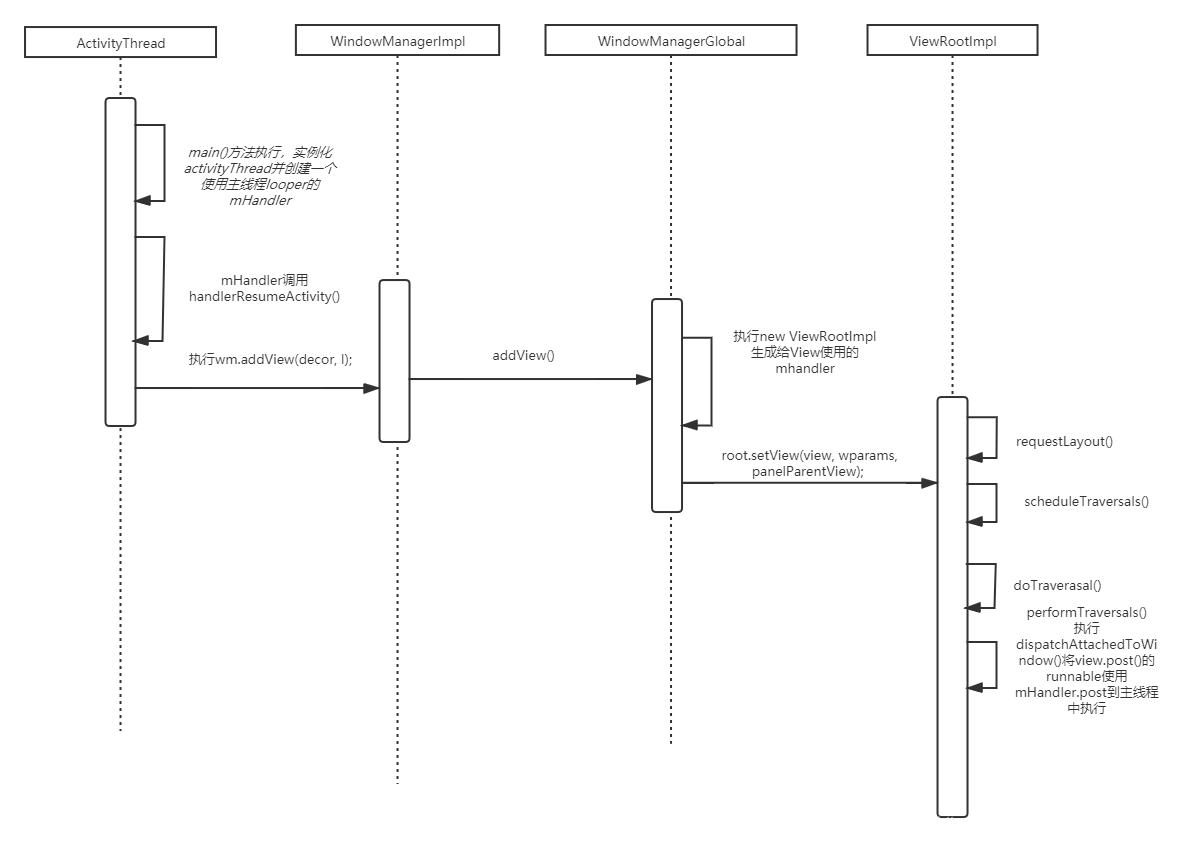
- 那么addView方法实在哪里调用的呢,查看ActivityThread.java的handleResumeActivity()方法我们可以看到如下关键代码:从ActivityThread执行addView()创建ViewRootImpl,进而创建了一个主线程的mHandler
@Override
public void handleResumeActivity(IBinder token, boolean finalStateRequest, boolean isForward,
        String reason) {
   ...

    final Activity a = r.activity;
        if (a.mVisibleFromClient) {
            if (!a.mWindowAdded) {
                a.mWindowAdded = true;
                // 此处将decorView添加到整个View体系,即View开始绘制
                wm.addView(decor, l);
                }
         ....
        }
    ...
  }
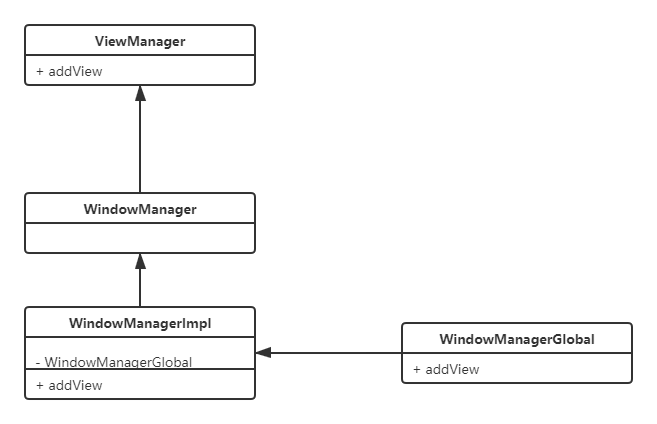
- ViewManager、WindowManager各类之间的关系以及Activity启动绘制View的流程图如下:
View.post()获取view的宽和高
- 从View的生命周期中可知,Activity执行onResume之后,View执行onAttachedToWindow,从上面的handleResumeActivity中一可以得到此结论,具体的View生命周期可以阅读上一篇博客,所以在Activity的onResume方法执行之前View的getHeight()、getWidth()可能为0,View在onResume()之后才会真正开始绘制,当我们使用post()方法后可以保证View在dispatchAttachedToWindow后获取高度,下面我们看下源码中的实现:
private void performTraversals() {
       host.dispatchAttachedToWindow(mAttachInfo, 0); // 2028
       ......
       performMeasure(...); // 2541
       ......
       performLayout(...); // 2590
       ......
       performDraw(); // 2755
}
- 注意:
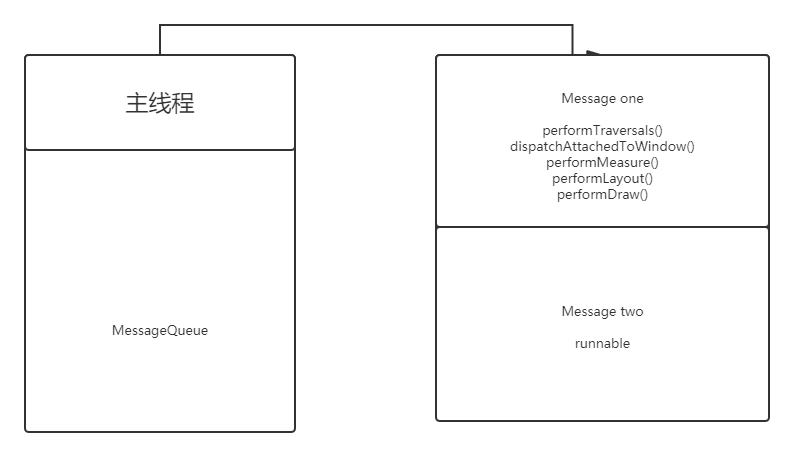
- dispatchAttachedToWindow在view绘制流程之前就执行了,其实在Activity启动的时候,执行performTraversals,当使用view.post()之后,会添加在消息队列之后,待执行完message one的时候会执行message two即view绘制完成之后会执行getHeight()、getWidth()
版权声明:本文为qq_39424143原创文章,遵循CC 4.0 BY-SA版权协议,转载请附上原文出处链接和本声明。