springboot整合springcloud以及遇到的问题解决
1.引入依赖
<?xml version="1.0" encoding="UTF-8"?>
<project xmlns="http://maven.apache.org/POM/4.0.0" xmlns:xsi="http://www.w3.org/2001/XMLSchema-instance"
         xsi:schemaLocation="http://maven.apache.org/POM/4.0.0 https://maven.apache.org/xsd/maven-4.0.0.xsd">
    <modelVersion>4.0.0</modelVersion>
    <parent>
        <groupId>org.springframework.boot</groupId>
        <artifactId>spring-boot-starter-parent</artifactId>
        <version>2.1.4.RELEASE</version>
        <relativePath/> <!-- lookup parent from repository -->
    </parent>
    <groupId>com.example</groupId>
    <artifactId>demo</artifactId>
    <version>0.0.1-SNAPSHOT</version>
    <name>demo</name>
    <description>Demo project for Spring Boot</description>

    <properties>
        <project.build.sourceEncoding>UTF-8</project.build.sourceEncoding>
        <project.reporting.outputEncoding>UTF-8</project.reporting.outputEncoding>
        <java.version>1.8</java.version>
    </properties>

    <dependencies>
        <dependency>
            <groupId>org.springframework.boot</groupId>
            <artifactId>spring-boot-starter-web</artifactId>
        </dependency>

        <!--jpa-->
        <dependency>
            <groupId>org.springframework.boot</groupId>
            <artifactId>spring-boot-starter-data-jpa</artifactId>
        </dependency>

        <!--mysql驱动jar包-->
        <dependency>
            <groupId>mysql</groupId>
            <artifactId>mysql-connector-java</artifactId>
            <version>5.1.47</version>
        </dependency>

        <!--导入配置文件处理器-->
        <dependency>
            <groupId>org.springframework.boot</groupId>
            <artifactId>spring-boot-configuration-processor</artifactId>
            <optional>true</optional>
        </dependency>

        <!--redis-->
        <dependency>
            <groupId>org.springframework.boot</groupId>
            <artifactId>spring-boot-starter-data-redis</artifactId>
        </dependency>

        <dependency>
            <groupId>redis.clients</groupId>
            <artifactId>jedis</artifactId>
            <version>2.8.1</version>
        </dependency>

        <!--<dependency>
            <groupId>org.apache.commons</groupId>
            <artifactId>commons-pool2</artifactId>
            <version>2.4.2</version>
        </dependency>-->

        <dependency>
            <groupId>junit</groupId>
            <artifactId>junit</artifactId>
            <version>4.13</version>
            <scope>test</scope>
        </dependency>

        <!--springCloud-->
        <!--eureka server -->
        <!--<dependency>
            <groupId>org.springframework.cloud</groupId>
            <artifactId>spring-cloud-starter-eureka-server</artifactId>
        </dependency>-->
        <dependency>
            <groupId>org.springframework.cloud</groupId>
            <artifactId>spring-cloud-netflix-eureka-server</artifactId>
        </dependency>
        <dependency>
            <groupId>org.springframework.cloud</groupId>
            <artifactId>spring-cloud-starter-netflix-hystrix</artifactId>
        </dependency>

        <!-- spring boot test -->
        <dependency>
            <groupId>org.springframework.boot</groupId>
            <artifactId>spring-boot-starter-test</artifactId>
            <scope>test</scope>
        </dependency>


    </dependencies>

    <dependencyManagement>
        <dependencies>
            <dependency>
                <groupId>org.springframework.cloud</groupId>
                <artifactId>spring-cloud-dependencies</artifactId>
                <version>Greenwich.SR6</version>
                <type>pom</type>
                <scope>import</scope>
            </dependency>
        </dependencies>
    </dependencyManagement>

    <build>
        <plugins>
            <plugin>
                <groupId>org.springframework.boot</groupId>
                <artifactId>spring-boot-maven-plugin</artifactId>
            </plugin>
        </plugins>
    </build>

    <repositories>
        <repository>
            <id>spring-milestones</id>
            <name>Spring Milestones</name>
            <url>https://repo.spring.io/milestone</url>
            <snapshots>
                <enabled>false</enabled>
            </snapshots>
        </repository>
    </repositories>

</project>
2. 修改application.yml配置文件
spring:
  freemarker:
    prefer-file-system-access: false
eureka:
  instance:
    hostname: localhost
  client:
    registerWithEureka: false
    fetchRegistry: false
    serviceUrl:
      defaultZone: http://${eureka.instance.hostname}:${server.port}/eureka/
3. 在启动类上加上@EnableEurekaServer注解
@SpringBootApplication
@EnableEurekaServer
public class DemoApplication {

    public static void main(String[] args) {
        System.setProperty("spring.devtools.restart.enabled", "false");
        SpringApplication.run(DemoApplication.class, args);
    }
}
4. 访问注册中心
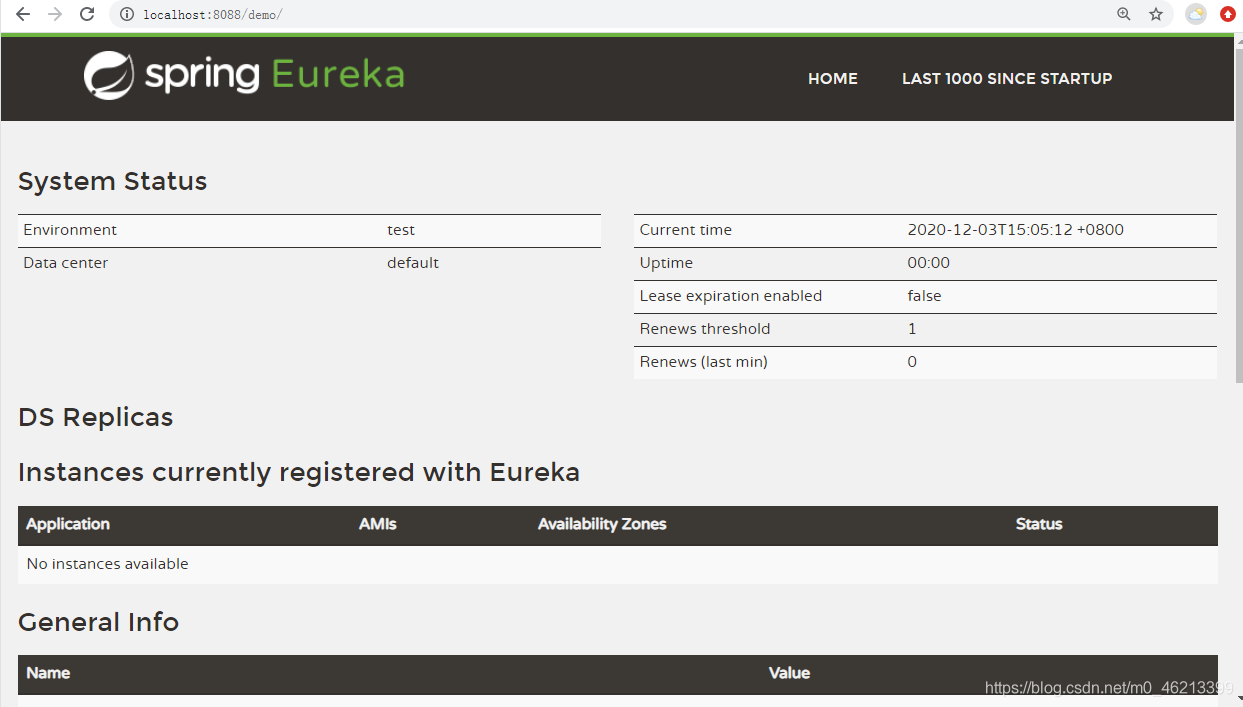
注意:我的项目中配置了项目相对路径,如果没有配置,不用加/demo
启动项目前可能遇到的问题:
在完成上述步骤后,然而@EnableEurekaServer注解可能是红色的,我在网上查阅了大量资料后发现主要是由于springboot和springcloud的版本不匹配导致的,查阅官方文档,链接:https://start.spring.io/actuator/info,得到版本匹配列表如下
{
“git”:{
“branch”:“d553b8c40760549bfa2ff12e29ee6ba3ca7e306d”,
“commit”:{
“id”:“d553b8c”,
“time”:“2020-11-30T12:38:26Z”
}
},
“build”:{
“version”:“0.0.1-SNAPSHOT”,
“artifact”:“start-site”,
“versions”:{
“spring-boot”:“2.4.0”,
“initializr”:“0.10.0-SNAPSHOT”
},
“name”:“start.spring.io website”,
“time”:“2020-11-30T12:39:20.364Z”,
“group”:“io.spring.start”
},
“bom-ranges”:{
“azure”:{
“2.0.10”:“Spring Boot >=2.0.0.RELEASE and <2.1.0.RELEASE”,
“2.1.10”:“Spring Boot >=2.1.0.RELEASE and <2.2.0.M1”,
“2.2.4”:“Spring Boot >=2.2.0.M1 and <2.3.0.M1”,
“2.3.5”:“Spring Boot >=2.3.0.M1”
},
“codecentric-spring-boot-admin”:{
“2.0.6”:“Spring Boot >=2.0.0.M1 and <2.1.0.M1”,
“2.1.6”:“Spring Boot >=2.1.0.M1 and <2.2.0.M1”,
“2.2.4”:“Spring Boot >=2.2.0.M1 and <2.3.0.M1”,
“2.3.1”:“Spring Boot >=2.3.0.M1 and <2.5.0-M1”
},
“solace-spring-boot”:{
“1.0.0”:“Spring Boot >=2.2.0.RELEASE and <2.3.0.M1”,
“1.1.0”:“Spring Boot >=2.3.0.M1”
},
“solace-spring-cloud”:{
“1.0.0”:“Spring Boot >=2.2.0.RELEASE and <2.3.0.M1”,
“1.1.1”:“Spring Boot >=2.3.0.M1”
},
“spring-cloud”:{
“Finchley.M2”:“Spring Boot >=2.0.0.M3 and <2.0.0.M5”,
“Finchley.M3”:“Spring Boot >=2.0.0.M5 and <=2.0.0.M5”,
“Finchley.M4”:“Spring Boot >=2.0.0.M6 and <=2.0.0.M6”,
“Finchley.M5”:“Spring Boot >=2.0.0.M7 and <=2.0.0.M7”,
“Finchley.M6”:“Spring Boot >=2.0.0.RC1 and <=2.0.0.RC1”,
“Finchley.M7”:“Spring Boot >=2.0.0.RC2 and <=2.0.0.RC2”,
“Finchley.M9”:“Spring Boot >=2.0.0.RELEASE and <=2.0.0.RELEASE”,
“Finchley.RC1”:“Spring Boot >=2.0.1.RELEASE and <2.0.2.RELEASE”,
“Finchley.RC2”:“Spring Boot >=2.0.2.RELEASE and <2.0.3.RELEASE”,
“Finchley.SR4”:“Spring Boot >=2.0.3.RELEASE and <2.0.999.BUILD-SNAPSHOT”,
“Finchley.BUILD-SNAPSHOT”:“Spring Boot >=2.0.999.BUILD-SNAPSHOT and <2.1.0.M3”,
“Greenwich.M1”:“Spring Boot >=2.1.0.M3 and <2.1.0.RELEASE”,
“Greenwich.SR6”:“Spring Boot >=2.1.0.RELEASE and <2.1.999.BUILD-SNAPSHOT”,
“Greenwich.BUILD-SNAPSHOT”:“Spring Boot >=2.1.999.BUILD-SNAPSHOT and <2.2.0.M4”,
“Hoxton.SR9”:“Spring Boot >=2.2.0.M4 and <2.3.7.BUILD-SNAPSHOT”,
“Hoxton.BUILD-SNAPSHOT”:“Spring Boot >=2.3.7.BUILD-SNAPSHOT and <2.4.0.M1”,
“2020.0.0-M3”:“Spring Boot >=2.4.0.M1 and <=2.4.0.M1”,
“2020.0.0-M4”:“Spring Boot >=2.4.0.M2 and <=2.4.0-M3”,
“2020.0.0-M5”:“Spring Boot >=2.4.0.M4 and <2.4.1-SNAPSHOT”,
“2020.0.0-SNAPSHOT”:“Spring Boot >=2.4.1-SNAPSHOT”
},
“spring-cloud-alibaba”:{
“2.2.1.RELEASE”:“Spring Boot >=2.2.0.RELEASE and <2.3.0.M1”
},
“spring-cloud-gcp”:{
“2.0.0-RC2”:“Spring Boot >=2.4.0-M1 and <2.5.0-M1”
},
“spring-cloud-services”:{
“2.0.3.RELEASE”:“Spring Boot >=2.0.0.RELEASE and <2.1.0.RELEASE”,
“2.1.8.RELEASE”:“Spring Boot >=2.1.0.RELEASE and <2.2.0.RELEASE”,
“2.2.6.RELEASE”:“Spring Boot >=2.2.0.RELEASE and <2.3.0.RELEASE”,
“2.3.0.RELEASE”:“Spring Boot >=2.3.0.RELEASE and <2.4.0-M1”
},
“spring-geode”:{
“1.2.11.RELEASE”:“Spring Boot >=2.2.0.M5 and <2.3.0.M1”,
“1.3.6.RELEASE”:“Spring Boot >=2.3.0.M1 and <2.4.0-M1”,
“1.4.0-RC1”:“Spring Boot >=2.4.0-M1”
},
“spring-statemachine”:{
“2.0.0.M4”:“Spring Boot >=2.0.0.RC1 and <=2.0.0.RC1”,
“2.0.0.M5”:“Spring Boot >=2.0.0.RC2 and <=2.0.0.RC2”,
“2.0.1.RELEASE”:“Spring Boot >=2.0.0.RELEASE”
},
“vaadin”:{
“10.0.17”:“Spring Boot >=2.0.0.M1 and <2.1.0.M1”,
“14.4.4”:“Spring Boot >=2.1.0.M1 and <2.5.0-M1”
},
“wavefront”:{
“2.0.2”:“Spring Boot >=2.1.0.RELEASE and <2.4.0-M1”,
“2.1.0-SNAPSHOT”:“Spring Boot >=2.4.0-M1”
}
},
“dependency-ranges”:{
“okta”:{
“1.2.1”:“Spring Boot >=2.1.2.RELEASE and <2.2.0.M1”,
“1.4.0”:“Spring Boot >=2.2.0.M1 and <2.4.0-M1”,
“1.5.0”:“Spring Boot >=2.4.0-M1 and <2.5.0-M1”
},
“mybatis”:{
“2.0.1”:“Spring Boot >=2.0.0.RELEASE and <2.1.0.RELEASE”,
“2.1.4”:“Spring Boot >=2.1.0.RELEASE and <2.5.0-M1”
},
“camel”:{
“2.22.4”:“Spring Boot >=2.0.0.M1 and <2.1.0.M1”,
“2.25.2”:“Spring Boot >=2.1.0.M1 and <2.2.0.M1”,
“3.3.0”:“Spring Boot >=2.2.0.M1 and <2.3.0.M1”,
“3.5.0”:“Spring Boot >=2.3.0.M1 and <2.4.0-M1”
},
“open-service-broker”:{
“2.1.3.RELEASE”:“Spring Boot >=2.0.0.RELEASE and <2.1.0.M1”,
“3.0.4.RELEASE”:“Spring Boot >=2.1.0.M1 and <2.2.0.M1”,
“3.1.1.RELEASE”:“Spring Boot >=2.2.0.M1 and <2.4.0-M1”
}
}
}
在修改版本之后就不再报红了。
启动项目没有报错,但是却访问不到注册中心:
_解决办法:去掉eureka/,直接访问http://localhost:8088/,如果还是不行,在application.yml里添加spring.freemarker.prefer-file-system-access: false试试看。