I have this table as an input and I would like to add the name of the header to its corresponding cells before converting it to a dataframe
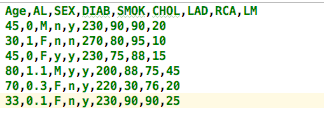
I am generating association rules after converting the table to a dataframe and each rule is not clear if it belongs to which antecedent/consequent.
Example for the first column of my desired table:
Age
Age = 45
Age = 30
Age = 45
Age = 80
.
.
and so on for the rest of the columns. What is the best way to access each column and rewrite them? And is there a better solution to reference my values after generating association rules other than adding the name of the header to each cell?
解决方案
Here is one way to add the column names to all cells:
df = pd.DataFrame({'age':[1,2],'sex':['M','F']})
df = df.applymap(str)
for c in df.columns:
df[c] = df[c].apply(lambda s: "{} = {}".format(c,s))
This yields:
age sex
0 age = 1 sex = M
1 age = 2 sex = F