一、Spring学习
- Spring是一个开源框架
- Spring为简化企业级开发而生,使用Spring,JavaBean就可以实现很多以前要靠EJB才能实现的功能。同样的功能,在EJB中要通过繁琐的配置和复杂的代码才能够实现,而在Spring中却非常的优雅和简洁。
- Spring是一个IOC(DI)和AOP容器框架。
- Spring的优良特性
① 非侵入式:基于Spring开发的应用中的对象可以不依赖于Spring的API
② 依赖注入:DI——Dependency Injection,反转控制(IOC)最经典的实现。
③ 面向切面编程:Aspect Oriented Programming——AOP
④ 容器:Spring是一个容器,因为它包含并且管理应用对象的生命周期
⑤ 组件化:Spring实现了使用简单的组件配置组合成一个复杂的应用。在 Spring 中可以使用XML和Java注解组合这些对象。 - 一站式:在IOC和AOP的基础上可以整合各种企业应用的开源框架和优秀的第三方类库(实际上Spring 自身也提供了表述层的SpringMVC和持久层的Spring JDBC)。
1、Factory Bean
Spring中有两种类型的bean,一种是普通bean,另一种是工厂bean,即FactoryBean。
工厂bean跟普通bean不同,其返回的对象不是指定类的一个实例,其返回的是该工 厂bean的getObject方法所返回的对象。
工厂bean必须实现org.springframework.beans.factory.FactoryBean接口。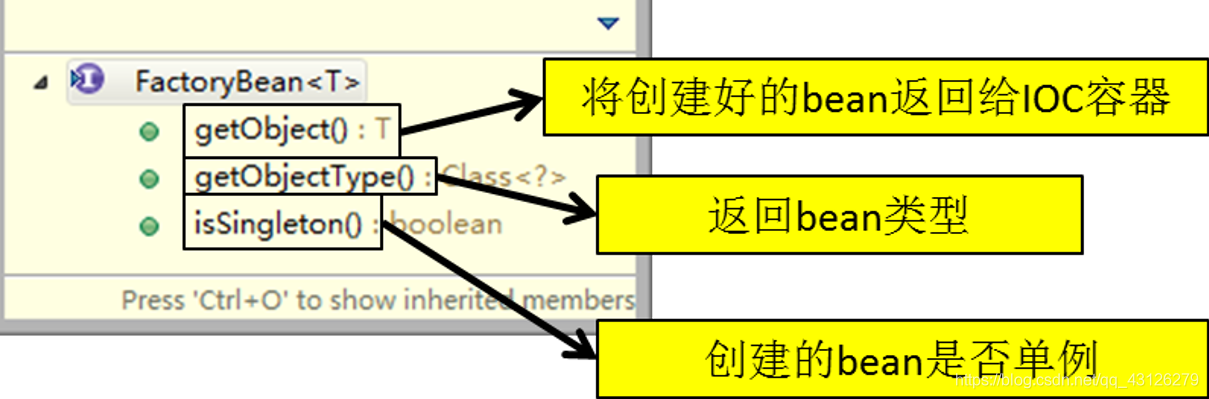
2、bean的作用域
bean的作用域参数主要分为4个
singleton: 单例的(默认值), 在整个IOC容器中只能存在一个bean的对象. 而且在IOC
容器对象被创建时,就创建单例的bean的对象. 后续每次通过getBean()方法
获取bean对象时,返回的都是同一个对象.
prototype: 原型的/多例的 在整个IOC容器中可有多个bean的对象。 在IOC容器对象被
创建时, 不会创建原型的bean的对象。 而是等到没次通过getBean()方法获取
bean对象时,才会创建一个新的bean对象返回.
request: 一次请求对应一个bean对象
session: 一次会话对应一个bean对象
	<bean id="car" class="com.atguigu.spring.scope.Car" scope="prototype">
		<property name="brand" value="奥迪"></property>
		<property name="price" value="400000"></property>
	</bean>
		ApplicationContext ctx =
				new ClassPathXmlApplicationContext("spring-scope.xml");
		Car car1 = ctx.getBean("car",Car.class);
		Car car2 = ctx.getBean("car",Car.class);
		System.out.println(car1 == car2);  // true
3、自动装配
根据类型自动装配:将类型匹配的bean作为属性注入到另一个bean中。若IOC容器中有多个与目标bean类型一致的bean,Spring将无法判定哪个bean最合适该属性,所以不能执行自动装配
根据名称自动装配:必须将目标bean的名称和属性名设置的完全相同
通过构造器自动装配:当bean中存在多个构造器时,此种自动装配方式将会很复杂。不推荐使用。
 byName: 使用bean的属性名与IOC容器中<bean>的id值进行匹配. 匹配成功则装配成功.

 byType: 使用bean的属性的类型与IOC容器中<bean>的class进行匹配。 如果唯一匹配则装配成功
                     如果匹配到多个兼容类型的bean。则跑出异常。
最多使用注解的方式,默认是bytype
3) @Autowired注解
①根据类型实现自动装配。
②构造器、普通字段(即使是非public)、一切具有参数的方法都可以应用@Autowired 注解
③默认情况下,所有使用@Autowired注解的属性都需要被设置。当Spring找不到匹 配的bean装配属性时,会抛出异常。
④若某一属性允许不被设置,可以设置@Autowired注解的required属性为 false
⑤默认情况下,当IOC容器里存在多个类型兼容的bean时,Spring会尝试匹配bean 的id值是否与变量名相同,如果相同则进行装配。如果bean的id值不相同,通过类 型的自动装配将无法工作。此时可以在@Qualifier注解里提供bean的名称。Spring 甚至允许在方法的形参上标注@Qualifiter注解以指定注入bean的名称。 ⑥@Autowired注解也可以应用在数组类型的属性上,此时Spring将会把所有匹配的bean进行自动装配。
⑦@Autowired注解也可以应用在集合属性上,此时Spring读取该集合的类型信息,然后自动装配所有与之兼容的bean。
⑧@Autowired注解用在java.util.Map上时,若该Map的键值为String,那么 Spring将自动装配与值类型兼容的bean作为值,并以bean的id值作为键。
4、DI和AOP
DI从上面可以感受出来就是一个新的对象在获取别的对象的时候可以通过容器框架来帮我们获取具体值,当把类声明成组件之后工具类会直接帮我们生成好,自动装配提供给我们所需的对象的值。这部分还是面向对象的部分只是在
AOP则是面向对象编程的进阶版,面向切面编程,利用动态代理的思想,具体实现不需要我们来进行代理,用户只需要将被代理类告诉给框架就可以自动实现代理。将所有对象方法按层级划分。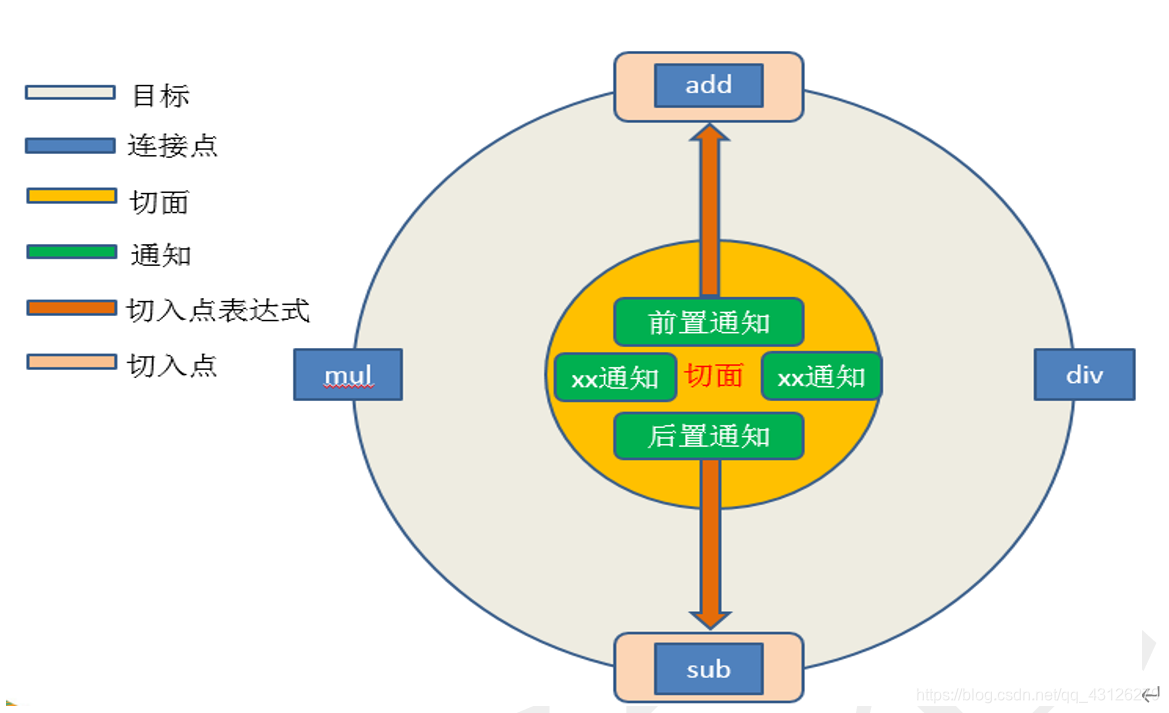
4.1 aspectj
AspectJ:Java社区里最完整最流行的AOP框架。
在Spring2.0以上版本中,可以使用基于AspectJ注解或基于XML配置的AOP。
	/**
	 * 声明切入点表达式
	 */
	@Pointcut("execution(* com.atguigu.spring.aspectJ.annotation.*.*(..))")
	public void declarePointCut() {}


	/**
	 * 前置通知: 在目标方法(连接点)执行之前执行.
	 */
	@Before("execution(public int com.atguigu.spring.aspectJ.annotation.ArithmeticCalculatorImpl.add(int,int))")
	public void  beforeMethod(JoinPoint joinPoint) {
		//获取方法的参数
		Object [] args = joinPoint.getArgs();
		//方法的名字
		String methodName = joinPoint.getSignature().getName();

		System.out.println("LoggingAspect==> The method "+methodName+" begin with "+ Arrays.asList(args));
	}

	/**
	 * 后置通知: 在目标方法执行之后执行, 不管目标方法有没有抛出异常.  不能获取方法的结果
	 *    * com.atguigu.spring.aspectJ.annotation.*.*(..)
	 *    * : 任意修饰符 任意返回值
	 *    * : 任意类
	 *    * : 任意方法
	 *    ..: 任意参数列表
	 *
	 * 连接点对象: JoinPoint
	 */

	//@After("execution(* com.atguigu.spring.aspectJ.annotation.*.*(..))")
	@After("declarePointCut()")
	public void afterMethod(JoinPoint joinPoint) {
		//方法的名字
		String methodName = joinPoint.getSignature().getName();
		System.out.println("LoggingAspect==> The method " + methodName +" ends .");

	}
5、JDBCtemplates
 * queryForObject():
 * 		1. 查询单行数据 返回一个对象
 *      2. 查询单值 返回单个值
 * 	 batchUpdate(): 批量增删改
 	 * update():  增删改操作*
5.1具名参数的JdbcTemplate
配置方式
<!-- 配置可以使用具名参数的JDBCTemplate类对象 -->
<bean
	id="namedTemplate"
	class="org.springframework.jdbc.core.namedparam.NamedParameterJdbcTemplate">
	<!-- 没有无参构造器,必须传入数据源或JdbcTemplate对象 -->
	<constructor-arg ref="dataSource"/>
</bean>
使用
String sql = "INSERT INTO depts (dept_name) VALUES (:deptName)";
Department department = new Department(null, "YYY", null);
SqlParameterSource sqlParameterSource =
		new BeanPropertySqlParameterSource(department);
namedTemplate.update(sql, sqlParameterSource);
5.2事务
为了保证数据的完整性和一致性使用事务
使用方式
	<!-- 事务管理器 -->
	<bean id="dataSourceTransactionManager"
		 class="org.springframework.jdbc.datasource.DataSourceTransactionManager">
		<property name="dataSource" ref="dataSource"></property>
	</bean>

	<!-- 开启事务注解
		transaction-manager 用来指定事务管理器, 如果事务管理器的id值 是 transactionManager,
		                                               可以省略不进行指定。
	-->
	<tx:annotation-driven transaction-manager="dataSourceTransactionManager"/>
@Transactional   //对当前类中所有的方法都起作用
@Service
public class BookShopServiceImpl implements BookShopService {

	@Autowired
	private BookShopDao  bookShopDao ;

	/**
	 * 事务属性:
	 * 	 1. 事务的传播行为 propagation: 一个事务方法被另外一个事务方法调用时,当前的事务如何使用事务.
	 * 			Propagation.REQUIRED  默认值.  使用调用者的事务.
	 * 			Propagation.REQUIRES_NEW     将调用者的事务挂起, 重新开启事务来使用.
	 *   2. 事务的隔离级别 isolation
	 *   		1    读未提交      脏读
	 *   		2    读已提交      不可重复读
	 *    		4    可重复读      幻读
	 *    		8    串行化         效率低。
	 *   3. 事务的回滚与不回滚   默认情况下, Spring会对所有的运行时异常进行事务回滚.
	 *   		rollbackFor
	 *          rollbackForClassName
	 *          noRollbackFor
	 *          noRollbackForClassName
	 *   4. 事务的只读设置:
	 *   		readOnly
	 *   			true:  只读     代表着只会对数据库进行读取操作, 不会有修改的操作.
	 *    						如果确保当前的事务只有读取操作,就有必要设置为只读,可以帮助数据库
	 *    						引擎优化事务
	 *   			false: 非只读   不仅会读取数据还会有修改操作。
	 *   5. 事务的超时设置:  设置事务在强制回滚之前可以占用的时间.
	 *   		timeout:
	 *
	 */
	//只对当前的方法起作用
	@Transactional(propagation=Propagation.REQUIRES_NEW,
					isolation=Isolation.READ_COMMITTED,
				 /* noRollbackFor={UserAccountException.class}*/
					readOnly=false,
					timeout=3)

	public void buyBook(String username, String isbn) {


		/*try {
			Thread.sleep(5000);
		} catch (InterruptedException e) {
			e.printStackTrace();
		}*/

		Integer price = bookShopDao.findPriceByIsbn(isbn);

		bookShopDao.updateStock(isbn);

		bookShopDao.updateUserAccount(username, price);

	}
二、Springmvc学习
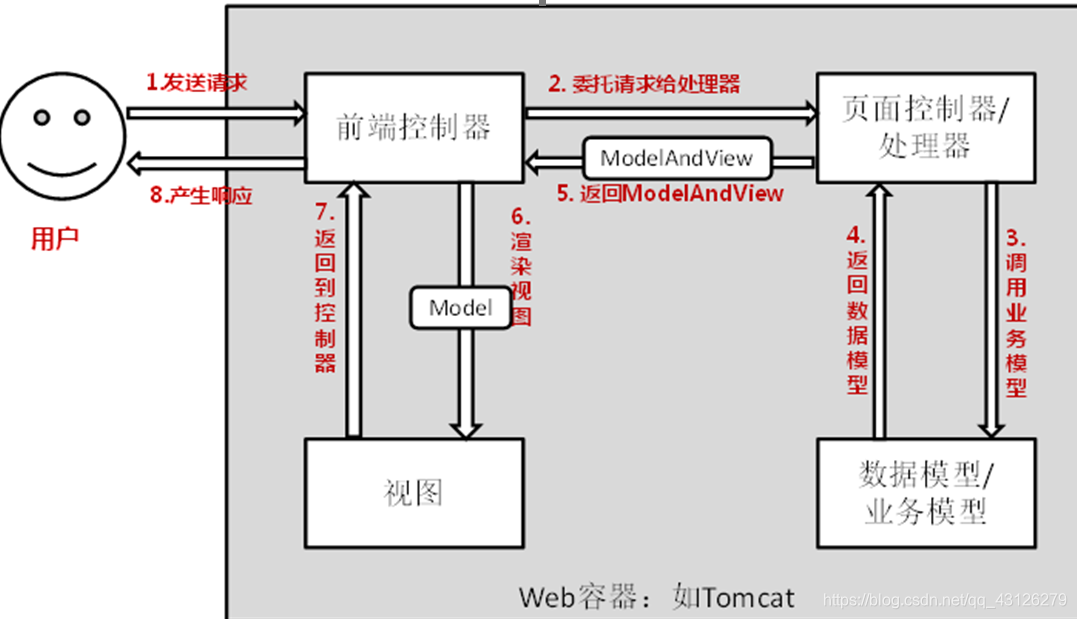
controller=handler 控制器
1、RequestMapping映射请求占位符PathVariable注解
带占位符的 URL 是 Spring3.0 新增的功能,该功能在 SpringMVC 向 REST 目标挺进发展过程中具有里程碑的意义
通过 @PathVariable 可以将 URL 中占位符参数绑定到控制器处理方法的入参中:
URL 中的 {xxx} 占位符可以通过 @PathVariable(“xxx”) 绑定到操作方法的入参中。
//@PathVariable 注解可以将请求URL路径中的请求参数,传递到处理请求方法的入参中
@RequestMapping(value="/testPathVariable/{id}")
public String testPathVariable(@PathVariable("id") Integer id){
System.out.println("testPathVariable...id="+id);
return "success";
}
<!-- 测试 @PathVariable -->
<a href="springmvc/testPathVariable/1">testPathVariable</a>
2、@RequestParam注解
1)在处理方法入参处使用 @RequestParam 可以把请求参数传递给请求方法
2)value:参数名
3)required:是否必须。默认为 true, 表示请求参数中必须包含对应的参数,若不存在,将抛出异常
4)defaultValue: 默认值,当没有传递参数时使用该值
控制器方法
/**
 * @RequestParam 注解用于映射请求参数
 *         value 用于映射请求参数名称
 *         required 用于设置请求参数是否必须的
 *         defaultValue 设置默认值,当没有传递参数时使用该值
 */
@RequestMapping(value="/testRequestParam")
public String testRequestParam(
@RequestParam(value="username") String username,
@RequestParam(value="age",required=false,defaultValue="0") int age){
System.out.println("testRequestParam - username="+username +",age="+age);
return "success";
}
<!--测试 请求参数 @RequestParam 注解使用 -->
<a href="springmvc/testRequestParam?username=atguigu&age=10">testRequestParam</a>
1和2都是处理签名的方法,对比两者之间的不同,1是利用路径直接获取,2则是拼接字符串当作参数传入
3、POJO(Plain Ordinary Java Object)简单的Java对象
1) 使用 POJO 对象绑定请求参数值
2) Spring MVC 会按请求参数名和 POJO 属性名进行自动匹配,自动为该对象填充属性值。支持级联属性。如:dept.deptId、dept.address.tel 等
如果有乱码,就 需要在xml中配置filter
1-3都是对参数进行请求,4则是对内部数据进行总结
4、处理模型数据之 Map
实现了map接口,最终结果在requestScope当中
1)Spring MVC 在内部使用了一个 org.springframework.ui.Model 接口存储模型数据
具体使用步骤
2)Spring MVC 在调用方法前会创建一个隐含的模型对象作为模型数据的存储容器。
3)如果方法的入参为 Map 或 Model 类型,Spring MVC 会将隐含模型的引用传递给这些入参。
4)在方法体内,开发者可以通过这个入参对象访问到模型中的所有数据,也可以向模型
//目标方法的返回类型也可以是一个Map类型参数(也可以是Model,或ModelMap类型)
@RequestMapping("/testMap")
public String testMap(Map<String,Object> map){ //【重点】
System.out.println(map.getClass().getName());
//org.springframework.validation.support.BindingAwareModelMap
map.put("names", Arrays.asList("Tom","Jerry","Kite"));
return "success";
}
<!-- 测试 Map 作为处理返回结果 -->
<a href="springmvc/testMap">testMap</a>
names: ${requestScope.names }
5、视图
1) 请求处理方法执行完成后,最终返回一个 ModelAndView 对象。对于那些返回 String,View 或 ModeMap 等类型的处理方法,Spring MVC 也会在内部将它们装配成一个 ModelAndView 对象,它包含了逻辑名和模型对象的视图
2) Spring MVC 借助视图解析器(ViewResolver)得到最终的视图对象(View),最终的视图可以是 JSP ,也可能是 Excel、JFreeChart等各种表现形式的视图
3) 对于最终究竟采取何种视图对象对模型数据进行渲染,处理器并不关心,处理器工作重点聚焦在生产模型数据的工作上,从而实现 MVC 的充分解耦
1) 视图的作用是渲染模型数据,将模型里的数据以某种形式呈现给客户,主要就是完成转发或者是重定向的操作.(具体见5.2)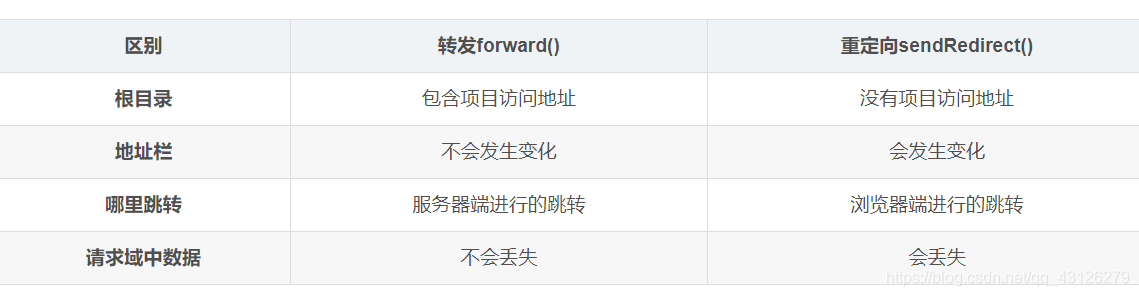
2) 为了实现视图模型和具体实现技术的解耦,Spring 在 org.springframework.web.servlet 包中定义了一个高度抽象的 View 接口:
5.1 JSTL
JSTL包含了和以下操作相关的标签:
1、核心标签:核心标签库是整个JSTL中最常用的部分,主要由以下几部分组成:基本输入输出、流程控制、迭代操作和URL操作。负责Web应用的常见工作,如:循环、表达式赋值、基本输入输出等。
2、I18N格式标签库:用来格式化显示数据的工作如:对不同区域的日期格式化等。
3、XML标签库:用来访问XML文件的工作,支持JSP对XML文档的处理。
若项目中使用了JSTL,则SpringMVC 会自动把视图由InternalResourceView转为 JstlView (断点调试,将JSTL的jar包增加到项目中,视图解析器会自动修改为JstlView)JSTLVIEW是前者的子类
常见代码用法
<!-- 导入JSTL标签库 -->
<%@taglib prefix="c" uri="http://java.sun.com/jsp/jstl/core" %>
<c:if test="${!empty requestScope.empList }">
<table border="1" cellpadding="10" cellspacing="0">
<tr>
<td>EmpId</td>
<td>LastName</td>
<td>Gender</td>
<td>Email</td>
<td>DepartmentName</td>
<td>Edit</td>
<td>Delete</td>
</tr>
<c:forEach items="${requestScope.empList }" var="emp">
<tr>
<td>${emp.id }</td>
<td>${emp.lastName }</td>
<td>${emp.gender==0?"Female":"Male" }</td>
<td>${emp.email }</td>
<td>${emp.department.departmentName }</td>
<td><a href="">Edit</a></td>
<td><a href="">Delete</a></td>
</tr>
</c:forEach>
</table>
</c:if>
5.2mvc中使用重定向和转发
① 一般情况下,控制器方法返回字符串类型的值会被当成逻辑视图名处理
② 如果返回的字符串中带 forward: 或 redirect: 前缀时,SpringMVC 会对他们进行特殊处理:将 forward: 和 redirect: 当成指示符,其后的字符串作为 URL 来处理
③ redirect:success.jsp:会完成一个到 success.jsp 的重定向的操作
④ forward:success.jsp:会完成一个到 success.jsp 的转发操作
@RequestMapping("/testRedirect")
public String testRedirect(){
System.out.println("testRedirect");
return "redirect:/index.jsp";
//return "forward:/index.jsp";
}
6、表单标签
form 标签
一般情况下,通过 GET 请求获取表单页面,而通过 POST 请求提交表单页面,因此获取表单页面和提交表单页面的 URL 是相同的。
只要满足该最佳条件的契约,form:form 标签就无需通过 action 属性指定表单提交的 URL
可以通过 modelAttribute 属性指定绑定的模型属性,若没有指定该属性,则默认从 request 域对象中读取 command 的表单 bean,如果该属性值也不存在,则会发生错误。
3) SpringMVC 提供了多个表单组件标签,如 form:input/、form:select/ 等,用以绑定表单字段的属性值,它们的共有属性如下:
path:表单字段,对应 html 元素的 name 属性,支持级联属性
htmlEscape:是否对表单值的 HTML 特殊字符进行转换,默认值为 true
cssClass:表单组件对应的 CSS 样式类名
cssErrorClass:表单组件的数据存在错误时,采取的 CSS 样式
4) form:input、form:password、form:hidden、form:textarea:对应 HTML 表单的 text、password、hidden、textarea 标签
5) form:radiobutton:单选框组件标签,当表单 bean 对应的属性值和 value 值相等时,单选框被选中
6) form:radiobuttons:单选框组标签,用于构造多个单选框
items:可以是一个 List、String[] 或 Map
itemValue:指定 radio 的 value 值。可以是集合中 bean 的一个属性值
itemLabel:指定 radio 的 label 值
delimiter:多个单选框可以通过 delimiter 指定分隔符
7) form:checkbox:复选框组件。用于构造单个复选框
8) form:checkboxs:用于构造多个复选框。使用方式同 form:radiobuttons 标签
9) form:select:用于构造下拉框组件。使用方式同 form:radiobuttons 标签
10) form:option:下拉框选项组件标签。使用方式同 form:radiobuttons 标签
11) form:errors:显示表单组件或数据校验所对应的错误
<form:errors path= “” /> :显示表单所有的错误
<form:errors path= “user” /> :显示所有以 user 为前缀的属性对应的错误
<form:errors path= “username” /> :显示特定表单对象属性的错误
<!--
1.为什么使用SpringMVC的form标签
① 快速开发
② 表单回显
2.可以通过modelAttribute指定绑定的模型属性,
若没有指定该属性,则默认从request域中查找command的表单的bean
如果该属性也不存在,那么,则会发生错误。
修改功能需要增加绝对路径,相对路径会报错,路径不对
 -->
 <form:form action="${pageContext.request.contextPath }/empUpdate"
method="POST" modelAttribute="employee">
<%--
         LastName : <form:input path="lastName" /><br><br>
          --%>
                 <form:hidden path="id"/>
                 <input type="hidden" name="_method" value="PUT">
                 <%-- 这里不要使用form:hidden标签,否则会报错。
<form:hidden path="_method" value="PUT"/>
                         Spring的隐含标签,没有value属性,同时,path指定的值,在模型对象中也没有这个属性(_method),所以回显时会报错。
                         org.springframework.beans.NotReadablePropertyException:
                         Invalid property '_method' of bean class [com.atguigu.springmvc.crud.entities.Employee]:
                         Bean property '_method' is not readable or has an invalid getter method:
                         Does the return type of the getter match the parameter type of the setter?
                  --%>
三、Mybatis
1使用mapper接口开发
查询和插入见下,删除(delete)、更新(update)
<mapper namespace="com.atguigu.mybatis.dao.EmployeeMapper">
	<!--
		<select>: 定义查询语句
			id:  <select>的唯一标识
			resultType:  结果集的映射类型。
			#{id}: 获取参数值

	 -->

	<select id="selectEmployee" resultType="com.atguigu.mybatis.beans.Employee">
		<!-- select *  from tbl_employee where id = #{id} -->
		select id, last_name lastName, email, gender from tbl_employee where id = #{iaaad}
	</select>
		<!-- public void addEmployee(Employee employee);
		 parameterType:指定参数类型. 可以省略不配置.

		 useGeneratedKeys:告诉Mybatis使用主键自增的方式
		 keyProperty:  指定用对象的哪个属性保存Mybatis返回的主键值
	-->
	<insert id="addEmployee" parameterType="com.atguigu.mybatis.beans.Employee"
		useGeneratedKeys="true" keyProperty="id"
	>
		insert into tbl_employee (last_name, email,gender) values(#{lastName},#{email},#{gender})
	</insert>
配置信息
	<!--5.  引入SQL映射文件
			 <mapper>:引入一个SQL映射文件
			 	resource: 引入类路径下的SQL映射文件
			 <package>: 批量引入SQL映射文件
			 		要求: SQL映射文件 必须与 Mapper接口同名同位置.
	-->
		<mappers>
			<!-- <mapper resource="EmployeeMapper.xml"  /> -->
			<package name="com.atguigu.mybatis.dao"/>
		</mappers>
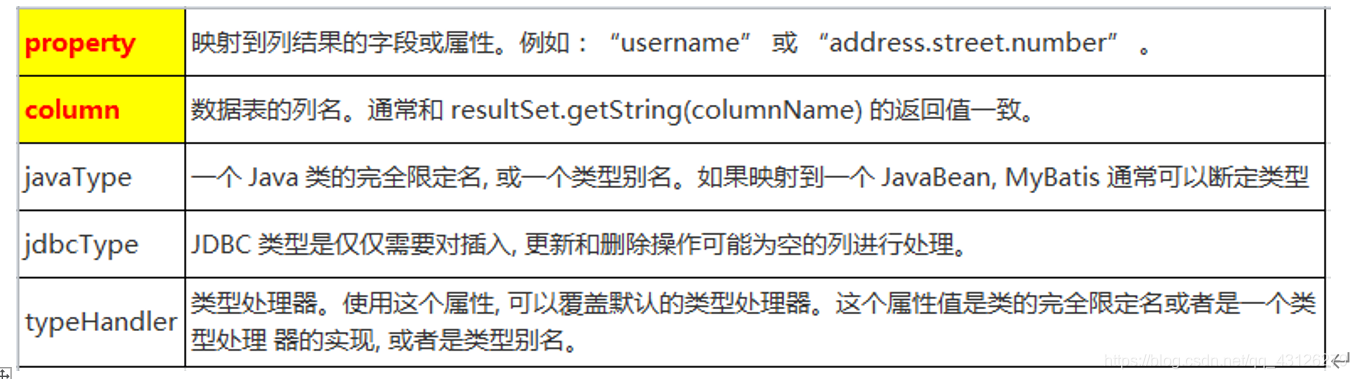
2、resultmap
两种方式第一种级联方式
<select id="getEmployeeAndDept" resultMap="myEmpAndDept" >
		SELECT e.id eid, e.last_name, e.email,e.gender ,d.id did, d.dept_name FROM tbl_employee e , tbl_dept d   WHERE e.d_id = d.id  AND e.id = #{id}
</select>

	<resultMap type="com.atguigu.mybatis.beans.Employee" id="myEmpAndDept">
		<id column="eid" property="id"/>
		<result column="last_name" property="lastName"/>
		<result column="email" property="email"/>
		<result column="gender" property="gender"/>
	    <!-- 级联的方式 -->
		<result column="did" property="dept.id"/>
	<result column="dept_name" property="dept.departmentName"/>
</resultMap>

<select id="getEmployeeById" resultMap="myEmp">
		select id, last_name,email, gender from tbl_employee where id =#{id}
</select>

<resultMap type="com.atguigu.mybatis.beans.Employee" id="myEmp">
		<id column="id"  property="id" />
		<result column="last_name" property="lastName"/>
		<result column="email" property="email"/>
		<result column="gender" property="gender"/>
</resultMap>
2.1延迟加载
- 在 和标签中都可以设置fetchType,指定本次查询是否要使用延迟加载。默认为 fetchType=”lazy” ,如果本次的查询不想使用延迟加载,则可设置为
fetchType=”eager”. - fetchType可以灵活的设置查询是否需要使用延迟加载,而不需要因为某个查询不想使用延迟加载将全局的延迟加载设置关闭.
- 在分步查询的基础上,可以使用延迟加载来提升查询的效率,只需要在全局的
Settings中进行如下的配置:
<!-- 开启延迟加载 -->
<setting name="lazyLoadingEnabled" value="true"/>
<!-- 设置加载的数据是按需还是全部 -->
<setting name="aggressiveLazyLoading" value="false"/>
2.2collection
<select id="getDeptAndEmpsById" resultMap="myDeptAndEmps">
		SELECT d.id did, d.dept_name ,e.id eid ,e.last_name ,e.email,e.gender
		FROM tbl_dept d  LEFT OUTER JOIN tbl_employee e ON  d.id = e.d_id
		WHERE d.id = #{id}
	</select>
	<resultMap type="com.atguigu.mybatis.beans.Department" id="myDeptAndEmps">
		<id column="did" property="id"/>
		<result column="dept_name" property="departmentName"/>
		<!--
			property: 关联的属性名
			ofType: 集合中元素的类型
		 -->
		<collection property="emps"  ofType="com.atguigu.mybatis.beans.Employee">
			<id column="eid" property="id"/>
			<result column="last_name" property="lastName"/>
			<result column="email" property="email"/>
			<result column="gender" property="gender"/>
		</collection>
</resultMap>
2.3分步查询
<select id="getEmployeeAndDeptStep" resultMap="myEmpAndDeptStep">
		 select id, last_name, email,gender,d_id  from tbl_employee where id =#{id}
</select>

<resultMap type="com.atguigu.mybatis.beans.Employee" id="myEmpAndDeptStep">
		<id column="id"  property="id" />
		<result column="last_name" property="lastName"/>
		<result column="email" property="email"/>
		<result column="gender" property="gender"/>
		<association property="dept" 			select="com.atguigu.mybatis.dao.DepartmentMapper.getDeptById"
				column="d_id" fetchType="eager">
		</association>
</resultMap>
3、动态查询
- If用于完成简单的判断.
- Where用于解决SQL语句中where关键字以及条件中第一个and或者or的问题
<select id="getEmpsByConditionIf" resultType="com.atguigu.mybatis.beans.Employee">
select id , last_name ,email , gender
from tbl_employee
<where>
<if test="id!=null">
and id = #{id}
</if>
<if test="lastName!=null && lastName!=""">
and last_name = #{lastName}
</if>
<if test="email!=null and email.trim()!=''">
and email = #{email}
</if>
<if test=""m".equals(gender) or "f".equals(gender)">
and gender = #{gender}
</if>
</where>
</select>
- Trim 可以在条件判断完的SQL语句前后 添加或者去掉指定的字符
prefix: 添加前缀
prefixOverrides: 去掉前缀
suffix: 添加后缀
suffixOverrides: 去掉后缀
<select id="getEmpsByConditionTrim" resultType="com.atguigu.mybatis.beans.Employee">
select id , last_name ,email , gender
from tbl_employee
<trim prefix="where" suffixOverrides="and">
<if test="id!=null">
id = #{id} and
</if>
<if test="lastName!=null && lastName!=""">
last_name = #{lastName} and
</if>
<if test="email!=null and email.trim()!=''">
email = #{email} and
</if>
<if test=""m".equals(gender) or "f".equals(gender)">
gender = #{gender}
</if>
</trim>
</select>
- set 主要是用于解决修改操作中SQL语句中可能多出逗号的问题
- foreach 主要用户循环迭代
collection: 要迭代的集合
item: 当前从集合中迭代出的元素
open: 开始字符
close:结束字符
separator: 元素与元素之间的分隔符
index:
迭代的是List集合: index表示的当前元素的下标
迭代的Map集合: index表示的当前元素的key
<select id="getEmpsByConditionForeach" resultType="com.atguigu.mybatis.beans.Employee">
		 select id , last_name, email ,gender from tbl_employee where  id in
		 <foreach collection="ids" item="curr_id" open="(" close=")" separator="," >
		 		#{curr_id}
		 </foreach>
</select>
4、两个内置参数
databaseID(记录当前工作环境) 和 _paramater(代表当前参数,如果是单个对象那就是单个对象,如果是map就是整个map)
<if test="_paramater != null ">
<uf test="_database == ">
5、重复sql片段抽取
- sql 标签是用于抽取可重用的sql片段,将相同的,使用频繁的SQL片段抽取出来,单独定义,方便多次引用.