使用实例
之前在学习锁的时候,其实用到过阻塞队列来实现线程间通信。
比如我们要处理一个文件,分为文件校验-文件保存-文件打印三个步骤
每个步骤又分为数据校验和数据处理两个阶段
数据校验是一个预处理,不耗时,没有线程安全问题,是一个读处理
数据处理是主要工作,会存在线程安全问题,是一个写处理
我们使用责任链+synchronized+阻塞队列(生产者-消费者)来实现
责任链+synchronized+阻塞队列(生产者-消费者)
- 责任链模式的接口IRequestProcessor 和链中的数据结构Request ,做一个简单定义
/**
 * 责任链模式的接口
 */
public interface IRequestProcessor {
    void process(Request request) throws InterruptedException;
    void process(String file) throws InterruptedException;
}
/**
 * 责任链中需要传输的数据
 */
public class Request {

    private List<String> files = new ArrayList();

    public List<String> getFiles() {
        return files;
    }

    public void setFiles(List<String> files) {
        this.files = files;
    }
}
- 责任链的三个节点,三个节点逻辑大同小异,头节点和尾节点略有差别
PreProcessor 文件校验节点
/**
 * 预处理节点
 */
public class PreProcessor extends Thread implements IRequestProcessor{

    private volatile Boolean finishedFlag = false;

    private IRequestProcessor nextProcessor;

    // 链表式的阻塞队列,分布式中消息队列的角色
    private LinkedBlockingQueue<String> fileQueue = new LinkedBlockingQueue<>();

    private static List<String> fileList;

    public void shutdown(){
        finishedFlag = true;
    }

    PreProcessor(Request request) throws IOException, ClassNotFoundException {
        fileList = LuhuiUtil.deepCopy(request.getFiles());
    }

    PreProcessor(IRequestProcessor nextProcessor,Request request){
        // 深拷贝,把需要处理的文件列表拷贝一份给此节点
        fileList = LuhuiUtil.deepCopy(request.getFiles());
        this.nextProcessor = nextProcessor;
    }

    @Override
    public void run(){
        while(!finishedFlag){
            try {
                // 消费者
                System.out.println("PreProcessor尝试获取数据...");
                String file = fileQueue.take();
                System.out.println("PreProcessor从消息队列取到【"+file+"】,开始数据处理阶段...");
                TimeUnit.SECONDS.sleep(5);
                System.out.println("PreProcessor【"+file+"】数据处理完毕");
                // 当前节点的文件列表中处理完一个文件,移除一个文件
                fileList.removeIf(file::equals);
                if (fileList.isEmpty()) {
                    // 列表为空则停止自旋
                    this.shutdown();
                }
                nextProcessor.process(file);
            } catch (InterruptedException e) {
                e.printStackTrace();
            }
        }
    }

    @Override
    public void process(Request request) throws InterruptedException {
        System.out.println("PreProcessor数据校验阶段...");
        for (int i = 0;i<request.getFiles().size();i++){
            TimeUnit.SECONDS.sleep(2);
            System.out.println("PreProcessor把【"+request.getFiles().get(i)+"】提交到消息队列!");
            // 生产者
            fileQueue.add(request.getFiles().get(i));
        }
    }

    @Override
    public void process(String file) throws InterruptedException {
    }
}
SaveProcessor 文件保存节点
public class SaveProcessor extends Thread implements IRequestProcessor {

    private volatile Boolean finishedFlag = false;

    private IRequestProcessor nextProcessor;

    private LinkedBlockingQueue<String> fileQueue = new LinkedBlockingQueue<>();

    private static List fileList;

    public void shutdown() {
        finishedFlag = true;
    }

    SaveProcessor(Request request) {
        fileList = LuhuiUtil.deepCopy(request.getFiles());
    }

    SaveProcessor(IRequestProcessor nextProcessor, Request request) {
        fileList = LuhuiUtil.deepCopy(request.getFiles());
        this.nextProcessor = nextProcessor;
    }

    @Override
    public void run() {
        while (!finishedFlag) {
            try {
                System.out.println("SaveProcessor尝试获取数据...");
                String file = fileQueue.take();
                System.out.println("SaveProcessor从消息队列取到【" + file + "】,开始数据处理阶段...");
                TimeUnit.SECONDS.sleep(5);
                System.out.println("SaveProcessor【" + file + "】数据处理完毕");
                fileList.removeIf(file::equals);
                if (fileList.isEmpty()) {
                    this.shutdown();
                }
                nextProcessor.process(file);
            } catch (InterruptedException e) {
                e.printStackTrace();
            }

        }
    }

    @Override
    public void process(Request request) throws InterruptedException {

    }

    @Override
    public void process(String file) throws InterruptedException {
        System.out.println("SaveProcessor数据校验阶段...");
        TimeUnit.SECONDS.sleep(2);
        System.out.println("SaveProcessor把【" + file + "】提交到消息队列!");
        fileQueue.add(file);
    }
}
PrintProcessor 文件打印节点
public class PrintProcessor extends Thread implements IRequestProcessor {

    private volatile Boolean finishedFlag = false;

    private IRequestProcessor nextProcessor;

    private LinkedBlockingQueue<String> fileQueue = new LinkedBlockingQueue<>();

    public static List<String> fileList;

    public void shutdown() {
        finishedFlag = true;
    }

    PrintProcessor(Request request) {
        fileList = LuhuiUtil.deepCopy(request.getFiles());
    }

    PrintProcessor(IRequestProcessor nextProcessor, Request request) {
        fileList = LuhuiUtil.deepCopy(request.getFiles());
        this.nextProcessor = nextProcessor;
    }

    @Override
    public void run() {
        while (!finishedFlag) {
            try {
                System.out.println("PrintProcessor尝试获取数据...");
                String file = fileQueue.take();
                System.out.println("PrintProcessor从消息队列取到【" + file + "】,开始数据处理阶段...");
                TimeUnit.SECONDS.sleep(5);
                System.out.println("PrintProcessor【" + file + "】数据处理完毕");
                fileList.removeIf(file::equals);
                if (fileList.isEmpty()) {
                    this.shutdown();
                }
            } catch (InterruptedException e) {
                e.printStackTrace();
            }

        }
    }

    @Override
    public void process(Request request) throws InterruptedException {
    }

    @Override
    public void process(String file) throws InterruptedException {
        System.out.println("SaveProcessor数据校验阶段...");
        TimeUnit.SECONDS.sleep(2);
        System.out.println("SaveProcessor把【" + file + "】提交到消息队列!");
        fileQueue.add(file);
    }
}
- 责任链初始化的类
public class ProcessorControl {
    static PrintProcessor printProcessor;
    static SaveProcessor saveProcessor;
    static PreProcessor preProcessor;

    public static void startup(Request request) throws InterruptedException {
        printProcessor = new PrintProcessor(request);
        saveProcessor = new SaveProcessor(printProcessor,request);
        preProcessor = new PreProcessor(saveProcessor,request);
        preProcessor.start();
        saveProcessor.start();
        printProcessor.start();
        preProcessor.process(request);
    }

}
- 启动类
public class ProcessorMain {
    public static void main(String[] args) throws InterruptedException {
        Request request = new Request();
        request.getFiles().add("政治资料");
        request.getFiles().add("历史资料");
        ProcessorControl.startup(request);
    }
}
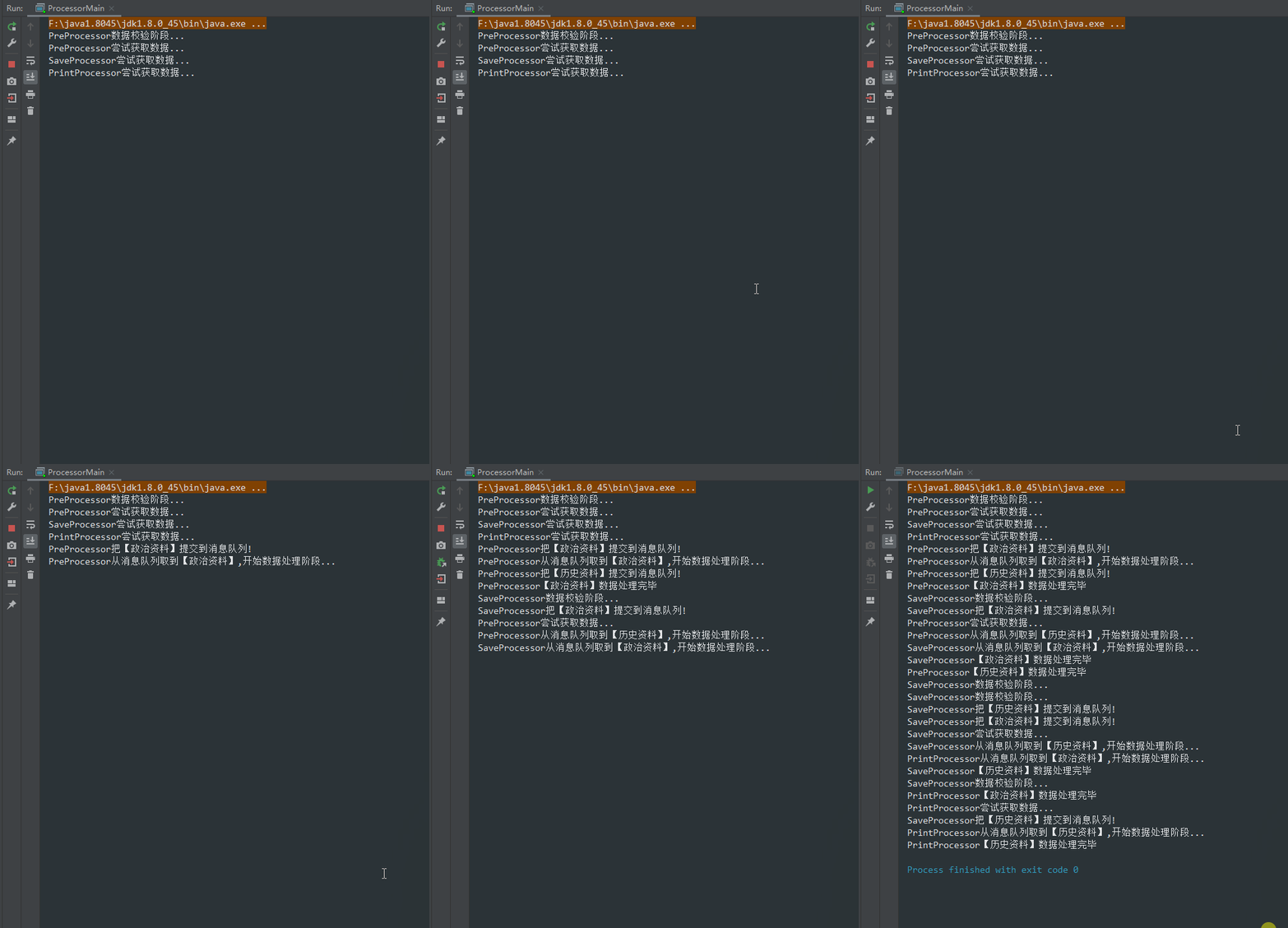
- 运行结果如下:
使用场景
- 上述场景中,在当今分布式的大环境中,更多情况是用分布式消息队列来代替阻塞队列
- 反之,如果想要在单个进程中实现类似的效果,就可以用阻塞队列
- 此外,阻塞队列是一个fifo队列,也可以用来保证线程的顺序访问
JUC中的阻塞队列
| 阻塞队列 | 结构 | 大小 | 顺序 |
|---|---|---|---|
| ArrayBlockingQueue | 数组 | 有界 | FIFO |
| LinkedBlockingQueue | 单向链表 | 有界 | FIFO |
| LinkedTransferQueue | 单向链表 | 无界 | FIFO |
| LinkedBlockingDeque | 双向链表 | 有界 | FIFO |
| PriorityBlockingQueue | 优先级别 | 无界 | 可以有序 |
| DelayQueue | 优先级 | 无界 | 无序 |
| SynchronousQueue | 单节点 | 有界 | 有序 |
操作方法
add(e)
添加元素到队列中,元素满了会报错
offer(e)
添加元素到队列中,会返回是否插入成功true/false
put(e)
添加元素到队列中,失败会阻塞线程,直到可以插入
offer(e,time,unit)
添加元素到队列中,失败会阻塞线程,直到可以插入或者超时
remove()
队列为空返回false,移除成功返回true
poll()
取出一个元素或者null
take()
基于阻塞的方式获取元素
poll(time,unit)
获取数据,如果失败则隔一段时间再去获取
ArrayBlockingQueue源码概述
通过阅读源码,阻塞队列基本都是通过可重入锁来保证队列的线程安全
- 对于put等方法,就是通过锁的await()挂起来实现阻塞
- 对于take()等方法,如果有的数据的话取出删除,如果没有的话就把当前线程封装成一个Node添加到一个名为notEmpty的等待队列中,等待put或者add操作来唤醒它
版权声明:本文为qq_31363843原创文章,遵循CC 4.0 BY-SA版权协议,转载请附上原文出处链接和本声明。