1 添加plugin
<plugin>
    <groupId>org.mybatis.generator</groupId>
    <artifactId>mybatis-generator-maven-plugin</artifactId>
    <version>1.3.2</version>
    <configuration>
        <configurationFile>${basedir}/src/main/resources/common/generator.xml</configurationFile>
        <overwrite>true</overwrite>
        <verbose>true</verbose>
    </configuration>
</plugin>
2 配置自动生成代码的configxml文件
<?xml version="1.0" encoding="UTF-8"?>
        <!DOCTYPE generatorConfiguration
                 PUBLIC "-//mybatis.org//DTD MyBatis Generator Configuration 1.0//EN"
                 "http://mybatis.org/dtd/mybatis-generator-config_1_0.dtd">

<generatorConfiguration>
    <!-- 数据库驱动:选择你的本地硬盘上面的数据库驱动包-->
    <classPathEntry location="D:\work\softwear\maven\lib\mysql\mysql-connector-java\8.0.16\mysql-connector-java-8.0.16.jar" />
    <context id="DB2Tables" targetRuntime="MyBatis3">
<!--       是否去除自动生成的注释-->
        <commentGenerator>
            <property name="suppressAllComments" value="true" />
        </commentGenerator>
        <!--数据库链接URL,用户名、密码 -->
        <jdbcConnection driverClass="com.mysql.jdbc.Driver" connectionURL="jdbc:mysql://****/****" userId="******" password="******">
        </jdbcConnection>
<!-- 解析为包装类       -->
        <javaTypeResolver>
            <property name="forceBigDecimals" value="true" />
        </javaTypeResolver>
        <!-- 生成模型的包名和位置-->
        <javaModelGenerator targetPackage="com.example.eureka.domain.po" targetProject="src/main/java/">
            <property name="enableSubPackages" value="true" />
            <property name="trimStrings" value="true" />
        </javaModelGenerator>
        <!-- 生成映射文件的包名和位置-->
        <sqlMapGenerator targetPackage="mapper" targetProject="src/main/resources/">
            <property name="enableSubPackages" value="true" />
        </sqlMapGenerator>
        <!-- 生成DAO的包名和位置-->
        <javaClientGenerator type="XMLMAPPER" targetPackage="com.example.eureka.dao" targetProject="src/main/java/">
            <property name="enableSubPackages" value="true" />
        </javaClientGenerator>
        <!-- 要生成的表 tableName是数据库中的表名或视图名 domainObjectName是实体类名-->
        <table tableName="ligen_test" domainObjectName="User" enableCountByExample="false" enableUpdateByExample="false" enableDeleteByExample="false" enableSelectByExample="false" selectByExampleQueryId="false" />
    </context>
</generatorConfiguration>
3 设置runconfig

4 application的配置文件
server:
  port: 1235
spring:
  datasource:
    url: jdbc:mysql://10.16.10.158:3306/challenger_smart?useUnicode=true&characterEncoding=utf8
    username: smart
    password: senthink
    driver-class-name: com.mysql.cj.jdbc.Driver

mybatis:
  mapper-locations:
    - classpath:mapper/*Mapper.xml
  type-aliases-package: com.example.eureka.domain.po
5 run该Generator即可
6 如下是生成 的目录结构
! 目录结构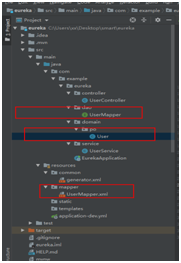
7 再添加上自己需要的controller和service即可运行结果如下
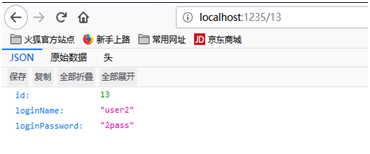
版权声明:本文为HUDCHSDI原创文章,遵循CC 4.0 BY-SA版权协议,转载请附上原文出处链接和本声明。