UE4 独立的控制台Program
UE4可以创建简单的控制台应用程序,可以用来做一些简单的功能测试。
源码BlankProgram
UE4源码中包含一个空白的控制台应用程序模板。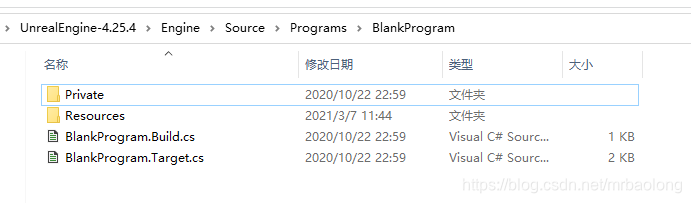
BlankProgram.Target.cs
配置生成目标:目标类型、链接方式、目标名称以及配置类型(控制台)。
// Copyright Epic Games, Inc. All Rights Reserved.

using UnrealBuildTool;
using System.Collections.Generic;

[SupportedPlatforms(UnrealPlatformClass.Desktop)]
public class BlankProgramTarget : TargetRules
{
	public BlankProgramTarget(TargetInfo Target) : base(Target)
	{
		Type = TargetType.Program;
		LinkType = TargetLinkType.Monolithic;
		LaunchModuleName = "BlankProgram";

		// Lean and mean
		bBuildDeveloperTools = false;

		// Never use malloc profiling in Unreal Header Tool.  We set this because often UHT is compiled right before the engine
		// automatically by Unreal Build Tool, but if bUseMallocProfiler is defined, UHT can operate incorrectly.
		bUseMallocProfiler = false;

		// Editor-only data, however, is needed
		bBuildWithEditorOnlyData = true;

		// Currently this app is not linking against the engine, so we'll compile out references from Core to the rest of the engine
		bCompileAgainstEngine = false;
		bCompileAgainstCoreUObject = false;
		bCompileAgainstApplicationCore = false;

		// UnrealHeaderTool is a console application, not a Windows app (sets entry point to main(), instead of WinMain())
		bIsBuildingConsoleApplication = true;
	}
}
BlankProgram.Build.cs
配置包含头文件和链接依赖库。
// Copyright Epic Games, Inc. All Rights Reserved.

using UnrealBuildTool;

public class BlankProgram : ModuleRules
{
	public BlankProgram(ReadOnlyTargetRules Target) : base(Target)
	{
		PublicIncludePaths.Add("Runtime/Launch/Public");

		PrivateIncludePaths.Add("Runtime/Launch/Private");		// For LaunchEngineLoop.cpp include

		PrivateDependencyModuleNames.Add("Core");
		PrivateDependencyModuleNames.Add("Projects");
	}
}
BlankProgram.h
// Copyright Epic Games, Inc. All Rights Reserved.

#pragma once

#include "CoreMinimal.h"
BlankProgram.cpp
// Copyright Epic Games, Inc. All Rights Reserved.


#include "BlankProgram.h"

#include "RequiredProgramMainCPPInclude.h"

DEFINE_LOG_CATEGORY_STATIC(LogBlankProgram, Log, All);

IMPLEMENT_APPLICATION(BlankProgram, "BlankProgram");

INT32_MAIN_INT32_ARGC_TCHAR_ARGV()
{
	GEngineLoop.PreInit(ArgC, ArgV);
	UE_LOG(LogBlankProgram, Display, TEXT("Hello World"));
	return 0;
}
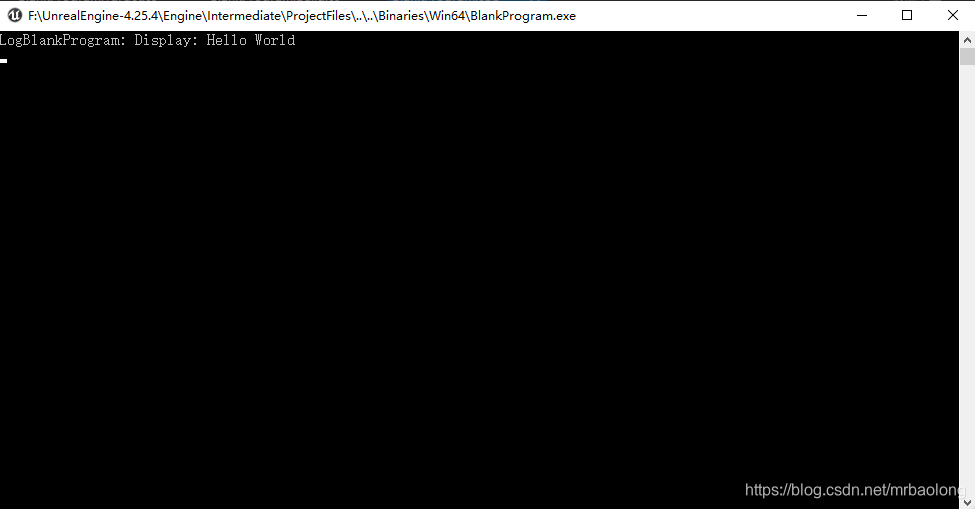
创建自己的控制台应用程序
可参考《UE4 Slate创建独立窗口APP》
不同的是***.Target.cs配置成控制台应用程序以及入口函数的不同。
原文链接
版权声明:本文为mrbaolong原创文章,遵循CC 4.0 BY-SA版权协议,转载请附上原文出处链接和本声明。