数据类型与DDL数据定义
数据类型
基本数据类型
| Hive数据类型 | Java 数据类型 | 长度 | 例子 |
|---|---|---|---|
| TINYINT | byte | 1字节 有符号整数 | 20 |
| SMALINT | short | 2字节 有符号整数 | 20 |
| INT | int | 4字节 有符号整型 | 20 |
| BIGINT | long | 8字节 有符号整数 | 20 |
| BOOLEAN | boolean | true or false | |
| FLOAT | float | 单精度浮点数 | 3.14159 |
| DOUBLE | double | 双精度浮点数 | 3.14159 |
| STRING | string | 字符系列 理论上它可以存储 2GB 的字符数 | ‘abc’ “abc” |
| TIMESTAMP | 时间类型。 | ||
| BINARY | 字节数组。 |
集合数据类型
| 数据类型 | 描述 | 语法示例 |
|---|---|---|
| STRUCT | 和 c 语言中的 struct 类似,都可以通过“点”符号访问元素内容。例如,如果某个列的数据类型是 STRUCT{first STRING, last STRING},那么第 1 个元素可以通过字段.first 来引用。 | struct() 例如 struct<street:string, city:string> |
| MAP | 一组键-值对元组集合,使用数组表示法可以访问数据。例如,如果某个列的数据类型是 MAP,其中键->值对是’first’->’John’和’last’->’Doe’,那么可以通过字段名[‘last’]获取最后一个元素 | 例如 map<string, int>| |
| ARRAY | 数组是一组具有相同类型和名称的变量的集合。这些变量称为数组的元素,每个数组元素都有一个编号,编号从零开始。例如,数组值为[‘John’, ‘Doe’],那么第 2 个元素可以通过数组名[1]进行引用。 | 例如 array<string> |
集合实操
如下数据结构
{
    "name": "songsong",
    "friends": ["bingbing" , "lili"] , //列表 Array,
    "children": { //键值 Map,
        "xiao song": 18 ,
        "xiaoxiao song": 19
    }
    "address": { //结构 Struct,
        "street": "hui long guan",
        "city": "beijing"
    }
}
实际文本数据
songsong,bingbing_lili,xiao song:18_xiaoxiao song:19,hui long guan_beijing
yangyang,caicai_susu,xiao yang:18_xiaoxiao yang:19,chao yang_beijing
- 每行分割是
\n - 数组和集合分割符是
_ - map key分割符是
:
建表语句
create table test_type_data(
name string,
friends array<string>,
children map<string,int>,
address struct<street:string,city:string>
)
row format delimited
fields terminated by ','
collection items terminated by '_'
map keys terminated by ':'
lines terminated by '\n';
查询语句
hive (study)> select * from test_type_data;
OK
test_type_data.name     test_type_data.friends  test_type_data.children test_type_data.address
songsong        ["bingbing","lili"]     {"xiao song":18,"xiaoxiao song":19}     {"street":"hui long guan","city":"beijing"}
yangyang        ["caicai","susu"]       {"xiao yang":18,"xiaoxiao yang":19}     {"street":"chao yang","city":"beijing"}
Time taken: 0.239 seconds, Fetched: 2 row(s)
hive (study)> select friends[1],children['xiaoxiao song'],address.city from test_type_data;
OK
_c0     _c1     city
lili    19      beijing
susu    NULL    beijing
Time taken: 0.67 seconds, Fetched: 2 row(s)
DDL数据定义–数据库
创建数据库
CREATE DATABASE [IF NOT EXISTS] database_name
[COMMENT database_comment]
[LOCATION hdfs_path]
[WITH DBPROPERTIES (property_name=property_value, ...)];
创建一个数据库,数据库在 HDFS 上的默认存储路径是/user/hive/warehouse/*.db。
指定位置创建数据库
create database db_hive2 location '/db_hive2.db';
此时hdfs会在/出现db_hive2.db目录
[hadoop@hadoop101 study]$ hadoop fs -ls /
Found 6 items
drwxr-xr-x   - hadoop supergroup          0 2021-07-08 00:02 /db_hive2.db
查询数据库
查询所有数据库
show databases;
过滤符合条件的数据库
show databases like 'db_hive*'
展示数据库信息
desc database study;
hive (db_hive2)> desc database study;
OK
db_name comment location        owner_name      owner_type      parameters
study           hdfs://hadoop101:8020/user/hive/warehouse/study.db      hadoop  USER
Time taken: 0.03 seconds, Fetched: 1 row(s)
展示数据库详细信息
desc database extended study;
hive (db_hive2)> desc database extended study;
OK
db_name comment location        owner_name      owner_type      parameters
study           hdfs://hadoop101:8020/user/hive/warehouse/study.db      hadoop  USER
Time taken: 0.027 seconds, Fetched: 1 row(s)
修改数据库
use study;
修改数据库
alter database db_hive
set dbproperties('createtime'='20170830');
删除数据库
drop database db_hive2;
如果数据库中存在表,则会删除报错
强制删除数据库
drop database db_hive cascade;
DDL数据定义–表
创建表
CREATE [EXTERNAL] TABLE [IF NOT EXISTS] table_name
[(col_name data_type [COMMENT col_comment], ...)]
[COMMENT table_comment]
[PARTITIONED BY (col_name data_type [COMMENT col_comment], ...)]
[CLUSTERED BY (col_name, col_name, ...)
[SORTED BY (col_name [ASC|DESC], ...)] INTO num_buckets BUCKETS]
[ROW FORMAT row_format]
[STORED AS file_format]
[LOCATION hdfs_path]
[TBLPROPERTIES (property_name=property_value, ...)]
[AS select_statement]
各个关键词说明
- EXTERNAL :外部表
- PARTITIONED BY :创建分区表。分区字段,不可以出现与表字段重复字段声明。
- CLUSTERED BY:创建分桶表,分桶字段必须是表中已有字段
- SORTED BY : 对一个分桶的指定列(一列或多列)进行排序
外部表与管理表
内部表(管理表):删除表自动删除数据
外部表:表定义与表数据关联,删除表定义,数据不被影响。(如果数据只是拿来运算,不能操作别人的数据,则应该建立为外部表)
查看表类型
desc formatted table_name
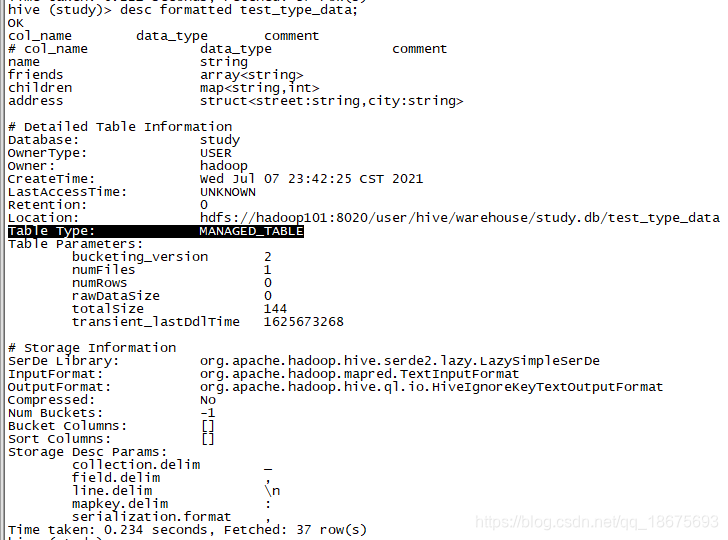
修改表类型
alter table table_name set tblproperties('EXTERNAL'='TRUE');
修改表名称
ALTER TABLE table_name RENAME TO new_table_name
修改表字段
## 更新列
ALTER TABLE table_name CHANGE [COLUMN] col_old_name col_new_name
column_type [COMMENT col_comment] [FIRST|AFTER column_name]
### 案例
alter table t_a change id id1 string comment 'a_id' ;

## 新增或者删除列
ALTER TABLE table_name ADD|REPLACE COLUMNS (col_name data_type [COMMENT
col_comment], ...)

### 案例
alter table t_a add  columns (a int comment 'aa' ,b float comment 'bb');
alter table t_a replace columns (id string comment '主键' ,aa string);
注:ADD 是代表新增一字段,字段位置在所有列后面(partition 列前),
REPLACE 则是表示替换表中所有字段。(覆盖所有字段元数据)
删除表
drop table t_a;
分区表
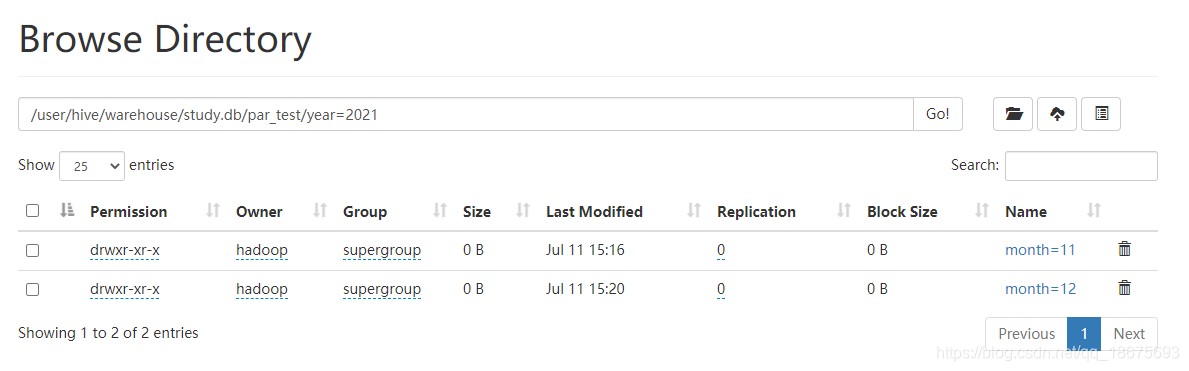
分区表就是分目录,在表目录下继续分目录,多级分区就会又多级目录。
假设我们有两个文件的数据,需要分区存储
par_test_202111.txt
par_test_202112.txt
内容(不重要)
aa bb
创建表
create table par_test(
a string,
b string
)
partitioned by (year int,month int)
row format delimited
fields terminated by ' '
lines terminated by '\n';
load 数据
load data local inpath '/opt/module/apache-hive-3.1.2-bin/study/par_test_202111.txt'
into table par_test partition(year=2021,month=11);
load data local inpath '/opt/module/apache-hive-3.1.2-bin/study/par_test_202112.txt'
into table par_test partition(year=2021,month=12);
多级分区,多层目录展示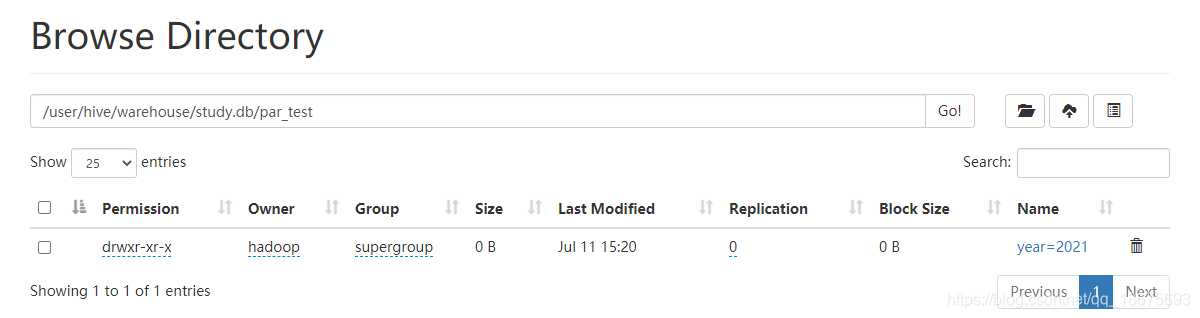
增加分区
alter table par_test add partition (year=2020,month=01);
此时hdfs会形成一个分区的空目录
删除分区
alter table par_test drop partition (year=2020,month=01);
查看分区
show partitions par_test;
查看分区结构
desc formatted par_test;
分区数据上传(分区恢复)
普通表的时候,我们可以通过直接将数据文件上传至表目录,就可以查询到数据,那么区分表,我们是否可以直接创建分区目录,上传数据呢?
答:可以,但是需要一些特殊操作。因为分区信息是记录在mysql的元数据的,而我们直接在hdfs的操作与元数据无关。
方法一:可以创建分区目录,上传数据文件,然后再执行修复表分区
msck repair table dept_partition2;
方法二:或者是手动添加分区
alter table par_test add partition (year=2020,month=01);
方法三:创建文件夹后 load 数据到分区
动态分区
我们之前的案例都是在load data指定分区,这样的操作被称为静态分区。
开启动态分区参数设置
- 开启动态分区功能
hive.exec.dynamic.partition=true - 设置为非严格模式,
hive.exec.dynamic.partition.mode=nonstrict默认是strict表示必须指定至少一个分区为静态分区,nonstrict 模式表示允许所有的分区字段都可以使用动态分区。 - 在所有执行 MR 的节点上,最大一共可以创建多少个动态分区。默认为1000。
hive.exec.max.dynamic.partitions=1000 - 在每个执行 MR 的节点上,最大可以创建多少个动态分区。默认为100,需根据实际情况进行设置。
hive.exec.max.dynamic.partitions.pernode=100 - 整个 MR Job 中,最大可以创建多少个 HDFS 文件。默认10000。
hive.exec.max.created.files=100000 - 当有空分区生成时,是否抛出异常。一般不需要设置。默认 false。
hive.error.on.empty.partition=false
案例
新建表 test08 ,准备分区的数据
内容
1 2 2021 12
2 3 2021 10
3 4 2021 09
3 4 2020 09
建表语句
create table test08(
a string,
b string,
year int,
month int
)
row format delimited
fields terminated by ' '
lines terminated by '\n';
load data
load data local inpath '/opt/module/apache-hive-3.1.2-bin/study/test08.txt'
into table test08;
动态分区SQL
# 设置非严格模式
set hive.exec.dynamic.partition.mode=nonstrict;

# 插入数据
insert into table par_test partition (year,month)
select a,b,year,month from test08;
分桶表
分区提供一个隔离数据和优化查询的便利方式。不过,并非所有的数据集都可形成合理
的分区。对于一张表或者分区,Hive 可以进一步组织成桶,也就是更为细粒度的数据范围
划分。
分桶是将数据集分解成更容易管理的若干部分的另一个技术。
分区针对的是数据的存储路径;分桶针对的是数据文件。
个人看法:
分区表侧重于解决根据实际业务,可以将数据根据某些字段进行分区存储使用。
分桶表是无法利用分区表进行归类,但是有不得不讲数据拆分存储的一种存储方案。
案例
数据文本
数据文件上传hdfs,尽量不要要本地文件,因为reducer调度不一定都在本地机器
1001 ss1
1002 ss2
1003 ss3
1004 ss4
1005 ss5
1006 ss6
1007 ss7
1008 ss8
1009 ss9
1010 ss10
1011 ss11
1012 ss12
1013 ss13
1014 ss14
1015 ss15
1016 ss16
创建分桶表
-- 普通表
create table test09(
id string,
name string
)
row format delimited
fields terminated by ' ';

-- 分桶表
create table bucket_test(
id string,
name string
)
clustered by (id)
into 4 buckets
row format delimited
fields terminated by ' ';
load data
经测试:分桶表load data overwrite 无法覆盖全表,会出现添加效果
load data inpath '/bucket_test.txt' overwrite into table bucket_test;
insert table
-- load data to test09
load data local inpath '/opt/module/apache-hive-3.1.2-bin/study/bucket_test.txt'
overwrite into table test09;

-- 插入
insert overwrite table bucket_test
select id,name from test09;
注意:
- 设置reducer个数为-1,让 Job 自行决定需要用多少个 reduce 或者将 reduce 的个
数设置为大于等于分桶表的桶数 - 从 hdfs 中 load 数据到分桶表中,避免本地文件找不到问题