首先说一下python的打包库pyinstaller是真坑,用了一天的时间,始终没找到原因,各种方法都试过,就是不好用,简直是相当顽固!
下面介绍一下报错类型:
cmd报错:raise ImportErrorWhenRunningHook(self.hook_module_name, self.hook_filename)
PyInstaller.exceptions.ImportErrorWhenRunningHook: Failed to import module __PyInstaller_hooks_0_pydoc required by hook for module C:\Users\maxu\AppData\Roaming\Python\Python39\site-packages\PyInstaller\hooks\hook-pydoc.py. Please check whether module __PyInstaller_hooks_0_pydoc actually exists and whether the hook is compatible with your version of C:\Users\maxu\AppData\Roaming\Python\Python39\site-packages\PyInstaller\hooks\hook-pydoc.py: You might want to read more about hooks in the manual and provide a pull-request to improve PyInstaller.

可以看到我这边报的错误是和pyinstaller-Hooks文件内容缺失相关,解决办法有4种:
1:
卸载和重新安装pyinstaller
pip uninstall pyinstaller
pip install pyinstaller
2:
报错肯能是由于环境中安装了过时的 IPython 引起的。我们可以尝试将其更新到更新的版本。
代码输入:
pip install --upgrade IPython
3:
更新pip
python -m pip install --upgrade pip
4:
pip install --force-reinstall --no-binary :all: pyinstaller
用此方法重新完整安装pyinstaller
如果再次报错
兄弟姐妹们,如果前4种方法还是解决不了你的问题那只能用此大招了
5:
先去github上下载一个进阶版的pyinstaller包
地址: https://github.com/pyinstaller/pyinstaller
点击此处下载压缩包
下载好之后解压后,找到hooks复制(或剪切)到你的python环境目录下,如下图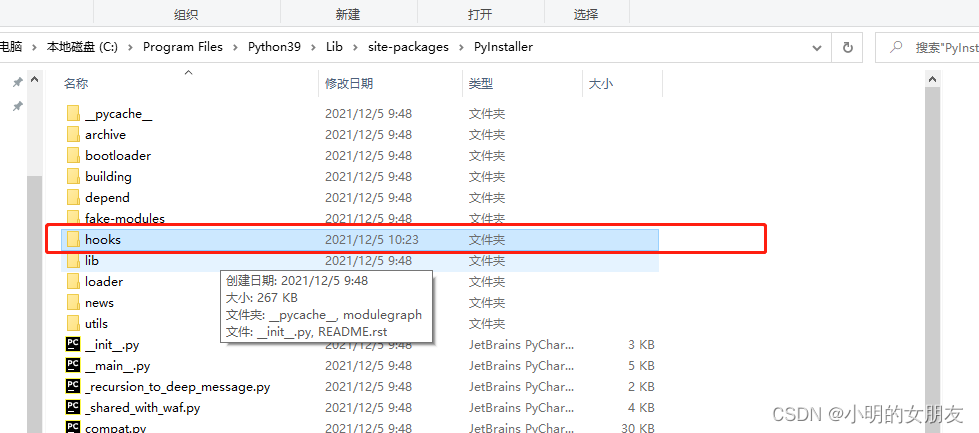
需要注意的是python的目录有两个:
一个是在C:\Program Files\Python39
一个是在C:\Users\用户\AppData\Roaming\Python\Python39
根据你的报错提示,我们应该把文件拷贝到前面的文件夹里面
之后正常打包python就ok了!
希望此方法能够帮助到读者,减少不必要的时间浪费。
麻烦动一动你的小手帮我点个关注吧,十分感谢!有问题可私信博主!