1.环境准备
node、vuepress
项目创建完成后由两部分组成,分为UI库源码和使用demo及文档(这里使用vuepress构建文档及demo)
2.创建项目
创建一个新项目,并执行 npm init 初始化项目
修改 package.json 添加 script,修改后如下
{
  "name": "0-subassemblyelement",
  "version": "1.0.0",
  "description": "Subassembly Element",
  "homepage": "http://",
  "keywords": [
    "vue",
    "subassembly"
  ],
  "main": "dist/subassembly-element.min.js",
  "scripts": {
    "test": "echo \"Error: no test specified\" && exit 1",
    "clean": "rimraf dist",
    "docs:dev": "npm run append:theme-index && vuepress dev docs",
    "docs:build": "npm run append:theme-index && vuepress build docs",
  },
  "author": "JC",
  "license": "ISC",
  "dependencies": {
    "core-js": "^3.6.5",
    "style-loader": "^1.2.1",
    "vue": "^2.6.11"
  },
  "devDependencies": {
    "@vue/cli-plugin-babel": "~4.4.0",
    "@vue/cli-service": "~4.4.0",
    "@vuepress/plugin-active-header-links": "^1.8.2",
    "@vuepress/plugin-back-to-top": "^1.8.2",
    "@vuepress/plugin-medium-zoom": "^1.8.2",
    "@vuepress/plugin-nprogress": "^1.8.2",
    "@vuepress/plugin-register-components": "^1.8.2",
    "css-loader": "^3.4.0",
    "file-loader": "^5.0.2",
    "less": "^3.12.2",
    "less-loader": "^5.0.0",
    "sass-loader": "^7.3.1",
    "svg-sprite-loader": "4.1.3",
    "vue-loader": "^15.8.3",
    "vue-template-compiler": "^2.6.11",
    "webpack": "^4.39.3",
    "webpack-cli": "^4.7.2"
  }
}
3.初始化组件目录结构
在项目下创建如下目录结构
build (配置文件文件夹)
------theme (样式构建配置)
------------build-theme-index.js (构建样式总入口文件)
------------gulpfile.js (打包样式)
src (源码文件夹)
------component
------lang (语言)
------packages (组件包)
------theme-default
------------base.scss (公共样式)
------------index.scss (样式入口文件)【这个文件不写内容,构建将自动填入】
------component.json (组件列表)
------utils (工具类)
------index.js (组件库总入口)
3.1.样式文件构建
目录中我们创建了两个样式文件 base.scss 和 index.scss,其中 index.scss 内不需要写入内容,防止构建内容时被覆盖。
修改 package.json 添加 glup,及脚本
{
  "scripts": {
    // 该命令用于启动文档demo
    "docs:dev": "npm run append:theme-index && vuepress dev docs",
    // 该命令用于自动生成 index.scss 文件
    "append:theme-index": "node build/theme/build-theme-index.js",
    // 该命令用于将所有 scss 文件构建为 css 文件
    "build:theme": "npm run append:theme-index && gulp build --gulpfile build/theme/gulpfile.js"
  },
  "devDependencies": {
    "gulp": "^4.0.0",
    "gulp-cssmin": "^0.1.7",
    "gulp-sass": "^3.1.0",
    "gulp-autoprefixer": "^4.0.0"
  }
}
build-theme-index.js
创建配置文件用于构建样式入口文件导出所有样式
var fs = require('fs');
var path = require('path');
var Components = require('../../src/packages/component.json');
Components = Object.keys(Components);
var basepath = path.resolve(__dirname, '../../src/packages/');
// 检查文件是否存在
function fileExists(filePath) {
    try {
        return fs.statSync(filePath).isFile();
    } catch (err) {
        return false;
    }
}
var indexContent = '@import "./base.scss";\n';
// 循环组件列表将组件注册到总入口
Components.forEach(function(key) {
    if (fileExists(path.resolve('theme-chalk', key, '.scss'))) {
        indexContent += `@import "./${key}.scss";\n`;
    }
});
fs.writeFileSync(path.resolve(basepath, 'theme-chalk', 'index.scss'), indexContent);
gulpfile.js
该文件使用 glup,构建指定目录内的 scss 文件为 css 文件
'use strict';
const { series, src, dest } = require('gulp');
const sass = require('gulp-sass');
const autoprefixer = require('gulp-autoprefixer');
const cssmin = require('gulp-cssmin');
function compile() {
  return src('../../src/packages/theme-chalk/*.scss')
    .pipe(sass.sync())
    .pipe(autoprefixer({
      browsers: ['ie > 9', 'last 2 versions'],
      cascade: false
    }))
    .pipe(cssmin())
    .pipe(dest('../../dist/theme-chalk/'));
}
function copyfont() {
  return src('../../src/packages/theme-chalk/fonts/**')
    .pipe(cssmin())
    .pipe(dest('../../dist/theme-chalk/fonts'));
}
exports.build = series(compile, copyfont);
3.2.添加组件
现在我们添加一个组件,以 tag 为例
首先在 src >> packages>> base 下创建组件文件夹,结构如下
tag
------src
------------Index.vue
------index.js
index.js
import Index from './src/Index';
Index.install = (Vue) => {
  // 安装组件
  Vue.component(Index.name, Index);
};
// 导出安装方法
export default Index;
Index.vue
<template>
	<span>我是标签</span>
</template>
<script>
    export default {
        name: "VeTag"
    }
</script>
<style scoped></style>
修改 src > component.json
{
  "base-tag": "./src/component/base/tag/index.js"
}
注意:这里的 key 为该组件的样式文件的文件名,即在 src/packages/theme-chalk 下应有一个名叫 base-tag.scss 文样式文件
修改 src > index.js
import BaseTag from './packages/base/tag/index'
const components = [
    BaseTag
];
function install (Vue) {
    components.forEach(component => {
        Vue.use(component);
    });
}
export default {
    ...components
};
4.初始化Demo及文档
4.1.初始化vuepress
创建如下目录结构
docs (文档目录)
------.vuepress (vuepress目录)
------------components (文档内部vue组件)
------------public (公共文件)
------------config.js (配置文件)
------------enhanceApp.js (增强文件)
------zh (中文文档文件夹)
------------index.js
------------index.md
------README.md (首页内容)
README.md
---
home: true
lang: zh-CN
heroText: SubElement UI组件库
actionText: 开始使用 →
actionLink: /zh/
footer: SubElement | Copyright © 2020-present
---
config.js
const config = {
    title: 'SubElement UI组件库',
    description: 'UI组件库',
    base: '/',
    dest: 'dist',
    themeConfig: {
        search: true,//搜索
        searchMaxSuggestions: 10,
        nav: [],
        // 左侧导航
        sidebar: {},
        // 最后更新时间
        lastUpdated: 'Last Update', // string | boolean
    },
    markdown: {
        lineNumbers: true
    },
    plugins: [
        ['@vuepress/last-updated']
        ['@vuepress/active-header-links'],
        ['@vuepress/back-to-top'],
        ['@vuepress/medium-zoom'],
        ['@vuepress/nprogress'],
    ],
    scss: {
        test: /\.s[ac]ss$/i,
        use: [
            "style-loader",
            "css-loader",
            "sass-loader",
        ],
    }
};
require('../zh/index').init(config);
module.exports = config;
enhanceApp.js
import Component from '../../src/index'
import '../../src/packages/theme-chalk/index.scss'
export default ({
                    Vue, // the version of Vue being used in the VuePress app
                    options, // the options for the root Vue instance
                    router, // the router instance for the app
                    siteData // site metadata
                }) => {
    // 将组件全部注册到本Demo
    Vue.use(Component)
}
zh > index.js
module.exports = {
    init(config) {
        config.themeConfig.sidebar['/zh/'] = [{
            title: '首页',
            path: '/zh/'
        }]
    }
};
zh > index.md
# Subassembly Element
4.2.添加 tag 组件文档
根据路径 docs/zh/component/base/Tag.md 创建 Tag.md
# Tag 标签
修改 zh/index.js
module.exports = {
    init(config) {
        config.themeConfig.sidebar['/zh/'] = [{
            title: '首页',
            path: '/zh/'
        }, {
            title: '组件',
            children: [{
                title: '基础组件',
                children: [{
                    title: 'Tag 标签',
                    path: '/zh/component/base/Tag'
                }]
            }]
        }]
    }
};
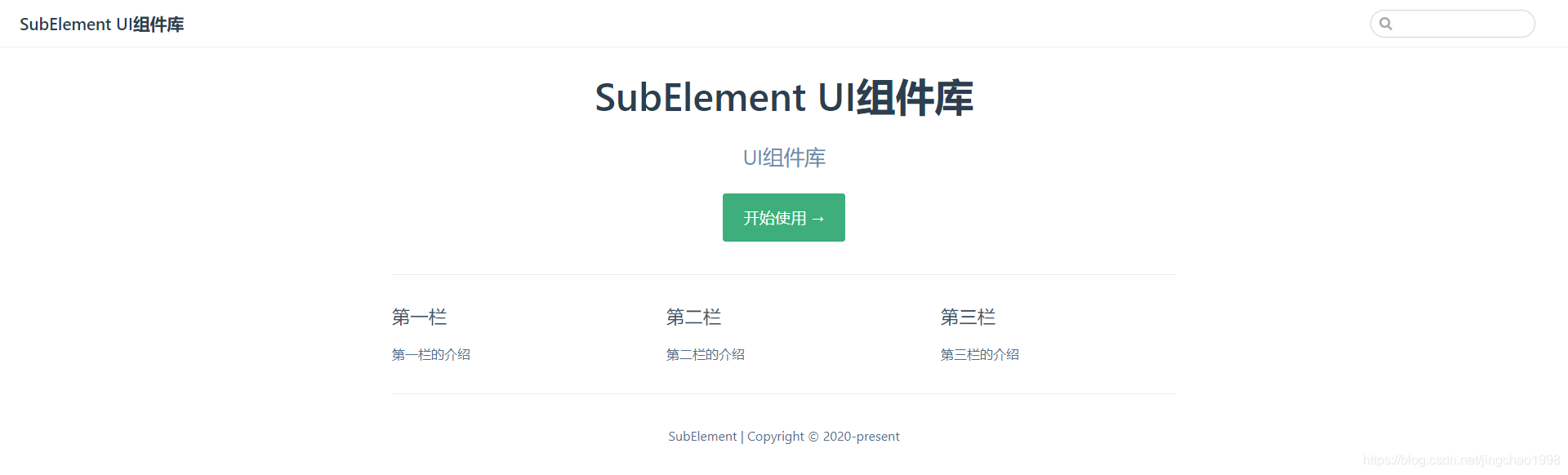
执行命令: npm run docs:dev
访问 http://127.0.0.1:8080/

5、构建
在 build 文件夹中添加文件 webpack.conf.js
const path = require('path');
const ProgressBarPlugin = require('progress-bar-webpack-plugin');
const VueLoaderPlugin = require('vue-loader/lib/plugin');
var Components = require('../src/packages/component.json');
module.exports = {
  mode: 'production',
  entry: {
    app: ['./src/index.js'],
    ...Components
  },
  output: {
    path: path.resolve(process.cwd(), './dist/packages'),
    chunkFilename: '[id].js',
    libraryTarget: 'umd',
    libraryExport: 'default',
    library: 'ELEMENT',
    umdNamedDefine: true,
    globalObject: 'typeof self !== \'undefined\' ? self : this'
  },
  resolve: {
    extensions: ['.js', '.vue', '.json']
  },
  externals: {
    vue: {
      root: 'Vue',
      commonjs: 'vue',
      commonjs2: 'vue',
      amd: 'vue'
    }
  },
  optimization: {
    minimizer: []
  },
  performance: {
    hints: false
  },
  stats: {
    children: false
  },
  module: {
    rules: [
      {
        test: /\.(jsx?|babel|es6)$/,
        include: process.cwd(),
        exclude: /node_modules|utils\/popper\.js|utils\/date\.js/,
        loader: 'babel-loader'
      },
      {
        test: /\.vue$/,
        loader: 'vue-loader',
        options: {
          compilerOptions: {
            preserveWhitespace: false
          }
        }
      }
    ]
  },
  plugins: [
    new ProgressBarPlugin(),
    new VueLoaderPlugin()
  ]
};
修改 package.json,最终的配置如下
{
  "name": "0-subassemblyelement",
  "version": "1.0.0",
  "description": "Subassembly Element",
  "homepage": "http://",
  "keywords": [
    "vue",
    "subassembly"
  ],
  "main": "dist/subassembly-element.min.js",
  "scripts": {
    "test": "echo \"Error: no test specified\" && exit 1",
    "docs:dev": "npm run append:theme-index && vuepress dev docs",
    "docs:build": "vuepress build docs",
    "clean": "rimraf dist",
    "append:theme-index": "node build/theme/build-theme-index.js",
    "build:theme": "npm run append:theme-index && gulp build --gulpfile build/theme/gulpfile.js",
    "build": "npm run clean && npm run build:theme && vuepress build docs",
    "build:package": "npm run build:theme && webpack --config build/webpack.conf.js"
  },
  "author": "JC",
  "license": "ISC",
  "dependencies": {
    "core-js": "^3.6.5",
    "progress-bar-webpack-plugin": "^2.1.0",
    "scss": "^0.2.4",
    "style-loader": "^1.2.1",
    "vue": "^2.6.11",
    "webpack-node-externals": "^3.0.0"
  },
  "devDependencies": {
    "@vue/cli-plugin-babel": "~4.4.0",
    "@vue/cli-service": "~4.4.0",
    "@vuepress/plugin-active-header-links": "^1.8.2",
    "@vuepress/plugin-back-to-top": "^1.8.2",
    "@vuepress/plugin-medium-zoom": "^1.8.2",
    "@vuepress/plugin-nprogress": "^1.8.2",
    "@vuepress/plugin-register-components": "^1.8.2",
    "css-loader": "^3.4.0",
    "file-loader": "^5.0.2",
    "gulp": "^4.0.0",
    "gulp-autoprefixer": "^4.0.0",
    "gulp-cssmin": "^0.1.7",
    "gulp-sass": "^3.1.0",
    "less": "^3.12.2",
    "less-loader": "^5.0.0",
    "sass-loader": "^7.3.1",
    "svg-sprite-loader": "4.1.3",
    "vue-loader": "^15.8.3",
    "vue-template-compiler": "^2.6.11",
    "webpack": "^4.39.3",
    "webpack-cli": "^4.7.2"
  }
}