Results
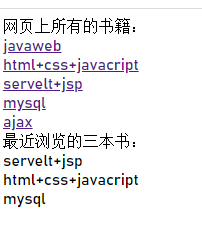
Code
public class Book {
    private String id;
    private String name;
    private String author;
    public Book() {
    }
    public Book(String id, String name, String author) {
        this.id = id;
        this.name = name;
        this.author = author;
    }
    public String getId() {
        return id;
    }
    public void setId(String id) {
        this.id = id;
    }
    public String getName() {
        return name;
    }
    public void setName(String name) {
        this.name = name;
    }
    public String getAuthor() {
        return author;
    }
    public void setAuthor(String author) {
        this.author = author;
    }
}
import java.util.LinkedHashMap;

public class bookMap {
    private static LinkedHashMap<String, Book> linkedHashMap = new LinkedHashMap<>();
    static {
        linkedHashMap.put("1", new Book("1", "javaweb", "zhong"));
        linkedHashMap.put("2", new Book("2", "html+css+javacript", "fu"));
        linkedHashMap.put("3", new Book("3", "servelt+jsp", "cheng"));
        linkedHashMap.put("4", new Book("4", "mysql", "ou"));
        linkedHashMap.put("5", new Book("5", "ajax", "zi"));
    }
    public static LinkedHashMap getAll() {
        return linkedHashMap;
    }
}
import javax.servlet.ServletException;
import javax.servlet.annotation.WebServlet;
import javax.servlet.http.Cookie;
import javax.servlet.http.HttpServlet;
import javax.servlet.http.HttpServletRequest;
import javax.servlet.http.HttpServletResponse;
import java.io.IOException;
import java.util.Arrays;
import java.util.LinkedList;
import java.util.List;

@WebServlet("/servlet02")
public class servlet02 extends HttpServlet {

    @Override
    protected void doPost(HttpServletRequest req, HttpServletResponse resp) throws ServletException, IOException {
        String id = req.getParameter("id");
        Book book = (Book) bookMap.getAll().get(id);
        resp.setHeader("content-type", "text/html;charset=UTF-8");
        resp.getWriter().write("书的编号是:" + book.getId() + "<br/>");
        resp.getWriter().write("书的名称是:" + book.getName() + "<br/>");
        resp.getWriter().write("书的作者是:" + book.getAuthor() + "<br/>");
        String bookHistory = makeHistory(req, id);
        Cookie cookie = new Cookie("bookHistory", bookHistory);
        cookie.setMaxAge(10000);
        resp.addCookie(cookie);
    }

    @Override
    protected void doGet(HttpServletRequest req, HttpServletResponse resp) throws ServletException, IOException {
        this.doPost(req, resp);
    }

    public static String makeHistory(HttpServletRequest req, String id) {
        String bookHistory = null;
        Cookie[] cookies = req.getCookies();
        for (int i = 0; cookies != null && i < cookies.length; i++) {
            if (cookies[i].getName().equals("bookHistory")) {
                bookHistory = cookies[i].getValue();
            }
        }

        if (bookHistory == null) {
            return id;
        }
        String[] strings = bookHistory.split("\\_");
        List list = Arrays.asList(strings);
        LinkedList<String> linkedList = new LinkedList<>();
        linkedList.addAll(list);
        if (linkedList.contains(id)) {
            linkedList.remove(id);
            linkedList.addFirst(id);
        } else {
            if (linkedList.size() >= 3) {
                linkedList.removeLast();
                linkedList.addFirst(id);
            } else {
                linkedList.addFirst(id);
            }
        }
        StringBuffer stringBuffer = new StringBuffer();
        for (String s : linkedList) {
            stringBuffer.append(s + '_');
        }
        return stringBuffer.deleteCharAt(stringBuffer.length() - 1).toString();
    }
}
import javax.servlet.ServletException;
import javax.servlet.annotation.WebServlet;
import javax.servlet.http.Cookie;
import javax.servlet.http.HttpServlet;
import javax.servlet.http.HttpServletRequest;
import javax.servlet.http.HttpServletResponse;
import java.io.IOException;
import java.util.*;

@WebServlet("/servlet01")
public class servlet01 extends HttpServlet {
    @Override
    protected void doPost(HttpServletRequest req, HttpServletResponse resp) throws ServletException, IOException {
        resp.setHeader("content-type", "text/html;charset=UTF-8");
        resp.getWriter().write("网页上所有的书籍:" + "<br/>");
        LinkedHashMap<String, Book> linkedHashMap = bookMap.getAll();
        Set<Map.Entry<String, Book>> entry = linkedHashMap.entrySet();
        for (Map.Entry<String, Book> stringBookEntry : entry) {
            Book book = stringBookEntry.getValue();
            resp.getWriter().write("<a href='/demo1/servlet02?id=" + book.getId() + "' target=_blank>" + book.getName() + "</a>");
            resp.getWriter().write("<br/>");
        }
        resp.getWriter().write("最近浏览的三本书:");
        resp.getWriter().write("<br/>");
        Cookie[] cookies = req.getCookies();
        for (int i = 0; cookies != null && i < cookies.length; i++) {
            if (cookies[i].getName().equals("bookHistory")) {
                String bookHistory = cookies[i].getValue();
                String[] ids = bookHistory.split("\\_");
                for (String id : ids) {
                    Book book = linkedHashMap.get(id);
                    resp.getWriter().write(book.getName());
                    resp.getWriter().write("<br/>");
                }
                break;
            }
        }
    }
    @Override
    protected void doGet(HttpServletRequest req, HttpServletResponse resp) throws ServletException, IOException {
        this.doPost(req, resp);
    }
}
Questions
one:
浏览器报错:HTTP Status 500 - java.lang.LinkageError
method:
把maven中pom.xml中的javaxjar包依赖改一下,因为provided表明该包只在编译和测试的时候用,所以,当启动tomcat的时候,就不会冲突了,完整依赖如下:
<dependency>
            <groupId>javax.servlet</groupId>
            <artifactId>servlet-api</artifactId>
            <version>3.0-alpha-1</version>
            <scope>provided</scope>
        </dependency>
two:
resp.getWriter().write(“xxx”),浏览器显示乱码
method:
在代码前面加一句:resp.setHeader(“content-type”, “text/html;charset=UTF-8”);
因为要告诉servlet用UTF-8转码,而不是用默认的ISO8859
resp.setHeader("content-type", "text/html;charset=UTF-8");
summarize
这个小案例主要运用的就是Cookie技术,把浏览过的书籍的编号记录到Cookie域中,因为Cookie域对象可以持久的保存在浏览器中,下次只要取出来就可以了,在多次会话中都可以保存。
版权声明:本文为h13245原创文章,遵循CC 4.0 BY-SA版权协议,转载请附上原文出处链接和本声明。