紧接上篇
未名客:【渲染流程】Cluster_Unity实现概述zhuanlan.zhihu.com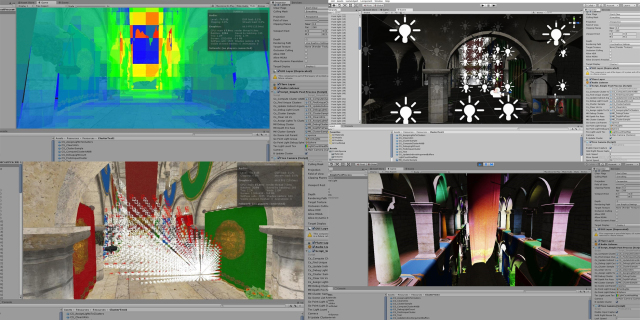
上篇文章,是对Unity 实现Cluster 灯光裁剪的一个概述,从这篇文章开始,我们开始结合代码详细展开,实现每一个流程。强烈建议大家先看上篇文章,很多推导,总结都在上篇文章里,这里及以后的文章不重复相关内容。
用Unity 实现ClusterBasedLighting,一开始考虑的便是Unity 的Srp,不过一来,自己对SRP 不熟,目前也没有足够的时间学习相关的东西,其二,本文的重点是梳理Cluster的流程,想更纯粹一些。最后受MaxwellGeng 兄弟的启发,决定,决定从零开始,完全自己手写。未来某一天如果对SRP 比较熟,会移植一下~
其实这里所谓的完全自定义,是自己调用一些Unity 较底层的绘制函数,绘制到自己创建的RT上,最后使用一个Blit 操作,把我们自己创建的RT 拷贝到摄像机的RT 上,由Unity 提交,最后在屏幕上显示。
一、准备环境
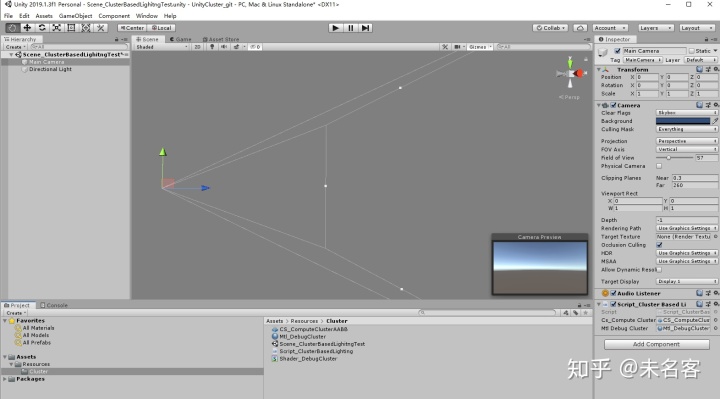
这一步比较简单,首先在一个空场景中,新建脚本Script_ClusterBasedLighting.cs, 并把它挂在Camera 上面,当你的Scene 视图,背景被清空成灰色,环境准备完成~
[ExecuteInEditMode]
#if UNITY_5_4_OR_NEWER
[ImageEffectAllowedInSceneView]
#endif
public class Script_ClusterBasedLighting : MonoBehaviour
{
    private RenderTexture _rtColor;
    private RenderTexture _rtDepth;

    void Start()
    {
        _rtColor = new RenderTexture(Screen.width, Screen.height, 24);
        _rtDepth = new RenderTexture(Screen.width, Screen.height, 24, RenderTextureFormat.Depth, RenderTextureReadWrite.Linear);
    }

    void OnRenderImage(RenderTexture sourceTexture, RenderTexture destTexture)
    {
        Graphics.SetRenderTarget(_rtColor.colorBuffer, _rtDepth.depthBuffer);
        GL.Clear(true, true, Color.gray);

        Graphics.Blit(_rtColor, destTexture);
    }
}
我们在_rtColor, _rtDepth 上面绘制内容,最后blit 到 camera 的rt 上。
使用OnRenderImage() 函数,配合【ExecuteInEditMode】,【ImageEffectAllowedInSceneView】 是为了能在Scene视图窗口 预览结果。
这部分内容MaxwellGeng 已经解释的很清楚了,这里不做赘述,有兴趣或者不太明白的小伙伴可以点一下链接过去学习一下。
二、预计算ClusterAABB, 绘制调试Cluster
从这一阶段开始,我们进入正题,如标题所言,我们将实现如下内容:
- 预计算Cluster AABB
- 绘制供调试的Cluster
完成以后,就能得到本篇文章标题的画面啦~
2.1 预计算Cluster AABB
主相机的视锥体被按照一定规则,切分成一定数量的小锥体,为了能更快的完成后面Cluster 与光源的求交,我们用AABB BoundBox 包围盒这种方式来表示Cluster,且此包围盒需要完整包含小锥体。这一步,我们的目标就是求出View空间下一系列Cluster AABB 的数组。
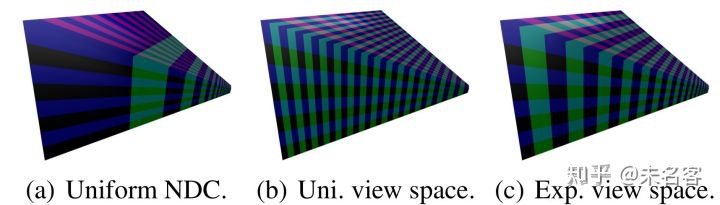
之前有提到我们最终实现的cluster, 是类似cube 的aabb,尽量做到均匀分布,实现方法就是在view 空间,做一种类似指数型的切分,具体推导过程见上篇文章,最终我们得到了如下公式:
这两个公式非常重要,是我们后面做各种变化的基础。简单解释一下:
第一个公式:根据View 空间下的z ,计算当前z 所处的 cluster z 方向的Index;
第二个公式:根据cluster z 方向的Index ,反推 View 空间下 z坐标。
设想,假设我们知道屏幕上的一个Tile(即,Cluster 的xy 坐标),配合相机近裁面的z,便可得出一个view 空间下的3d 坐标,这个坐标与 摄像机的位置,便可形成一条线。
同时我知道了view 空间下,第k 个 cluster 的z坐标,根据这个z 构建一个平行于相机近、远裁面的面,那么便可以求出 这条线与k 平面的交点。 这个交点其实 就是 小cluster 锥体的某个点啦~
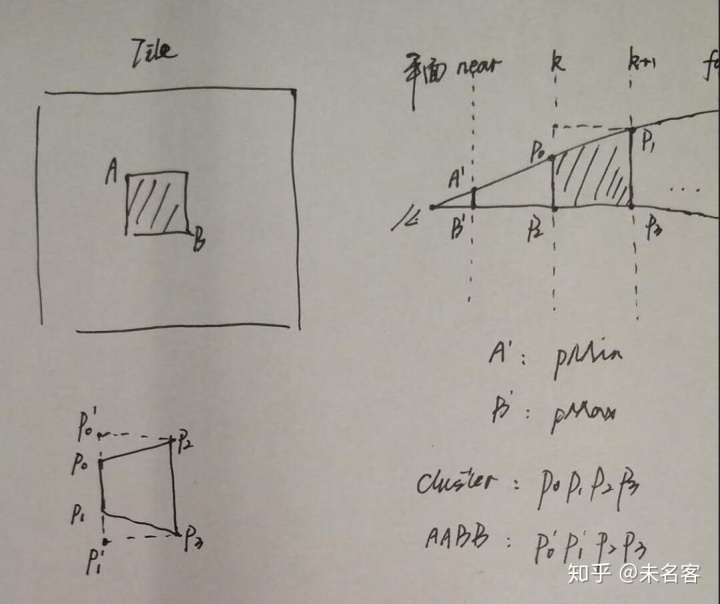
有了这个思路就可以写代码了~
为了方便,我们构建如下结构体:
struct CD_DIM
{
    public float fieldOfViewY;
    public float zNear;
    public float zFar;

    public float sD;
    public float logDimY;
    public float logDepth;

    public int clusterDimX;
    public int clusterDimY;
    public int clusterDimZ;
    public int clusterDimXYZ;
};
用来表示cluster 和相机的一些信息。在相机视锥体发生改变时(初始化需要调用一次),计算这个结构:
    void CalculateMDim(Camera cam)
    {
        // The half-angle of the field of view in the Y-direction.
        float fieldOfViewY = cam.fieldOfView * Mathf.Deg2Rad * 0.5f;//Degree 2 Radiance:  Param.CameraInfo.Property.Perspective.fFovAngleY * 0.5f;
        float zNear = cam.nearClipPlane;// Param.CameraInfo.Property.Perspective.fMinVisibleDistance;
        float zFar = cam.farClipPlane;// Param.CameraInfo.Property.Perspective.fMaxVisibleDistance;

        // Number of clusters in the screen X direction.
        int clusterDimX = Mathf.CeilToInt(Screen.width / (float)m_ClusterGridBlockSize);
        // Number of clusters in the screen Y direction.
        int clusterDimY = Mathf.CeilToInt(Screen.height / (float)m_ClusterGridBlockSize);

        // The depth of the cluster grid during clustered rendering is dependent on the
        // number of clusters subdivisions in the screen Y direction.
        // Source: Clustered Deferred and Forward Shading (2012) (Ola Olsson, Markus Billeter, Ulf Assarsson).
        float sD = 2.0f * Mathf.Tan(fieldOfViewY) / (float)clusterDimY;
        float logDimY = 1.0f / Mathf.Log(1.0f + sD);

        float logDepth = Mathf.Log(zFar / zNear);
        int clusterDimZ = Mathf.FloorToInt(logDepth * logDimY);

        m_DimData.zNear = zNear;
        m_DimData.zFar = zFar;
        m_DimData.sD = sD;
        m_DimData.fieldOfViewY = fieldOfViewY;
        m_DimData.logDepth = logDepth;
        m_DimData.logDimY = logDimY;
        m_DimData.clusterDimX = clusterDimX;
        m_DimData.clusterDimY = clusterDimY;
        m_DimData.clusterDimZ = clusterDimZ;
        m_DimData.clusterDimXYZ = clusterDimX * clusterDimY * clusterDimZ;
    }
其中,clusterDimX/Y/Z 就是Cluster 的三维个数, clusterDimXYZ 就是总个数。
我们根据这个clusterDimXYZ,来创建一个AABB数组
    private ComputeBuffer cb_ClusterAABBs;

    void Start()
    {
        //...
        CalculateMDim(_camera);

        int stride = Marshal.SizeOf(typeof(AABB));
        cb_ClusterAABBs = new ComputeBuffer(m_DimData.clusterDimXYZ, stride);
        //...
    }
完成以后,就可以调用CS 数组里面填数据了。
2.1.1 先说shader
CS 计算的过程,就是我们刚刚分析的过程,完整的cs代码,如下:
// Each #kernel tells which function to compile; you can have many kernels
#pragma kernel CSMain
#pragma enable_d3d11_debug_symbols

//Cluster Data
uint3 ClusterCB_GridDim;      // The 3D dimensions of the cluster grid.
float ClusterCB_ViewNear;     // The distance to the near clipping plane. (Used for computing the index in the cluster grid)
uint2 ClusterCB_Size;         // The size of a cluster in screen space (pixels).
float ClusterCB_NearK;        // ( 1 + ( 2 * tan( fov * 0.5 ) / ClusterGridDim.y ) ) // Used to compute the near plane for clusters at depth k.
float ClusterCB_LogGridDimY;  // 1.0f / log( 1 + ( tan( fov * 0.5 ) / ClusterGridDim.y )
float4 ClusterCB_ScreenDimensions;

struct Plane
{
	float3 N;   // Plane normal.
	float  d;   // Distance to origin.
};

/**
 * Convert a 1D cluster index into a 3D cluster index.
 */
uint3 ComputeClusterIndex3D(uint clusterIndex1D)
{
	uint i = clusterIndex1D % ClusterCB_GridDim.x;
	uint j = clusterIndex1D % (ClusterCB_GridDim.x * ClusterCB_GridDim.y) / ClusterCB_GridDim.x;
	uint k = clusterIndex1D / (ClusterCB_GridDim.x * ClusterCB_GridDim.y);

	return uint3(i, j, k);
}

/**
 * Convert the 3D cluster index into a 1D cluster index.
 */
uint ComputeClusterIndex1D(uint3 clusterIndex3D)
{
	return clusterIndex3D.x + (ClusterCB_GridDim.x * (clusterIndex3D.y + ClusterCB_GridDim.y * clusterIndex3D.z));
}

/**
* Compute the 3D cluster index from a 2D screen position and Z depth in view space.
* source: Clustered deferred and forward shading (Olsson, Billeter, Assarsson, 2012)
*/
uint3 ComputeClusterIndex3D(float2 screenPos, float viewZ)
{
	uint i = screenPos.x / ClusterCB_Size.x;
	uint j = screenPos.y / ClusterCB_Size.y;
	// It is assumed that view space z is negative (right-handed coordinate system)
	// so the view-space z coordinate needs to be negated to make it positive.
	uint k = log(viewZ / ClusterCB_ViewNear) * ClusterCB_LogGridDimY;

	return uint3(i, j, k);
}
/**
 * Find the intersection of a line segment with a plane.
 * This function will return true if an intersection point
 * was found or false if no intersection could be found.
 * Source: Real-time collision detection, Christer Ericson (2005)
 */
bool IntersectLinePlane(float3 a, float3 b, Plane p, out float3 q)
{
	float3 ab = b - a;

	float t = (p.d - dot(p.N, a)) / dot(p.N, ab);

	bool intersect = (t >= 0.0f && t <= 1.0f);

	q = float3(0, 0, 0);
	if (intersect)
	{
		q = a + t * ab;
	}

	return intersect;
}

/// Functions.hlsli
// Convert clip space coordinates to view space
float4 ClipToView(float4 clip)
{
	// View space position.
	//float4 view = mul(clip, g_Com.Camera.CameraProjectInv);
	float4 view = mul(_InverseProjectionMatrix, clip);
	// Perspecitive projection.
	view = view / view.w;

	return view;
}

// Convert screen space coordinates to view space.
float4 ScreenToView(float4 screen)
{
	// Convert to normalized texture coordinates in the range [0 .. 1].
	float2 texCoord = screen.xy * ClusterCB_ScreenDimensions.zw;

	// Convert to clip space
	float4 clip = float4(texCoord * 2.0f - 1.0f, screen.z, screen.w);

	return ClipToView(clip);
}

#ifndef BLOCK_SIZE
#define BLOCK_SIZE 1024
#endif

struct ComputeShaderInput
{
	uint3 GroupID           : SV_GroupID;           // 3D index of the thread group in the dispatch.
	uint3 GroupThreadID     : SV_GroupThreadID;     // 3D index of local thread ID in a thread group.
	uint3 DispatchThreadID  : SV_DispatchThreadID;  // 3D index of global thread ID in the dispatch.
	uint  GroupIndex        : SV_GroupIndex;        // Flattened local index of the thread within a thread group.
};

struct AABB
{
	float4 Min;
	float4 Max;
};
RWStructuredBuffer<AABB> RWClusterAABBs;

[numthreads(BLOCK_SIZE, 1, 1)]
void CSMain(ComputeShaderInput cs_IDs)
{
	uint clusterIndex1D = cs_IDs.DispatchThreadID.x;

	// Convert the 1D cluster index into a 3D index in the cluster grid.
	uint3 clusterIndex3D = ComputeClusterIndex3D(clusterIndex1D);

	// Compute the near and far planes for cluster K.
	Plane nearPlane = { 0.0f, 0.0f, 1.0f, ClusterCB_ViewNear * pow(abs(ClusterCB_NearK), clusterIndex3D.z) };
	Plane farPlane = { 0.0f, 0.0f, 1.0f, ClusterCB_ViewNear * pow(abs(ClusterCB_NearK), clusterIndex3D.z + 1) };

	// The top-left point of cluster K in screen space.
	float4 pMin = float4(clusterIndex3D.xy * ClusterCB_Size.xy, 0.0f, 1.0f);
	// The bottom-right point of cluster K in screen space.
	float4 pMax = float4((clusterIndex3D.xy + 1) * ClusterCB_Size.xy, 0.0f, 1.0f);

	// Transform the screen space points to view space.
	pMin = ScreenToView(pMin);
	pMax = ScreenToView(pMax);

	pMin.z *= -1;
	pMax.z *= -1;

	// Find the min and max points on the near and far planes.
	float3 nearMin, nearMax, farMin, farMax;
	// Origin (camera eye position)
	float3 eye = float3(0, 0, 0);
	IntersectLinePlane(eye, (float3)pMin, nearPlane, nearMin);
	IntersectLinePlane(eye, (float3)pMax, nearPlane, nearMax);
	IntersectLinePlane(eye, (float3)pMin, farPlane, farMin);
	IntersectLinePlane(eye, (float3)pMax, farPlane, farMax);

	float3 aabbMin = min(nearMin, min(nearMax, min(farMin, farMax)));
	float3 aabbMax = max(nearMin, max(nearMax, max(farMin, farMax)));

	AABB aabb = { float4(aabbMin, 1.0f), float4(aabbMax, 1.0f) };

	RWClusterAABBs[clusterIndex1D] = aabb;
}
ComputeShader 分析:
1、每一个cluster 就是一个线程,若一个线程组有1024个线程,所以,需要dispath m_DimData.clusterDimXYZ / 1024.0 个线程组
2、为了方便填充我们的一维数组结果,这里我们分配的线程组是一维的。虽然cluster index 是3维的,但是不虚,因为index 3维到一维是非常方便的。所以在shader 的一开始,我们写了如下一些用于转换的工具函数,这些函数后面会被反复用到。
/**
 * Convert a 1D cluster index into a 3D cluster index.
 */
uint3 ComputeClusterIndex3D(uint clusterIndex1D)
{
	uint i = clusterIndex1D % ClusterCB_GridDim.x;
	uint j = clusterIndex1D % (ClusterCB_GridDim.x * ClusterCB_GridDim.y) / ClusterCB_GridDim.x;
	uint k = clusterIndex1D / (ClusterCB_GridDim.x * ClusterCB_GridDim.y);

	return uint3(i, j, k);
}

/**
 * Convert the 3D cluster index into a 1D cluster index.
 */
uint ComputeClusterIndex1D(uint3 clusterIndex3D)
{
	return clusterIndex3D.x + (ClusterCB_GridDim.x * (clusterIndex3D.y + ClusterCB_GridDim.y * clusterIndex3D.z));
}

/**
* Compute the 3D cluster index from a 2D screen position and Z depth in view space.
* source: Clustered deferred and forward shading (Olsson, Billeter, Assarsson, 2012)
*/
uint3 ComputeClusterIndex3D(float2 screenPos, float viewZ)
{
	uint i = screenPos.x / ClusterCB_Size.x;
	uint j = screenPos.y / ClusterCB_Size.y;
	uint k = log(viewZ / ClusterCB_ViewNear) * ClusterCB_LogGridDimY;

	return uint3(i, j, k);
}
前两个转换非常简单,第三个有一点意思,用到了上面提到的公式1, 即,根据屏幕像素坐标,和 view 空间的z 计算cluster 的3维index。
3、接下来是一个线面求交的函数,这个等下将用来计算 cluster 锥体两个平面的的左上角,和右下角,四个顶点。
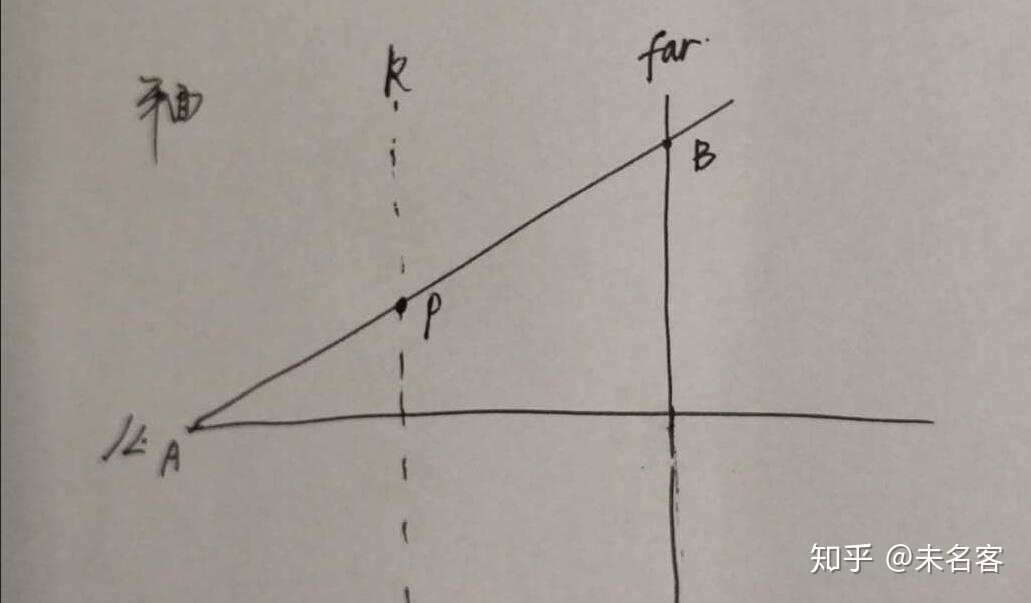
4、再下来就是常规的空间转化,不多解释。
5、CSMain 的内容简单介绍:
1)DispatchThreadID 即对应cluster 的1维索引。
2)这里要注意,Unity 的View 空间是右手坐标系,我们所有view 空间下的z 值都是负数,同理,在构建纵向k,k+1 两个平面的时候,他们的法向量是,( 0,0,1)。
3)下面的代码是,计算view 空间的z, 用到了公式1
ClusterCB_ViewNear * pow(abs(ClusterCB_NearK), clusterIndex3D.z) 4)我们将屏幕tile (即cluster 的xy) 左上角,右下角转换到view空间,求出view 空间的坐标,pMin, pMax。注意view z 是负数。
5)最后就可以做线面求交了,从四个点中,拼出最小最大的,就是我们cluster aabb 的左上,右下角的点啦~
cluster AABB 的计算,到了这一步,就已经完成了。在实际游戏运行过程中,因为视锥体常规情况下是不会发生变化的,所以可以预先把数据准备好,在Init 的时候就可以Dispatch 执行CS了。
2.1.2 c# 分析
最后简单看一眼c# 这边情况
    void UpdateClusterCBuffer(ComputeShader cs)
    {
        int[] gridDims = { m_DimData.clusterDimX, m_DimData.clusterDimY, m_DimData.clusterDimZ };
        int[] sizes = { m_ClusterGridBlockSize, m_ClusterGridBlockSize };
        Vector4 screenDim = new Vector4((float)Screen.width, (float)Screen.height, 1.0f / Screen.width, 1.0f / Screen.height);
        float viewNear = m_DimData.zNear;

        cs.SetInts("ClusterCB_GridDim", gridDims);
        cs.SetFloat("ClusterCB_ViewNear", viewNear);
        cs.SetInts("ClusterCB_Size", sizes);
        cs.SetFloat("ClusterCB_NearK", 1.0f + m_DimData.sD);
        cs.SetFloat("ClusterCB_LogGridDimY", m_DimData.logDimY);
        cs.SetVector("ClusterCB_ScreenDimensions", screenDim);
    }
     void Pass_ComputeClusterAABB()
    {
        var projectionMatrix = GL.GetGPUProjectionMatrix(_camera.projectionMatrix, false);
        var projectionMatrixInvers = projectionMatrix.inverse;
        cs_ComputeClusterAABB.SetMatrix("_InverseProjectionMatrix", projectionMatrixInvers);

        UpdateClusterCBuffer(cs_ComputeClusterAABB);

        int threadGroups = Mathf.CeilToInt(m_DimData.clusterDimXYZ / 1024.0f);

        int kernel = cs_ComputeClusterAABB.FindKernel("CSMain");
        cs_ComputeClusterAABB.SetBuffer(kernel, "RWClusterAABBs", cb_ClusterAABBs);
        cs_ComputeClusterAABB.Dispatch(kernel, threadGroups, 1, 1);
    }
这里有一点要注意的是,Unity InvProjectMatrix 的用法。Dx 系列和OpenGl 系类的投影是不一样的。DX是以左上角为(0,0) OpenGL是以右下角为(0,0) ,DX的Z范围是(0,1) GL是(-1,1)。为了跨平台,Unity 使用GetGPUProjectionMatrix 函数,做转换,友情提示,这里处理不好,出来的结果很有可能是 Y 方向相反哦。
这个我当时也被坑了,最后翻了翻Untiy PostProcess Steck 里面SSR 代码,才明白过来.....
2.2 绘制供调试的Cluster
ClusterAABB 计算完以后,心里还是没底,也为了后面调试的方便,我们首先把计算出来的AABB 画出来,先看个大概~
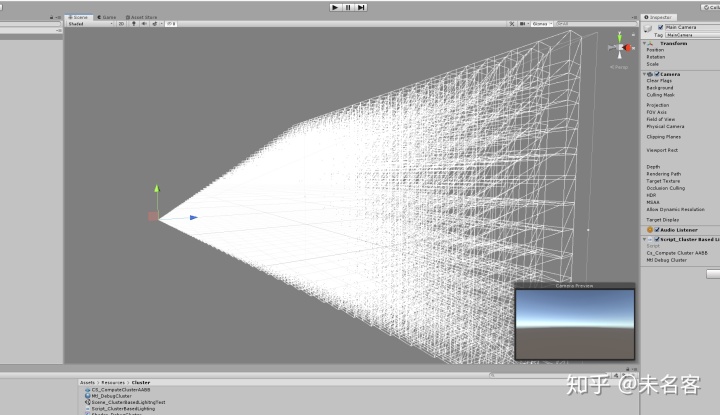
绘制的话,我们使用GS的方式,提交clusterDimXYZ 这个点,shader 里面根据点的id, 访问我们刚刚完成的数组,就能拿到当前点对应的cluster aabb 啦,然后在GS里面,生成8个点,表示cube。
简单看一下shader :
Shader "ClusterBasedLightingGit/Shader_DebugCluster"
{
	Properties
	{
	}
	SubShader
	{
		Tags { "RenderType"="Opaque" }
		LOD 100

		Pass
		{
			CGPROGRAM

			#pragma vertex main_VS
			#pragma fragment main_PS
			#pragma geometry main_GS
			#pragma target 5.0
			#pragma enable_d3d11_debug_symbols

			#include "UnityCG.cginc"

			struct VertexShaderOutput
			{
				float4 Min          : AABB_MIN;  // Min vertex position in view space.
				float4 Max          : AABB_MAX;  // Max vertex position in view space.
				float4 Color        : COLOR;     // Cluster color.
			};

			struct GeometryShaderOutput
			{
				float4 Color        : COLOR;
				float4 Position     : SV_POSITION;          // Clip space position.
			};

			struct AABB
			{
				float4 Min;
				float4 Max;
			};

			StructuredBuffer<AABB> ClusterAABBs;// : register(t1);

			bool CMin(float3 a, float3 b)
			{
				if (a.x < b.x && a.y < b.y && a.z < b.z)
					return true;
				else
					return false;
			}

			bool CMax(float3 a, float3 b)
			{
				if (a.x > b.x && a.y > b.y && a.z > b.z)
				{
					return true;
				}
				else
				{
					return false;
				}
			}

			float4 WorldToProject(float4 posWorld)
			{
				float4 posVP0 = UnityObjectToClipPos(posWorld);
				return posVP0;
			}

			VertexShaderOutput main_VS(uint VertexID : SV_VertexID)
			{
				uint clusterID = VertexID; ;// UniqueClusters[VertexID];// VertexID;

				VertexShaderOutput vsOutput = (VertexShaderOutput)0;

				AABB aabb = ClusterAABBs[clusterID];// ClusterAABBs[VertexID];

				vsOutput.Min = aabb.Min;
				vsOutput.Max = aabb.Max;

				float4 factor = aabb.Max - aabb.Min;
				//factor *= 0.2;
				vsOutput.Max = aabb.Min + factor;
				vsOutput.Color = float4(1,1,1,1);

				return vsOutput;
			}


			// Geometry shader to convert AABB to cube.
			[maxvertexcount(16)]
			void main_GS(point VertexShaderOutput IN[1], inout TriangleStream<GeometryShaderOutput> OutputStream)
			{
				float4 min = IN[0].Min;
				float4 max = IN[0].Max;

				// Clip space position
				GeometryShaderOutput OUT = (GeometryShaderOutput)0;

				// AABB vertices
				const float4 Pos[8] = {
					float4(min.x, min.y, min.z, 1.0f),    // 0
					float4(min.x, min.y, max.z, 1.0f),    // 1
					float4(min.x, max.y, min.z, 1.0f),    // 2

					float4(min.x, max.y, max.z, 1.0f),    // 3
					float4(max.x, min.y, min.z, 1.0f),    // 4
					float4(max.x, min.y, max.z, 1.0f),    // 5
					float4(max.x, max.y, min.z, 1.0f),    // 6
					float4(max.x, max.y, max.z, 1.0f)     // 7
				};

				// Colors (to test correctness of AABB vertices)
				const float4 Col[8] = {
					float4(0.0f, 0.0f, 0.0f, 1.0f),       // Black
					float4(0.0f, 0.0f, 1.0f, 1.0f),       // Blue
					float4(0.0f, 1.0f, 0.0f, 1.0f),       // Green
					float4(0.0f, 1.0f, 1.0f, 1.0f),       // Cyan
					float4(1.0f, 0.0f, 0.0f, 1.0f),       // Red
					float4(1.0f, 0.0f, 1.0f, 1.0f),       // Magenta
					float4(1.0f, 1.0f, 0.0f, 1.0f),       // Yellow
					float4(1.01, 1.0f, 1.0f, 1.0f)        // White
				};

				const uint Index[18] = {
					0, 1, 2,
					3, 6, 7,
					4, 5, -1,
					2, 6, 0,
					4, 1, 5,
					3, 7, -1
				};

				[unroll]
				for (uint i = 0; i < 18; ++i)
				{
					if (Index[i] == (uint) - 1)
					{
						OutputStream.RestartStrip();
					}
					else
					{
						OUT.Position = WorldToProject(Pos[Index[i]]);
						OUT.Color = IN[0].Color;
						OutputStream.Append(OUT);
					}
				}
			}

			float4 main_PS(GeometryShaderOutput IN) : SV_Target
			{
				return IN.Color;
			}

			ENDCG
		}
	}
}
GS 的用法和DX11, 很常规,这里就不多介绍了,不了解的小伙伴,可以搜一下,GS的具体用法,功能很灵活,但是慎用哦,效率是一个很大的问题。
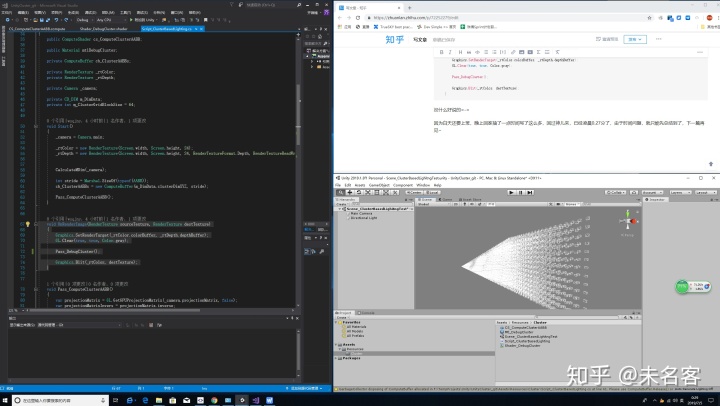
可以从上面的图里看出,Cluster 的AABB 确实把小锥体完全包围住了, 因为很多AABB在边缘的地方都有重叠,这是符合我们的需求的。为了方便查看,我把aabb 的左上角做了保留,实际大小做了一下缩放,看上去,清晰明了~ 标题图,get!
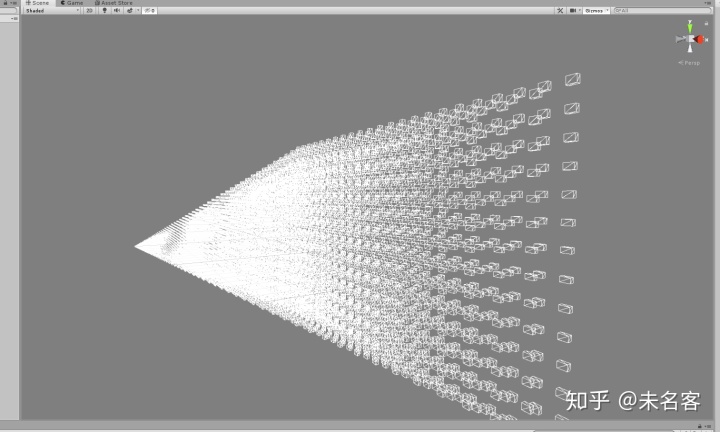
c# 脚本简单看一眼
    void Pass_DebugCluster()
    {
        GL.wireframe = true;

        mtlDebugCluster.SetBuffer("ClusterAABBs", cb_ClusterAABBs);

        mtlDebugCluster.SetPass(0);
        Graphics.DrawProceduralNow(MeshTopology.Points, m_DimData.clusterDimXYZ);

        GL.wireframe = false;
    }
    void OnRenderImage(RenderTexture sourceTexture, RenderTexture destTexture)
    {
        Graphics.SetRenderTarget(_rtColor.colorBuffer, _rtDepth.depthBuffer);
        GL.Clear(true, true, Color.gray);

        Pass_DebugCluster();

        Graphics.Blit(_rtColor, destTexture);
    }
没什么好说的=-=
因为白天还要上班,晚上回家抽了一点时间写了这么多,回过神儿来,不知不觉,已经凌晨0.27分了,由于时间问题,就只能先总结到了,下一篇再见~