前提:安装好VirtualBox虚拟机,并且在虚拟机上安装好Ubuntu系统。
打开虚拟机中Ubuntu系统的终端
1、安装sshd服务
$ sudo apt-get install openssh-server2、开启服务
$ /etc/init.d/ssh start3、判断是否安装ssh服务,可以通过如下命令进行:
ps -e|grep ssh另外附上其他两个命令
//关闭服务
$ /etc/init.d/ssh stop
//重启服务
$ /etc/init.d/ssh restart
4、 VirtualBox配置端口转发,点击VirtualBox的设置项
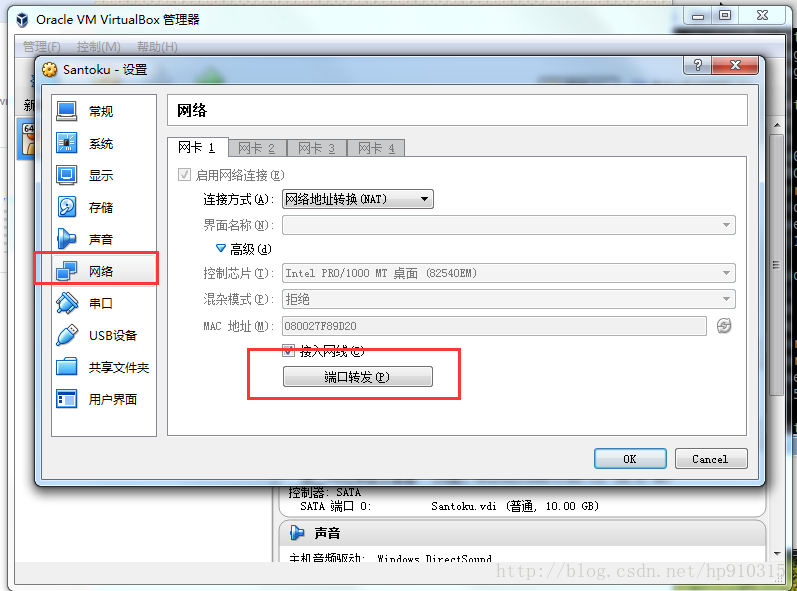
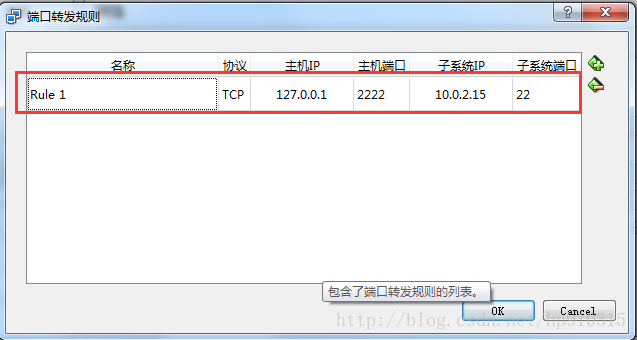
5、 在Window上进行XShell下载和安装
http://www.netsarang.com/xshell_download.html
6、在Windows上使用XShell连接VirtualBox虚拟机
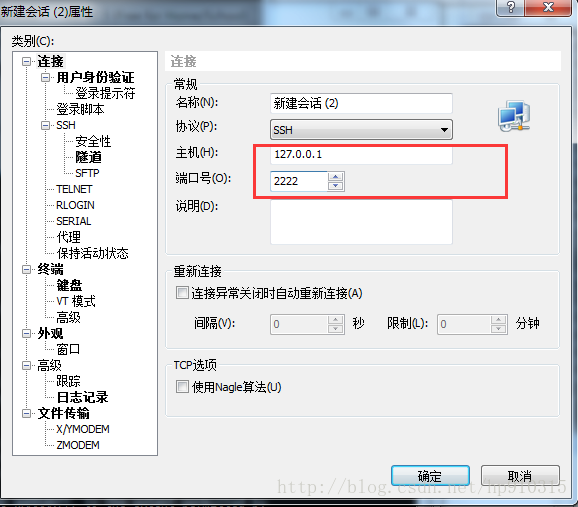
配置好主机和端口点击连接就行
版权声明:本文为hp910315原创文章,遵循CC 4.0 BY-SA版权协议,转载请附上原文出处链接和本声明。