布局:将控件有序的放在界面上
eg:将一个按钮,一个文本框放在界面上
import javax.swing.*;
import java.awt.*;
class Layout1 extends JFrame{
	private JTextField jtf = new JTextField(20);
	private JButton jbt = new JButton("按钮");
	private JPanel jpl = new JPanel();
	public Layout1(){
		FlowLayout fl = new FlowLayout(FlowLayout.LEFT,20,20);
		jpl.setLayout(fl);
		this.add(jpl);	jpl.add(jtf);		jpl.add(jbt);
		this.setSize(300,400);
		this.setDefaultCloseOperation(EXIT_ON_CLOSE);
		this.setVisible(true);
	}
	public static void main(String[] args) throws Exception  {
		new Layout1();
	}
}
- FlowLayout
JPanel默认的布局方式是:流式布局(FlowLayout),优先放在1行,放不下,到后面1行。该布局方式由java.awt.FlowLayout来管理
任何容器管理类都有setLayout函数设置布局 - GridLayout:网格布局,将界面设置为多行多列的格子,放置控件。该布局方式由java.awt.GridLayout来管理
eg:放置24个按钮在界面上
import javax.swing.*;
import java.awt.*;
class Layout2 extends JFrame{
	private JPanel jpl = new JPanel();
	public Layout2(){
		GridLayout gl = new GridLayout(6,4);
		jpl.setLayout(gl);
		this.add(jpl);
		for(int i=1;i<=24;i++){
			jpl.add(new JButton(String.valueOf(i)));
		}

		this.setSize(300,400);
		this.setDefaultCloseOperation(EXIT_ON_CLOSE);
		this.setVisible(true);
	}
	public static void main(String[] args) throws Exception  {
		new Layout2();
	}
}
输出界面: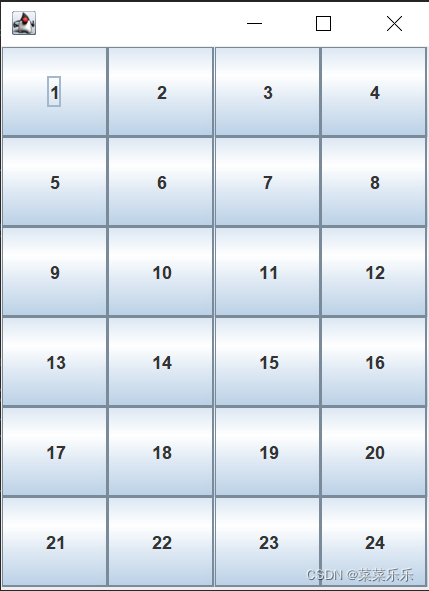
eg:8*8国际象棋棋盘
import javax.swing.*;
import java.awt.*;
class Layout3 extends JFrame{
	private JPanel jpl = new JPanel();
	public Layout3(){
		GridLayout gl = new GridLayout(8,8);
		jpl.setLayout(gl);
		this.add(jpl);
		for(int i=1;i<=8;i++){
			for(int j=1;j<=8;j++){
				JPanel pl = new JPanel();
				if((i+j)%2==0)  {pl.setBackground(Color.white);}
				else { pl.setBackground(Color.black);}
				jpl.add(pl);
			}
		}

		this.setSize(300,400);
		this.setDefaultCloseOperation(EXIT_ON_CLOSE);
		this.setVisible(true);
	}
	public static void main(String[] args) throws Exception  {
		new Layout3();
	}
}
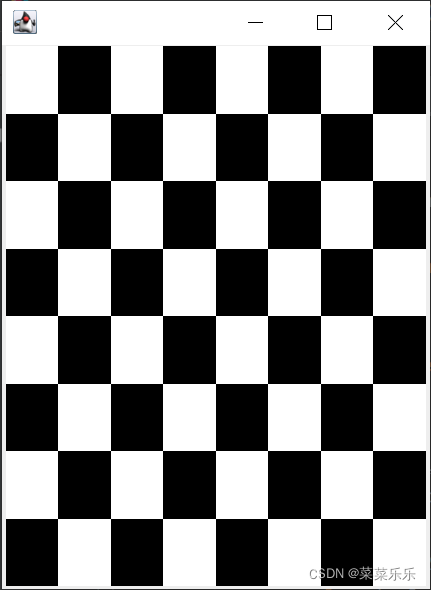
- BorderLayout:边界布局。将界面分为东西南北中,添加控件。该布局方式由java.awt.BorderLayout来管理
eg:随意在各个方向测试边界布局
import javax.swing.*;
import java.awt.*;
class Layout4 extends JFrame{
	private JPanel jpl = new JPanel();
	public Layout4(){
		BorderLayout bl = new BorderLayout();
		jpl.setLayout(bl);
		this.add(jpl);
		jpl.add(new JButton("按钮"),BorderLayout.SOUTH);
		jpl.add(new JTextField(),BorderLayout.NORTH);
		jpl.add(new JTextArea(),BorderLayout.CENTER);
		jpl.add(new JButton("按钮"),BorderLayout.WEST);
		jpl.add(new JButton("按钮"),BorderLayout.EAST);
		this.setSize(300,400);
		this.setDefaultCloseOperation(EXIT_ON_CLOSE);
		this.setVisible(true);
	}
	public static void main(String[] args) throws Exception  {
		new Layout4();
	}
}
- 完全自由布局:控件的位置,大小,用坐标决定,而不是由界面大小决定。实际上是:设置容器布局为null,然后通过setSize设置大小,setLocation设置位置,设置的原因:坐标体系在不同的操作系统不能保证相同
eg:按键大小不随界面大小改变而改变的测试样例
import javax.swing.*;
import java.awt.*;
class Layout5 extends JFrame{
	private JButton jbt = new JButton("按钮");
	public Layout5(){
		this.setLayout(null);  //***
		jbt.setSize(80,60);
		jbt.setLocation(60,50);
		this.add(jbt);

		this.setSize(300,400);
		this.setDefaultCloseOperation(EXIT_ON_CLOSE);
		this.setVisible(true);
	}
	public static void main(String[] args) throws Exception  {
		new Layout5();
	}
}
练习题和作业
练习:一个按钮,从界面上方以抛物线形式掉下来
import javax.swing.*;
import java.awt.*;
class Layout6 extends JFrame implements Runnable{
	private JButton jbt = new JButton();
	int X,Y = 0;
	public Layout6(){
		jbt.setIcon(new ImageIcon("img.jpg"));
		this.setLayout(null);
		jbt.setSize(80,60);
		this.add(jbt);
		this.setSize(300,400);
		this.setDefaultCloseOperation(EXIT_ON_CLOSE);
		this.setVisible(true);
		Thread th = new Thread(this);
		th.start();
	}
	public void run(){
		while(true){
			try{Thread.sleep(20);} catch(Exception e){}
			X++;  Y=X*X/100;
			jbt.setLocation(X,Y);
		}
	}
	public static void main(String[] args) throws Exception  {
		new Layout6();
	}
}
作业:
图片上下弹跳
小球自由落体掉下,弹起来,再次自由落体
两个小球在界面上相向而行,碰撞之后反方向运行
小球,以正弦波形式向前运动
版权声明:本文为m0_53244895原创文章,遵循CC 4.0 BY-SA版权协议,转载请附上原文出处链接和本声明。