1.向数据表中插入Blob类型数据
public class Test1 {
    @Test
    public void testInsert() throws Exception {
        Connection conn = JDBCUtils.getConnection();
        String sql = "insert into 男神们(id,name,email,photo)values(?,?,?,?)";//插入几个数据,'?'就有几个
        PreparedStatement ps = conn.prepareStatement(sql);

        FileInputStream fis = new FileInputStream(new File("韦礼安.jpg"));
        ps.setObject(1,1);
        ps.setObject(2,"韦礼安");
        ps.setObject(3,"wei@qq.com");
        ps.setBlob(4,fis);
        ps.execute();
        JDBCUtils.closeResource(conn,ps);
    }
}
可能会遇见的问题:
1.java.sql.SQLSyntaxErrorException(SQL语句格式错误):检查一下你的sql语句是不是有哪里不小心写错了。
2.图片过大报错:
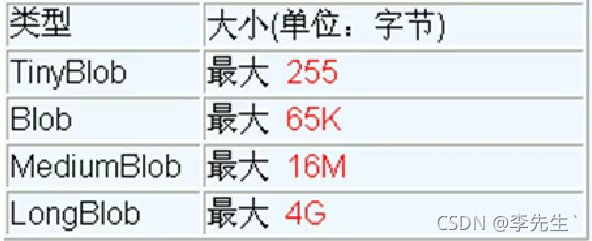
首先,检查一下你是否在mysql创建的表里指定了相关的Blob类型,一般来说,对于图片MediumBlob类型已经够用;
其次,如果指定了类型还报错:XXX too large,那就在mysql 的安装目录下找到my.ini文件加上如下配置参数: max_allowed_packet=16M。同时注意:修改了my.ini文件之后,需要重新启动mysql服务。
以下MYSQL 的四种Blob类型:
2.从数据表中读取Blob类型数据
    public void testQuery() throws Exception {
        Connection conn = null;
        PreparedStatement ps = null;
        InputStream is = null;
        FileOutputStream fos = null;
        ResultSet rs = null;
        try {
            conn = JDBCUtils.getConnection();
            String sql = "select id,name,photo from 男神们 where id = ?";
            ps = conn.prepareStatement(sql);
            ps.setObject(1,1);
            rs = ps.executeQuery();

            if(rs.next()){
                int id = rs.getInt("id");
                String name = rs.getString("name");
                Blob photo = rs.getBlob("photo");
                is = photo.getBinaryStream();
                fos = new FileOutputStream("weilian.jpg");//运行后存到当前工程下
                Customer customer = new Customer();
                System.out.println(customer);

                byte[] buffer = new byte[1024];
                int len ;
                while(-1 != (len = (is.read(buffer))) ){
                    fos.write(buffer,0,len);
                }
            }
        } catch (Exception e) {
            e.printStackTrace();
        } finally {
            try {
                if(is != null)
                is.close();
            } catch (IOException e) {
                e.printStackTrace();
            }
            try {
                if(fos != null)
                fos.close();
            } catch (IOException e) {
                e.printStackTrace();
            }
            JDBCUtils.closeResource01(conn,ps,rs);
        }
    }
版权声明:本文为lonewolfh原创文章,遵循CC 4.0 BY-SA版权协议,转载请附上原文出处链接和本声明。