2020-6-4号更新,由于不可查 无法滚动原因,已弃用MultiPicker,改用cube-ui滴滴的自定义timepicker实现替代本功能;
        const that = this
          that.$createTimePicker({
          showNow: true,
          minuteStep: 10,
          delay: 10,
          day: {
            len: 3,
            filter: ['今天'],
            format: 'M月d日'
          },
          onSelect: (selectedTime, selectedText, formatedTime) => {
            that.showNow = false
            that.driverParam.loadTime = Utils.formatTime(selectedTime, 'Y-M-D h:m:s')
          },
          onCancel: () => {
          }
        }).show()
--------------
最后实现的效果。1年前做的,最近总结免得以后忘记了就放上来了。
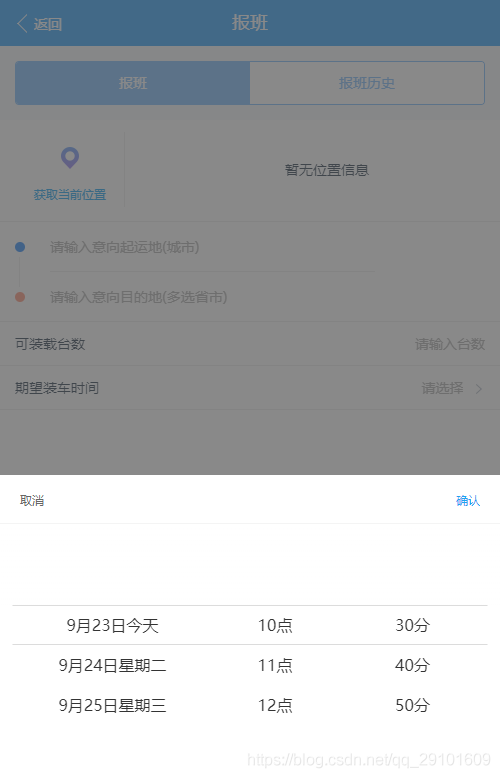
一、前言
公司移动端项目,需求自定义的时间picker组件,翻阅mint-ui饿了么 cube-ui滴滴 zan-ui蚂蚁金服 的现有模板均不满足需求。
然后最后采用了 multPicker 自定义多级联动选择器 进行了自我需求魔改
ps:当时做需求时候滴滴能满足需求的组件还未出,刚查了居然滴滴最新的time-picker已有可满足需求的模板了
二、思路
思路额 比较复杂,主要是 要
第一版需求是, 第一项:年-月-日 第二项:时 第三项: 分 前后时间段 00分-10分 ,老板不满意改需求。
第二版需求是, 第一项:月-日-周 第二项:时 第三项: 分 00分,
第一项 要求 最近三天 ,中间还要考虑月份进1年份进1问题,
第二项 要求 第二天 第三天 初始展示8点,第一天 显示当前 点
第三项 要求 10分钟为间隔 ,第一天当前时间 半小时相近比对 进行判断是 显示 30分/ 00分
三、实现
1.dateList.js 时间列表数据编撰-逻辑
import Utils from '@/utils/util'
const dateFun = {
  // 初始化时间
  init: function() {
    const that = this
    that.Date = new Date()
  },
  // 当前年
  getCurrentYear: function() {
    return new Date().getFullYear()
  },
  // 当前月
  getCurrentMonth: function() {
    return new Date().getMonth() + 1
  },
  // 当前日
  getCurrentDay: function() {
    return new Date().getDate()
  },
  // 当前周
  getCurrentWeek: function(index) {
    let weekName
    const weekIndex = new Date().getDay() // 获取 今天的 星期index,0-6(星期,0 是星期天)
    const new_index = (weekIndex + index) % 7
    switch (new_index) {
      case 0:
        weekName = '星期天'
        break
      case 1:
        weekName = '星期一'
        break
      case 2:
        weekName = '星期二'
        break
      case 3:
        weekName = '星期三'
        break
      case 4:
        weekName = '星期四'
        break
      case 5:
        weekName = '星期五'
        break
      case 6:
        weekName = '星期六'
        break
    }
    return weekName
  },
  // 今天0时时间戳
  getCurrentZeroStamp: function() {
    // 今天0时时间戳
    const nowZeroDate = new Date()
    const nowZeroStr = Utils.formatTime(nowZeroDate, 'Y-M-D 0:0:0')
    // console.log('nowZeroDate', nowZeroDate, 'nowZeroStr', nowZeroStr)
    const tranNowZeroDate = Utils.formatTranNumber(nowZeroStr)
    // console.log('tranNowZeroDate', tranNowZeroDate)
    return tranNowZeroDate
  },
  // 今天现在时间戳
  getNowTimeStamp: function() {
    // 现在时间戳
    const nowDate = new Date()
    const nowStr = Utils.formatTime(nowDate, 'Y-M-D h:m:s')
    // console.log('nowDate', nowDate, 'nowStr', nowStr)
    const tranNowDate = Utils.formatTranNumber(nowStr)
    // console.log('tranNowDate', tranNowDate)
    return tranNowDate
  },
  getCurrentMonthDayNum: function() {
		    const year = dateFun.getCurrentYear()
		    const month = dateFun.getCurrentMonth()
		    const dayNum = new Date(year, month, 0)
		    return dayNum.getDate()
  },
  // 是否是本年
  juedgYear: function(_month) {
    const month = dateFun.getCurrentMonth()
    return _month >= month
  },
  // 时间picker展示总
  dateRst: function(arr, _el, _boolen) {
    const isThisYear = dateFun.juedgYear(arr[0].id)
    const thisYear = dateFun.getCurrentYear()
    const nextYear = thisYear + 1
    let startTime = ''
    let startS = ''
    let endS = ''
    let endTime = ''
    let timeLine = ''
    let fillDate = ''
    // console.log('arr', arr, 'arr[0]', arr[0], 'arr[1]', arr[1], 'arr[2]', arr[2])
    switch (arr[2].id) {
      case 1:
        startS = '00'
        endS = '01:00'
        break
      case 2:
        startS = '01'
        endS = '02:00'
        break
      case 3:
        startS = '02'
        endS = '03:00'
        break
      case 4:
        startS = '03'
        endS = '04:00'
        break
      case 5:
        startS = '04'
        endS = '05:00'
        break
      case 6:
        startS = '05'
        endS = '06:00'
        break
      case 7:
        startS = '06'
        endS = '07:00'
        break
      case 8:
        startS = '07'
        endS = '08:00'
        break
      case 9:
        startS = '08'
        endS = '09:00'
        break
      case 10:
        startS = '09'
        endS = '10:00'
        break
      case 11:
        startS = '10'
        endS = '11:00'
        break
      case 12:
        startS = '11'
        endS = '12:00'
        break
      case 13:
        startS = '12'
        endS = '13:00'
        break
      case 14:
        startS = '13'
        endS = '14:00'
        break
      case 15:
        startS = '14'
        endS = '15:00'
        break
      case 16:
        startS = '15'
        endS = '16:00'
        break
      case 17:
        startS = '16'
        endS = '17:00'
        break
      case 18:
        startS = '17'
        endS = '18:00'
        break
      case 19:
        startS = '18'
        endS = '19:00'
        break
      case 20:
        startS = '19'
        endS = '20:00'
        break
      case 21:
        startS = '20'
        endS = '21:00'
        break
      case 22:
        startS = '21'
        endS = '22:00'
        break
      case 23:
        startS = '22'
        endS = '23:00'
        break
      case 24:
        startS = '23'
        endS = '24:00'
        break
    }
    const str1 = arr[1].value
    const reg1 = new RegExp('点') // 创建正则表达式对象
    let r_str1 = str1.replace(reg1, '') // 把'is'替换为空字符串
    const str2 = arr[2].value
    const reg2 = new RegExp('分') // 创建正则表达式对象
    let r_str2 = str2.replace(reg2, '') // 把'is'替换为空字符串
    const str3 = arr[0].value
    const r_str3_index = str3.indexOf('月')
    const r_str3 = str3.substring(0, r_str3_index)
    // console.log('r_str3_index', r_str3_index, 'r_str3', r_str3)
    if (r_str1 === '0') {
      r_str1 = '00'
    }
    if (r_str2 === '0') {
      r_str2 = '00'
    }
    // 具体实际展示
    if (isThisYear) {
      startTime = thisYear + '-' + arr[0].id + '-' + arr[1].id + ' ' + startS
      endTime = thisYear + '-' + arr[0].id + '-' + arr[1].id + ' ' + endS
      fillDate = thisYear + '-' + r_str3 + '-' + arr[0].id + ' ' + r_str1 + ':' + r_str2
    } else {
      startTime = nextYear + '-' + arr[0].id + '-' + arr[1].id + ' ' + startS
      endTime = nextYear + '-' + arr[0].id + '-' + arr[1].id + ' ' + endS
      fillDate = thisYear + '-' + r_str3 + '-' + arr[0].id + ' ' + r_str1 + ':' + r_str2
    }
    timeLine = new Date(startTime).getTime() / 1000 + ',' + new Date(endTime).getTime() / 1000
			  // 回填参数
    if (_el && !_boolen) {
      document.getElementById(_el).value = fillDate
    } else if (_boolen) {
      return {
        // 'timeLine': timeLine,
        'fillDate': fillDate
      }
    } else {
      return {
        // 'timeLine': timeLine,
        'fillDate': fillDate
      }
    }
    // 保存参数
    return timeLine/* 时间段转化为时间戳字符串*/
  },

  currentDateRst: function() {
    const getDateArr = dateFun.getDateArr(0)
    const currentDate = getDateArr[0]
    const fillCurrentDate = []
    // console.log('currentDateRst-getDateArr', getDateArr, 'currentDate', currentDate)
    fillCurrentDate.push({
      id: currentDate.month,
      value: currentDate.month
    })
    fillCurrentDate.push({
      id: currentDate.child[0],
      value: currentDate.child[0]
    })
    fillCurrentDate.push({
      id: currentDate.minutesSection,
      value: currentDate.minutesSection
    })
    // console.log('currentDateRst-fillCurrentDate', fillCurrentDate)
    return dateFun.dateRst(fillCurrentDate)
  },
  /*
		*获取N天后的时间 demo处传入的变量加的天数
		**/
  getDateArr: function(AddDayCount) {
    let dd = ''
    const today = dateFun.getCurrentDay()
    const toDayZeroStamp = dateFun.getCurrentZeroStamp()
    const nowTimeStamp = dateFun.getNowTimeStamp()
    const subDateSlice = (nowTimeStamp - toDayZeroStamp) / 3600000
    // 当前时间戳 - 今日0点时间戳 的结果除以 1小时单位的时间戳,得出现在 已有几个小时
    const dateList = []
    let index = 0
    if (subDateSlice > 15) {
      index = 0
      AddDayCount = AddDayCount - 1
    } else {
      AddDayCount = AddDayCount - 1
    }
    for (let i = index; i <= AddDayCount; i++) {
      // i 控制天数 , 0 今天 ,1 明天, 2后天
      dd = new Date().setDate(today + i)// 获取AddDayCount天后的日期
      const y = new Date(dd).getFullYear()
      const m = new Date(dd).getMonth() + 1// 获取当前月份的日期
      const d = new Date(dd).getDate()
      const c = dateFun.timeSliceFun(i)
      // console.log('AddDayCount', AddDayCount, 'dd', dd, 'i', i, 'd', d)
      // 数据存储
      dateList.push({
        year: y,
        month: m,
        day: d,
        child: c
      })
    }
    return dateList
  },

  /*
		*月展示参数
		*/
  monthJsonOp: function(_mval, _dval, _child, dix) {
    // console.log('monthJsonOp-mavl', _mval, '_dval', _dval, '_child', _child, 'dix', dix)
    const child = []
    for (let h = 0; h < _child.length; h++) {
      const hoursOp = dateFun.hoursJsonOp(_child, _child[h])
      child.push(hoursOp)
    }
    const toDayNum = dateFun.getCurrentDay()
    // const addDayNum = dix + 1 // dix 传入的往后的天数 是 0 1 2
    // console.log('monthJsonOp()-dix', dix)
    const weekName = dateFun.getCurrentWeek(dix)
    if (toDayNum === _dval) {
      return {
        'id': _dval,
        'value': _mval + '月' + _dval + '日' + '今天',
        'arr': dix,
        'child': child
      }
    } else {
      return {
        'id': _dval,
        'arr': dix,
        'value': _mval + '月' + _dval + '日' + weekName,
        'child': child
      }
    }
  },

  /*
		*日展示参数 -目前展示 hours
    */
  dayJsonOp: function(_mval, _dval, _child) {
    return {
      'id': _dval,
      'value': _dval,
      'child': _child
    }
  },

  /*
		* hours 参数展示
    */
  hoursJsonOp: function(_child, _child_item) {
    const child = []
    for (let h = 0; h < _child_item.child.length; h++) {
      const minutesOp = dateFun.minutesJsonOp(_child_item.child[h])
      child.push(minutesOp)
    }
    return {
      'id': _child_item.id,
      'value': _child_item.value + '点',
      'child': child
    }
  },

  /*
		* minutes 参数展示
    */
  minutesJsonOp: function(_minutes) {
    return {
      'id': _minutes.id,
      'value': _minutes.value + '分'
    }
  },

  /*
		* minutes 参数展示
    */
  halfHoursFun: function(index) {
    const minutesList = []
    const c = index
    let minutes_item = {}
    // 目前 index=0 展示8:00 ; index=1 展示8:30
    if (c === 1) {
      for (let y = 0; y < 2; y++) {
        if (y === 0) {
          minutes_item = {
            id: 1,
            value: 1 * 30
          }
        } else {
          minutes_item = {
            id: 0,
            value: 0 * 30
          }
        }
        minutesList.push(minutes_item)
      }
    } else {
      for (let y = 0; y < 2; y++) {
        minutes_item = {
          id: y,
          value: y * 30
        }
        minutesList.push(minutes_item)
      }
    }
    // console.log('index', index, 'halfHoursFun-minutesList', minutesList)
    return minutesList
  },
  /*
  * 分钟段创造参数展示
  */
  minutesSectionFun: function(index) {
    // 今天零时
    const toDayZeroStamp = dateFun.getCurrentZeroStamp()
    const nowTimeStamp = dateFun.getNowTimeStamp()
    // 判断时间段
    // 初始化符合条件的时间段
    const minutesList = []
    const c_index = index
    const subDateSlice = (nowTimeStamp - toDayZeroStamp) / 3600000

    let halfhour = false
    // 逻辑:分钟区域 从 00分 开始展示 或 从 30分 开始展示
    const cutNum = subDateSlice + 0.5 - Number.parseInt(subDateSlice)
    if (cutNum === 0) {
      halfhour = false
    } else if (cutNum > 0 && cutNum <= 0.75) {
      halfhour = true
    } else if (cutNum > 0.75 && cutNum <= 1.25) {
      halfhour = false
    } else if (cutNum > 1.25) {
      halfhour = true
    }
    if (c_index === 0) {
      // console.log('halfhour-math', halfhour)
      if (halfhour) {
        for (let c = 3; c < 6; c++) {
          const minutes_item2 = {
            id: c,
            value: c * 10
          }
          minutesList.push(minutes_item2)
        }
      } else {
        for (let c = 0; c < 6; c++) {
          const minutes_item2 = {
            id: c,
            value: c * 10
          }
          minutesList.push(minutes_item2)
        }
      }
    }
    // console.log('minutesSectionFun-c_index', c_index, 'cutNum', cutNum, 'minutesList', minutesList)
    return minutesList
  },
  /*
		*时间段参数展示
		*/
  timeSliceFun: function(index) {
    // 今天零时
    const toDayZeroStamp = dateFun.getCurrentZeroStamp()
    const nowTimeStamp = dateFun.getNowTimeStamp()
    // console.log('minutesSectionFun-nowTimeStamp', nowTimeStamp)
    // 初始化符合条件的时间段
    const timeSlice = []
    // 判断时间段
    const subDateSlice = (nowTimeStamp - toDayZeroStamp) / 3600000
    // console.log('nowTimeStamp', nowTimeStamp, 'toDayZeroStamp', toDayZeroStamp, 'n-to', (nowTimeStamp - toDayZeroStamp))
    // console.log('取整subDateSlice', Number.parseInt(subDateSlice))
    let indexData = 0
    const cutNum = subDateSlice + 0.5 - Number.parseInt(subDateSlice)
    // 5:15 + 30分钟 = 5:45 => 5:30 , cutNum = 0.75; 5:15分以后6点之前 都是 小时数+1
    // 5:16 + 30分钟 = 5:46 => 6:00 , cutNum = 0.76;
    if (cutNum < 0.75) {
      indexData = 0
    } else {
      indexData = 1
    }

    const e = []
    for (let c = 0; c < 6; c++) {
      const minutes_item2 = {
        id: c,
        value: c * 10
      }
      e.push(minutes_item2)
    }
    const nowMinutesList = dateFun.minutesSectionFun(0)
    // 初始 hours 8点
    const integerHour = Number.parseInt(subDateSlice)
    const c_index = index
    if (c_index === 0) {
      for (let i = integerHour; i < 24; i++) {
        const startData = i + indexData
        if (i === integerHour) {
          // console.log('i', i, 'integerHour', integerHour, 'nowMinutesList', nowMinutesList)
          timeSlice.push({
            'id': i - 8 + indexData,
            'value': startData,
            'child': nowMinutesList
          })
        } else {
          timeSlice.push({
            'id': i - 8 + indexData,
            'value': startData,
            'child': e
          })
        }
      }
    } else {
      for (let k = 0; k < 24; k++) {
        const startData = k
        timeSlice.push({
          'id': k - 8,
          'value': startData,
          'child': e
        })
      }
    }
    // console.log('e', e, 'nowMinutesList', nowMinutesList)
    return timeSlice
  },

  /*
		*时间列表 -最后放出的 时间表 数列 加载进 multiPicker 里供于选择
		*/
  timeList: function(_day) {
    const list = dateFun.getDateArr(_day)
    // console.log('进入初始数据timeList-list', list)
    const timeList = []
    const dayList = []
    const that = this
    list.map(function(_itm, idx) {
      if (_itm.child && _itm.child.length > 0) {
        dayList.push(_itm)
      }
    })
    console.log('列表排列中-dayList', dayList)
    dayList.map(function(_itm, idx) {
      // console.log('起-1天的数据-dayList.map-itm', _itm, 'idx', idx, '_itm.month', _itm.month,
      //   '_itm.day', _itm.day, '_itm.child', _itm.child, 'idx', idx)
      if (idx === 0) {
        timeList.push(that.monthJsonOp(_itm.month, _itm.day, _itm.child, idx))
      } else {
        // console.log('idx !== 0-_itm', _itm, 'idx', idx, '_itm.child', _itm.child)
        timeList.map(function(item, index) {
          if (_itm.month === item.id) {
            timeList.push(that.monthJsonOp(_itm.month, _itm.day, _itm.child, idx))
          } else if (index === timeList.length - 1) {
            // console.log('index', index, 'timeList.length', timeList.length, '此时除掉第天数据的item', item)
            timeList.push(that.monthJsonOp(_itm.month, _itm.day, _itm.child, idx))
          }
        })
      }
    })
    console.log('排列最后生成的-timeList', timeList)
    return timeList
  }
}
export default dateFun
2.multiPicker.js 具体demo +css + 逻辑数据传入 遍历
(function(wid, dcm) {
  // let msg = require('./msg.min.js')
  // console.log(msg)
  // let win = wid
  const doc = dcm

  function $id(id) {
    return doc.getElementById(id)
  }

  // function $class(name) {
  //   return doc.getElementsByClassName(name)
  // }

  function loop(begin, length, fuc) {
    for (let i = begin; i < length; i++) {
      if (fuc(i)) break
    }
  }

  function on(action, selector, callback) {
    doc.addEventListener(action, function(e) {
      if (selector === e.target.tagName.toLowerCase() || selector === e.target.className || selector === e.target.id) {
        callback(e)
      }
    })
  }

  function MultiPicker(config) {
    // console.log('MultiPicker的config', config)
    this.input = config.input
    this.container = config.container
    this.jsonData = config.jsonData
    this.fillContent = config.fillContent
    this.success = config.success
    this.pickerShow = config.pickerShow
    // this.errorE     = config.error

    this.ulCount = 0 // 记录上一次的
    this.ulIdx = 0 // ul下标计数器,前一次的计数器
    this.ulDomArr = []// ul的dom元素,【a】
    this.idxArr = []// 更新后的ul的下标 【a】
    this.jsonArr = []// 用来存储每个ul的li中显示的arr【a】
    this.liHeight = 40
    this.maxHeight = []// 每个ul的最大高度【a】
    this.distance = []// transition的移动位置【a】
    this.start = {
      Y: 0,
      time: ''
    }
    this.move = {
      Y: 0,
      speed: []
    }
    this.end = {
      Y: 0,
      status: true
    }
    this.resultArr = []
    this.initDomFuc()
    this.initReady(0, this.jsonData[0])
    this.initBinding()
  }

  MultiPicker.prototype = {
    constructor: MultiPicker,
    generateArrData: function(targetArr) {
      const tempArr = []
      loop(0, targetArr.length, function(i) {
        tempArr.push({
          'id': targetArr[i].id,
          'value': targetArr[i].value
        })
      })
      return tempArr
    },
    checkArrDeep: function(parent) {
      const _this = this
      if ('child' in parent && parent.child.length > 0) {
        _this.jsonArr.push(_this.generateArrData(parent.child))
        _this.checkArrDeep(parent.child[0])
      }
      _this.idxArr.push(this.ulIdx++)
    },
    insertLiArr: function(targetUl, arr) {
      let html = ''
      const nullObj = {
        id: '-99',
        value: ''
      }
      arr.unshift(nullObj, nullObj)
      arr.push(nullObj, nullObj)
      loop(0, arr.length, function(i) {
        html += '<li data-id="' + arr[i].id + '">' + arr[i].value + '</li>'
      })
      targetUl.innerHTML = html
    },
    initDomFuc: function() {
      const _this = this
      // console.log('_this.container', _this.container)
      let html = ''
      html += '<div class="multi-picker-bg" id="multi-picker-bg-' + _this.container + '">' +
                        '<div  class="multi-picker-container" id="multi-picker-container-' + _this.container + '">' +
                        '<div class="multi-picker-btn-box">' +
                        '<div class="multi-picker-btn" id="multi-picker-btn-cancel">取消</div>' +
                        '<div class="multi-picker-btn" id="multi-picker-btn-save-' + _this.container + '">确认</div>' +
                        '</div>' +
                        '<div class="multi-picker-content">' +
                        '<div class="multi-picker-up-shadow"></div>' +
                        '<div class="multi-picker-down-shadow"></div>' +
                        '<div class="multi-picker-line"></div>' +
                        '</div></div></div>'
      $id(_this.container).innerHTML = html
      _this.jsonArr.push(_this.generateArrData(_this.jsonData))
    },
    initReady: function(idx, target) {
      const _this = this
      this.ulIdx = 0
      this.idxArr.length = idx
      _this.jsonArr.length = idx + 1
      _this.checkArrDeep(target)
      let now_arr // 控制 now_arr 为 0 (0 或 非0) 时候 即为传入的第一条数据
      if (idx === 0) {
        now_arr = target.arr
      } else {
        now_arr = 1
      }
      const parentNode = $id('multi-picker-container-' + _this.container).children[1]
      const tempMax = _this.ulCount <= _this.idxArr.length ? _this.ulCount : _this.idxArr.length
      loop(idx + 1, tempMax, function(i) {
        const $picker = $id('multi-picker-' + _this.container + '-' + i)
        _this.insertLiArr($picker, _this.jsonArr[i])
        _this.distance[i] = 0
        if (_this.distance[0] !== 0) {
          $picker.style.transform = 'translate3d(0, -320px, 0)'
          $picker.style.webkitTransform = 'translate3d(0, -320px, 0)'
          // 标记分钟 归零
        } else if (_this.distance[0] === 0) {
          $picker.style.transform = 'translate3d(0, 0, 0)'
          $picker.style.webkitTransform = 'translate3d(0, 0, 0)'
        }
        _this.minuteFlag = false
        // 分展示区, 不设置 y轴320px
        for (let x = 0; x < _this.jsonArr[i].length; x++) {
          if (_this.jsonArr[i][x].value.indexOf('分') !== -1) {
            _this.minuteFlag = true
          }
        }
        if (_this.minuteFlag) {
          $picker.style.transform = 'translate3d(0, 0, 0)'
          $picker.style.webkitTransform = 'translate3d(0, 0, 0)'
        }
        // 控制 初始 8点正中后,选其它 点 值错误问题;
        if (idx === 0) {
          _this.distance[1] = 320
        }
        // console.log('i', i, 'jsonArr[i]', _this.jsonArr[i], 'minuteFlag', _this.minuteFlag, 'distance', _this.distance[0])
      })
      if (_this.ulCount <= _this.idxArr.length) {
        loop(_this.ulCount, _this.idxArr.length, function(i) {
          // console.log('i', i, '_this.ulCount,', _this.ulCount, _this.idxArr)
          const newPickerDiv = document.createElement('div')
          newPickerDiv.setAttribute('class', 'multi-picker')
          newPickerDiv.innerHTML = '<ul id="multi-picker-' + _this.container + '-' + i + '"></ul>'
          parentNode.insertBefore(newPickerDiv, parentNode.children[parentNode.children.length - 3])
          const tempDomUl = $id('multi-picker-' + _this.container + '-' + i)
          _this.ulDomArr.push(tempDomUl)
          _this.distance.push(0)
          _this.insertLiArr(tempDomUl, _this.jsonArr[i])
          const tempArray = _this.jsonArr[i]
          tempDomUl.addEventListener('touchstart', function() {
            // console.log('_this1', _this)
            _this.touch(event, _this, tempDomUl, tempArray, i)
          }, false)
          tempDomUl.addEventListener('touchmove', function() {
            _this.touch(event, _this, tempDomUl, tempArray, i)
          }, false)
          tempDomUl.addEventListener('touchend', function() {
            _this.touch(event, _this, tempDomUl, tempArray, i)
          }, true)
        })
      } else {
        for (let j = _this.ulCount - 1; j > _this.idxArr.length - 1; j--) {
          const oldPicker = $id(_this.container).querySelectorAll('.multi-picker')[j]
          oldPicker.parentNode.removeChild(oldPicker)
          _this.ulDomArr.pop()
          _this.distance.pop()
        }
      }

      _this.maxHeight.length = 0
      _this.resultArr.length = 0
      loop(0, _this.idxArr.length, function(i) {
        const pickerLength = $id(_this.container).querySelectorAll('.multi-picker').length
        if (pickerLength === 1) {
          $id(_this.container).querySelectorAll('.multi-picker')[0].style.width = 100 / _this.idxArr.length + '%'
        }
        _this.maxHeight.push($id('multi-picker-' + _this.container + '-' + i).childNodes.length * _this.liHeight)
        let temp = null
        if (idx === 0 && now_arr === 0) {
          temp = 0
        } else {
          temp = _this.distance[i]
        }
        _this.resultArr.push({
          'id': (_this.jsonArr[i][temp / _this.liHeight + 2]).id,
          'value': (_this.jsonArr[i][temp / _this.liHeight + 2]).value
        })
      })
      _this.ulCount = _this.idxArr.length
    },
    initBinding: function() {
      const _this = this
      const bg = $id('multi-picker-bg-' + _this.container)
      const container = $id('multi-picker-container-' + _this.container)
      const body = doc.body
      // console.log('加类名multi-picker-bg-up1', bg)
      if (_this.pickerShow) {
        bg.classList.add('multi-picker-bg-up')
        container.classList.add('multi-picker-container-up')
        body.classList.add('multi-picker-locked')
      }
      on('touchstart', _this.input, function() {
        // console.log('加类名multi-picker-bg-up2', bg)
        bg.classList.add('multi-picker-bg-up')
        container.classList.add('multi-picker-container-up')
        body.classList.add('multi-picker-locked')
      }, false)
      // console.log('加类名multi-picker-bg-up-opacity0')
      on('touchstart', 'multi-picker-btn-save-' + _this.container, function() {
        _this.success(_this.resultArr, _this.fillContent)
        _this.filterUndefined(_this.resultArr)
        // console.log('_this.resultArr', _this.resultArr, '_this.fillContent', _this.fillContent)
        if (_this.filterUndefined(_this.resultArr)) {
          // msg.default.tips('请选择城市', 1000, 'warn')
          return false
        }
        // bg.classList.remove('multi-picker-bg-up');
        container.classList.remove('multi-picker-container-up')
        bg.classList.add('multi-picker-bg-up-opacity0')
        body.classList.remove('multi-picker-locked')
        setTimeout(function() {
          bg.classList.remove('multi-picker-bg-up')
          bg.classList.remove('multi-picker-bg-up-opacity0')
        }, 350)
      }, false)

      on('touchstart', 'multi-picker-bg-' + _this.container, function() {
        bg.classList.remove('multi-picker-bg-up')
        container.classList.remove('multi-picker-container-up')
        body.classList.remove('multi-picker-locked')
      }, false)

      on('touchstart', 'multi-picker-btn-cancel', function() {
        // _this.errorE();
        // bg.classList.remove('multi-picker-bg-up');
        container.classList.remove('multi-picker-container-up')
        bg.classList.add('multi-picker-bg-up-opacity0')
        body.classList.remove('multi-picker-locked')
        setTimeout(function() {
          bg.classList.remove('multi-picker-bg-up')
          bg.classList.remove('multi-picker-bg-up-opacity0')
          // bg.classList.remove('multi-picker-bg-up');
        }, 350)
      }, false)
    },
    checkRange: function(idx) {
      const _this = this
      let tempObj = _this.jsonData
      let targetIdx = 0
      loop(0, idx + 1, function(i) {
        targetIdx = _this.distance[i] / _this.liHeight
        tempObj = i === 0 ? tempObj[targetIdx] : tempObj.child[targetIdx]
      })
      _this.initReady(idx, tempObj)
    },
    filterUndefined: function(_arr) {
      // _arr.forEach(function (itm){
      //    //  console.log(itm.value+";"+itm.value === '请选择');
      //    // return  itm.value === '请选择'? true:false;
      //    if(itm.value === "请选择"){

      //    }
      // });
      let isNull = false
      for (let i = 0; i < _arr.length; i++) {
        if (_arr[i].value === '请选择') {
          isNull = true
        }
      }
      return isNull
    },
    initPosition: function(dis, max, idx) {
      dis = dis < 0 ? 0 : dis
      dis = dis > max ? max : dis
      const sub = dis % this.liHeight
      if (sub < this.liHeight / 2) {
        this.distance[idx] = dis - sub
      } else {
        this.distance[idx] = dis + (this.liHeight - sub)
      }
      return this
    },
    initSpeed: function(arr, dir, max, idx) {
      let letiance = 0
      let sum = 0
      let rate = 0
      for (const i in arr) {
        sum += arr[i] - 0
      }
      for (const j in arr) {
        letiance += (arr[j] - (sum / arr.length)) * (arr[j] - (sum / arr.length))
      }
      if ((letiance / arr.length).toFixed(2) > 0.1) {
        rate = max > this.liHeight * 15 ? dir * 2 : 0
        this.initPosition(this.distance[idx] + rate, max - this.liHeight * 5, idx)
        this.move.speed[0] = 0.2
      } else {
        this.initPosition(this.distance[idx], max, idx)
        this.move.speed[0] = this.move.speed[0] > 0.2 ? 0.2 : this.move.speed[0]
      }
    },
    touch: function(event, that, $picker, array, idx) {
      event = event || window.event
      event.preventDefault()
      const tempDis = that.distance[idx] + (that.start.Y - that.end.Y)
      const temp = that.distance[idx]
      const offset = that.start.Y - that.move.Y
      switch (event.type) {
        case 'touchstart':
          if (that.end.status) {
            that.end.status = !that.end.status
            event.preventDefault()
            that.move.speed = []
            that.start.Y = event.touches[0].clientY
            that.start.time = Date.now()
          }
          break
        case 'touchend':
          that.end.Y = Math.abs(event.changedTouches[0].clientY)
          that.distance[idx] = tempDis < 0 ? 0 : (tempDis < that.maxHeight[idx] - this.liHeight * 5 ? tempDis : that.maxHeight[idx] - this.liHeight * 5)
          that.initSpeed(that.move.speed, that.start.Y - that.end.Y, that.maxHeight[idx], idx)
          // console.log('that.distance[idx]', that.distance[idx])
          $picker.style.transform = 'translate3d(0,-' + that.distance[idx] + 'px, 0)'
          $picker.style.webkitTransform = 'translate3d(0,-' + that.distance[idx] + 'px, 0)'
          $picker.style.transition = 'transform ' + that.move.speed[0] + 's ease-out'
          $picker.style.webkitTransition = '-webkit-transform ' + that.move.speed[0] + 's ease-out'
          // 设置后续ul;
          if (temp !== that.distance[idx]) {
            that.checkRange(idx)
            setTimeout(function() {
              that.end.status = true
            }, that.move.speed[0] * 10)
          }
          break
        case 'touchmove':
          event.preventDefault()
          that.move.Y = event.touches[0].clientY
          if (that.distance[idx] === 0 && offset < 0) {
            $picker.style.transform = 'translate3d(0,' + 1.5 * that.liHeight + 'px, 0)'
            $picker.style.webkitTransform = 'translate3d(0,' + 1.5 * that.liHeight + 'px, 0)'
            $picker.style.transition = 'transform 0.2s ease-out'
            $picker.style.webkitTransition = '-webkit-transform 0.2s ease-out'
          } else {
            $picker.style.transform = 'translate3d(0,-' + (offset + that.distance[idx]) + 'px, 0)'
            $picker.style.webkitTransform = 'translate3d(0,-' + (offset + that.distance[idx]) + 'px, 0)'
          }
          if (Math.abs(offset).toFixed(0) % 5 === 0) {
            const time = Date.now()
            that.move.speed.push((Math.abs(offset) / (time - that.start.time)).toFixed(2))
          }
          break
      }
    }
  }

  module.exports = MultiPicker
})(window, document)
3.util.js 自用工具类
  /**
   * import Utils from '@/utils/util'
   * 时间戳 进去 转换出 Y-M-D h:m:s日期格式
   * Utils.formatTime(nowDateDay, 'Y-M-D h:m:s')
   */
  formatTime: function(timeStamp, format) {
    const formateArr = ['Y', 'M', 'D', 'h', 'm', 's']
    const returnArr = []

    const date = new Date(timeStamp)
    returnArr.push(date.getFullYear())
    returnArr.push(formatNumber(date.getMonth() + 1))
    returnArr.push(formatNumber(date.getDate()))

    returnArr.push(formatNumber(date.getHours()))
    returnArr.push(formatNumber(date.getMinutes()))
    returnArr.push(formatNumber(date.getSeconds()))

    for (const i in returnArr) {
      format = format.replace(formateArr[i], returnArr[i])
    }
    return format
  },
  /**
   * import Utils from '@/utils/util'
   * Y-M-D h:m:s日期格式 进去 转换出 时间戳数字   date.getTime() 与 date.valueOf()作用相同
   * Utils.formatTranNumber('2018-6-7 8:02:00')
   */
  formatTranNumber: function(str) {
    let timeStr = str
    timeStr = timeStr.replace(/-/g, ':').replace(' ', ':')
    timeStr = timeStr.split(':')
    const time1 = new Date(timeStr[0], (timeStr[1] - 1), timeStr[2], timeStr[3], timeStr[4], timeStr[5])
    // console.log('timestr', time1)
    const tranDate = (new Date(time1)).getTime()
    return tranDate
  },
4.multiPicker.css 样式
* {
    padding: 0;
    margin: 0;
    font-weight: 400;
}

.multi-picker-locked {
    height: 100% !important;
    overflow: hidden !important;
}

.multi-picker-bg-delay {
    z-index: 999!important;
}

.multi-picker-bg {
    position: fixed;
    top: 0;
    left: 0;
    background: rgba(75, 75, 75, 0);
    height: 100%;
    width: 100%;
    overflow: hidden;
    transition: all .3s ease;
    -webkit-transition: all .3s ease;
    z-index: -1;
}

.multi-picker-bg-up {
    z-index: 999 !important;
    background: rgba(75, 75, 75, 0.65) !important;
}

.multi-picker-container {
    width: 100%;
    height:303px;
    position: absolute;
    bottom: 0;
    transform: translate3d(0, 101%, 0);
    -webkit-transform: translate3d(0, 101%, 0);
    left: 0;
    background-color: #FFF;
    transition: transform .3s ease;
    -webkit-transition: -webkit-transform .3s ease;
    z-index: -1;
}

.multi-picker-container-up {
    transform: translate3d(0, 0, 0) !important;
    -webkit-transform: translate3d(0, 0, 0) !important;
}

.multi-picker-btn-box {
    display: block;
    position: relative;
    text-align: center;
    width: 100%;
    height: 50px;
    line-height: 50px;
    /* background: rgba(218, 218, 218, .7); */
    z-index: 10;
}
.multi-picker-btn-box:after{
    position: absolute;
    content: '';
    left: 0;
    bottom: 0;
    right: 0;
    height: 1px;
    border-top: 1px solid #dedede;
    transform-origin: 0 0;
    transform: scaleY(.5);
}

.multi-picker-btn-box .multi-picker-btn {
    position: absolute;
    display: inline-block;
    margin: 0 20px;
    /* color:  #ff7700; */
    color: #01a4f6;
    right: 0;
}
.multi-picker-btn-box .multi-picker-btn:nth-child(1) {
    left: 0;
    right: initial;
    color:#666;
}
/* .multi-picker-btn-box .multi-picker-btn:nth-child(2) {
    color:#fa8919;
}
 */

.multi-picker-content {
    position: absolute;
    width: 100%;
    background: #fff;
    font-size: 0;
    top: 50px;
    z-index: 10;
    transform: translate3d(0, 0, 0);
    -webkit-transform: translate3d(0, 0, 0);
    transition: transform .3s ease;
    -webkit-transition: -webkit-transform .3s ease;
}

.multi-picker-content .multi-picker {
    display: inline-block;
    height: 200px;
    overflow: hidden;
    position: relative;
    z-index: -1;
    transition: width .3s ease;
    vertical-align: top;
    top: 0;
}
.multi-picker-content .multi-picker:nth-child(1){
    width:45%;
}
.multi-picker-content .multi-picker:nth-child(2){
    width:20%;
}

.multi-picker-content .multi-picker:nth-child(3){
    width:35%;
}


.multi-picker-content ul::-webkit-scrollbar {
    display: none;
}

.multi-picker-content li {
    height: 40px;
    text-align: center;
    font-size: 16px;
    line-height: 40px;
    list-style: none;
    color: #333;
    overflow: hidden;
    text-overflow: ellipsis;
    white-space: nowrap;
}

.multi-picker-content .multi-picker-up-shadow, .multi-picker-content .multi-picker-down-shadow {
    position: absolute;
    width: 100%;
    height: 80px;
    pointer-events: none;
}

.multi-picker-content .multi-picker-up-shadow {
    top: 0;
    background-image: linear-gradient(to bottom, #FFF, rgba(255, 255, 255, 0));
    z-index: 50;
}

.multi-picker-content .multi-picker-down-shadow {
    bottom: -200px;
    z-index: 50;
    background-image: linear-gradient(to top, #FFF, rgba(255, 255, 255, 0));
}

.multi-picker-content .multi-picker-line {
    width: 95%;
    height: 40px;
    position: absolute;
    top: 80px;
    left: 50%;
    pointer-events: none;
    box-sizing: border-box;
    border-top: 1px solid #DCDCDC;
    border-bottom: 1px solid #DCDCDC;
    transform: translate3d(-50%, 0, 0);
    -webkit-transform: translate3d(-50%, 0, 0);
}
 /* 透明度为0 */
.multi-picker-bg-up-opacity0{
    z-index: 999000 !important;
    background: rgba(75, 75, 75, 0) !important;
}
5. checkin.vue 调用demo
<template>
  <div>
    <div id="multiPickerOnstie1" class="time-type-item" @click="timeTypeClick2()">预约</div>
  </div>
</template>
<script type="text/ecmascript-6">
  import '@/styles/multiPicker.css'
  import MultiPicker from '@/utils/multiPicker' // 自定义时间控件-picker demo结构
  import dateList from '@/utils/dateList' // 自定义时间控件-时间数据
export default {
    name: '',
    data() {},
    methods: {
       timeTypeClick2: function(val) {
        this.timeTypeShowName = val
        const that = this
        that.downPickerTimeShow = false
        const mydateListOnsite1 = dateList.timeList(3) // 后3天
        // 初始化时间列表
        dateList.init()
        // 上门回收时间选择
        new MultiPicker({
          input: 'multiPickerOnstie1', // 点击触发插件的input框的id
          container: 'targetContainer1', // 插件插入的容器id -主页index.html 预置picker容器
          fillContent: 'multiPickerOnstie1',
          jsonData: mydateListOnsite1,
          pickerShow: true,
          success: function(arr, _fillContent) {
            const datelist = dateList.dateRst(arr, _fillContent, true)
            // that.loadTime2 = datelist.timeLine
            that.driverParam.loadTime = datelist.fillDate + ':00'
            console.log('datelist', datelist, 'that.driverParam.loadTime', that.driverParam.loadTime)
          }
        })

    }
}
6.index.html 主页预置容器
<!DOCTYPE html>
<html>
  <head>
    <meta charset="utf-8">
    <meta name="viewport" content="width=device-width,initial-scale=1.0, maximum-scale=1.0, user-scalable=0">
    <title>xx平台</title>
    <link type="favicon" rel="shortcut icon" href="./favicon.ico" />
    <script>
      (function() {
        var fontSize = document.documentElement.clientWidth / 3.75
        document.documentElement.style.fontSize = fontSize >= 100 ? 100 + 'px' : fontSize + 'px'
        // 设计稿是375px ,HTML的font-size:100px;
        window.onresize = function() {
          var onFontSize = document.documentElement.clientWidth / 3.75
          document.documentElement.style.fontSize = onFontSize >= 100 ? 100 + 'px' : onFontSize + 'px'
        }
      })()
    </script>
  </head>
  <body>
    <div id="app"></div>
    <!-- 时间弹框容器 -->
    <div id="targetContainer1" style="font-size: .12rem;"></div>
    <script>
      (function() {
        /*
        * IOS10以上不识别放大meta标签
        * 双指缩放、双击缩放
        * **/
        document.documentElement.addEventListener('touchstart', function(event) {
          if (event.touches.length > 1) {
            event.preventDefault()
          }
        }, false)
        let lastTouchEnd = 0
        document.documentElement.addEventListener('touchend', function(event) {
          const now = Date.now()
          if (now - lastTouchEnd <= 300) {
            event.preventDefault()
          }
          lastTouchEnd = now
        }, false)
      })()
  </body>
</html>
四、总结
难点。。。全是难点。。
当时也是 一点点 改 看报错 看改对报错后实际效果比对 然后再继续慢慢调试
一个是 遍历,dateList.js 将 所有的 年-月-日 时-分 时间全部处理好后的 大数据 进行扔进
dayList.map(function(_itm, idx) {}) 遍历 数据一层套一层 套了3层 脑容量都不够用了 稍微错点 就崩,当时调试的脑子炸裂还有具体的时间段 逻辑修改
分钟段创造参数展示 minutesSectionFun() ,时间段参数展示 timeSliceFun() 要根据需求去修改逻辑遍历 当时只能一步步的看数据 每步数据是什么样 然后进行调整逻辑再一个是 multiPicker.js 时间数据做好了 插入遍历也做好了 然后要 对接demo结构里 也是一点点改 最后卡在了 要默认切换到第二天 默认滚动到8点 这个需求处,因为这js 完全没有 可以设置 可以默认 ‘点’ 第二项 的滚动 的设置,最后解决方法是 强掰的 8点 320px 的 滚动 高度(这个问题的解决是靠同事想的,当时感觉脑力耗尽,所以有时候出问题感觉没有好的idea时候可以找同事帮忙一起想,大家集思广益)。