一个简单的matlab图形界面程序GUI
function varargout = showGUI(varargin)
% SHOWGUI MATLAB code for showGUI.fig
% SHOWGUI, by itself, creates a new SHOWGUI or raises the existing
% singleton*.
%
% H = SHOWGUI returns the handle to a new SHOWGUI or the handle to
% the existing singleton*.
%
% SHOWGUI('CALLBACK',hObject,eventData,handles,...) calls the local
% function named CALLBACK in SHOWGUI.M with the given input arguments.
%
% SHOWGUI('Property','Value',...) creates a new SHOWGUI or raises the
% existing singleton*. Starting from the left, property value pairs are
% applied to the GUI before showGUI_OpeningFcn gets called. An
% unrecognized property name or invalid value makes property application
% stop. All inputs are passed to showGUI_OpeningFcn via varargin.
%
% *See GUI Options on GUIDE's Tools menu. Choose "GUI allows only one
% instance to run (singleton)".
%
% See also: GUIDE, GUIDATA, GUIHANDLES
% Edit the above text to modify the response to help showGUI
% Last Modified by GUIDE v2.5 08-Jun-2013 21:53:16
% Begin initialization code - DO NOT EDIT
gui_Singleton = 1;
gui_State = struct('gui_Name', mfilename, ...
'gui_Singleton', gui_Singleton, ...
'gui_OpeningFcn', @showGUI_OpeningFcn, ...
'gui_OutputFcn', @showGUI_OutputFcn, ...
'gui_LayoutFcn', [] , ...
'gui_Callback', []);
if nargin && ischar(varargin{1})
gui_State.gui_Callback = str2func(varargin{1});
end
if nargout
[varargout{1:nargout}] = gui_mainfcn(gui_State, varargin{:});
else
gui_mainfcn(gui_State, varargin{:});
end
% End initialization code - DO NOT EDIT
function showGUI_OpeningFcn(hObject, eventdata, handles, varargin)
% This function has no output args, see OutputFcn.
% hObject handle to figure
% eventdata reserved - to be defined in a future version of MATLAB
% handles structure with handles and user data (see GUIDATA)
% varargin command line arguments to showGUI (see VARARGIN)
% Choose default command line output for showGUI
handles.output = hObject;
guidata(hObject, handles);
% UIWAIT makes showGUI wait for user response (see UIRESUME)
% uiwait(handles.showGUI);
% --- Outputs from this function are returned to the command line.
function varargout = showGUI_OutputFcn(hObject, eventdata, handles)
% varargout cell array for returning output args (see VARARGOUT);
% hObject handle to figure
% eventdata reserved - to be defined in a future version of MATLAB
% handles structure with handles and user data (see GUIDATA)
% Get default command line output from handles structure
varargout{1} = handles.output;
% --- Executes on button press in runBut.
function runBut_Callback(hObject, eventdata, handles)
% hObject handle to runBut (see GCBO)
% eventdata reserved - to be defined in a future version of MATLAB
% handles structure with handles and user data (see GUIDATA)
maxRunTime = 10;
current_run_no = str2double(get(handles.beginValue, 'String'));
if (get(handles.rdch, 'Value') == get(handles.rdch, 'Max'))
if runtime_number_check(handles, current_run_no) == 1
current_run_no = mod((current_run_no + 1), maxRunTime);
if current_run_no == 0
current_run_no = maxRunTime;
end
set(handles.beginValue, 'String', num2str(current_run_no));
curimno = str2double(get(handles.imgNo, 'String'));
if imgno_number_check(curimno, handles) ~= -1
gui_contents_update(handles, curimno);
end
end
else
running_testfunc(handles);
end
function rdch_Callback(hObject, eventdata, handles)
% hObject handle to rdch (see GCBO)
% eventdata reserved - to be defined in a future version of MATLAB
% handles structure with handles and user data (see GUIDATA)
if (get(hObject, 'Value') == get(hObject, 'Max'))
set(hObject, 'String', 'show test results');
else
set(hObject,'String', 'show maps results');
end
current_no = str2double(get(handles.imgNo,'String'));
if imgno_number_check(current_no, handles) == -1
return;
else
gui_contents_update(handles, current_no);
end
guidata(hObject, handles);
function beginValue_Callback(hObject, eventdata, handles)
% hObject handle to beginValue (see GCBO)
% eventdata reserved - to be defined in a future version of MATLAB
% handles structure with handles and user data (see GUIDATA)
current_no = str2double(get(handles.imgNo,'String'));
if imgno_number_check(current_no, handles) == -1
return;
elseif get(handles.rdch, 'Value') == get(handles.rdch, 'Max')
gui_contents_update(handles, current_no);
end
guidata(hObject, handles);
function beginValue_CreateFcn(hObject, eventdata, handles)
% hObject handle to beginValue (see GCBO)
% eventdata reserved - to be defined in a future version of MATLAB
% handles empty - handles not created until after all CreateFcns called
if ispc && isequal(get(hObject,'BackgroundColor'), get(0,'defaultUicontrolBackgroundColor'))
set(hObject,'BackgroundColor','white');
end
function endValue_Callback(hObject, eventdata, handles)
% hObject handle to endValue (see GCBO)
% eventdata reserved - to be defined in a future version of MATLAB
% handles structure with handles and user data (see GUIDATA)
function endValue_CreateFcn(hObject, eventdata, handles)
% hObject handle to endValue (see GCBO)
% eventdata reserved - to be defined in a future version of MATLAB
% handles empty - handles not created until after all CreateFcns called
if ispc && isequal(get(hObject,'BackgroundColor'), get(0,'defaultUicontrolBackgroundColor'))
set(hObject,'BackgroundColor','white');
end
function sliderImageNo_Callback(hObject, eventdata, handles)
% hObject handle to sliderImageNo (see GCBO)
% eventdata reserved - to be defined in a future version of MATLAB
% handles structure with handles and user data (see GUIDATA)
current = get(hObject,'Value');
current = floor(current);
set(handles.imgNo, 'String', num2str(current));
gui_contents_update(handles, current);
guidata(hObject, handles);
% --- Executes during object creation, after setting all properties.
function sliderImageNo_CreateFcn(hObject, eventdata, handles)
% hObject handle to sliderImageNo (see GCBO)
% eventdata reserved - to be defined in a future version of MATLAB
% handles empty - handles not created until after all CreateFcns called
% Hint: slider controls usually have a light gray background.
if isequal(get(hObject,'BackgroundColor'), get(0,'defaultUicontrolBackgroundColor'))
set(hObject,'BackgroundColor',[.9 .9 .9]);
end
set(hObject, 'Max', handles.sliderImageNo.maxValue);
set(hObject, 'Min', handles.sliderImageNo.minValue);
step = 1/(handles.sliderImageNo.maxValue - handles.sliderImageNo.minValue);
set(hObject, 'SliderStep', [step, 0.1]);
initValue = handles.sliderImageNo.maxValue + ...
handles.sliderImageNo.minValue;
initValue = floor(initValue/2);
set(hObject, 'value', initValue);
guidata(hObject, handles);
function imgNo_Callback(hObject, eventdata, handles)
% hObject handle to imgNo (see GCBO)
% eventdata reserved - to be defined in a future version of MATLAB
% handles structure with handles and user data (see GUIDATA)
current_no = str2double(get(hObject,'String'));
if imgno_number_check(current_no, handles) == -1
return;
else
gui_contents_update(handles, current_no);
end
guidata(hObject, handles);
% --- Executes during object creation, after setting all properties.
function imgNo_CreateFcn(hObject, eventdata, handles)
% hObject handle to imgNo (see GCBO)
% eventdata reserved - to be defined in a future version of MATLAB
% handles empty - handles not created until after all CreateFcns called
if ispc && isequal(get(hObject,'BackgroundColor'), get(0,'defaultUicontrolBackgroundColor'))
set(hObject,'BackgroundColor','white');
end
initValue = handles.sliderImageNo.maxValue + ...
handles.sliderImageNo.minValue;
initValue = floor(initValue/2);
set(hObject, 'String', num2str(initValue));
guidata(hObject, handles);
function preBut_Callback(hObject, eventdata, handles)
% hObject handle to preBut (see GCBO)
% eventdata reserved - to be defined in a future version of MATLAB
% handles structure with handles and user data (see GUIDATA)
% previous button callback
current_no = str2double(get(handles.imgNo,'String'));
if imgno_number_check(current_no, handles) == -1
return;
elseif imgno_number_check(current_no, handles) == 2
msgbox('At the first image!!','Attention','modal');
else
current_no = current_no - 1;
end
gui_contents_update(handles, current_no);
guidata(hObject, handles);
function nextBut_Callback(hObject, eventdata, handles)
% hObject handle to nextBut (see GCBO)
% eventdata reserved - to be defined in a future version of MATLAB
% handles structure with handles and user data (see GUIDATA)
% next button callback
current_no = str2double(get(handles.imgNo,'String'));
if imgno_number_check(current_no, handles) == -1
return;
elseif imgno_number_check(current_no, handles) == 3
msgbox('At the last image!!','Attention','modal');
else
current_no = current_no + 1;
end
gui_contents_update(handles, current_no);
guidata(hObject, handles);
% --- Executes on button press in timesRd.
function timesRd_Callback(hObject, eventdata, handles)
% hObject handle to timesRd (see GCBO)
% eventdata reserved - to be defined in a future version of MATLAB
% handles structure with handles and user data (see GUIDATA)
% Hint: get(hObject,'Value') returns toggle state of timesRd
function showGUI_CreateFcn(hObject, eventdata, handles)
% hObject handle to showGUI (see GCBO)
% eventdata reserved - to be defined in a future version of MATLAB
% handles empty - handles not created until after all CreateFcns called
handles.sliderImageNo.maxValue = 6000;
handles.sliderImageNo.minValue = 1;
guidata(hObject, handles);
function nbs_Callback(hObject, eventdata, handles)
% hObject handle to nbs (see GCBO)
% eventdata reserved - to be defined in a future version of MATLAB
% handles structure with handles and user data (see GUIDATA)
current_no = floor(str2double(get(handles.imgNo,'String')));
if imgno_number_check(current_no, handles) == -1
return;
end
gui_contents_update(handles, current_no);
guidata(hObject, handles);
function nbs_CreateFcn(hObject, eventdata, handles)
% hObject handle to nbs (see GCBO)
% eventdata reserved - to be defined in a future version of MATLAB
% handles empty - handles not created until after all CreateFcns called
if ispc && isequal(get(hObject,'BackgroundColor'), get(0,'defaultUicontrolBackgroundColor'))
set(hObject,'BackgroundColor','white');
end
function showGUI_DeleteFcn(hObject, eventdata, handles)
% hObject handle to showGUI (see GCBO)
% eventdata reserved - to be defined in a future version of MATLAB
% handles structure with handles and user data (see GUIDATA)
function sliderObj_Callback(hObject, eventdata, handles)
% hObject handle to sliderObj (see GCBO)
% eventdata reserved - to be defined in a future version of MATLAB
% handles structure with handles and user data (see GUIDATA)
objNo = get(hObject, 'Value');
objNo = floor(objNo);
set(handles.objNo, 'String', num2str(objNo));
current_no = str2double(get(handles.imgNo, 'String'));
if imgno_number_check(current_no, handles) == -1
return;
else
gui_contents_update(handles, current_no);
end
guidata(hObject, handles);
function sliderObj_CreateFcn(hObject, eventdata, handles)
% hObject handle to sliderObj (see GCBO)
% eventdata reserved - to be defined in a future version of MATLAB
% handles empty - handles not created until after all CreateFcns called
if isequal(get(hObject,'BackgroundColor'), get(0,'defaultUicontrolBackgroundColor'))
set(hObject,'BackgroundColor',[.9 .9 .9]);
end
set(hObject, 'Visible', 'off');
guidata(hObject, handles);
function imageName = gui_get_imageName(no)
% get the imagename with order no
namelist = ['/home/aborn/research/code/SalDef/dataset/' ...
'voc2012imglist.txt'];
fid = fopen(namelist);
C = textscan(fid,'%s');
fclose(fid);
name = C{1,1};
clear C;
imageName = name{no,1}(1,1:end-4);
function gui_contents_update(handles, cur_img_no)
cur_img_no = floor(cur_img_no);
mapsdir = '/media/research/mapsCIKM/maps/';
set(handles.imgNo,'String',num2str(cur_img_no));
set(handles.sliderImageNo, 'Value', cur_img_no);
imageName = gui_get_imageName(cur_img_no);
info = getVOC2012ImgInfo(imageName);
imageName = [mapsdir,imageName, '.jpg'];
contents = cellstr(get(handles.nbs, 'String'));
cur_conts = contents{get(handles.nbs, 'Value')};
segmapName = [imageName(1,1:end-4),'_segmap_', cur_conts, '.mat'];
if file_check(segmapName) == -1
return;
end
load(segmapName);
rgbSeg = segmap.rgbSeg;
if (get(handles.rdch, 'Value') == get(handles.rdch, 'Max'))
% if the rdch radio button has been chosen, update test results
if (gui_contents_update_test(handles, cur_img_no, rgbSeg) == -1)
return;
end
else
salmapName = [imageName(1,1:end-4),'_salmap.mat'];
load(salmapName);
defmapName = [imageName(1,1:end-4),'_defmap.mat'];
load(defmapName);
gui_update_axes(imageName, 11, handles);
gui_update_axes(salmap, 21, handles, 'im');
gui_update_axes(defmap, 12, handles, 'im');
gui_update_axes(rgbSeg, 22, handles, 'im');
set(handles.percent, 'String', '');
set(handles.objNo, 'String', '');
set(handles.sliderObj, 'Visible', 'off');
set(handles.currentMsg, 'String', '');
change_objdet_panel(handles, 'maps');
gui_update_names(handles, 'maps');
end
gui_update_msg(cur_img_no, handles);
function st = gui_contents_update_test(handles, cur_img_no, rgbSeg)
% if the rdch be chosen
% show the test result.
objno = floor(get(handles.sliderObj, 'Value'));
runNo = floor(str2double(get(handles.beginValue, 'String')));
if runtime_number_check(handles, runNo) == -1
nmr = 1;
set(handles.beginValue, 'String', '1');
else
nmr = runNo;
end
set(handles.beginValue, 'String', num2str(nmr));
imageName = gui_get_imageName(cur_img_no);
info = getVOC2012ImgInfo(imageName);
set(handles.sliderObj, 'Max', info.objno);
contents = cellstr(get(handles.nbs, 'String'));
cur_conts = contents{get(handles.nbs, 'Value')};
set(handles.sliderObj, 'Visible', 'off');
testRS = gui_obtain_testRS(imageName, str2num(cur_conts), objno, nmr);
if (testRS.st == -1)
tmsg = 'runing test before this action!';
msg = sprintf('Can not find the image %s \n %s', imageName, tmsg);
msgbox(msg,'FileReadError', 'modal');
st = -1;
return;
end
maxV = get(handles.sliderObj, 'Max');
minV = get(handles.sliderObj, 'Min');
if maxV > minV
set(handles.sliderObj, 'Visible', 'on');
step = 1/(maxV-minV);
set(handles.sliderObj, 'SliderStep', [step, 0.1]);
elseif maxV == minV
set(handles.sliderObj, 'Visible', 'off');
end
if objno > maxV
set(handles.sliderObj, 'Value', minV);
objno = minV;
end
gui_update_axes(rgbSeg, 11, handles, 'im');
gui_update_axes(testRS.resIM, 12, handles, 'im');
gui_update_axes(testRS.labIM, 21, handles, 'im');
gui_update_axes(testRS.reslabIM, 22, handles, 'im');
set(handles.percent, 'String', num2str(testRS.percent));
objNo = floor(get(handles.sliderObj,'Value'));
set(handles.objNo, 'String', num2str(objNo));
curMsg = sprintf('obj_%d:%s run_%d nbs_%s',objNo, ...
info.obj(objNo).class, nmr, cur_conts);
set(handles.currentMsg, 'String', curMsg);
change_objdet_panel(handles, 'test');
gui_update_names(handles, 'test');
st = 1;
function gui_update_msg(current_no, handles)
% update the meg content
% set(handles.msg, 'string', message);
imageName = gui_get_imageName(current_no);
info = getVOC2012ImgInfo(imageName);
msg = info.fname;
msg = sprintf('%s\nits has %d objects:', msg, info.objno);
msgObj = '';
for i=1:info.objno
msgObj = sprintf('%sobj_%d:%s\n', msgObj, i, info.obj(i).class);
end
msg = sprintf('%s\n%s', msg, msgObj);
set(handles.msg, 'String', msg);
function change_objdet_panel(handles, tag)
% change object detection panel title content
if strcmp(tag, 'test') == 1
set(handles.objdet, 'Title', 'running time select');
set(handles.textBeginEnd, 'String', 'run_i');
set(handles.endValue, 'Visible', 'off');
set(handles.runBut, 'String', ' next_i');
elseif strcmp(tag, 'maps') == 1
set(handles.objdet, 'Title', 'object detection');
set(handles.textBeginEnd, 'String', ' begin : end');
set(handles.endValue, 'Visible', 'on');
set(handles.runBut, 'String', 'run');
set(handles.beginValue, 'String', '1');
set(handles.endValue,'String','1');
end
function gui_update_names(handles, tag)
if strcmp(tag, 'test') == 1
set(handles.name11, 'String', 'setment map');
set(handles.name12, 'String', 'object detection result');
set(handles.name21, 'String', 'human label information');
set(handles.name22, 'String', 'label and detection res.');
elseif strcmp(tag, 'maps') == 1
set(handles.name11, 'String', 'origin image');
set(handles.name12, 'String', 'defocus map');
set(handles.name21, 'String', 'saliency map');
set(handles.name22, 'String', 'segment map');
end
function gui_update_axes(imageName, axespos, handles, class)
% refresh the axes content using imageName
if nargin < 4
class = 'image';
end
if axespos == 11
axes(handles.axes11);
elseif axespos == 12
axes(handles.axes12);
elseif axespos == 21
axes(handles.axes21);
elseif axespos == 22
axes(handles.axes22);
end
if strcmp(class,'image') == 1
im = imread(imageName);
elseif strcmp(class,'im') == 1
im = imageName;
else
disp('error in using gui_update_axes');
end
imshow(im);
function st = runtime_number_check(handles, no)
% check the runtime wether between in [1, 10]
if isnan(no)
msgbox('You must entry a number value','InputError', 'modal');
st = -1;
return;
elseif no <= 0 || no > 10
msgbox('Input number must between [1,10]!!','Attention','modal');
st = -1;
return;
else
st = 1;
return;
end
function st = file_check(filename)
% check the file wether exists?
if exist(filename, 'file') ~= 0
st = 1;
else
msg = sprintf('% the file: %s does not exist!', filename);
msgbox(msg,'FileReadError', 'modal');
st = -1;
end
function st = imgno_number_check(no, handles)
% check the image order whether legal
maxValue = get(handles.sliderImageNo, 'Max');
minValue = get(handles.sliderImageNo, 'Min');
if isnan(no)
msgbox('You must entry a number value','InputError', 'modal');
st = -1;
elseif no <= 0
msgbox('Input number must be positive!!','Attention','modal');
st = -1;
elseif no>maxValue
msgbox(['Input number exceed the max value (',num2str(maxValue),')!!'],...
'Attention','modal');
st = -1;
else
if (no - 1) == (minValue - 1)
st = 2;
elseif (no + 1) == (maxValue + 1)
st = 3;
else
st = 1;
end
end
function running_testfunc(handles);
% running test fuction after we have trained
% classify model and segmentations
message = ['running command pressed'];
startI = floor(str2double(get(handles.beginValue, 'String')));
endI = floor(str2double(get(handles.endValue, 'String')));
if imgno_number_check(startI, handles) ~= -1 && ...
imgno_number_check(endI, handles) ~= -1
msg = sprintf('%s\n i=%d:%d', message, startI, endI);
set(handles.msg, 'string', msg);
else
set(handles.msg, 'string', message);
end
界面如下:
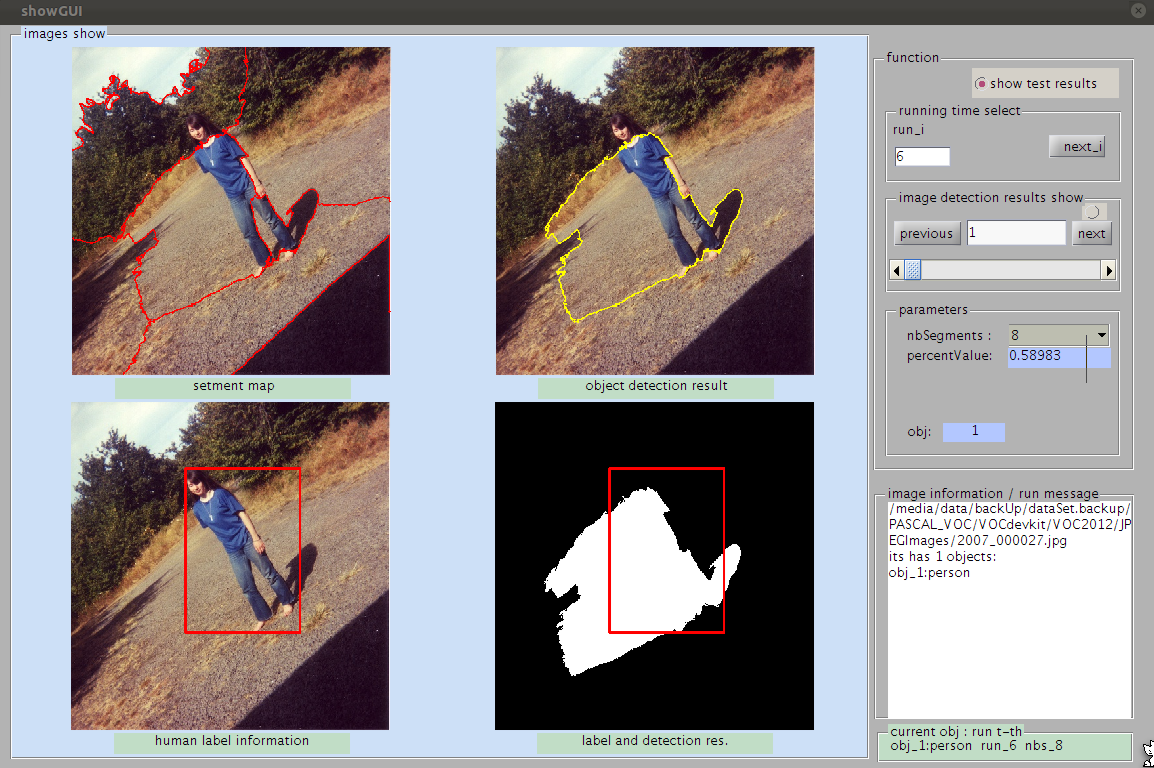
把上面代码保存到文件:showGUI.m
下载这里的showGUI.fig文件,把它们放在同一个目录下运行showGUI.m文件就可以了。
我自己用的测试平台为Ubuntu 11.10 linux , matlab 为7.12 -- R2011a
showGUI.fig文件下载:
具体下载目录在 /2013年资料/6月/14日/一个简单的matlab图形界面程序GUI