1、Neo4j数据库访问
(1)Neo4j访问的两种方式
- 嵌入式数据库
- 服务器模式(通过REST的访问)
它是由应用程序的性质(neo4j是独立服务器 还是和程序在一起),性能,监控和数据安全性来决定架构选择。
(2)An embedded database(嵌入式数据库)
嵌入式Neo4j数据库是性能的最佳选择。 通过指定数据存储的路径以编程方式访问嵌入式数据库。
我们选择嵌入式数据库出于以下原因:
- 使用Java作为我们项目的编程语言时
- 应用程序是独立的
- 程序追求很高的性能
(3)Neo4j Server(服务器模式)
Neo4j Server是相互操作性,安全性和监控的最佳选择。 实际上,REST接口允许所有现代平台和编程语言与它进行互操作。 此外,作为独立应用程序,它比嵌入式配置更安全(客户端中的潜在故障不会影响服务器),并且更易于监控。 如果我们选择使用这种模式,我们的应用程序将充当Neo4j服务器的客户端。要连接到Neo4j服务器,可以使用任何编程语言的REST 访问数据库。
2、Java客户端操作Neo4j
(1)嵌入式模式
<?xml version="1.0" encoding="UTF-8"?>
<project xmlns="http://maven.apache.org/POM/4.0.0"
         xmlns:xsi="http://www.w3.org/2001/XMLSchema-instance"
         xsi:schemaLocation="http://maven.apache.org/POM/4.0.0 http://maven.apache.org/xsd/maven-4.0.0.xsd">
    <modelVersion>4.0.0</modelVersion>

    <groupId>com.lagou</groupId>
    <artifactId>embodied_neo4j_demo</artifactId>
    <version>1.0-SNAPSHOT</version>

    <dependencies>
        <dependency>
            <groupId>org.neo4j</groupId>
            <artifactId>neo4j</artifactId>
            <version>3.5.5</version>
        </dependency>
    </dependencies>

    <build>
        <plugins>
            <plugin>
                <groupId>org.apache.maven.plugins</groupId>
                <artifactId>maven-compiler-plugin</artifactId>
                <version>3.5.1</version>
                <configuration>
                    <source>1.8</source>
                    <target>1.8</target>
                </configuration>
            </plugin>
        </plugins>
    </build>
</project>
package com.lagou;
import org.neo4j.graphdb.GraphDatabaseService;
import org.neo4j.graphdb.Label;
import org.neo4j.graphdb.Node;
import org.neo4j.graphdb.Transaction;
import org.neo4j.graphdb.factory.GraphDatabaseFactory;
import java.io.File;
public class EmbodiedNeo4jAdd {
private static final File databaseDirectory = new File("target/graph.db");
public static void main(String[] args) {
// 创建数据库服务对象
GraphDatabaseService graphDatabaseService = new GraphDatabaseFactory().newEmbeddedDatabase(databaseDirectory);
System.out.println("database load!");
// 获取事务对象,开启事务
Transaction tx = graphDatabaseService.beginTx();
// (使用Java api定义)
Node n1 = graphDatabaseService.createNode();
n1.setProperty("name","张三");
n1.setProperty("character", "A");
n1.setProperty("money", 10086);
n1.addLabel(new Label() {
@Override
public String name() {
return "Person";
}
});
// 定义cql(使用原生api定义)
String cql = "create(p:Person {name:'李四',character:'B', money:21000})";
graphDatabaseService.execute(cql);
// 提交事务
tx.success();
tx.close();
graphDatabaseService.shutdown(); // 必须在事务提交后才能调用,否则会报错
System.out.println("database shutdown!");
}
}
package com.lagou;

import org.neo4j.graphdb.GraphDatabaseService;
import org.neo4j.graphdb.Node;
import org.neo4j.graphdb.Result;
import org.neo4j.graphdb.Transaction;
import org.neo4j.graphdb.factory.GraphDatabaseFactory;

import java.io.File;
import java.util.HashMap;
import java.util.Map;

public class EmbodiedNeo4jQueryAll {
    private static final File databaseDirectory = new File("target/graph.db");

    public static void main(String[] args) {
        // 创建数据库服务对象
        GraphDatabaseService graphDatabaseService = new GraphDatabaseFactory().newEmbeddedDatabase(databaseDirectory);
        System.out.println("database load!");
        // 获取事务对象,开启事务
        Transaction tx = graphDatabaseService.beginTx();

        // 定义cql
        String cql = "match(p:Person) where p.money < $money return p"; // 使用$作为占位符
        Map<String, Object> parameters = new HashMap<>();
        parameters.put("money", 20000);
        Result result = graphDatabaseService.execute(cql, parameters);
        while (result.hasNext()) {
            Map<String, Object> row = result.next();
            // System.out.println(row); // {p=Node[0]}
            // System.out.println(result.columns()); // [p]
            for (String key : result.columns()) {
                Node nd = (Node) row.get(key);
                System.out.printf("%s=%s:%s%n",key,nd.getProperty("name"), nd.getProperty("money"));
            }
        }


        // 提交事务
        tx.success();
        tx.close();
        graphDatabaseService.shutdown(); // 必须在事务提交后才能调用,否则会报错
        System.out.println("database shutdown!");
    }
}
(2)服务器模式
<?xml version="1.0" encoding="UTF-8"?>
<project xmlns="http://maven.apache.org/POM/4.0.0"
         xmlns:xsi="http://www.w3.org/2001/XMLSchema-instance"
         xsi:schemaLocation="http://maven.apache.org/POM/4.0.0 http://maven.apache.org/xsd/maven-4.0.0.xsd">
    <modelVersion>4.0.0</modelVersion>

    <groupId>com.lagou</groupId>
    <artifactId>server_neo4j_demo</artifactId>
    <version>1.0-SNAPSHOT</version>

    <dependencies>
        <dependency>
            <groupId>org.neo4j</groupId>
            <artifactId>neo4j-ogm-bolt-driver</artifactId>
            <version>3.2.10</version>
        </dependency>
    </dependencies>

    <build>
        <plugins>
            <plugin>
                <groupId>org.apache.maven.plugins</groupId>
                <artifactId>maven-compiler-plugin</artifactId>
                <version>3.5.1</version>
                <configuration>
                    <source>1.8</source>
                    <target>1.8</target>
                </configuration>
            </plugin>
        </plugins>
    </build>
</project>
package com.lagou;
import org.neo4j.driver.*;
import static org.neo4j.driver.Values.parameters; // 使用此类来简化参数传递
public class Neo4jServerMain {
public static void main(String[] args) {
Driver driver = GraphDatabase.driver("bolt://8.142.8.105:7687",
AuthTokens.basic("neo4j", "123456"));
// 获取会话对象
Session session = driver.session();
String cql = "match(p:Person) where p.money < $money return p.name, p.money AS money";
Result result = session.run(cql, parameters("money", 10000));
while (result.hasNext()) {
Record record = result.next();
System.out.println(record.get("p.name").asString() + ", " + record.get("money").asDouble());
}
session.close();
driver.close();
}
}
package com.lagou;

import org.neo4j.driver.*;

import static org.neo4j.driver.Values.parameters;

public class Neo4jServerMain2 {
    public static void main(String[] args) {
        Driver driver = GraphDatabase.driver("bolt://8.142.8.105:7687",
                AuthTokens.basic("neo4j", "123456"));
        // 获取会话对象
        Session session = driver.session();
        String cql = "MATCH p=(person:Person {name:$startName})-[*1..4]-(person2:Person {name:$endName} ) RETURN p";
        Result result = session.run(cql,parameters("startName","王启年","endName","九品射手燕小乙"));
        while (result.hasNext()) {
            Record record = result.next();
            System.out.println(record);
        }
        session.close();
        driver.close();
    }
}
3、SpringBoot 整合Neo4j
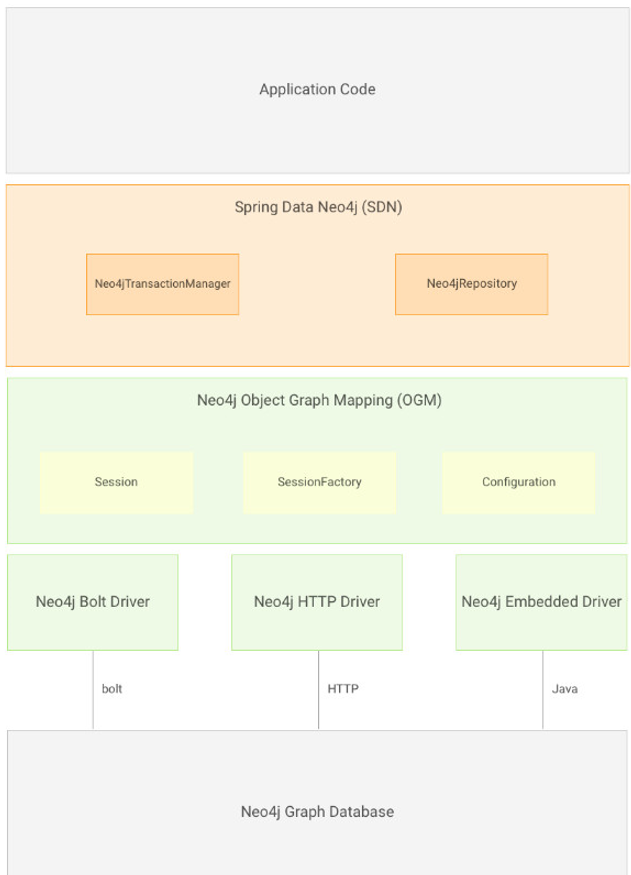
(1) 导入jar包
<?xml version="1.0" encoding="UTF-8"?>
<project xmlns="http://maven.apache.org/POM/4.0.0"
         xmlns:xsi="http://www.w3.org/2001/XMLSchema-instance"
         xsi:schemaLocation="http://maven.apache.org/POM/4.0.0 http://maven.apache.org/xsd/maven-4.0.0.xsd">
    <modelVersion>4.0.0</modelVersion>

    <groupId>com.lagou</groupId>
    <artifactId>springboot_neo4j_demo</artifactId>
    <version>1.0-SNAPSHOT</version>

    <parent>
        <groupId>org.springframework.boot</groupId>
        <artifactId>spring-boot-starter-parent</artifactId>
        <version>2.0.5.RELEASE</version>
    </parent>

    <properties>
        <project.build.sourceEncoding>UTF-8</project.build.sourceEncoding>
        <project.reporting.outputEncoding>UTF-8</project.reporting.outputEncoding>
        <java.version>1.8</java.version>
    </properties>

    <dependencies>
        <dependency>
            <groupId>org.springframework.boot</groupId>
            <artifactId>spring-boot-starter-data-neo4j</artifactId>
        </dependency>
        <dependency>
            <groupId>org.neo4j</groupId>
            <artifactId>neo4j-ogm-bolt-driver</artifactId>
        </dependency>
    </dependencies>
    <build>
        <plugins>
            <plugin>
                <groupId>org.springframework.boot</groupId>
                <artifactId>spring-boot-maven-plugin</artifactId>
            </plugin>
        </plugins>
    </build>
</project>
(2)建立实体类
package com.lagou.bean;

import org.neo4j.ogm.annotation.*;

import java.util.Set;

@NodeEntity
public class Person {
    @Id
    @GeneratedValue
    private Long id;
    @Property("cid")
    private int pid;
    private String name;
    private String character;
    private double money;
    private int gender;
    private int age;
    private String description;

    @Relationship(type = "Friends",direction = Relationship.INCOMING) // 这里的type是你在创建关系是设置的名称,direction是指明关系箭头的走向
    private Set<Person> friendsPerson;

// 省略get、set方法以及toString方法
(3)数据持久化类
package com.lagou.repository;

import com.lagou.bean.Person;
import org.springframework.data.neo4j.annotation.Query;
import org.springframework.data.neo4j.repository.Neo4jRepository;
import org.springframework.data.repository.query.Param;
import org.springframework.stereotype.Repository;

import java.util.List;

@Repository
public interface PersonRepository extends Neo4jRepository<Person, Long> {
    // 查询money大于指定值的数据
    /* @Query("match(p:Person) where p.money > {0} return p")
    List<Person> personList(double money); */
    @Query("match(p:Person) where p.money > {money} return p")
    List<Person> personList(@Param("money")double money);

    /** 指定开始的名字 和 结束的名字 查询最短路径 限定深度为4以层包含4*/
    @Query("MATCH p=shortestPath((person:Person {name:{0}})-[*1..4]-(person2:Person {name:{1}}) ) RETURN p")
    List<Person> shortestPath(String startName,String endName);
}
(3)配置文件 application.yml
spring:
  data:
    neo4j:
      username: neo4j
      password: 123456
      uri: bolt://8.142.8.105:7687
      #uri: http://192.168.211.133:7474
      #uri: file:///target/graph.db
(4)编写服务类
package com.lagou.service;

import com.lagou.bean.Person;
import com.lagou.repository.PersonRepository;
import org.springframework.beans.factory.annotation.Autowired;
import org.springframework.stereotype.Service;

import java.util.ArrayList;
import java.util.List;

@Service("personService")
public class Neo4jPersonService {
    @Autowired
    private PersonRepository personRepository;

    public List<Person> getAll() {
        List<Person> datas = new ArrayList<>();
        personRepository.findAll().forEach(person -> datas.add(person));
        return datas;
    }

    public Person save(Person person) {
        return personRepository.save(person);
    }

    public List<Person> personList(double money) {
        return personRepository.personList(money);
    }
}
(5)编写测试类
package com.lagou;

import com.lagou.bean.Person;
import com.lagou.service.Neo4jPersonService;
import org.springframework.boot.SpringApplication;
import org.springframework.boot.autoconfigure.SpringBootApplication;
import org.springframework.context.ApplicationContext;

import java.util.List;

@SpringBootApplication
public class Neo4jBootAppMain {
    public static void main(String[] args) {
        ApplicationContext applicationContext = SpringApplication.run(Neo4jBootAppMain.class, args);
        Neo4jPersonService personService = applicationContext.getBean("personService", Neo4jPersonService.class);

        Person person = new Person();
        person.setName("testBoot");
        person.setMoney(10086.9);
        person.setCharacter("A");
        person.setAge(11);

        Person p1 = personService.save(person);
        System.out.println(p1);
        System.out.println(personService.getAll());

        // 自定义方法
        List<Person> personList =  personService.personList(1000);
        System.out.println(personList);
    }
}
版权声明:本文为weixin_52851967原创文章,遵循CC 4.0 BY-SA版权协议,转载请附上原文出处链接和本声明。