如何在mac系统上编译srs流媒体服务器
编译环境: Mac OS 11.2.2
1、克隆代码
git clone https://github.com/ossrs/srs.git
2、进入trunk文件夹
cd /srs/trunk
3、Mac 编译和其它系统有点区别,需要加上一些参数
./configure --osx --without-ssl --without-hls --without-hds --without-dvr --without-nginx --without-http-callback --without-http-server --without-stream-caster --without-http-api --without-ffmpeg --without-transcode --without-ingest --without-stat --without-librtmp
遇到奇怪的问题编译不了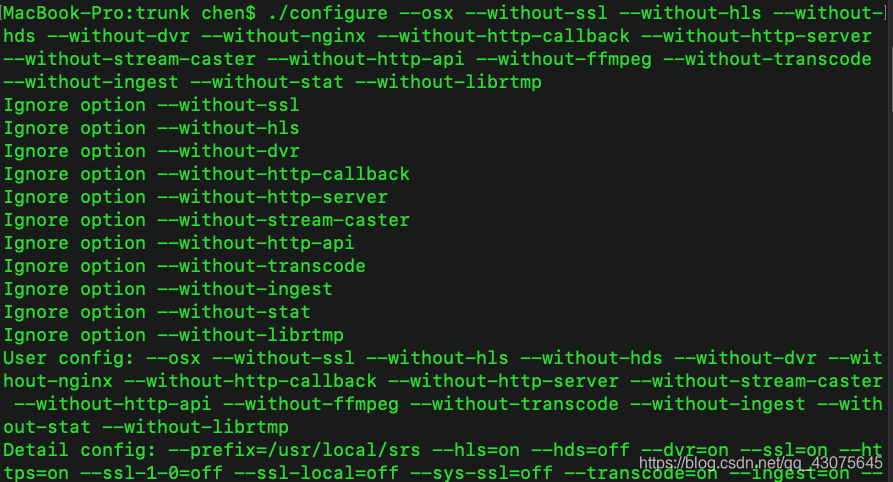
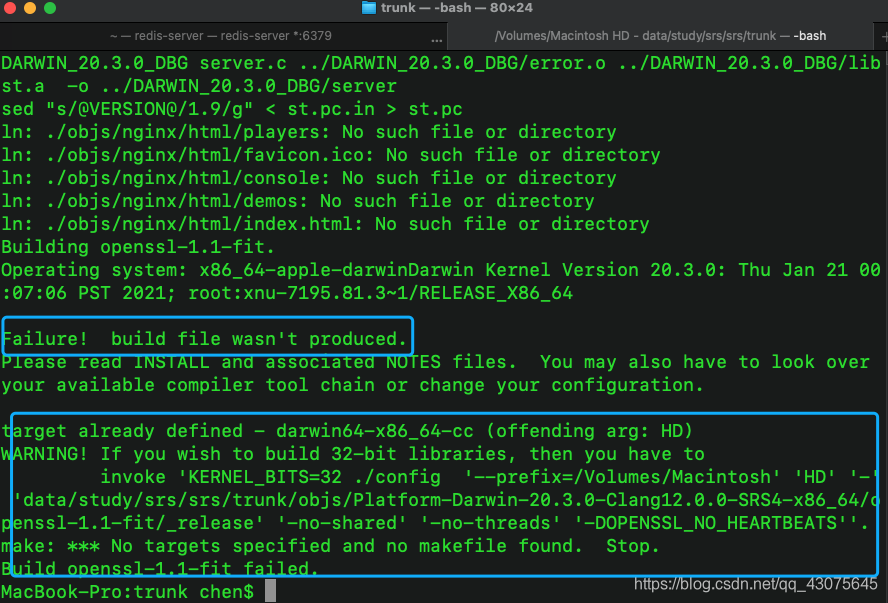
卡在这一步了
最后才发现,原来是磁盘路径有空格,换到没空格的路径就好了
4、最后执行:
make
The build summary:
 +------------------------------------------------------------------------------------
 For SRS benchmark, gperf, gprof and valgrind, please read:
      http://blog.csdn.net/win_lin/article/details/53503869
 +------------------------------------------------------------------------------------
 |The main server usage: ./objs/srs -c conf/srs.conf, start the srs server
 |     About HLS, please read https://github.com/ossrs/srs/wiki/v2_CN_DeliveryHLS
 |     About DVR, please read https://github.com/ossrs/srs/wiki/v3_CN_DVR
 |     About SSL, please read https://github.com/ossrs/srs/wiki/v1_CN_RTMPHandshake
 |     About transcoding, please read https://github.com/ossrs/srs/wiki/v3_CN_FFMPEG
 |     About ingester, please read https://github.com/ossrs/srs/wiki/v1_CN_Ingest
 |     About http-callback, please read https://github.com/ossrs/srs/wiki/v3_CN_HTTPCallback
 |     Aoubt http-server, please read https://github.com/ossrs/srs/wiki/v2_CN_HTTPServer
 |     About http-api, please read https://github.com/ossrs/srs/wiki/v3_CN_HTTPApi
 |     About stream-caster, please read https://github.com/ossrs/srs/wiki/v2_CN_Streamer
 |     (Disabled) About VALGRIND, please read https://github.com/ossrs/state-threads/issues/2
 +------------------------------------------------------------------------------------
binaries, please read https://github.com/ossrs/srs/wiki/v2_CN_Build
You can:
  ./objs/srs -c conf/srs.conf
              to start the srs server, with config conf/srs.conf.
5、配置srs 将max_connections 设为200
vim conf/srs.conf
# main config for srs.
# @see full.conf for detail config.

listen              1935;
max_connections     200;
srs_log_tank        file;
srs_log_file        ./objs/srs.log;
http_api {
enabled         on;
listen          1985;
}
http_server {
enabled         on;
listen          8080;
dir             ./objs/nginx/html;
}
stats {
network         0;
disk            sda sdb xvda xvdb;
}
vhost __defaultVhost__ {
}
6、启动
./etc/init.d/srs start
版权声明:本文为qq_43075645原创文章,遵循CC 4.0 BY-SA版权协议,转载请附上原文出处链接和本声明。