javaWEB
1.基本概念
1.1 前言
web开发:
web,网页的意思
静态web
- html,css
- 提供给别人看的数据始终不会改变
动态web
- 提供给别人看的数据始终会改变,每个人可能看到的东西都不同
- 技术栈:Servlet/JSP,ASP,PHP
在java中动态开发的web统称为javaweb
1.2 WEB应用程序
web应用程序:可以提供浏览器访问的程序;
- a.html b.html …多个web资源,这些web资源可以被外界访问,对外界提供服务
1.3 静态WEB
- 静态WEB是不经过java代码处理的,所以数据无法持久化
- 客户在浏览器发起一个请求 直接到服务器上 返回页面,用户看到的页面内容都是一样的
1.4 动态WEB
页面会根据不同的用户访问发生变化
- 客户端发起一个请求 这个请求先到服务器上 然后交给java程序处理,然后再响应给浏览器
缺点是:
- 加入服务器的动态web资源出现了错误,我们都需要重新编写后天程序,重新发布;
- 停机维护
2. WEB服务器
常见的web服务器
Tomcat
文件结构

lls
微软的ASP
…
服务器是一种被动的操作,用来处理用户的一些请求和给用户一些响应信息
启动与关闭Tomcat
[外链图片转存失败,源站可能有防盗链机制,建议将图片保存下来直接上传(img-Q83VMFaD-1647853059430)(javaWEBmd.assets/image-20220317224446860.png)]
可以配置启动端口号
 <Connector port="此处可修改" protocol="HTTP/1.1"
               connectionTimeout="20000"
               redirectPort="8443" />
- Tomcat的默认端口号 8080
- mysql 3306
- http 80
- https 443
可以配置 主机名称
 <Host name="此处可修改"  appBase="webapps"
            unpackWARs="true" autoDeploy="true">
3. HTTP
3.1什么是http
超文本传输协议(Hyper Text Transfer Protocol,HTTP)是一个简单的请求-响应协议,它通常运行在TCP之上。它指定了客户端可能发送给服务器什么样的消息以及得到什么样的响应。请求和响应消息的头以ASCII形式给出;而消息内容则具有一个类似MIME的格式。这个简单模型是早期Web成功的有功之臣,因为它使开发和部署非常地直截了当。
3.2 请求
用户在浏览器访问web资源就是发起一次请求
GET / HTTP/1.1  //get请求
Host: www.baidu.com  //主机名
  //浏览器信息
User-Agent: Mozilla/5.0 (Macintosh; Intel Mac OS X 10_15_7) AppleWebKit/605.1.15 (KHTML, like Gecko) Version/15.3 Safari/605.1.15
Accept-Language: zh-CN,zh-Hans;q=0.9
Accept-Encoding: gzip, deflate, br
Connection: keep-alive
3.3 响应
HTTP/1.1 200 OK  //状态码
Content-Type: text/html;charset=utf-8
Set-Cookie: BDSVRTM=0; path=/
Set-Cookie: BD_HOME=1; path=/
Set-Cookie: H_PS_PSSID=35835_35104_36011_35912_34584_36120_36032_35955_35984_35323_26350_36101; path=/; domain=.baidu.com
Content-Encoding: gzip
Expires: Thu, 17 Mar 2022 15:02:43 GMT
Transfer-Encoding: Identity
Cache-Control: private
Date: Thu, 17 Mar 2022 15:02:55 GMT
Connection: keep-alive
X-Frame-Options: sameorigin
Server: BWS/1.1
Bdqid: 0xa78a01e70008fecb
Bdpagetype: 1
Strict-Transport-Security: max-age=172800
Traceid: 1647529375023844916212072463842769698507
X-Ua-Compatible: IE=Edge,chrome=1
状态码
200 请求响应代表成功
3xx 代表重定向
4xx 找不到资源
5xx 服务器内部出错
4. Maven
1.在javaweb中需要导入大量jar包和相关jar包依赖包
2.maven可以帮助我们导入jar,和自动导入jar的相关依赖包
Maven的核心思想约定大于配置
有约束不要违反
配置Maven
配置仓库
 <!-- 配置本地jar仓库 -->
  <localRepository>/Users/pjy/configuration/apache-maven-3.8.4/repository</localRepository>
配置镜像
<mirrors>

	<!--配置阿里云Maven镜像-->
     <mirror>
        <id>nexus-aliyun</id>
        <mirrorOf>central</mirrorOf>
        <name>Nexus aliyun</name>
        <url>http://maven.aliyun.com/nexus/content/groups/public</url>
    </mirror>
     <!--配置华为云Maven镜像-->
    <mirror>
        <id>huaweicloud</id>
        <mirrorOf>*</mirrorOf>
        <url>https://mirrors.huaweicloud.com/repository/maven/</url>
    </mirror>


  </mirrors>
4.1 maven静态资源问题
在pom文件最后加上,解决静态资源导出问题
 <build>
        <resources>

            <resource>
                <directory>src/main/resources</directory>
                <includes>
                    <include>**/*.properties</include>
                    <include>**/*.xml</include>
                </includes>
            </resource>

            <resource>
                <directory>src/main/java</directory>
                <includes>
                    <include>**/*.properties</include>
                    <include>**/*.xml</include>
                </includes>
            </resource>

        </resources>
    </build>
5. Servlet
servlet是sum公司开发动态web的一种技术
使用时必须导入servlet-api包
   		<dependency>
            <groupId>javax.servlet</groupId>
            <artifactId>javax.servlet-api</artifactId>
            <version>4.0.1</version>
        </dependency>
一个基本的servlet必须要继承HttpServlet
重写 doget和dopos
public class HolleServlet extends HttpServlet {
    @Override
    protected void doGet(HttpServletRequest request, HttpServletResponse response) throws ServletException, IOException {
        //设置响应回去的文本类型
        response.setContentType("text/html");
        //设置响应回去的字符编码
        response.setCharacterEncoding("utf-8");
        //获取响应的输出流
        PrintWriter writer = response.getWriter();
        writer.println("<h1>hello world</h1>");
    }

    @Override
    protected void doPost(HttpServletRequest request, HttpServletResponse response) throws ServletException, IOException {
        doGet(request, response);
    }
}
然后再web.xml里配置
<?xml version="1.0" encoding="UTF-8"?>
<web-app xmlns="http://xmlns.jcp.org/xml/ns/javaee"
         xmlns:xsi="http://www.w3.org/2001/XMLSchema-instance"
         xsi:schemaLocation="http://xmlns.jcp.org/xml/ns/javaee http://xmlns.jcp.org/xml/ns/javaee/web-app_4_0.xsd"
         version="4.0">
    <!--  web.xml配置web核心应用   -->

    <!--  注册servlet  -->
    <servlet>
        <servlet-name>hello</servlet-name>
        <servlet-class>com.pjy.servlet.HolleServlet</servlet-class>
    </servlet>
    <!--  映射注册servlet地址  -->
    <servlet-mapping>
        <servlet-name>hello</servlet-name>
        <!--请求路径-->
        <url-pattern>/hello</url-pattern>
    </servlet-mapping>

</web-app>
5.1 maven父子工程
<modules>
    <module>servlet-01</module>
    <module>servlet-02</module>
</modules>
父工程有子模块
子工程用有父工程的所有jar包
5.2 如何实现一个Servlet
import javax.servlet.ServletException;
import javax.servlet.http.HttpServlet;
import javax.servlet.http.HttpServletRequest;
import javax.servlet.http.HttpServletResponse;
import java.io.IOException;
import java.io.PrintWriter;

public class MyServlet extends HttpServlet {
    @Override
    protected void doGet(HttpServletRequest request, HttpServletResponse response) throws ServletException, IOException {
        PrintWriter writer = response.getWriter();//获取响应流
        writer.println("HelloServlet");
    }

    @Override
    protected void doPost(HttpServletRequest request, HttpServletResponse response) throws ServletException, IOException {
        doGet(request, response);
    }
}
5.2 如何在web.xml配置Servlet
为什么要映射servlet 我们写的servlet需要在浏览器上访问
而浏览器访问的是web服务器,所以需要在web服务器注册servlet
<?xml version="1.0" encoding="UTF-8"?>
<web-app xmlns="http://xmlns.jcp.org/xml/ns/javaee"
         xmlns:xsi="http://www.w3.org/2001/XMLSchema-instance"
         xsi:schemaLocation="http://xmlns.jcp.org/xml/ns/javaee http://xmlns.jcp.org/xml/ns/javaee/web-app_4_0.xsd"
         version="4.0">
    <servlet>
        <servlet-name>MyServlet</servlet-name>
        <servlet-class>com.pjy.servlet.MyServlet</servlet-class>
    </servlet>
    <servlet-mapping>
        <servlet-name>MyServlet</servlet-name>
        <url-pattern>/MyServlet</url-pattern>
    </servlet-mapping>
</web-app>
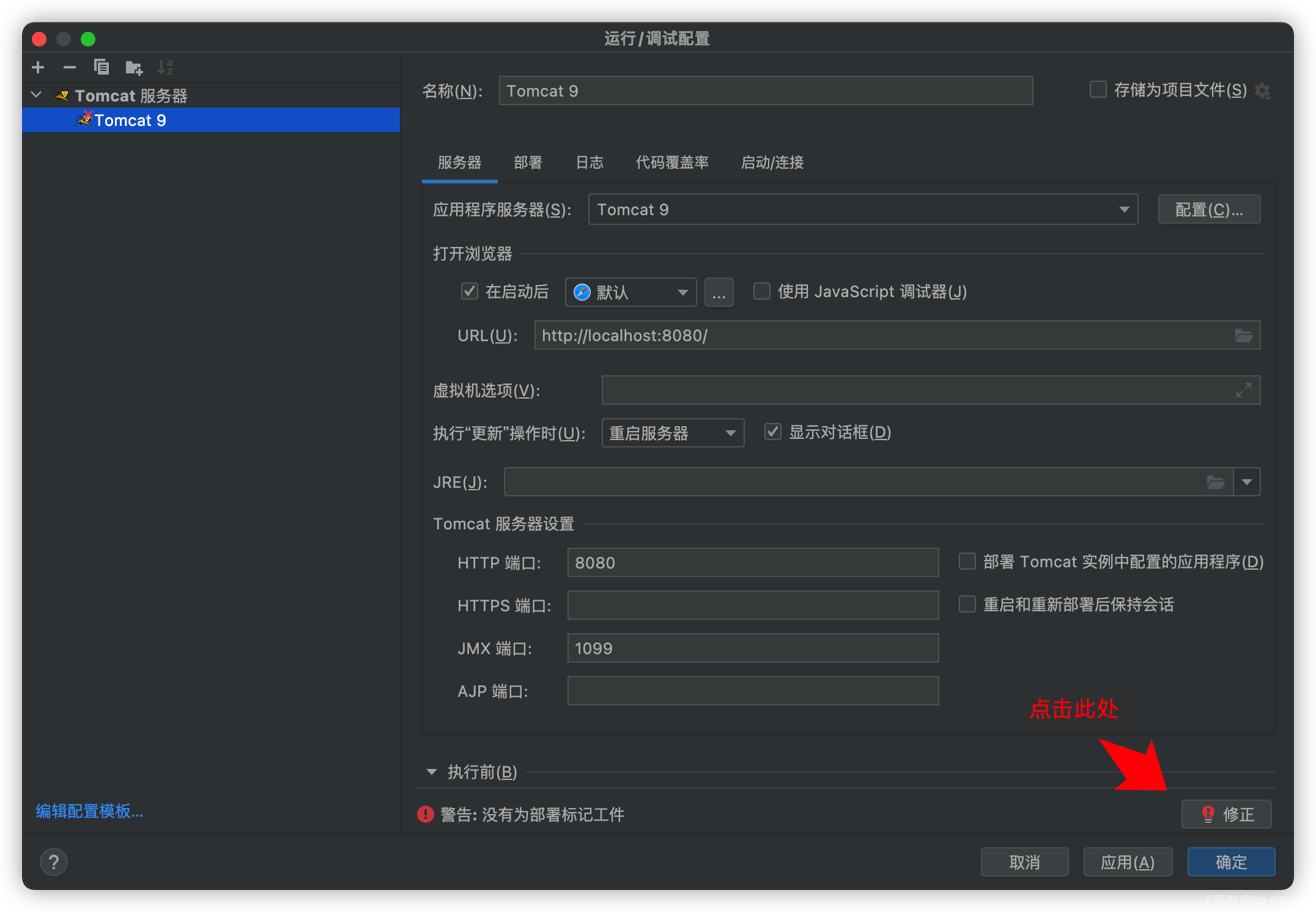
5.3 配置TomCat服务

5.4 mapping映射
一个servlet可以映射一个请求路径
 <servlet-mapping>
        <servlet-name>MyServlet</servlet-name>
        <url-pattern>/MyServlet</url-pattern>
    </servlet-mapping>
一个servlet可以映射多个请求路径
 <servlet-mapping>
        <servlet-name>MyServlet</servlet-name>
        <url-pattern>/MyServlet</url-pattern>
    </servlet-mapping>
    <servlet-mapping>
        <servlet-name>MyServlet</servlet-name>
        <url-pattern>/MyServlet1</url-pattern>
    </servlet-mapping>
    <servlet-mapping>
        <servlet-name>MyServlet</servlet-name>
        <url-pattern>/MyServlet2</url-pattern>
    </servlet-mapping>
一个servlet可以映射一个请求通用路径
 <servlet-mapping>
        <servlet-name>MyServlet</servlet-name>
        <url-pattern>/MyServlet/*</url-pattern>
    </servlet-mapping>
可以设置请求后缀
不能有多级 此处只能*.xxxx不能改成其他格式
  <!--设置请求后缀-->
       <!--设置请求后缀-->
    <servlet-mapping>
        <servlet-name>MyServlet</servlet-name>
        <url-pattern>*.coom</url-pattern>
    </servlet-mapping>
通配符与非通配符优先级问题
<servlet-mapping> <servlet-name>MyServlet</servlet-name> <url-pattern>/mys</url-pattern> </servlet-mapping> <servlet-mapping> <servlet-name>MyError</servlet-name> <url-pattern>/*</url-pattern> </servlet-mapping>*此处有2个路径/也可以被/mys匹配,指定路径的优先级比通配符的高
6. ServletContext
在web容器启动时,它会为每一个web程序创建一个ServletContext对象
它代表了当前应用
6.1 共享数据
在当前web程序中数据可以在多个servlet之间共享
 @Override
    protected void doGet(HttpServletRequest request, HttpServletResponse response) throws ServletException, IOException {
        ServletContext servletContext = this.getServletContext();
        String name = "张三";
        //存放数据在servletContext中可以在另一个servlet中取出来
        servletContext.setAttribute("name", name);
        //设置响应类型
        response.setContentType("text/html");
        //设置响应编码
        response.setCharacterEncoding("utf-8");
        response.getWriter().println("以存放" + name);
    }
存放数据
 @Override
    protected void doGet(HttpServletRequest request, HttpServletResponse response) throws ServletException, IOException {
        //设置响应文本类型
        response.setContentType("text/html");
        //设置响应编码
        response.setCharacterEncoding("utf-8");
        //从ServletContext中取出数据
        String name = (String) this.getServletContext().getAttribute("name");
        response.getWriter().println("以取出" + name);
    }
获取数据
6.2 可以设置web.xml的初始化参数
 <!--可以配置一下初始化参数-->
    <context-param>
        <param-name>name</param-name>
        <param-value>张三</param-value>
    </context-param>
取出数据
  			ServletContext context = this.getServletContext();
        //可以获取到web.xml中的初始化参数
        String name = context.getInitParameter("name");
6.3 转发
路径名必须以/开头,并被解释为相对于当前上下文根。使用getContext获取外部上下文中资源的RequestDispatcher 。
  @Override
    protected void doGet(HttpServletRequest req, HttpServletResponse resp) throws ServletException, IOException {
        resp.setContentType("text/html");
        resp.setCharacterEncoding("utf-8");
        ServletContext context = this.getServletContext();

        //转发到/gnt请求
        context.getRequestDispatcher("/getpar").forward(req, resp);
    }
使用getRequestDispatcher方法可以跳转到其他Servlet
注意转发的url不会发生变化!!!
6.4 读取资源文件
Properties类

我们发现在java下与resources下建的properties包都会被打包到项目中

classes路径我们俗称为: classpath:路径
    protected void doGet(HttpServletRequest req, HttpServletResponse resp) throws ServletException, IOException {
        ServletContext context = this.getServletContext();
        //获取资源文件流
        InputStream is = context.getResourceAsStream("/WEB-INF/classes/db.properties");
        Properties props = new Properties();
        props.load(is);
        String name = props.getProperty("username");
        String pwd = props.getProperty("password");
        resp.setContentType("text/html");
        resp.setCharacterEncoding("utf-8");
        PrintWriter writer = resp.getWriter();
        writer.println("名字为" + name);
        writer.println("密码为" + pwd);
    }
7. HttpServletRequest请求对象
web服务中接受到一个用户的http请求会创建2个对象HttpServletRequest和HttpServletResponse
如果要获取客户端请求过来的数据需要找HttpServletResponse
如果要给客户端响应一下资源找HttpServletResponse
7.1 获取请求的参数
 @Override
    protected void doGet(HttpServletRequest req, HttpServletResponse resp) throws ServletException, IOException {
        //获取请求参数
        String uname = req.getParameter("uname");
        String pwd = req.getParameter("pwd");

        System.out.println("账号为:" + uname + "密码为:" + pwd);
        //重定向到主页
        resp.sendRedirect("Home.jsp");
    }

7.2转发
//        指定的路径名可以是相对的,尽管它不能扩展到当前 servlet 上下文之外。如果路径以“/”开头,则将其解释为相对于当前上下文根
        req.getRequestDispatcher().forward(req,resp);
8. HttpServletResponse响应对象
简单的分类
- 向浏览器发送数据
public ServletOutputStream getOutputStream() throws IOException;
public PrintWriter getWriter() throws IOException;
向浏览器发送一下响应头的方法
 public void setCharacterEncoding(String charset);
  public void setContentLength(int len);
public void setContentLengthLong(long len);
  public void setContentType(String type);
public void setDateHeader(String name, long date);
    public void addDateHeader(String name, long date);

    public void setHeader(String name, String value);

    public void addHeader(String name, String value);

    public void setIntHeader(String name, int value);
    public void addIntHeader(String name, int value);
响应的状态码
    /**
     * Status code (100) indicating the client can continue.
     */
    public static final int SC_CONTINUE = 100;

    /**
     * Status code (101) indicating the server is switching protocols
     * according to Upgrade header.
     */
    public static final int SC_SWITCHING_PROTOCOLS = 101;

    /**
     * Status code (200) indicating the request succeeded normally.
     */
    public static final int SC_OK = 200;

    /**
     * Status code (201) indicating the request succeeded and created
     * a new resource on the server.
     */
    public static final int SC_CREATED = 201;

    /**
     * Status code (202) indicating that a request was accepted for
     * processing, but was not completed.
     */
    public static final int SC_ACCEPTED = 202;

    /**
     * Status code (203) indicating that the meta information presented
     * by the client did not originate from the server.
     */
    public static final int SC_NON_AUTHORITATIVE_INFORMATION = 203;

    /**
     * Status code (204) indicating that the request succeeded but that
     * there was no new information to return.
     */
    public static final int SC_NO_CONTENT = 204;

    /**
     * Status code (205) indicating that the agent <em>SHOULD</em> reset
     * the document view which caused the request to be sent.
     */
    public static final int SC_RESET_CONTENT = 205;

    /**
     * Status code (206) indicating that the server has fulfilled
     * the partial GET request for the resource.
     */
    public static final int SC_PARTIAL_CONTENT = 206;

    /**
     * Status code (300) indicating that the requested resource
     * corresponds to any one of a set of representations, each with
     * its own specific location.
     */
    public static final int SC_MULTIPLE_CHOICES = 300;

    /**
     * Status code (301) indicating that the resource has permanently
     * moved to a new location, and that future references should use a
     * new URI with their requests.
     */
    public static final int SC_MOVED_PERMANENTLY = 301;

    /**
     * Status code (302) indicating that the resource has temporarily
     * moved to another location, but that future references should
     * still use the original URI to access the resource.
     *
     * This definition is being retained for backwards compatibility.
     * SC_FOUND is now the preferred definition.
     */
    public static final int SC_MOVED_TEMPORARILY = 302;

    /**
    * Status code (302) indicating that the resource reside
    * temporarily under a different URI. Since the redirection might
    * be altered on occasion, the client should continue to use the
    * Request-URI for future requests.(HTTP/1.1) To represent the
    * status code (302), it is recommended to use this variable.
    */
    public static final int SC_FOUND = 302;

    /**
     * Status code (303) indicating that the response to the request
     * can be found under a different URI.
     */
    public static final int SC_SEE_OTHER = 303;

    /**
     * Status code (304) indicating that a conditional GET operation
     * found that the resource was available and not modified.
     */
    public static final int SC_NOT_MODIFIED = 304;

    /**
     * Status code (305) indicating that the requested resource
     * <em>MUST</em> be accessed through the proxy given by the
     * <code><em>Location</em></code> field.
     */
    public static final int SC_USE_PROXY = 305;

     /**
     * Status code (307) indicating that the requested resource
     * resides temporarily under a different URI. The temporary URI
     * <em>SHOULD</em> be given by the <code><em>Location</em></code>
     * field in the response.
     */
    public static final int SC_TEMPORARY_REDIRECT = 307;

    /**
     * Status code (400) indicating the request sent by the client was
     * syntactically incorrect.
     */
    public static final int SC_BAD_REQUEST = 400;

    /**
     * Status code (401) indicating that the request requires HTTP
     * authentication.
     */
    public static final int SC_UNAUTHORIZED = 401;

    /**
     * Status code (402) reserved for future use.
     */
    public static final int SC_PAYMENT_REQUIRED = 402;

    /**
     * Status code (403) indicating the server understood the request
     * but refused to fulfill it.
     */
    public static final int SC_FORBIDDEN = 403;

    /**
     * Status code (404) indicating that the requested resource is not
     * available.
     */
    public static final int SC_NOT_FOUND = 404;

    /**
     * Status code (405) indicating that the method specified in the
     * <code><em>Request-Line</em></code> is not allowed for the resource
     * identified by the <code><em>Request-URI</em></code>.
     */
    public static final int SC_METHOD_NOT_ALLOWED = 405;

    /**
     * Status code (406) indicating that the resource identified by the
     * request is only capable of generating response entities which have
     * content characteristics not acceptable according to the accept
     * headers sent in the request.
     */
    public static final int SC_NOT_ACCEPTABLE = 406;

    /**
     * Status code (407) indicating that the client <em>MUST</em> first
     * authenticate itself with the proxy.
     */
    public static final int SC_PROXY_AUTHENTICATION_REQUIRED = 407;

    /**
     * Status code (408) indicating that the client did not produce a
     * request within the time that the server was prepared to wait.
     */
    public static final int SC_REQUEST_TIMEOUT = 408;

    /**
     * Status code (409) indicating that the request could not be
     * completed due to a conflict with the current state of the
     * resource.
     */
    public static final int SC_CONFLICT = 409;

    /**
     * Status code (410) indicating that the resource is no longer
     * available at the server and no forwarding address is known.
     * This condition <em>SHOULD</em> be considered permanent.
     */
    public static final int SC_GONE = 410;

    /**
     * Status code (411) indicating that the request cannot be handled
     * without a defined <code><em>Content-Length</em></code>.
     */
    public static final int SC_LENGTH_REQUIRED = 411;

    /**
     * Status code (412) indicating that the precondition given in one
     * or more of the request-header fields evaluated to false when it
     * was tested on the server.
     */
    public static final int SC_PRECONDITION_FAILED = 412;

    /**
     * Status code (413) indicating that the server is refusing to process
     * the request because the request entity is larger than the server is
     * willing or able to process.
     */
    public static final int SC_REQUEST_ENTITY_TOO_LARGE = 413;

    /**
     * Status code (414) indicating that the server is refusing to service
     * the request because the <code><em>Request-URI</em></code> is longer
     * than the server is willing to interpret.
     */
    public static final int SC_REQUEST_URI_TOO_LONG = 414;

    /**
     * Status code (415) indicating that the server is refusing to service
     * the request because the entity of the request is in a format not
     * supported by the requested resource for the requested method.
     */
    public static final int SC_UNSUPPORTED_MEDIA_TYPE = 415;

    /**
     * Status code (416) indicating that the server cannot serve the
     * requested byte range.
     */
    public static final int SC_REQUESTED_RANGE_NOT_SATISFIABLE = 416;

    /**
     * Status code (417) indicating that the server could not meet the
     * expectation given in the Expect request header.
     */
    public static final int SC_EXPECTATION_FAILED = 417;

    /**
     * Status code (500) indicating an error inside the HTTP server
     * which prevented it from fulfilling the request.
     */
    public static final int SC_INTERNAL_SERVER_ERROR = 500;

    /**
     * Status code (501) indicating the HTTP server does not support
     * the functionality needed to fulfill the request.
     */
    public static final int SC_NOT_IMPLEMENTED = 501;

    /**
     * Status code (502) indicating that the HTTP server received an
     * invalid response from a server it consulted when acting as a
     * proxy or gateway.
     */
    public static final int SC_BAD_GATEWAY = 502;

    /**
     * Status code (503) indicating that the HTTP server is
     * temporarily overloaded, and unable to handle the request.
     */
    public static final int SC_SERVICE_UNAVAILABLE = 503;

    /**
     * Status code (504) indicating that the server did not receive
     * a timely response from the upstream server while acting as
     * a gateway or proxy.
     */
    public static final int SC_GATEWAY_TIMEOUT = 504;

    /**
     * Status code (505) indicating that the server does not support
     * or refuses to support the HTTP protocol version that was used
     * in the request message.
     */
    public static final int SC_HTTP_VERSION_NOT_SUPPORTED = 505;
8.1 常见的应用
向浏览器输出信息
下载文件
获取下载文件的路径
下载的文件名是什么
想办法让浏览器支持下载
获取下载文件的输入流
创建缓冲区
获取OutputStream对象
将FileOutputStream流写入缓冲区
使用OutputStream将缓冲区内容输出到客户端
 @Override
    protected void doGet(HttpServletRequest req, HttpServletResponse resp) throws ServletException, IOException {
        resp.setCharacterEncoding("utf-8");
        resp.setContentType("text/html;charset=utf-8");
        ServletContext context = this.getServletContext();
        //获取文件的下载路径
        String realPath = "/Users/pjy/code/JAVAWEB/javaweb/FileDowload-03/target/classes/matlab.png";
        System.out.println(realPath);

        //获取文件名
        int index = realPath.lastIndexOf("/") + 1;
        String Filename = realPath.substring(index);
        System.out.println(Filename);
        //让浏览器支持可以支持下载,URLEncoder可以设置字符编码,让文件名支持中文
        resp.setHeader("content-disposition", "attachment;filename=" + URLEncoder.encode(Filename, "utf-8"));
        //创建文件输入流
        FileInputStream fis = new FileInputStream(realPath);
        //获取浏览器输出流
        ServletOutputStream out = resp.getOutputStream();
        //创建缓冲区
        byte[] buf = new byte[1024];
        int len = 0;
        //把文件写入缓冲区
        while ((len = fis.read(buf)) != -1) {
            //把缓冲区内容写入到浏览器
            out.write(buf, 0, len);
        }
        //关闭流
        out.close();
        fis.close();
    }
8.2 验证码
   @Override
    protected void doGet(HttpServletRequest req, HttpServletResponse resp) throws ServletException, IOException {
        //如何让浏览器3秒自动刷新一次
        resp.setHeader("refresh", "3");
        //创建图片
        BufferedImage image = new BufferedImage(300, 100, BufferedImage.TYPE_INT_RGB);
        //获得画笔
        Graphics2D graphics = (Graphics2D) image.getGraphics();
        //设置图片背景颜色
        graphics.setBackground(Color.pink);
        //画出范围
        graphics.fillRect(70, 25, 150, 40);
        //设置颜色
        graphics.setColor(Color.black);
        //设置字体
        graphics.setFont(new Font(null, Font.BOLD, 20));
        //给图片写入随机数
        graphics.drawString(read(), 100, 50);
        //告诉浏览器这个请求用图片打开
        resp.setContentType("image/png");
        //网站存在缓存不让浏览器出现缓存
        resp.setDateHeader("expires", -1);
        resp.setHeader("Cache-Control", "no-cache");
        resp.setHeader("Pragma", "no-cache");
        //把图片写到浏览器
        ImageIO.write(image, "png", resp.getOutputStream());
    }


    private String read() {
        Random random = new Random();
        String v = random.nextInt(99999999) + "";
        StringBuffer sb = new StringBuffer();
        //如果随机数不够8位给他补0
        for (int i = 0; i <= 7 - v.length(); i++) {
            sb.append("0");
        }
        String result = sb.toString() + v;
        System.out.println(result);
        return result;
    }
8.3 实现重定向
当客户端向web服务器请求一个url时,被请求的Servlet会通知这个请求去访问其他url这个过程叫做重定向
Url会发生改变
常用场景
- 用户登录
- 重定向方法 public void sendRedirect(String location) throws IOException;
       /*
         * servlet 容器必须在将响应发送到客户端之前将相对 URL 转换为绝对 URL。如果该位置是相对的,没有前导“/”,
         * 则容器将其解释为相对于当前请求 URI。如果位置与前导“/”相对,
         *则容器将其解释为相对于 servlet 容器根。如果位置与两个前导“/”相对,则容器将其解释为网络路径引用
         * */
        //注意此处要么写img
        //要么写绝对url/项目名/img
//        resp.sendRedirect("img");
        //与下面等价
        resp.setHeader("Location", "img");
        resp.setStatus(HttpServletResponse.SC_FOUND);
9. 重定向与转发的区别
相同点
页面都会跳转
不同点
- 请求转发时,url不会发生变化 状态码为307
- 重定向的时候url会发生变化 状态码为302
10. Cookie与Session
10.1 什么是Session
Session代表服务器与浏览器的一次会话过程,这个过程是连续的,也可以时断时续的。在Servlet中,当JSP页面没有显式禁止session的时候,在打开浏览器第一次请求该jsp的时候,服务器会自动为其创建一个session,并赋予其一个sessionID,发送给客户端的浏览器。
以后客户端接着请求本应用中其他资源的时候,会自动在请求头上添加:(Cookie:SESSIONID=客户端第一次拿到的session ID)。这样,服务器端在接到请求时候,就会收到session ID,并根据ID在内存中找到之前创建的session对象。
10.2 什么是Cookie
一个 Web 站点可能会为每一个访问者产生一个唯一的ID, 然后以 Cookie 文件的形式保存在每个用户的机器上。如果使用浏览器访问 Web, 会看到所有保存在硬盘上的 Cookie。在这个文件夹里每一个文件都是一个由“名/值”对组成的文本文件,另外还有一个文件保存有所有对应的 Web 站点的信息。在这里的每个 Cookie 文件都是一个简单而又普通的文本文件。透过文件名, 就可以看到是哪个 Web 站点在机器上放置了Cookie(当然站点信息在文件里也有保存)
10.3 保存会话的两种技术
Cookie
- 客户端技术(存在在客户端)
Session
- 服务器技术(存在在服务器)
常见应用
- 网站登录后,下次再访问的时候可以不用再登录一遍
10.4 Cookie
从Request中获取
cookie一般会存在于本地的用户文件夹下
cookie的操作
   Cookie[] cookies = req.getCookies();//获取cookie
		cookies[i].getName();//获取cookie的名字
 	 	cookies[i].getValue();//获取cookie的值
		  Cookie usk = new Cookie("UserTime", "");//创建一个cookie
//负值表示 cookie 不会永久存储,并且会在 Web 浏览器退出时被删除。
//零值会导致 cookie 被删除。
  		setMaxAge(3600);//设置cookie的有效期(以秒为单位)
			 resp.addCookie(usk);// 添加cookie
cookie的上限
servlet 使用HttpServletResponse.addCookie方法将 cookie 发送到浏览器,该方法将字段添加到 HTTP 响应标头以将 cookie 发送到浏览器,一次一个。浏览器预计为每个 Web 服务器支持 20 个 cookie,总共 300 个 cookie,并且每个 cookie 的大小可能限制为 4 KB。
如何删除cookie
不设置有效期,关闭浏览器,自动销毁cookie
设置有效期为0
Cookie乱码问题
使用 URLEncoder.encode("", “UTF-8”)编码
使用 URLDecoder.decode(cookie.getValue(),“UTF-8”)解码
cookie操作演示
  @Override
    protected void doGet(HttpServletRequest req, HttpServletResponse resp) throws ServletException, IOException {
        //解决乱码问题
        req.setCharacterEncoding("utf-8");
        resp.setCharacterEncoding("utf-8");
        PrintWriter out = resp.getWriter();
        //获取客户端的Cookie
        //这里返回数组,代表Cookie可能存在多个
            Cookie[] cookies = req.getCookies();

        //判断是否是第一次访问
        if (cookies != null) {
            String tim = "";
            for (int i = 0; i < cookies.length; i++) {
                //如果这个Cookie是存在UserTime的
                if (cookies[i].getName().equals("UserTime")) {
                    //取出其内容
                    tim = cookies[i].getValue();
                    out.println("欢迎您,上一次来本站时间为:" + tim);
                }
            }
        } else {
            //是新用户
            out.println("欢迎新用户来到坑人网");
        }
        //创建一个Cookie发给此用户
        Date date = new Date(System.currentTimeMillis());
        DateFormat df = new SimpleDateFormat("yyy-mmm-ddd-hh:mm:ss");
        //存放用户第一次访问的时间
        Cookie usk = new Cookie("UserTime", df.format(date));
        //设置cookie过期时间,以秒为单位
        //设置cookie一小时后过期
        usk.setMaxAge(3600);
        //放入Cookie
        resp.addCookie(usk);
    }
10.5 Session
Session与cookie区别
Session可以存在对象,cookie不能(可以保存多个)
cookie存放与客户端本地,Session是存储在用户独占的Session中,服务器端保存(保存重要的消息 以减少服务器资源浪费)
Session由服务器自动创建
常用的方法
  		 //得到Session
        HttpSession session = req.getSession();
				//获取Session的id
				session.getId();
  		//判断Session是不是新创建的
         session.isNew()
            //存放数据到Session
        session.setAttribute(,);
			 //获取Session的值
       session.getAttribute("xxx");
			  //删除Session中存放的对象
        session.removeAttribute("xxx");
        //注销Session
        session.invalidate();
Session演示
@Override
    protected void doGet(HttpServletRequest req, HttpServletResponse resp) throws ServletException, IOException {
        //解决乱码问题
        req.setCharacterEncoding("utf-8");
        resp.setCharacterEncoding("utf-8");
        resp.setContentType("text/html;charset=utf-8");
        PrintWriter out = resp.getWriter();
        //得到Session
        HttpSession session = req.getSession();
        //获取Session的id
        out.println("Session的id是:" + session.getId());
        //判断Session是不是新创建的
        out.println("Session是不是新创建的:" + session.isNew());
        //存放数据到Session
        session.setAttribute("name", "凯!");

        //Session在创建的时候干了什么猜想
//        Cookie cookie = new Cookie("JSESSIONID", session.getId());
//        resp.addCookie(cookie);
        //获取Session的值
        out.write((String) session.getAttribute("name"));
       //从此会话中删除的对象的名称
        session.removeAttribute("name");
        //使此会话无效
        session.invalidate();
    }
设置Session的有效期
  <session-config>
        <!--设置Session有效期 (单位分钟)-->
        <session-timeout>10</session-timeout>
    </session-config>
10. JSP
10.1 什么是jsp
JSP全名为Java Server Pages,中文名叫java服务器页面,其根本是一个简化的Servlet设计,它是由Sun Microsystems公司倡导、许多公司参与一起建立的一种动态网页技术标准。
JSP技术有点类似ASP技术,它是在传统的网页HTML(标准通用标记语言的子集)文件(.htm,.html)中插入Java程序段(Scriptlet)和JSP标记(tag),从而形成JSP文件,后缀名为(*.jsp)。 用JSP开发的Web应用是跨平台的,既能在Linux下运行,也能在其他操作系统上运行。
一个JSP页面可以被分为以下几部份:静态数据、JSP指令、JSP脚本元素和变量、JSP动作、用户自定义标签。
10.2 JSP原理
我们在Tomcat下某个文件夹发现

index.jsp文件是一个class字节码文件
浏览器向服务器发送请求,不管访问的是Servlet还是jsp文件,其实都访问的是Servlet
JSP最终会被转换为java文件


这里继承了一个HttpServlet
JSP本质上来说就是一个Servlet
什么时候发生转换,在客户端访问该jsp文件是会发生转换
10.3 JSP内置对象

HttpServletRequest request
HttpServletResponse response
10.4 JSP基础语法
jsp注释
<%--你好,这一段是注释--%>
jsp注释不会在客户端显示,html就会!
jsp表达式
<%--
作用相当于把变量或表达式输出到客户端
和这个等价out.println(new Date());
--%>
<%= new Date()%>
jsp脚本片段
<%
    int sum = 0;
    for (int i = 1; i <= 100; i++) {
        sum += i;
    }
    out.println("<p>" + sum + "</p>");
%>
<%
    int x = 10;
    out.println(x);
%>
<p>这是一段文本</p>
<%
    int y = 220;
    out.println(y);
    out.println(x + y);
%>
<hr>
<%--在jsp脚本片段嵌入html--%>
<%
    for (int i = 0; i <= 10; i++) {


%>
<span>你好呀</span>
<%
    }
%>
<hr>
<br>
<%
    for (int i = 0; i <= 10; i++) {


%>
<span>你好呀<%=i%></span>
<%
    }
%>
jsp声明
<%!
    static {
        System.out.println("正在加载Servlet!");
    }
		//声明一个变量
    private int a = 55;

		//声明一个函数
    public void bs() {
        System.out.println("进入了bs方法");
    }
%>
<%
    a = 2;
    bs();
%>
jsp声明会被编译到java类中 而其他的则会被生成到_jspService方法中!
在jsp中嵌入java代码与html代码即可~
<%----%>
<%%>
<%=%>
<%!%>
10.5 jsp指令
<%@ page .... %>
<%--导入其他jsp页面--%>
<%@ include file="" %>

<%@ page contentType="text/html;charset=UTF-8" language="java" %>
<html>
<head>
    <title>Title</title>
</head>
<body>

<%--会将页面和二唯一,会冲突--%>
<%@ include file="common/head.jsp" %>
<h2>网页主体</h2>
<%@ include file="common/Sidebar.jsp" %>


<%--jsp标签--%>

<%--不会合并页面本质上还是3个页面--%>
<jsp:include page="common/head.jsp"></jsp:include>
<h2>网页主体</h2>
<jsp:include page="common/Sidebar.jsp"></jsp:include>
</body>
</html>
10.6 使用内置对象
PageContext 存东西
Request 存东西
Response
Session 存东西
Application {ServletContext} 存东西
Config {ServletConfig}
out
page
exception
作用域
 //作用域

    //数据只在一个页面中有效
    pageContext.setAttribute("name1", "张三1");
    //在一次请求中有效(请求转发的时候会携带这个数据)
    request.setAttribute("name2", "张三2");
    //在一次会话中有效,从打开浏览器到关闭浏览器
    session.setAttribute("name3", "张三3");
    //在web服务器中有效,从打开服务器到关闭服务器
    application.setAttribute("name4", "张三4");
10.7 EL表达式失效如何解决
在jsp文件中加入一下代码
<%@ page isELIgnored="false" %>
10.8 jsp标签,jstl标签,EL表达式
需要导入一下jar包才能使用
 <!--    jsp    -->
        <dependency>
            <groupId>javax.servlet.jsp</groupId>
            <artifactId>javax.servlet.jsp-api</artifactId>
            <version>2.3.3</version>
        </dependency>
        <!--    jstl表达式    -->
        <dependency>
            <groupId>javax.servlet.jsp.jstl</groupId>
            <artifactId>jstl-api</artifactId>
            <version>1.2</version>
        </dependency>
        <!--   standard标签库     -->
        <dependency>
            <groupId>taglibs</groupId>
            <artifactId>standard</artifactId>
            <version>1.1.2</version>
        </dependency>
El表达式: ${}
- 获取数据
- 执行运算符
- 获取web开发常用对象
jsp标签
<%--转发--%>
<jsp:forward page="jsptag2.jsp">
    <%--    携带转发参数  --%>
    <jsp:param name="name" value="lll"/>
    <jsp:param name="password" value="123123"/>
</jsp:forward>
jstl表达式
jstl标签库弥补的原生的标签不足,它自定义了许多标签,我们可以使用它们
注意如果我们的Tomcat中lib文件没有jstl包,会出现解析错误,需要手动放入jstl包
核心标签
需要引入 <%@ taglib prefix=“c” uri=“http://java.sun.com/jsp/jstl/core” %>

<body>
<div>
    <form action="coreif.jsp" method="get">
        <%--
        El表达式从表单获取元素
        ${param.表单元素的name属性值}
        --%>
        <div>
            姓名: <input type="text" name="uname" value="${param.uname}">
        </div>
        <div>
            密码: <input type="password" name="pwd" value="${param.pwd}">
        </div>
        <div>
            <input type="submit" value="提交">
        </div>
    </form>

</div>
<%--如果提交的是管理员就让他登录成功--%>
<%--test判断,var存放返回值--%>
<c:if test="${param.uname=='root'}" var="isAdmin">
    <c:out value="欢迎管理员"></c:out>
</c:if>
<c:out value="${isAdmin}"></c:out>
</body>
<body>
<%
    List list = new ArrayList();
    list.add(0, "张三");
    list.add(1, "王五");
    list.add(2, "赵氏");
    list.add(3, "库克");
    list.add(4, "田七");
    request.setAttribute("list", list);
%>
<%-- var 表示每次取出来的值
        items表示要遍历的容器
        begin 起始位置
        end    末尾位置[begin,end]
         step  步长

        --%>
<c:forEach var="value" items="${list}">
    <c:out value="${value}"></c:out> <br>
</c:forEach>
<hr>
<c:forEach var="value" items="${list}" begin="0" end="4" step="1">
    <c:out value="${value}"></c:out> <br>
</c:forEach>
</body>
格式化标签
SQL标签
xml标签
10.9 javaBean
实体类
javaBean写法
- 必须有无惨构造
- 属性必须私有化
- 必须有get/ser方法
一般用来和数据库表进行映射关系
ORM:映射
表 ->类
字段->属性
记录->一个个对象
数据库表中的每一个字段代表实体类中的每一个属性
<body>
<jsp:useBean id="people" class="pojo.People" scope="page"></jsp:useBean>

<jsp:setProperty name="people" property="address" value="xxx.xxxx.xxxx"></jsp:setProperty>
<jsp:setProperty name="people" property="id" value="112"></jsp:setProperty>
<jsp:setProperty name="people" property="name" value="网网"></jsp:setProperty>
<jsp:setProperty name="people" property="age" value="44"></jsp:setProperty>


姓名:<jsp:getProperty name="people" property="name"/>
<br>
年龄:<jsp:getProperty name="people" property="age"/>
<br>
住址:<jsp:getProperty name="people" property="address"/>
<br>
</body>
11. MVC三层架构初探
什么是MVC: Model View Controller 模型,视图,控制器
在早些年用户直接访问控制器就可以操作数据库
Servlet—CRUD—数据库
弊端:我们把处理一下CRUD相关的操作写在Servlet控制器里面耦合度极高,不易后期的扩展
在架构的思想上没有加一层解决不了的问题!

Model
- 业务处理:业务代码(Service)
- 数据持久层:CRUD(Dao)
View
- 展示数据
- 提供一下功能链接,发起一些请求
Controller
- 控制视图跳转
- 接受请求与(处理请求(交给业务层去做))
12. 过滤器Filter
过滤器,一般用来过滤网站数据的
- 处理中文乱码
- 处理恶意数据
12.1 使用Filter
使用过滤器步骤
导包
编写过滤器
import javax.servlet.*;
import java.io.IOException;

public class CodingFilter implements Filter {
    /*
     * 此方法的典型实现将遵循以下模式:
     *检查请求
     *可以选择使用自定义实现包装请求对象以过滤内容或标题以进行输入过滤
     *可以选择使用自定义实现包装响应对象以过滤内容或标题以进行输出过滤
     *使用 FilterChain 对象( chain.doFilter chain.doFilter() )调用链中的下一个实体,
     *或不将请求/响应对传递给过滤器链中的下一个实体以阻止请求处理
     *调用过滤器链中的下一个实体后,直接在响应上设置标头。
     * */
    public void doFilter(ServletRequest request, ServletResponse response, FilterChain chain) throws IOException, ServletException {
        request.setCharacterEncoding("utf-8");
        response.setCharacterEncoding("utf-8");
        response.setContentType("text/html;charset=utf-8");
        //传递给下一个过滤器如果有的话
        chain.doFilter(request, response);
    }

    /*
     *servlet 容器在实例化过滤器后只调用一次 init 方法。在要求过滤器执行任何过滤工作之前,init 方法必须成功完成。
     *如果使用 init 方法,则 Web 容器无法将过滤器投入使用
     * */
    public void init(FilterConfig filterConfig) throws ServletException {

    }

    /*
     * 由 Web 容器调用以向过滤器指示它正在停止服务。
     *仅当过滤器的 doFilter 方法中的所有线程都退出或经过超时时间后才调用此方法。 Web 容器调用该方法后,不会在该过滤器实例上再次调用 doFilter 方法。
     *此方法使过滤器有机会清理被占用的任何资源(例如,内存、文件句柄、线程),并确保任何持久状态与内存中过滤器的当前状态同步。
     *实现要求:
     *默认实现不采取任何行动。
     * */
    public void destroy() {

    }
}
配置过滤器
  <filter>
        <filter-name>CodingFilter</filter-name>
        <filter-class>com.xxx.filters.CodingFilter</filter-class>
    </filter>
    <filter-mapping>
        <filter-name>CodingFilter</filter-name>
      		<!--  要过滤的请求路径  -->
        <url-pattern>/servlet/*</url-pattern>
    </filter-mapping>
13. 监听器
设计需求要监听什么事件
这里是HttpSessionListener
编写监听器
//统计网站在线人数   统计:Session
public class OnlineCountListener implements HttpSessionListener {


    //创建Session监听
    public void sessionCreated(HttpSessionEvent se) {
        ServletContext context = se.getSession().getServletContext();
        Integer count = (Integer) context.getAttribute("count");
        if (count == null) {
            count = new Integer(1);
        } else {
            ++count;
        }
        context.setAttribute("count", count);
        System.out.println(context.getAttribute("count"));
    }

    //销毁Session监听
    public void sessionDestroyed(HttpSessionEvent se) {
        ServletContext context = se.getSession().getServletContext();
        Integer count = (Integer) context.getAttribute("count");
        if (count == null) {
            count = new Integer(0);
        } else {
            --count;
        }
        context.setAttribute("count", count);
    }
}
配置监听器
<listener>
       <listener-class>com.xxx.listeners.OnlineCountListener</listener-class>
   </listener>