1.分页的种类
分页有两种,分别是物理分页与逻辑分页
物理分页:是指多次去数据库查询,然后返回给前端显示。 物理分页依赖的是某一物理实体,这个物理实体就是数据库,比如MySQL数据库提供了limit关键字,程序员只需要编写带有limit关键字的SQL语句,数据库返回的就是分页结果。
逻辑分页:是指一次讲结果全部查询出来,然后去进行分割显示。逻辑分页依赖的是程序员编写的代码。数据库返回的不是分页结果,而是全部数据,然后再由程序员通过代码获取分页数据,常用的操作是一次性从数据库中查询出全部数据并存储到List集合中,因为List集合有序,再根据索引获取指定范围的数据。
为了使自己更好的理解分页功能,希望读者先看由我自己编写的分页功能实现,再看分页插件 - PageHelper的使用
2.我们采用分页插件 - PageHelper
开发环境结构:idea、maven、SSM框架
1.导入相关maven依赖
 <!--分页插件-->
    <dependency>
      <groupId>com.github.pagehelper</groupId>
      <artifactId>pagehelper</artifactId>
      <version>5.1.10</version>
    </dependency>
2.我们知道该插件是由mybatis提供的,那么使用其插件肯定要去mybatis配置文件中进行配置
<!--mybatis分页插件pagehelper-->
    <plugins>
        <plugin interceptor="com.github.pagehelper.PageInterceptor"></plugin>
    </plugins>
3.项目编写实现
当我们点击了商品管理后,跳转到controller中,然后进行分页返回到前端页面呈现
现在我们来看相关代码实现
controller相关代码我们看到里面有关于关键字的一些参数,这是因为我还想实现按关键字查询分页功能,于是下面的controller出现了与keyword相关的代码,如果读者不想使用按关键字查询分页的话,只需要将其去掉。
    //商品管理用mybatis插件分页
    @GetMapping("/productManage")
    public String ProductsList(Model model, HttpServletRequest request)
    {
        //接收搜索的关键字
        String keyword = request.getParameter("keywords");
        int pageNum = 1;//当前页数,第一次进入
        String cp = request.getParameter("pageNum"); //获取用户指定的页
        if(cp != null)
        {
            pageNum = Integer.parseInt(cp);
        }                                           //pageSize为每一页显示几条数据,keyword为用户是否搜索查找
        PageInfo pageInfo = productsService.findPage(pageNum,5,keyword);
        //将keyword传入前端,方便下一次页面切换查找
        if(keyword != null) {
            model.addAttribute("searchParams", "&keywords="+keyword);
        }
        model.addAttribute("pageInfo",pageInfo);
        return "admin/admin_product";
    }
service相关代码
1.接口
//带有条件的分页功能
    PageInfo findPage(int page, int pageSize,String keyword);
2.实现类
@Override
    public PageInfo findPage(int page, int pageSize ,String keyword) {
        //需要注意Service层PageHelper.startPage(xxx,yyy);语句后一定是紧跟查询语句
        PageHelper.startPage(page,pageSize);//启动
        //查询所有产品
        List<Products> list=productsMapper.selectAllProducts(keyword);
        PageInfo pageInfo = new PageInfo(list);
        return pageInfo;
    }
我们可以看到上面的controller与service我们都在使用PageInfo,那么他到底是什么呀?我们点击进去一探究竟
Mybatis分页插件 - PageHelper-PageInfo类(这是插件自带的类),我们可以发现他其实就是给我们封装好了分页功能的实现,里面有很多参数,以及ger、set、构造、toString方法和一些边界计算方法等,具体的大家可以去看他的源码。http://git.oschina.net/free/Mybatis_PageHelper,下面的代码是只是该类的一些属性,省略了其他代码
@SuppressWarnings({"rawtypes", "unchecked"})
public class PageInfo<T> extends PageSerializable<T> {
    //当前页
    private int pageNum;
    //每页的数量
    private int pageSize;
    //当前页的数量
    private int size;

    //由于startRow和endRow不常用,这里说个具体的用法
    //可以在页面中"显示startRow到endRow 共size条数据"

    //当前页面第一个元素在数据库中的行号
    private int startRow;
    //当前页面最后一个元素在数据库中的行号
    private int endRow;
    //总页数
    private int pages;

    //前一页
    private int prePage;
    //下一页
    private int nextPage;

    //是否为第一页
    private boolean isFirstPage = false;
    //是否为最后一页
    private boolean isLastPage = false;
    //是否有前一页
    private boolean hasPreviousPage = false;
    //是否有下一页
    private boolean hasNextPage = false;
    //导航页码数
    private int navigatePages;
    //所有导航页号
    private int[] navigatepageNums;
    //导航条上的第一页
    private int navigateFirstPage;
    //导航条上的最后一页
    private int navigateLastPage;
Mapper接口
//查询所有产品
    List<Products> selectAllProducts(String keyword);
Mapper映射
<!--查询所有商品-->
    <select id="selectAllProducts"  resultType="products">
        select * from products
        <where>
            <if test=" keyword != null">
                pro_name like concat(concat('%',#{keyword}),'%') and
            </if>
            1 = 1
        </where>
    </select>
为什么说该插件是物理分页呀,我们可以进行一探究竟。修改service实现类的代码
@Override
    public PageInfo findPage(int page, int pageSize ,String keyword) {
        //需要注意Service层PageHelper.startPage(xxx,yyy);语句后一定是紧跟查询语句
        PageHelper.startPage(page,pageSize); //启动
        //查询所有产品
        List<Products> list=productsMapper.selectAllProducts(keyword);
        System.out.println("list为"+list);
        PageInfo pageInfo = new PageInfo(list);
        System.out.println("pageInfo为"+pageInfo);
        return pageInfo;
    }
通过调用该功能,我们在控制台打印出list与pageInfo的结果为
我们可以看到或者理解为他去进行查询的时候,一共进行了两次。第一次首先把全部的数目查出来返回给page,然后再去查第二次,得到当前页面所需要的数据,同时我们能够看到他封装了很多的参数,这些参数就是在前面所提到的PageInfo类的属性
前端jsp页面相关代码
<!---按关键字查询分页->
<form action="${pageContext.request.contextPath}/productManage" method="get">
<table class="search-tab">
<tr>
<th width="120">关键字:</th>
<td><input class="common-text" placeholder="关键字(利用商品名称来搜索)" name="keywords" value="${param.keywords }" id="" type="text"></td>
<td><input class="btn btn-primary btn2" name="sub" value="查询" type="submit"></td>
</tr>
</table>
</form>
<form action="#" method="post">
<div class="result-title">
<div class="result-list">
<a href="${pageContext.request.contextPath}/gotoAddProductPage"><i class="icon-font"></i>新增商品</a>
</div>
</div>
<div class="result-content">
<table class="result-tab" width="70%">
<tr>
<th>ID</th>
<th>商品名称</th>
<th>商品价格</th>
<th>商品库存</th>
<th>操作</th>
</tr>
<c:forEach var = "p" items = "${pageInfo.list}">
<tr>
<td>${p.pro_id }</td>
<td><img src="${p.pro_imgurl}" width="60px" height="70px">
${p.pro_name}
</td>
<td> ${p.pro_price}</td>
<td> ${p.pro_num}</td>
<td>
</td>
</tr>
</c:forEach>
</table>
<div class="list-page">
共${pageInfo.total}条记录,当前${pageInfo.pageNum}/${pageInfo.pages }页
<a href = "/productManage?pageNum=1${searchParams}">首页</a>
<a href = "/productManage?pageNum=${pageInfo.hasPreviousPage?pageInfo.prePage:1}${searchParams}">上一页</a>
<a href = "/productManage?pageNum=${pageInfo.hasNextPage?pageInfo.nextPage:pageInfo.pages}${searchParams}">下一页</a>
<a href = "/productManage?pageNum=${pageInfo.pages}${searchParams}">尾页</a>
</div>
</div>
</form>

其中我要说明的是,在使用EL表达式的时候,items取值不是p a g e I n f o 而 是 {pageInfo}而是pageInfo而是{pageInfo.list},因为我们的结果集在list里面
按关键字查询分页效果图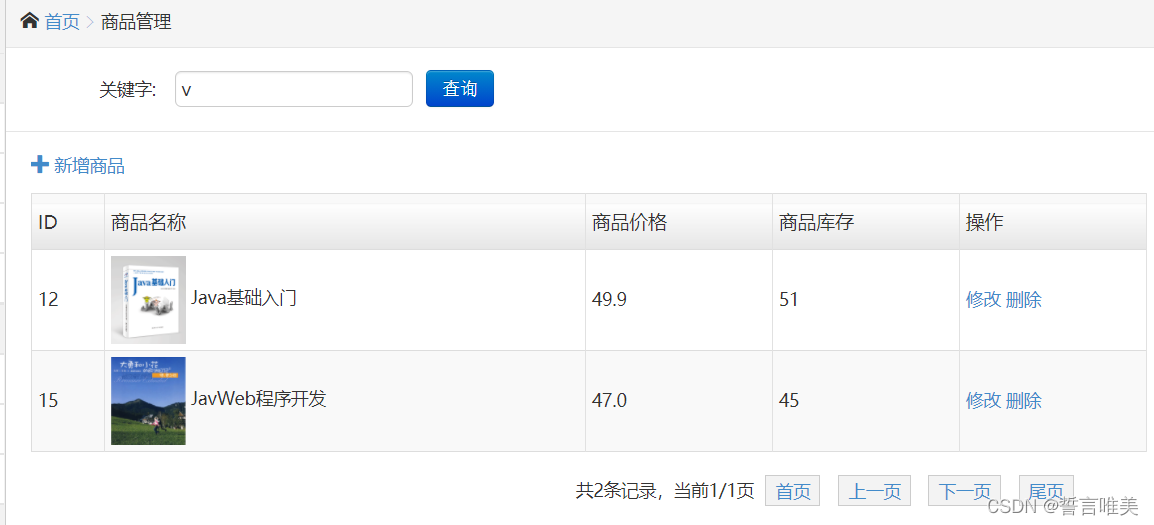
3.我们自己编写分页功能
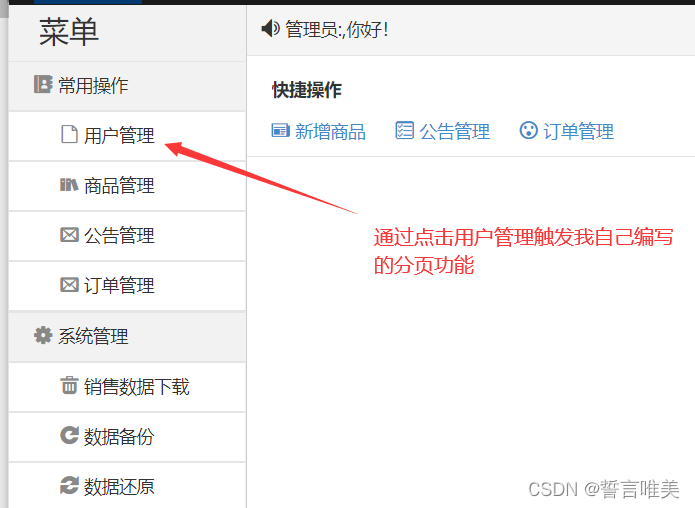
进入controller
//用户管理_显示用户列表,并以分页形式显示,我们采用物理分页,即多次去数据库查询记录,然后返回到我们的视图层
    //首先我们需要1.获得用户记录的条数,2.根据条件限制去查找该页的记录
    //另外我们这里也用到了一个模糊查询,进行用户的筛选
    @GetMapping("/userManage")
    public ModelAndView userList(HttpServletRequest request) {
        ModelAndView modelandview = new ModelAndView();

        //接收用户搜索的关键字
        String keyword = request.getParameter("keywords");

        int cpage = 1;//当前页数,第一次进入
        String cp = request.getParameter("cp"); //获取用户指定的页
        if(cp != null)
        {
            cpage = Integer.parseInt(cp);
        }
        //先根据条件获取用户数量
        int arr[] = adminService.totalCountUser(keyword);

        //根据上面返回的结果查询相关的用户
        List<User> userlist = adminService.selectAlluser(cpage,keyword);

        modelandview.addObject("userlist", userlist);
        modelandview.addObject("tsum", arr[0]); //记录总数
        modelandview.addObject("tpage", arr[1]);  //记录总页数
        modelandview.addObject("cpage", cpage);  //当前在第几页

        //保障,进行关键字查询时,在点击下一页的按钮时,也能够将关键字传入,继续上一次之后的查询
        //http://localhost:8080/userManage?keywords=admin&sub=%E6%9F%A5%E8%AF%A2
        //如果不加的下面的if代码的话点击下一页得到的路径就是:http://localhost:8080/userManage?cp=1
        //不会有keywords=xxxx,不能进行模糊查询
        if(keyword != null) {
            modelandview.addObject("searchParams", "&keywords="+keyword);
        }
        modelandview.setViewName("admin/admin_user");
        return modelandview;
    }
service
接口
//根据条件查询所有用户记录
    List<User> selectAlluser(int cpage,String keyword);
实现类
@Override
    public List<User> selectAlluser(int cpage,String keyword) {
        int pagecount = 5;//每页显示条数
        int limit1 =(cpage - 1)*pagecount;
        int limit2 = pagecount;
        Map<String,Object> map = new HashMap<>();
        map.put("keyword",keyword);
        map.put("limit1",limit1);
        map.put("limit2",limit2);
        return adminMapper.selectAlluser(map);
    }
mapper接口
//根据条件查询所有用户记录
    List<User> selectAlluser(Map map);
mapper映射
<!--根据条件查询用户记录-->
    <select id="selectAlluser" parameterType="map" resultType="user">
        select * from user
        <where>
            <if test=" keyword != null">
                username like concat(concat('%',#{keyword}),'%') and
            </if>
            1 = 1
            order by registTime desc limit #{limit1}, #{limit2}
        </where>
    </select>
实现效果图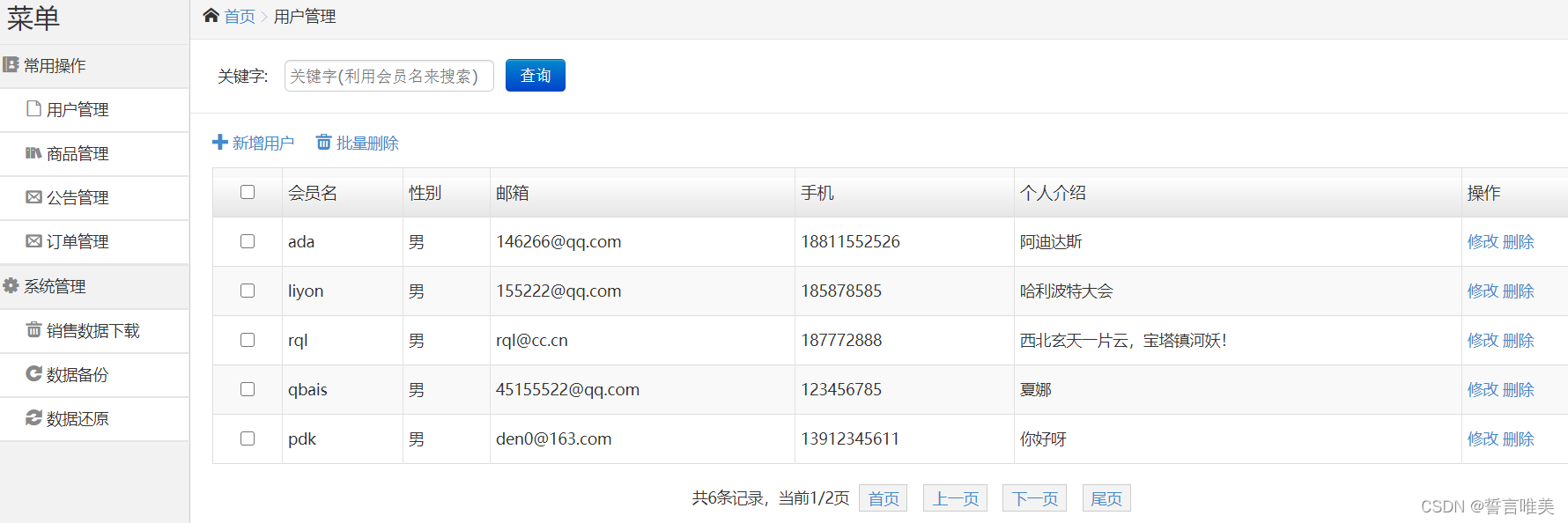
关键字查询