一 Java NIO 简介
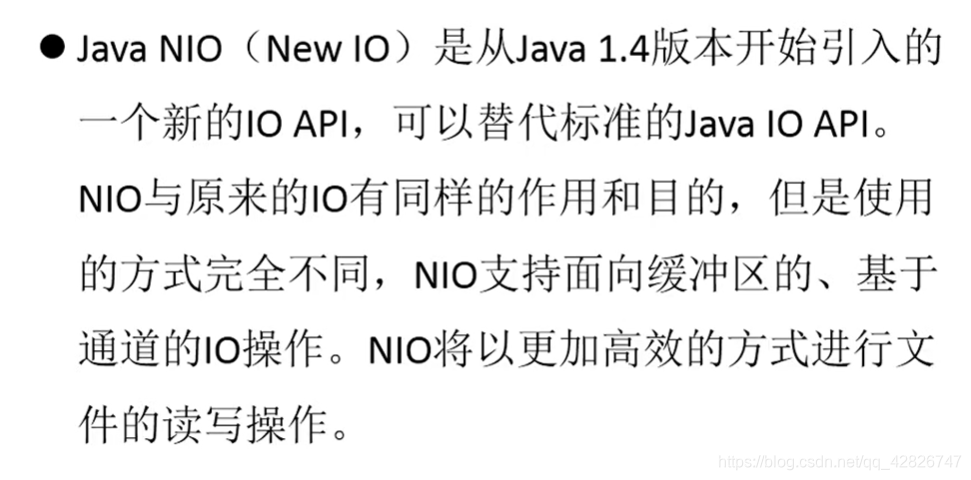
二 Java NIO 与 IO的主要区别
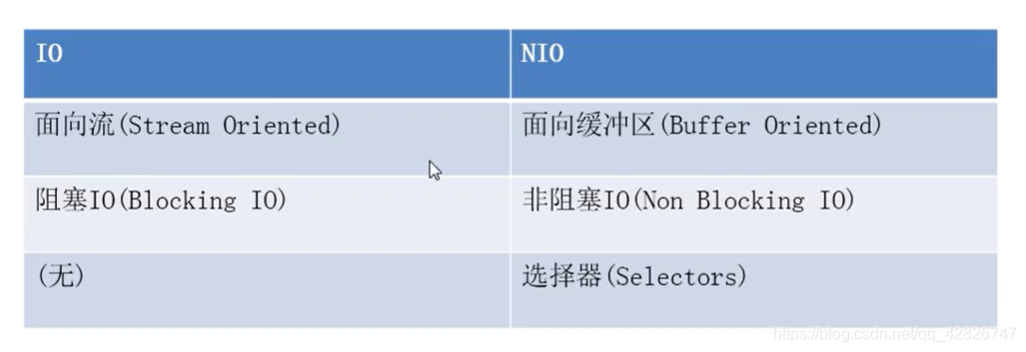
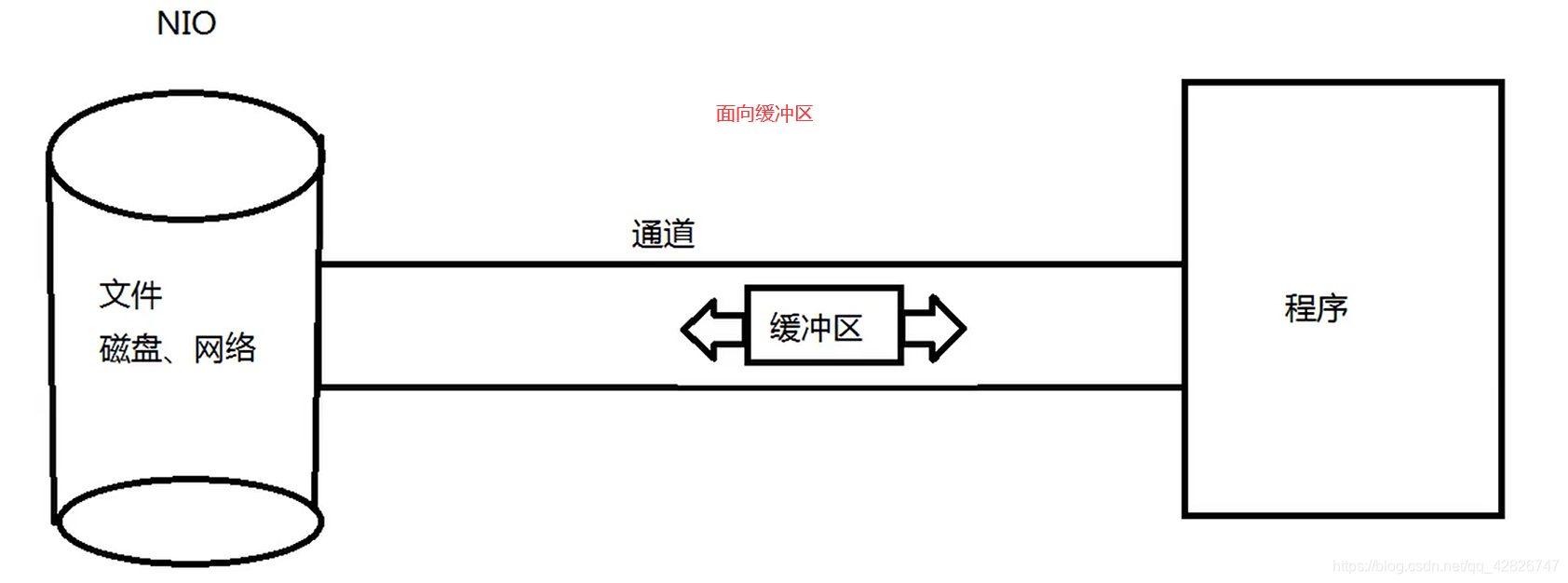
三 缓冲区(Buffer)和通道(Channel)
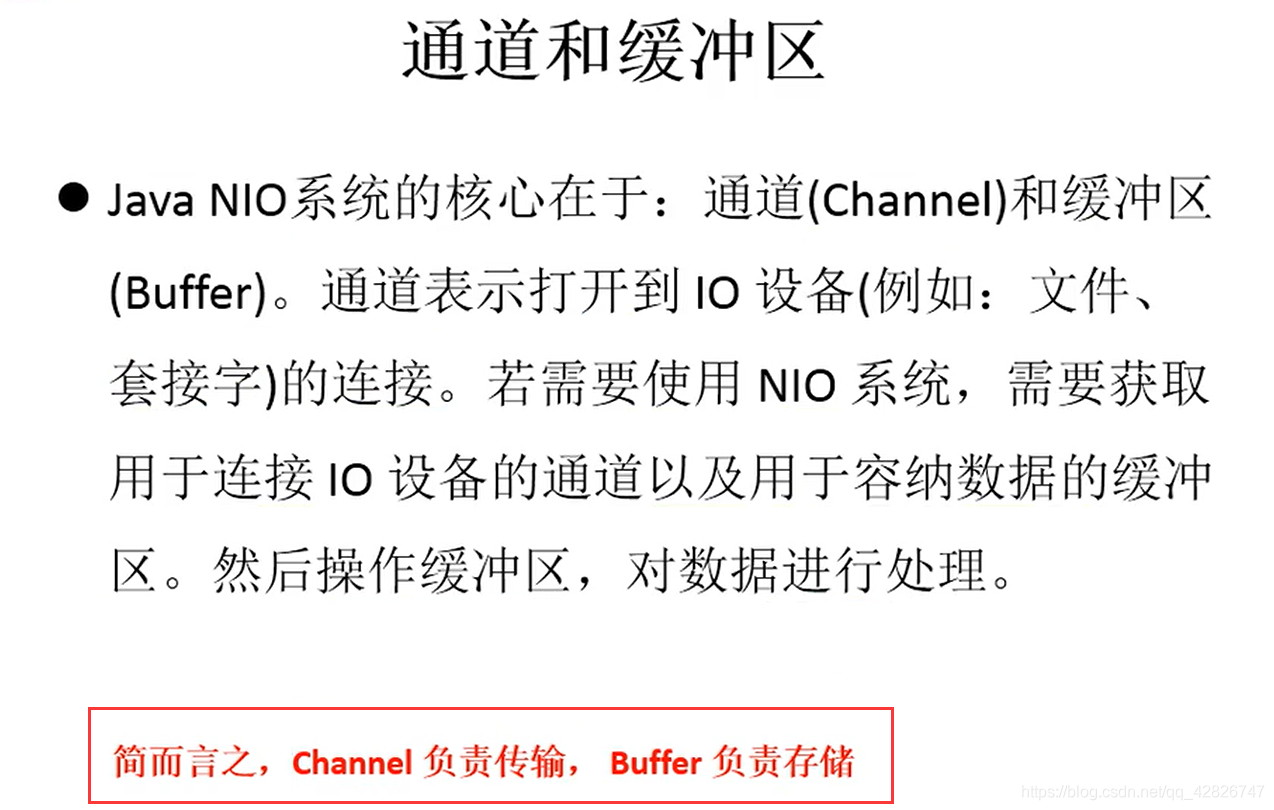
1. 缓冲区(Buffer)
- 缓冲区:在Java NIO 中负责数据的存取。缓冲区就是数组,用于存储不同数据类型数据
- 根据数据类型不同(boolean除外),提供了相应类型的缓冲区
① ByteBuffer
② CharBuffer
③ ShortBuffer
④ IntBuffer
⑤ LongBuffer
⑥ FloatBuffer
⑦ DoubleBuffer - 获取缓冲区:上述缓冲区的管理方式几乎一致,通过
allocate()获取缓冲区 - 缓冲区存取数据的两个核心方法
put()和get()
public void test1(){
		String str = "abcde";

		//1. 分配一个指定大小的缓冲区
		ByteBuffer buf = ByteBuffer.allocate(1024);

		System.out.println("-----------------allocate()----------------");
		System.out.println(buf.position());
		System.out.println(buf.limit());
		System.out.println(buf.capacity());

		//2. 利用 put() 存入数据到缓冲区中
		buf.put(str.getBytes());

		System.out.println("-----------------put()----------------");
		System.out.println(buf.position());
		System.out.println(buf.limit());
		System.out.println(buf.capacity());

		//3. 切换读取数据模式
		buf.flip();

		System.out.println("-----------------flip()----------------");
		System.out.println(buf.position());
		System.out.println(buf.limit());
		System.out.println(buf.capacity());

		//4. 利用 get() 读取缓冲区中的数据
		byte[] dst = new byte[buf.limit()];
		buf.get(dst);
		System.out.println(new String(dst, 0, dst.length));

		System.out.println("-----------------get()----------------");
		System.out.println(buf.position());
		System.out.println(buf.limit());
		System.out.println(buf.capacity());

		//5. rewind() : 可重复读
		buf.rewind();

		System.out.println("-----------------rewind()----------------");
		System.out.println(buf.position());
		System.out.println(buf.limit());
		System.out.println(buf.capacity());

		//6. clear() : 清空缓冲区. 但是缓冲区中的数据依然存在,但是处于“被遗忘”状态
		buf.clear();

		System.out.println("-----------------clear()----------------");
		System.out.println(buf.position());
		System.out.println(buf.limit());
		System.out.println(buf.capacity());

		System.out.println((char)buf.get());

	}
- mark: 标记,表示记录当前position的位置,可以通过reset()将position恢复到mark的位置
@Test
	public void test2(){
		String str = "abcde";

		ByteBuffer buf = ByteBuffer.allocate(1024);

		buf.put(str.getBytes());

		buf.flip();

		byte[] dst = new byte[buf.limit()];
		buf.get(dst, 0, 2);
		System.out.println(new String(dst, 0, 2));
		System.out.println(buf.position());

		//mark() : 标记
		buf.mark();

		buf.get(dst, 2, 2);
		System.out.println(new String(dst, 2, 2));
		System.out.println(buf.position());

		//reset() : 恢复到 mark 的位置
		buf.reset();
		System.out.println(buf.position());

		//判断缓冲区中是否还有剩余数据
		if(buf.hasRemaining()){

			//获取缓冲区中可以操作的数量
			System.out.println(buf.remaining());
		}
	}
注意:mark <= position <= limit <= capacity
2.直接缓冲区和非直接缓冲区
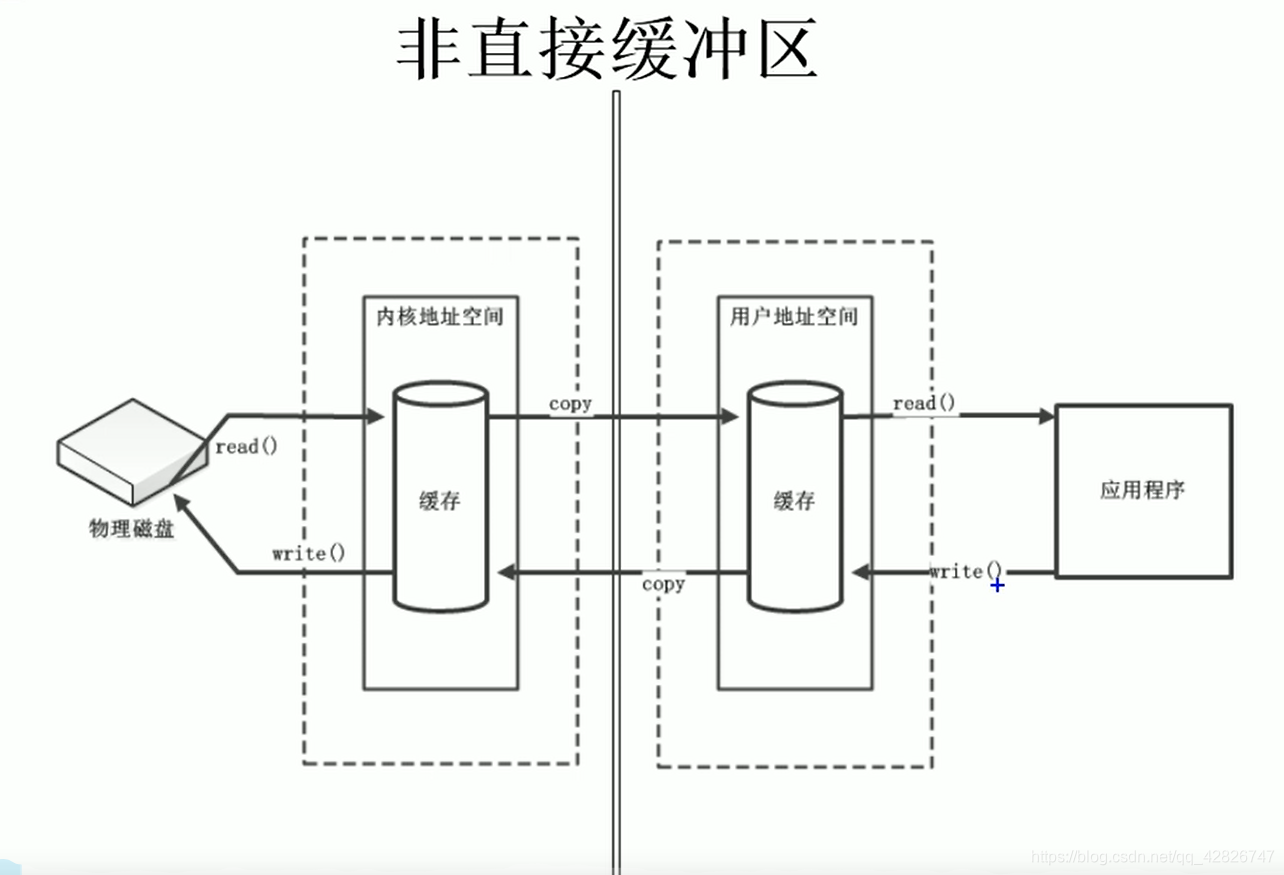
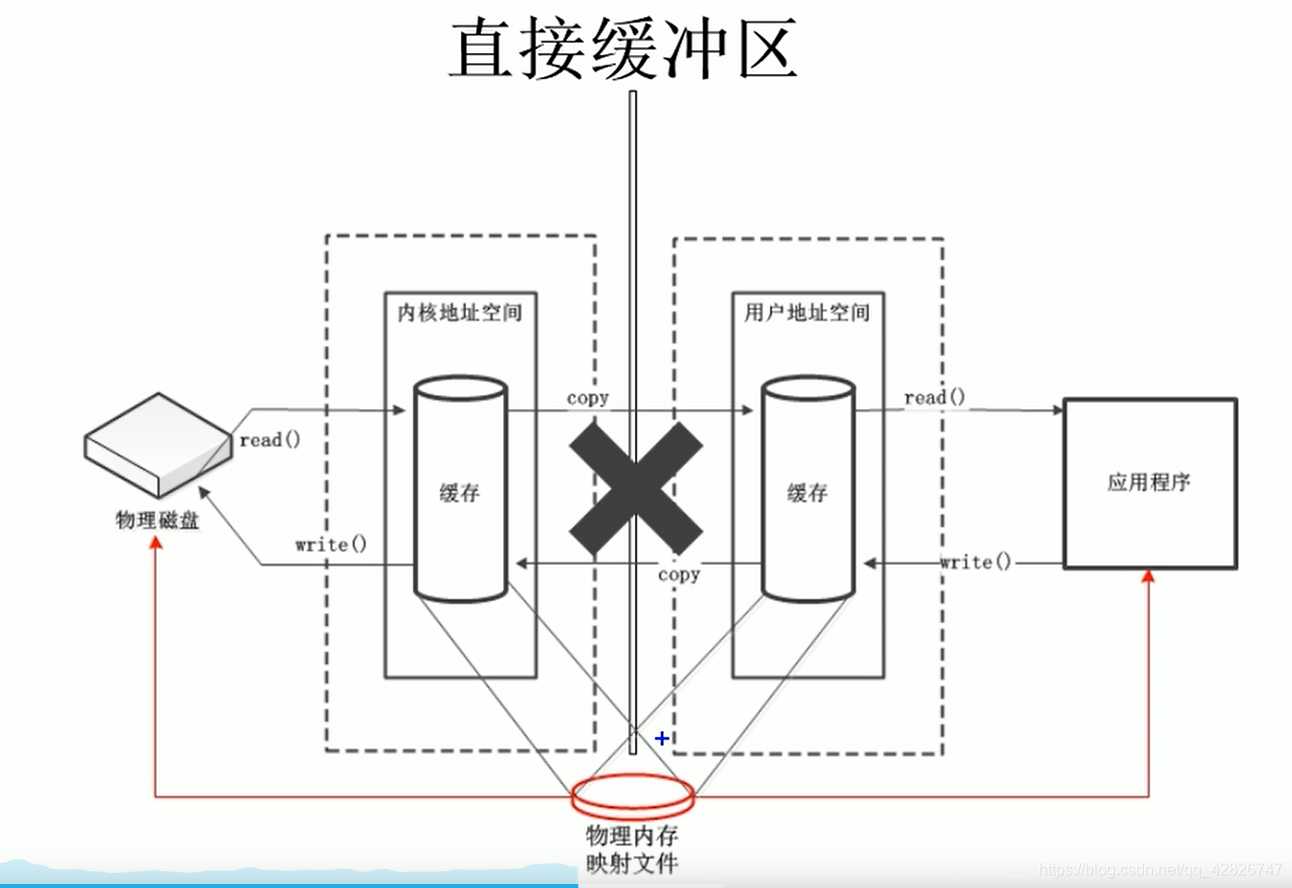
非直接缓冲区:通过allocate()方法分配缓冲区,将缓冲区建立在JVM的内存中
直接缓冲区:通过allocateDirect()方法分配直接缓冲区,将缓冲区建立在操作系统的物理内存中。(可以提高效率)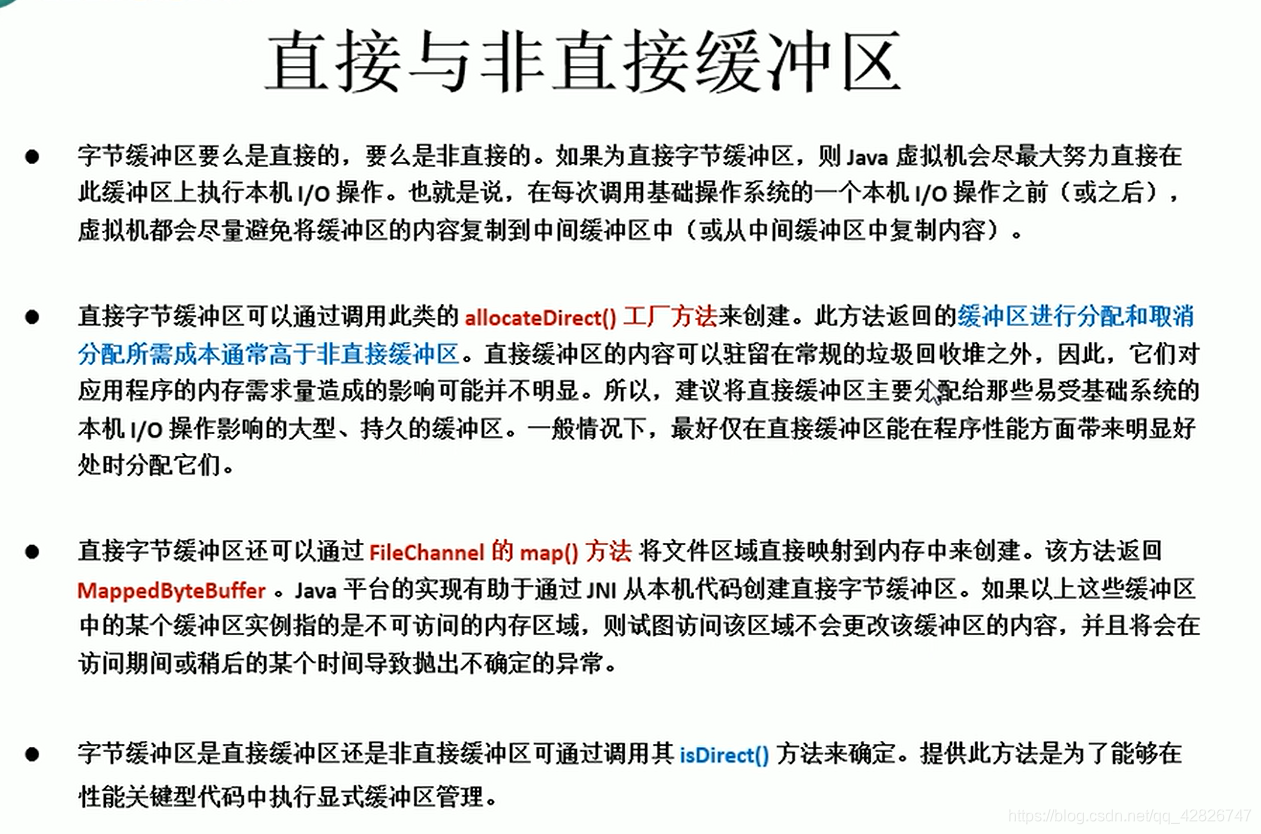
3. 通道
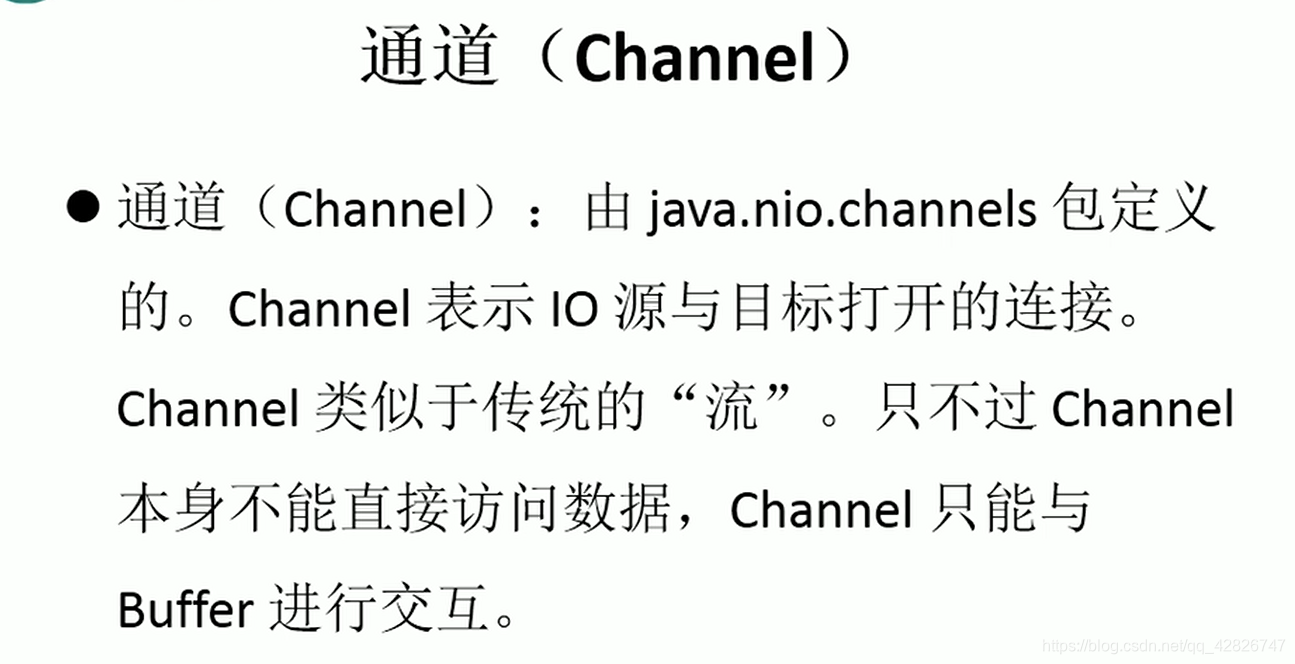
- 通道:用于源节点与目标节点的连接,在Java NIO中负责缓冲区中数据的传输,Channel本事不存储数据,因此需要配合缓冲区进行传输
- 通道的主要实现类
① FileChannel
② SocketChannel
③ ServerSocketChannel
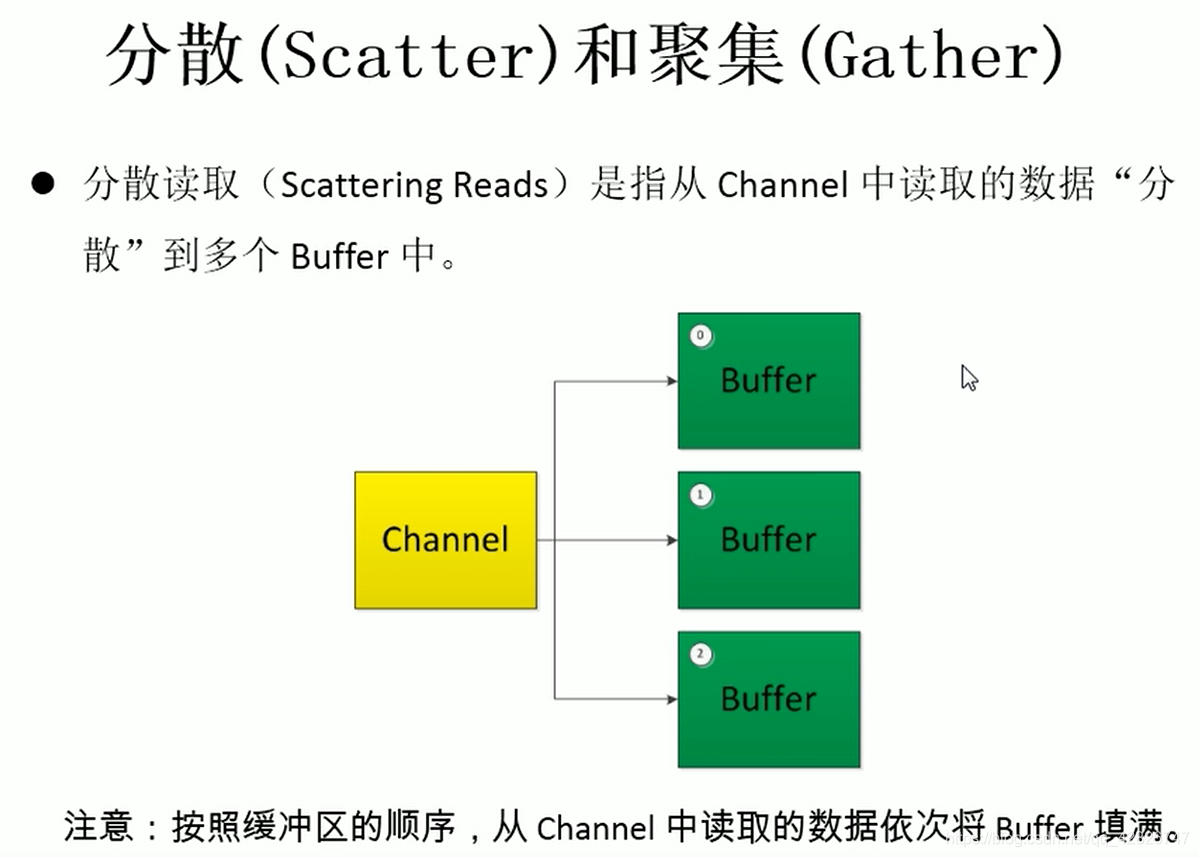
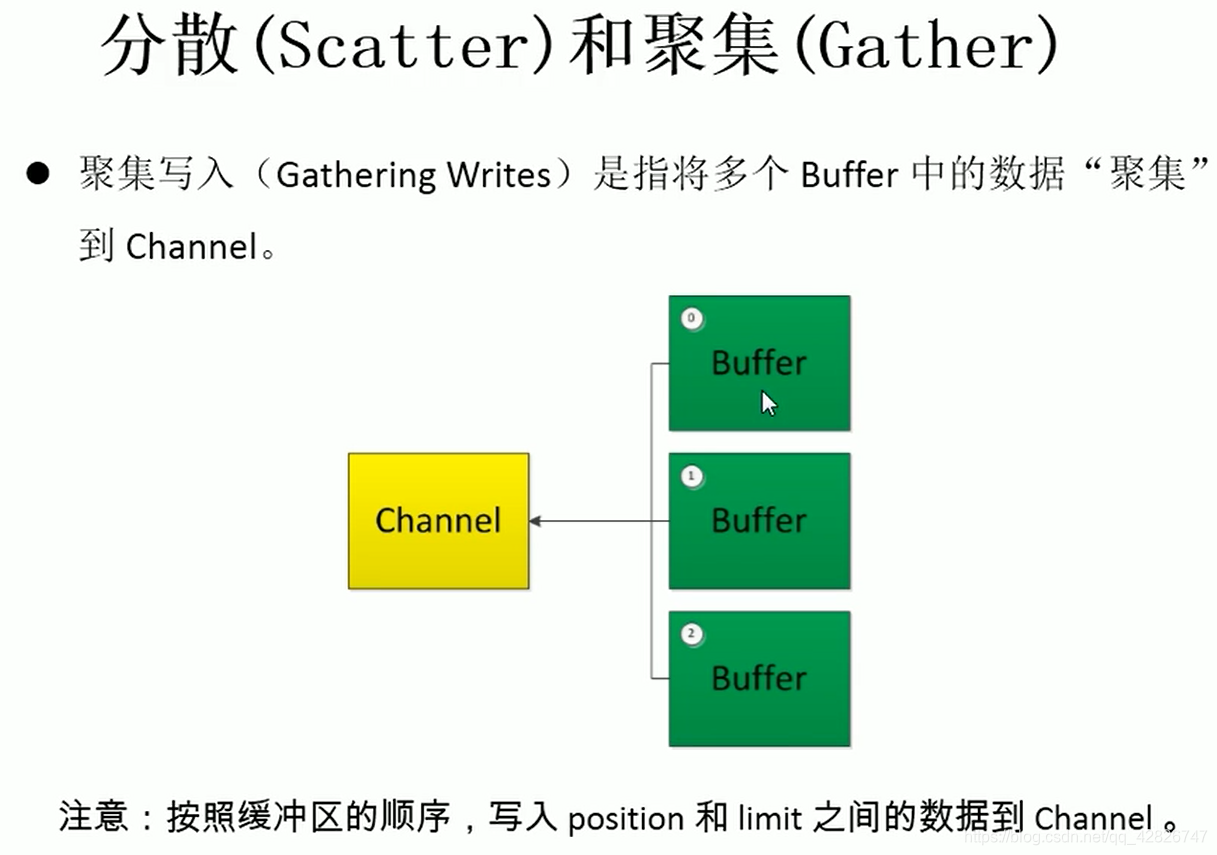
④ DatagramChannel - 分散和聚集
/*
 * 三、获取通道
 * 1. Java 针对支持通道的类提供了 getChannel() 方法
 * 		本地 IO:
 * 		FileInputStream/FileOutputStream
 * 		RandomAccessFile
 *
 * 		网络IO:
 * 		Socket
 * 		ServerSocket
 * 		DatagramSocket
 *
 * 2. 在 JDK 1.7 中的 NIO.2 针对各个通道提供了静态方法 open()
 * 3. 在 JDK 1.7 中的 NIO.2 的 Files 工具类的 newByteChannel()
 *
 * 四、通道之间的数据传输
 * transferFrom()
 * transferTo()
 *
 * 五、分散(Scatter)与聚集(Gather)
 * 分散读取(Scattering Reads):将通道中的数据分散到多个缓冲区中
 * 聚集写入(Gathering Writes):将多个缓冲区中的数据聚集到通道中
 *
 * 六、字符集:Charset
 * 编码:字符串 -> 字节数组
 * 解码:字节数组  -> 字符串
 *
 */
public class TestChannel {

	//字符集
	@Test
	public void test6() throws IOException{
		Charset cs1 = Charset.forName("GBK");

		//获取编码器
		CharsetEncoder ce = cs1.newEncoder();

		//获取解码器
		CharsetDecoder cd = cs1.newDecoder();

		CharBuffer cBuf = CharBuffer.allocate(1024);
		cBuf.put("尚硅谷威武!");
		cBuf.flip();

		//编码
		ByteBuffer bBuf = ce.encode(cBuf);

		for (int i = 0; i < 12; i++) {
			System.out.println(bBuf.get());
		}

		//解码
		bBuf.flip();
		CharBuffer cBuf2 = cd.decode(bBuf);
		System.out.println(cBuf2.toString());

		System.out.println("------------------------------------------------------");

		Charset cs2 = Charset.forName("UTF-8");
		bBuf.flip();
		CharBuffer cBuf3 = cs2.decode(bBuf);
		System.out.println(cBuf3.toString());
	}

	@Test
	public void test5(){
		Map<String, Charset> map = Charset.availableCharsets();

		Set<Entry<String, Charset>> set = map.entrySet();

		for (Entry<String, Charset> entry : set) {
			System.out.println(entry.getKey() + "=" + entry.getValue());
		}
	}

	//分散和聚集
	@Test
	public void test4() throws IOException{
		RandomAccessFile raf1 = new RandomAccessFile("1.txt", "rw");

		//1. 获取通道
		FileChannel channel1 = raf1.getChannel();

		//2. 分配指定大小的缓冲区
		ByteBuffer buf1 = ByteBuffer.allocate(100);
		ByteBuffer buf2 = ByteBuffer.allocate(1024);

		//3. 分散读取
		ByteBuffer[] bufs = {buf1, buf2};
		channel1.read(bufs);

		for (ByteBuffer byteBuffer : bufs) {
			byteBuffer.flip();
		}

		System.out.println(new String(bufs[0].array(), 0, bufs[0].limit()));
		System.out.println("-----------------");
		System.out.println(new String(bufs[1].array(), 0, bufs[1].limit()));

		//4. 聚集写入
		RandomAccessFile raf2 = new RandomAccessFile("2.txt", "rw");
		FileChannel channel2 = raf2.getChannel();

		channel2.write(bufs);
	}

	//通道之间的数据传输(直接缓冲区)
	@Test
	public void test3() throws IOException{
		FileChannel inChannel = FileChannel.open(Paths.get("d:/1.mkv"), StandardOpenOption.READ);
		FileChannel outChannel = FileChannel.open(Paths.get("d:/2.mkv"), StandardOpenOption.WRITE, StandardOpenOption.READ, StandardOpenOption.CREATE);

//		inChannel.transferTo(0, inChannel.size(), outChannel);
		outChannel.transferFrom(inChannel, 0, inChannel.size());

		inChannel.close();
		outChannel.close();
	}

	//使用直接缓冲区完成文件的复制(内存映射文件)
	@Test
	public void test2() throws IOException{//2127-1902-1777
		long start = System.currentTimeMillis();

		FileChannel inChannel = FileChannel.open(Paths.get("d:/1.mkv"), StandardOpenOption.READ);
		FileChannel outChannel = FileChannel.open(Paths.get("d:/2.mkv"), StandardOpenOption.WRITE, StandardOpenOption.READ, StandardOpenOption.CREATE);

		//内存映射文件
		MappedByteBuffer inMappedBuf = inChannel.map(MapMode.READ_ONLY, 0, inChannel.size());
		MappedByteBuffer outMappedBuf = outChannel.map(MapMode.READ_WRITE, 0, inChannel.size());

		//直接对缓冲区进行数据的读写操作
		byte[] dst = new byte[inMappedBuf.limit()];
		inMappedBuf.get(dst);
		outMappedBuf.put(dst);

		inChannel.close();
		outChannel.close();

		long end = System.currentTimeMillis();
		System.out.println("耗费时间为:" + (end - start));
	}

	//利用通道完成文件的复制(非直接缓冲区)
	@Test
	public void test1(){//10874-10953
		long start = System.currentTimeMillis();

		FileInputStream fis = null;
		FileOutputStream fos = null;
		//①获取通道
		FileChannel inChannel = null;
		FileChannel outChannel = null;
		try {
			fis = new FileInputStream("d:/1.mkv");
			fos = new FileOutputStream("d:/2.mkv");

			inChannel = fis.getChannel();
			outChannel = fos.getChannel();

			//②分配指定大小的缓冲区
			ByteBuffer buf = ByteBuffer.allocate(1024);

			//③将通道中的数据存入缓冲区中
			while(inChannel.read(buf) != -1){
				buf.flip(); //切换读取数据的模式
				//④将缓冲区中的数据写入通道中
				outChannel.write(buf);
				buf.clear(); //清空缓冲区
			}
		} catch (IOException e) {
			e.printStackTrace();
		} finally {
			if(outChannel != null){
				try {
					outChannel.close();
				} catch (IOException e) {
					e.printStackTrace();
				}
			}

			if(inChannel != null){
				try {
					inChannel.close();
				} catch (IOException e) {
					e.printStackTrace();
				}
			}

			if(fos != null){
				try {
					fos.close();
				} catch (IOException e) {
					e.printStackTrace();
				}
			}

			if(fis != null){
				try {
					fis.close();
				} catch (IOException e) {
					e.printStackTrace();
				}
			}
		}

		long end = System.currentTimeMillis();
		System.out.println("耗费时间为:" + (end - start));

	}

}
四 NIO的非阻塞式网络通道
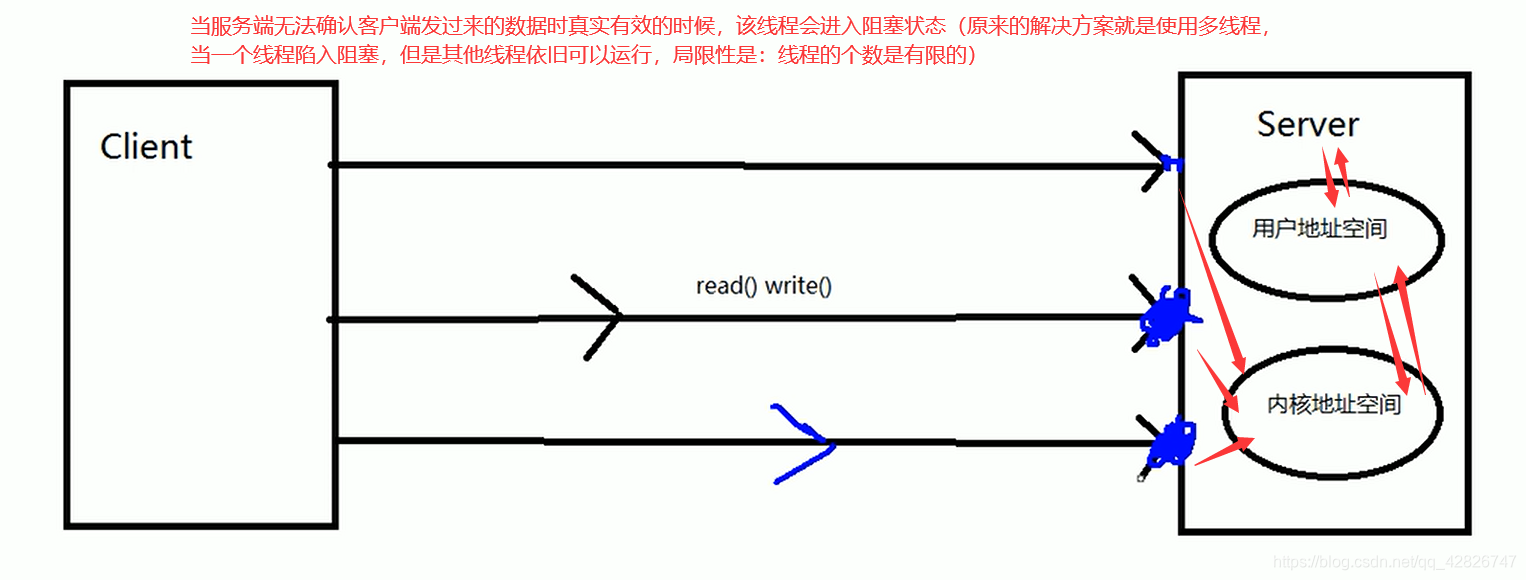
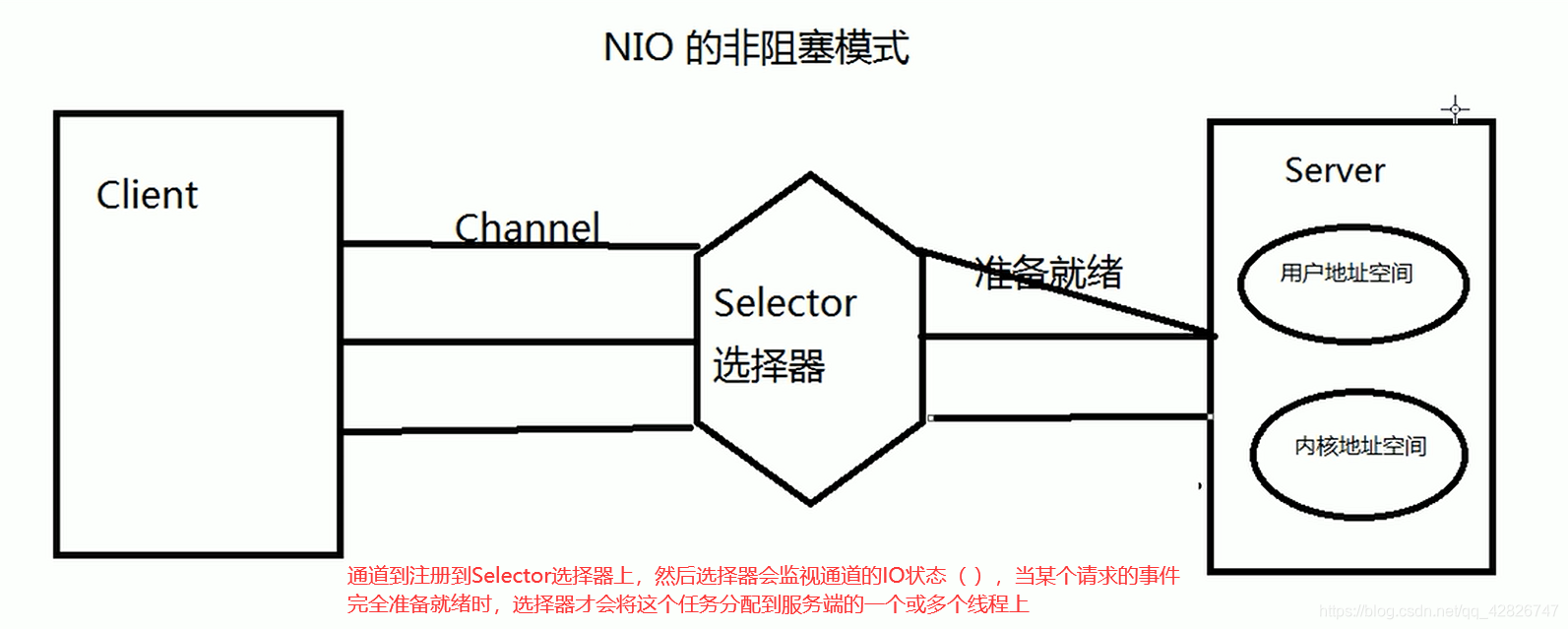
1. 阻塞与非阻塞
2. 阻塞式NIO
package com.atguigu.nio;

import java.io.IOException;
import java.net.InetSocketAddress;
import java.nio.ByteBuffer;
import java.nio.channels.FileChannel;
import java.nio.channels.ServerSocketChannel;
import java.nio.channels.SocketChannel;
import java.nio.file.Paths;
import java.nio.file.StandardOpenOption;

import org.junit.Test;

/*
 * 一、使用 NIO 完成网络通信的三个核心:
 *
 * 1. 通道(Channel):负责连接
 *
 * 	   java.nio.channels.Channel 接口:
 * 			|--SelectableChannel
 * 				|--SocketChannel
 * 				|--ServerSocketChannel
 * 				|--DatagramChannel
 *
 * 				|--Pipe.SinkChannel
 * 				|--Pipe.SourceChannel
 *
 * 2. 缓冲区(Buffer):负责数据的存取
 *
 * 3. 选择器(Selector):是 SelectableChannel 的多路复用器。用于监控 SelectableChannel 的 IO 状况
 *
 */
public class TestBlockingNIO {

	//客户端
	@Test
	public void client() throws IOException{
		//1. 获取通道
		SocketChannel sChannel = SocketChannel.open(new InetSocketAddress("127.0.0.1", 9898));

		FileChannel inChannel = FileChannel.open(Paths.get("1.jpg"), StandardOpenOption.READ);

		//2. 分配指定大小的缓冲区
		ByteBuffer buf = ByteBuffer.allocate(1024);

		//3. 读取本地文件,并发送到服务端
		while(inChannel.read(buf) != -1){
			buf.flip();
			sChannel.write(buf);
			buf.clear();
		}

		//4. 关闭通道
		inChannel.close();
		sChannel.close();
	}

	//服务端
	@Test
	public void server() throws IOException{
		//1. 获取通道
		ServerSocketChannel ssChannel = ServerSocketChannel.open();

		FileChannel outChannel = FileChannel.open(Paths.get("2.jpg"), StandardOpenOption.WRITE, StandardOpenOption.CREATE);

		//2. 绑定连接
		ssChannel.bind(new InetSocketAddress(9898));

		//3. 获取客户端连接的通道
		SocketChannel sChannel = ssChannel.accept();

		//4. 分配指定大小的缓冲区
		ByteBuffer buf = ByteBuffer.allocate(1024);

		//5. 接收客户端的数据,并保存到本地
		while(sChannel.read(buf) != -1){
			buf.flip();
			outChannel.write(buf);
			buf.clear();
		}

		//6. 关闭通道
		sChannel.close();
		outChannel.close();
		ssChannel.close();

	}

}


public class TestBlockingNIO2 {

	//客户端
	@Test
	public void client() throws IOException{
		SocketChannel sChannel = SocketChannel.open(new InetSocketAddress("127.0.0.1", 9898));

		FileChannel inChannel = FileChannel.open(Paths.get("1.jpg"), StandardOpenOption.READ);

		ByteBuffer buf = ByteBuffer.allocate(1024);

		while(inChannel.read(buf) != -1){
			buf.flip();
			sChannel.write(buf);
			buf.clear();
		}

		sChannel.shutdownOutput();

		//接收服务端的反馈
		int len = 0;
		while((len = sChannel.read(buf)) != -1){
			buf.flip();
			System.out.println(new String(buf.array(), 0, len));
			buf.clear();
		}

		inChannel.close();
		sChannel.close();
	}

	//服务端
	@Test
	public void server() throws IOException{
		ServerSocketChannel ssChannel = ServerSocketChannel.open();

		FileChannel outChannel = FileChannel.open(Paths.get("2.jpg"), StandardOpenOption.WRITE, StandardOpenOption.CREATE);

		ssChannel.bind(new InetSocketAddress(9898));

		SocketChannel sChannel = ssChannel.accept();

		ByteBuffer buf = ByteBuffer.allocate(1024);

		while(sChannel.read(buf) != -1){
			buf.flip();
			outChannel.write(buf);
			buf.clear();
		}

		//发送反馈给客户端
		buf.put("服务端接收数据成功".getBytes());
		buf.flip();
		sChannel.write(buf);

		sChannel.close();
		outChannel.close();
		ssChannel.close();
	}

}
3. 非阻塞式NIO
public class TestNonBlockingNIO {

	//客户端
	@Test
	public void client() throws IOException{
		//1. 获取通道
		SocketChannel sChannel = SocketChannel.open(new InetSocketAddress("127.0.0.1", 9898));

		//2. 切换非阻塞模式
		sChannel.configureBlocking(false);

		//3. 分配指定大小的缓冲区
		ByteBuffer buf = ByteBuffer.allocate(1024);

		//4. 发送数据给服务端
		Scanner scan = new Scanner(System.in);

		while(scan.hasNext()){
			String str = scan.next();
			buf.put((new Date().toString() + "\n" + str).getBytes());
			buf.flip();
			sChannel.write(buf);
			buf.clear();
		}

		//5. 关闭通道
		sChannel.close();
	}

	//服务端
	@Test
	public void server() throws IOException{
		//1. 获取通道
		ServerSocketChannel ssChannel = ServerSocketChannel.open();

		//2. 切换非阻塞模式
		ssChannel.configureBlocking(false);

		//3. 绑定连接
		ssChannel.bind(new InetSocketAddress(9898));

		//4. 获取选择器
		Selector selector = Selector.open();

		//5. 将通道注册到选择器上, 并且指定“监听接收事件”
		ssChannel.register(selector, SelectionKey.OP_ACCEPT);

		//6. 轮询式的获取选择器上已经“准备就绪”的事件
		while(selector.select() > 0){

			//7. 获取当前选择器中所有注册的“选择键(已就绪的监听事件)”
			Iterator<SelectionKey> it = selector.selectedKeys().iterator();

			while(it.hasNext()){
				//8. 获取准备“就绪”的是事件
				SelectionKey sk = it.next();

				//9. 判断具体是什么事件准备就绪
				if(sk.isAcceptable()){
					//10. 若“接收就绪”,获取客户端连接
					SocketChannel sChannel = ssChannel.accept();

					//11. 切换非阻塞模式
					sChannel.configureBlocking(false);

					//12. 将该通道注册到选择器上
					sChannel.register(selector, SelectionKey.OP_READ);
				}else if(sk.isReadable()){
					//13. 获取当前选择器上“读就绪”状态的通道
					SocketChannel sChannel = (SocketChannel) sk.channel();

					//14. 读取数据
					ByteBuffer buf = ByteBuffer.allocate(1024);

					int len = 0;
					while((len = sChannel.read(buf)) > 0 ){
						buf.flip();
						System.out.println(new String(buf.array(), 0, len));
						buf.clear();
					}
				}

				//15. 取消选择键 SelectionKey
				it.remove();
			}
		}
	}
}
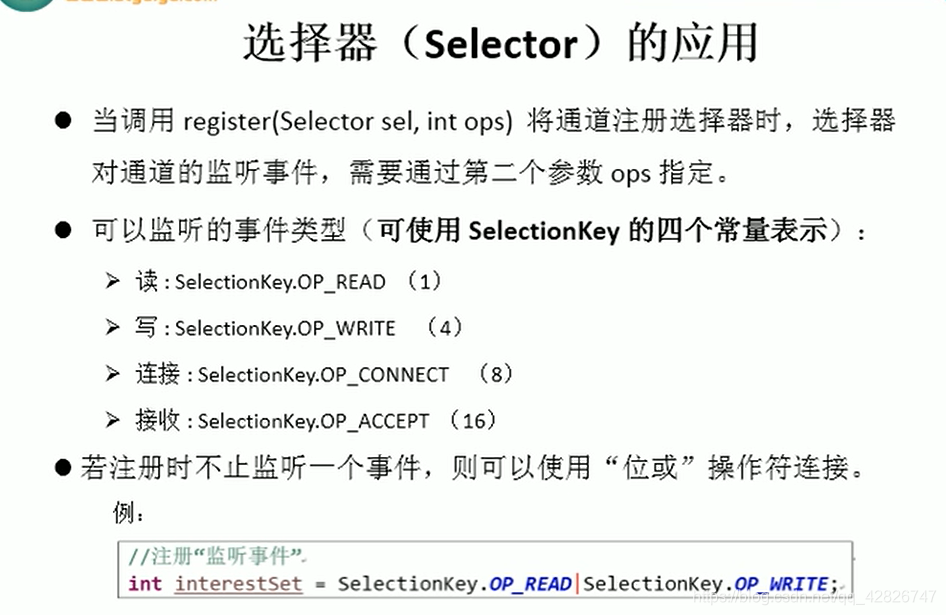
其中注册选择器
4. DatagramChannel
@Test
	public void send() throws IOException{
		DatagramChannel dc = DatagramChannel.open();

		dc.configureBlocking(false);

		ByteBuffer buf = ByteBuffer.allocate(1024);

		Scanner scan = new Scanner(System.in);

		while(scan.hasNext()){
			String str = scan.next();
			buf.put((new Date().toString() + ":\n" + str).getBytes());
			buf.flip();
			dc.send(buf, new InetSocketAddress("127.0.0.1", 9898));
			buf.clear();
		}

		dc.close();
	}

	@Test
	public void receive() throws IOException{
		DatagramChannel dc = DatagramChannel.open();

		dc.configureBlocking(false);

		dc.bind(new InetSocketAddress(9898));

		Selector selector = Selector.open();

		dc.register(selector, SelectionKey.OP_READ);

		while(selector.select() > 0){
			Iterator<SelectionKey> it = selector.selectedKeys().iterator();

			while(it.hasNext()){
				SelectionKey sk = it.next();

				if(sk.isReadable()){
					ByteBuffer buf = ByteBuffer.allocate(1024);

					dc.receive(buf);
					buf.flip();
					System.out.println(new String(buf.array(), 0, buf.limit()));
					buf.clear();
				}
			}

			it.remove();
		}
	}

}
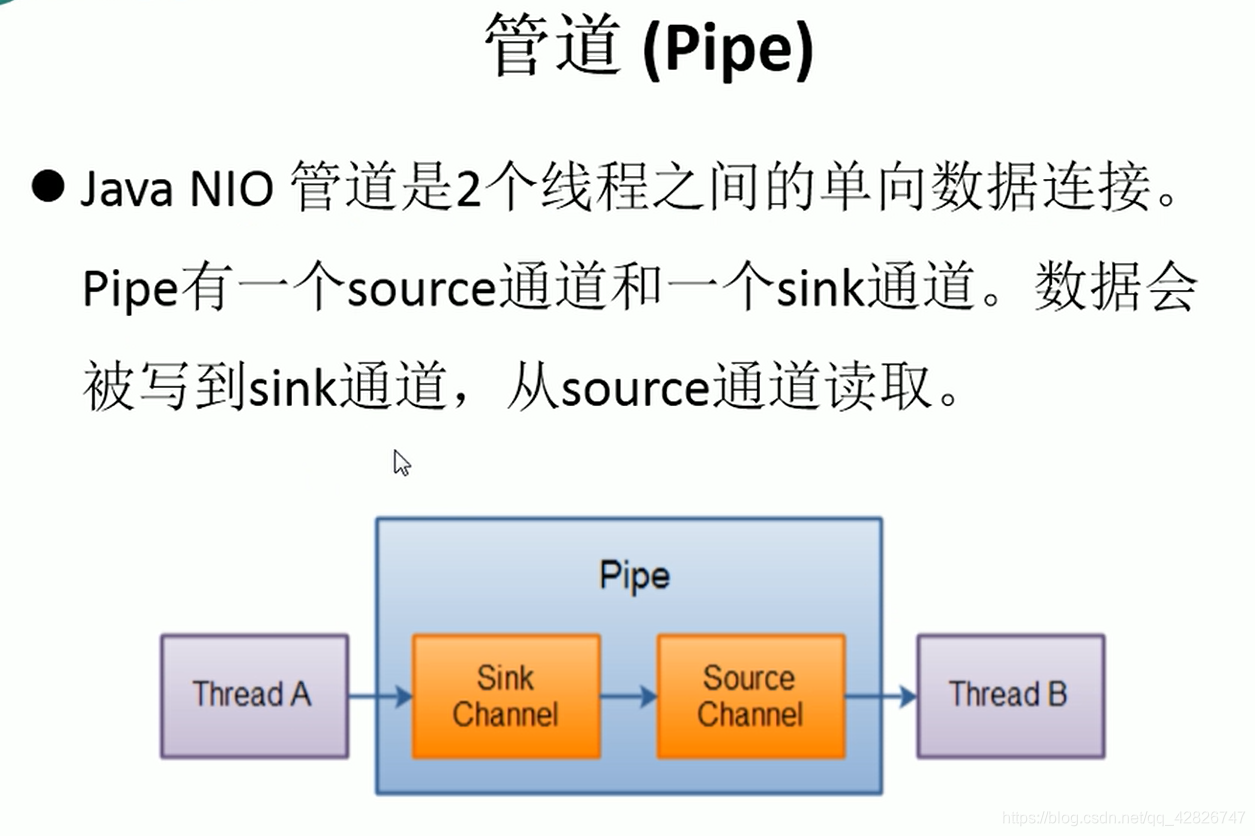
五 管道(Pipe)
package com.atguigu.nio;

import java.io.IOException;
import java.nio.ByteBuffer;
import java.nio.channels.Pipe;

import org.junit.Test;

public class TestPipe {

	@Test
	public void test1() throws IOException{
		//1. 获取管道
		Pipe pipe = Pipe.open();

		//2. 将缓冲区中的数据写入管道
		ByteBuffer buf = ByteBuffer.allocate(1024);

		Pipe.SinkChannel sinkChannel = pipe.sink();
		buf.put("通过单向管道发送数据".getBytes());
		buf.flip();
		sinkChannel.write(buf);

		//3. 读取缓冲区中的数据
		Pipe.SourceChannel sourceChannel = pipe.source();
		buf.flip();
		int len = sourceChannel.read(buf);
		System.out.println(new String(buf.array(), 0, len));

		sourceChannel.close();
		sinkChannel.close();
	}

}
六 Java NIO2(Path、Paths与Files)
package com.atguigu.nio;

import java.io.IOException;
import java.nio.ByteBuffer;
import java.nio.channels.FileChannel;
import java.nio.channels.SeekableByteChannel;
import java.nio.file.DirectoryStream;
import java.nio.file.Files;
import java.nio.file.LinkOption;
import java.nio.file.Path;
import java.nio.file.Paths;
import java.nio.file.StandardCopyOption;
import java.nio.file.StandardOpenOption;
import java.nio.file.attribute.BasicFileAttributes;
import java.nio.file.attribute.DosFileAttributeView;

import org.junit.Test;

public class TestNIO_2 {


	//自动资源管理:自动关闭实现 AutoCloseable 接口的资源
	@Test
	public void test8(){
		try(FileChannel inChannel = FileChannel.open(Paths.get("1.jpg"), StandardOpenOption.READ);
				FileChannel outChannel = FileChannel.open(Paths.get("2.jpg"), StandardOpenOption.WRITE, StandardOpenOption.CREATE)){

			ByteBuffer buf = ByteBuffer.allocate(1024);
			inChannel.read(buf);

		}catch(IOException e){

		}
	}

	/*
		Files常用方法:用于操作内容
			SeekableByteChannel newByteChannel(Path path, OpenOption…how) : 获取与指定文件的连接,how 指定打开方式。
			DirectoryStream newDirectoryStream(Path path) : 打开 path 指定的目录
			InputStream newInputStream(Path path, OpenOption…how):获取 InputStream 对象
			OutputStream newOutputStream(Path path, OpenOption…how) : 获取 OutputStream 对象
	 */
	@Test
	public void test7() throws IOException{
		SeekableByteChannel newByteChannel = Files.newByteChannel(Paths.get("1.jpg"), StandardOpenOption.READ);

		DirectoryStream<Path> newDirectoryStream = Files.newDirectoryStream(Paths.get("e:/"));

		for (Path path : newDirectoryStream) {
			System.out.println(path);
		}
	}

	/*
		Files常用方法:用于判断
			boolean exists(Path path, LinkOption … opts) : 判断文件是否存在
			boolean isDirectory(Path path, LinkOption … opts) : 判断是否是目录
			boolean isExecutable(Path path) : 判断是否是可执行文件
			boolean isHidden(Path path) : 判断是否是隐藏文件
			boolean isReadable(Path path) : 判断文件是否可读
			boolean isWritable(Path path) : 判断文件是否可写
			boolean notExists(Path path, LinkOption … opts) : 判断文件是否不存在
			public static <A extends BasicFileAttributes> A readAttributes(Path path,Class<A> type,LinkOption... options) : 获取与 path 指定的文件相关联的属性。
	 */
	@Test
	public void test6() throws IOException{
		Path path = Paths.get("e:/nio/hello7.txt");
//		System.out.println(Files.exists(path, LinkOption.NOFOLLOW_LINKS));

		BasicFileAttributes readAttributes = Files.readAttributes(path, BasicFileAttributes.class, LinkOption.NOFOLLOW_LINKS);
		System.out.println(readAttributes.creationTime());
		System.out.println(readAttributes.lastModifiedTime());

		DosFileAttributeView fileAttributeView = Files.getFileAttributeView(path, DosFileAttributeView.class, LinkOption.NOFOLLOW_LINKS);

		fileAttributeView.setHidden(false);
	}

	/*
		Files常用方法:
			Path copy(Path src, Path dest, CopyOption … how) : 文件的复制
			Path createDirectory(Path path, FileAttribute<?> … attr) : 创建一个目录
			Path createFile(Path path, FileAttribute<?> … arr) : 创建一个文件
			void delete(Path path) : 删除一个文件
			Path move(Path src, Path dest, CopyOption…how) : 将 src 移动到 dest 位置
			long size(Path path) : 返回 path 指定文件的大小
	 */
	@Test
	public void test5() throws IOException{
		Path path1 = Paths.get("e:/nio/hello2.txt");
		Path path2 = Paths.get("e:/nio/hello7.txt");

		System.out.println(Files.size(path2));

//		Files.move(path1, path2, StandardCopyOption.ATOMIC_MOVE);
	}

	@Test
	public void test4() throws IOException{
		Path dir = Paths.get("e:/nio/nio2");
//		Files.createDirectory(dir);

		Path file = Paths.get("e:/nio/nio2/hello3.txt");
//		Files.createFile(file);

		Files.deleteIfExists(file);
	}

	@Test
	public void test3() throws IOException{
		Path path1 = Paths.get("e:/nio/hello.txt");
		Path path2 = Paths.get("e:/nio/hello2.txt");

		Files.copy(path1, path2, StandardCopyOption.REPLACE_EXISTING);
	}

	/*
		Paths 提供的 get() 方法用来获取 Path 对象:
			Path get(String first, String … more) : 用于将多个字符串串连成路径。
		Path 常用方法:
			boolean endsWith(String path) : 判断是否以 path 路径结束
			boolean startsWith(String path) : 判断是否以 path 路径开始
			boolean isAbsolute() : 判断是否是绝对路径
			Path getFileName() : 返回与调用 Path 对象关联的文件名
			Path getName(int idx) : 返回的指定索引位置 idx 的路径名称
			int getNameCount() : 返回Path 根目录后面元素的数量
			Path getParent() :返回Path对象包含整个路径,不包含 Path 对象指定的文件路径
			Path getRoot() :返回调用 Path 对象的根路径
			Path resolve(Path p) :将相对路径解析为绝对路径
			Path toAbsolutePath() : 作为绝对路径返回调用 Path 对象
			String toString() : 返回调用 Path 对象的字符串表示形式
	 */
	@Test
	public void test2(){
		Path path = Paths.get("e:/nio/hello.txt");

		System.out.println(path.getParent());
		System.out.println(path.getRoot());

//		Path newPath = path.resolve("e:/hello.txt");
//		System.out.println(newPath);

		Path path2 = Paths.get("1.jpg");
		Path newPath = path2.toAbsolutePath();
		System.out.println(newPath);

		System.out.println(path.toString());
	}

	@Test
	public void test1(){
		Path path = Paths.get("e:/", "nio/hello.txt");

		System.out.println(path.endsWith("hello.txt"));
		System.out.println(path.startsWith("e:/"));

		System.out.println(path.isAbsolute());
		System.out.println(path.getFileName());

		for (int i = 0; i < path.getNameCount(); i++) {
			System.out.println(path.getName(i));
		}
	}
}
版权声明:本文为qq_42826747原创文章,遵循CC 4.0 BY-SA版权协议,转载请附上原文出处链接和本声明。