MD5加密
shiro有很多加密算法,如md5和sha,而且还支持加盐,使得密码的解析变得更有难度,更好的保障了数据的安全性。首先我们来看看md5算法的各种实现方式:
package com.buba.test;

import org.apache.shiro.crypto.hash.Md5Hash;
import org.apache.shiro.crypto.hash.SimpleHash;

public class MD5Test {
    public static void main(String[] args) {
        //要加密的字符串
        String password = "123456";
        //盐
        String salt = "ywz";
        //散列次数
        Integer hashIterations = 2;
        //1.不加盐的md5
        Md5Hash md5 = new Md5Hash(password);
        System.out.println(md5.toString());
        //2.加盐的md5
        md5 = new Md5Hash(password, salt);
        System.out.println(md5.toString());
        //3.加盐再设置散列次数的md5
        md5 = new Md5Hash(password, salt, hashIterations);
        System.out.println(md5.toString());
        //4.利用SimpleHash来设置md5(上面三种都可以通过这个来设置,这里举例加盐加散列次数的)
        //第一个参数是算法名称,这里指定md5,第二个是要加密的密码,第三个参数是加盐,第四个是散列次数
        SimpleHash hash = new SimpleHash("md5", password, salt, hashIterations);
        System.out.println(hash.toString());
    }
}
上面列举了md5算法的各种实现,包括不加盐的,加盐的,加盐加散列次数的(从HashedCredentialsMatcher的源码可得知,默认散列次数为1),还有通过SimpleHash来实现md5的方式,下面看看它们的输出:
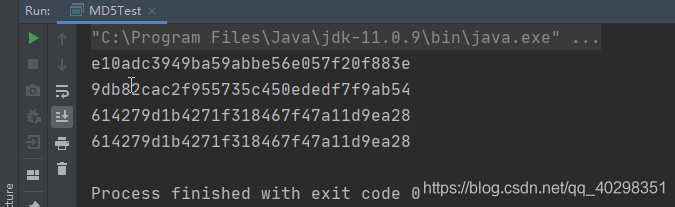
可以看到,不加盐、加盐、加盐加散列次数后的加密字段是不一样的,而它们的数据安全性也是递增的!但是注意散列次数不能设置过大,否则运行效率会变低。下面讲讲加密算法在realm中的应用。
一般我们在数据库保存的用户密码都是经过加密后的密码,所以我们想把加密后的用户信息传给shiro进行认证,就必须把该密码加密的算法、添加的盐以及散列的次数告诉shiro,因此我们需要配置realm里面的凭证匹配器credentialsMatcher,当用户将账号密码输进来时,shiro就会根据我们设置的加密规则对密码进行加密加盐,然后与realm中查询封装好的数据库数据进行比对认证。
/**
     * 身份验证
     *
     * @param authenticationToken
     * @return
     * @throws AuthenticationException
     */
    @Override
    protected AuthenticationInfo doGetAuthenticationInfo(AuthenticationToken authenticationToken) throws AuthenticationException {
        // 1.先通过主体传过来的验证信息获取用户名
        String account = (String) authenticationToken.getPrincipal();
        //*********
        // 2.通过用户名去数据库中获取凭证 此处只是简单模拟
        String password = "";
        if (!"user".equals(account)) {
            return null;
        }
        // 用户加密后的密码和盐,这两个应该从数据库中获取
        password = "614279d1b4271f318467f47a11d9ea28";
        String salt = "ywz";
        // ********
        //查询到用户,则返回AuthenticationInfo对象
        SimpleAuthenticationInfo authenticationInfo = new SimpleAuthenticationInfo(account, password, "customRealm");
        // 设置盐
        authenticationInfo.setCredentialsSalt(ByteSource.Util.bytes(salt));
        return authenticationInfo;
    }
注意SimpleAuthenticationInfo构造函数中的盐是ByteSource类型的,因此我们需要用接口ByteSource中的静态内部类Util下的bytes(String str)方法来将我们的盐转换成ByteSource类型。
向自定义Realm中注入认证匹配器。
 /**
     * 将CustomRealm交给Spring管理
     *
     * @return
     */
    @Bean
    public CustomRealm realm() {
        CustomRealm customRealm = new CustomRealm();
        // 添加认证匹配器
        HashedCredentialsMatcher matcher = new HashedCredentialsMatcher();
        // 设置加密算法名字
        matcher.setHashAlgorithmName("MD5");
        // 设置迭代次数
        matcher.setHashIterations(2);
        customRealm.setCredentialsMatcher(matcher);
        return customRealm;
    }
运行测试:
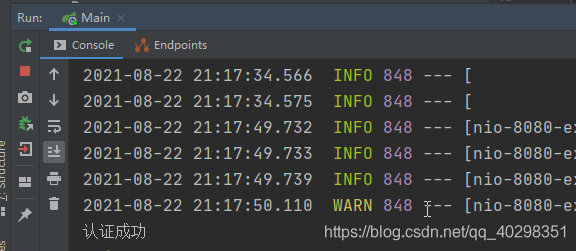
可以看到,我们模拟的用户输入的账号是user,密码是123456,但数据库中的密码是加密加盐后的密码,所以我们给realm配置了加密算法的规则,让它将我们传过去的密码进行了同样的加密加盐(这里盐不需要我们设置,是从数据库中查询出来的),然后再和数据库的数据进行比对认证,因此这里认证是成功的(123456进行md5加密和ywz加盐后然后再散列2次就是这一串东西了:614279d1b4271f318467f47a11d9ea28。