目录
一、概述
Binding的作用就是架在Source与Target之间的桥梁,数据可以在这座桥梁的帮助下来流通。就像现实世界中的桥梁会设置一些关卡进行安检一样,Binding这座桥上也可以设置关卡对数据的有效性进行检验,不仅如此,当Binding的两端要求使用不同的数据类型时,我们还可以为数据设置转换器。
Binding用于数据有效性检验的关卡是它的ValidationRules属性,用于数据类型转换的关卡是它的Converter属性。
二、详细说明
2.1 Binding的数据效验
Binding的ValidationRules属性是Collection<ValidationRule>,可以为每个Binding设置多个数据校验的条件,每个条件是一个ValidationRule类型对象。
ValidationRule类是个抽象类,在使用的时候我们需要创建它的派生类并实现它的Validate方法。Validate方法的返回值是ValidationResult类型对象,如果效验通过,就把ValidationResult对象的IsValid属性设为true,反之,需要把IsValid属性设为false并为其ErrorContent属性设置一个合适的消息内容(一般是一个字符串)。
实例:
在UI上绘制一个TextBox和一个Slider,然后在CS后台使用Binding把它们关联起来。Slider的取值范围0到100。
程序的XAML代码如下:
<Window x:Class="WpfApp1.MainWindow"
        xmlns="http://schemas.microsoft.com/winfx/2006/xaml/presentation"
        xmlns:x="http://schemas.microsoft.com/winfx/2006/xaml"
        xmlns:d="http://schemas.microsoft.com/expression/blend/2008"
        xmlns:mc="http://schemas.openxmlformats.org/markup-compatibility/2006"
        xmlns:local="clr-namespace:WpfApp1"
        mc:Ignorable="d"
        Title="MainWindow" Height="120" Width="300">
    <StackPanel>
        <TextBox x:Name="textBox1" Margin="5"/>
        <Slider x:Name="slider1" Minimum="0" Maximum="100" Margin="5"/>
    </StackPanel>
</Window>
为了效验,需要准备一个ValidationRule的派生类:
using System.Windows.Controls;

namespace WpfApp1
{
    public class RangeValidationRule:ValidationRule
    {
        public override ValidationResult Validate(object value, System.Globalization.CultureInfo cultureInfo)
        {
            double d = 0;
            if (double.TryParse(value.ToString(), out d))
            {
                if (d >= 0 && d <= 100)
                {
                    return new ValidationResult(true, null);
                }
            }
            return new ValidationResult(false, "Validation Failed");
        }
    }
}
CS代码如下:
using System.Windows;
using System.Windows.Controls;
using System.Windows.Data;

namespace WpfApp1
{
    /// <summary>
    /// MainWindow.xaml 的交互逻辑
    /// </summary>
    public partial class MainWindow : Window
    {
        public MainWindow()
        {
            InitializeComponent();

            Binding binding = new Binding("Value") { Source = this.slider1 };
            binding.UpdateSourceTrigger = UpdateSourceTrigger.PropertyChanged;
            RangeValidationRule rvr = new RangeValidationRule();
            binding.ValidationRules.Add(rvr);
            this.textBox1.SetBinding(TextBox.TextProperty, binding);
        }
    }
}
效果如下:
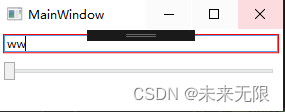
完成后运行程序,当输入0到100之间的值时程序正常显示,但输入这个区间之外的值或不能解析的值时TextBox会心思红色的边框,表示值是错误的,不能传递给Source。
Binding进行校验时默认的行为是认为来自Source的数据是没有问题的,只有来自Target的数据有问题(Target多为UI控件,所以等价于用户输入的数据)。所以只有Target到Source的数据才会进行校验。如果想要改变这种行为,就需要ValidatesOnTargetUpdated="True"。
2.2 Binding的数据转换
Slider的Value是double类型,TextBox的Text是string类型,它们却能来去自如,这是Binding的数据转换机制Data Convert,因为double到string的转换比较简单,所以WPF自动为我们添加了数据转换器Data Converet。
但有些类型之间的转换就不是WPF能替我们做的了,遇到这种情况我们只有自己写Converet了。例如下面的这些情况:
- Source里的数据是Y、N和X三个值(可能是char类型、string类型或自定义枚举类型),UI上对应的是CheckBox控件,需要把这三个值映射为它的Ischecked属性值。
- 当TextBox里已经输入了文字时用于登录的button才会出现,这是string类型与Visibility枚举类型或bool类型之间的转换。
- Source里的数据可能是Male或Female。UI上对应的是用于显示头像的Image控件,这时需要把Source里的值转换成对你应的头像图片URI。
方法就是创建一个类并让这个类实现IValueConverer接口,IValueConveret接口定义如下:
public interface IValueConverter
    {
        object Convert(object value, Type targetType, object parameter, CultureInfo culture);
        object ConvertBack(object value, Type targetType, object parameter, CultureInfo culture);
    }
当数据从Binding的Source流向Target时,Convert方法将被调用;反之,当Binding的Target流向Source时,ConvertBack方法将被调用。这两个方法的参数列表一模一样,第一个参数为Object,最大限度的保证了Convert的重用性;第二个参数用于确定方法返回的类型(注意避免与Binding的Target混淆),第三个参数用于把额外的信息传入方法,若需要传递多个信息则可把信息放入一个集合对象来传入方法。
Binding的Mode属性会影响这两个方法的调用。如果Mode为TwoWay则两个方法都有可能被调用,如果Mode为OneWay,那么只有Convert方法会被调用。
实例:
在列表里向玩家显示一些军用飞机的状态。
首先创建几个自定义数据类型:
public enum Category
    {
        Bomber,
        Fighter
    }

    public enum State
    {
        Available,
        Locked,
        Unknown
    }

    public class Plane
    {
        public Category Category { get; set; }
        public string Name { get; set; }
        public State State { get; set; }
    }
在UI里Plane的Category属性被映射为轰战机或战斗机的图标。
同时,飞机的State属性在UI里被映射为CheckBox。因为存在以上两个映射关系,我们需要提供两个Converter:一个是由Category类型单向转换为string,另一个是在State与bool类型之间的双向转换,代码如下:
public class CategoryToSourceConveret : IValueConverter
    {
        public object Convert(object value, Type targetType, object parameter, CultureInfo culture)
        {
            Category c = (Category)value;
            switch (c)
            {
                case Category.Bomber:
                    return @"\Icons\Bomber.png";
                case Category.Fighter:
                    return @"\Icons\Fighter.png";
                default: return null;
            }
        }

        public object ConvertBack(object value, Type targetType, object parameter, CultureInfo culture)
        {
            throw new NotImplementedException();
        }
}

public class StateToNullableBoolConveret : IValueConverter
    {
        public object Convert(object value, Type targetType, object parameter, CultureInfo culture)
        {
            State s = (State)value;
            switch (s)
            {
                case State.Available:
                    return true;
                case State.Locked:
                    return false;
                case State.Unknown:
                default: return null;
            }
        }


        public object ConvertBack(object value, Type targetType, object parameter, CultureInfo culture)
        {
            bool? nb = (bool?)value;
            switch (nb)
            {
                case true:
                    return State.Available;
                case false:
                    return State.Locked;
                case null:
                default:
                    return State.Unknown;
            }
        }
    }
UI代码如下:
<Window x:Class="WpfApp1.MainWindow"
        xmlns="http://schemas.microsoft.com/winfx/2006/xaml/presentation"
        xmlns:x="http://schemas.microsoft.com/winfx/2006/xaml"
        xmlns:d="http://schemas.microsoft.com/expression/blend/2008"
        xmlns:mc="http://schemas.openxmlformats.org/markup-compatibility/2006"
        xmlns:local="clr-namespace:WpfApp1"
        mc:Ignorable="d"
        Title="MainWindow" Height="350" Width="520">
    <Window.Resources>
        <local:CategoryToSourceConveret x:Key="cts"/>
        <local:StateToNullableBoolConveret x:Key="stc"/>
    </Window.Resources>
    <StackPanel>
        <ListBox x:Name="listBoxPlane" Height="160" Margin="5">
            <ListBox.ItemTemplate>
                <DataTemplate>
                    <StackPanel Orientation="Horizontal">
                        <Image Width="20" Height="20" Source="{Binding Path=Category,Converter={StaticResource cts}}"></Image>
                        <TextBlock Text="{Binding Path=Name}" Width="60" Margin="80,0"></TextBlock>
                        <CheckBox IsThreeState="True" IsChecked="{Binding Path=State,Converter={StaticResource stc}}"></CheckBox>
                    </StackPanel>
                </DataTemplate>
            </ListBox.ItemTemplate>
        </ListBox>
        <Button x:Name="buttonLoad" Content="Load" Height="25" Margin="5,0" Click="buttonLoad_Click"></Button>
        <Button x:Name="buttonSave" Content="Save" Height="25" Margin="5,0" Click="buttonSave_Click"></Button>
    </StackPanel>
</Window>
CS代码:
private void buttonLoad_Click(object sender, RoutedEventArgs e)
        {
            List<Plane> planeList = new List<Plane>() {
                new Plane(){Category=Category.Bomber,Name="B-1",State=State.Unknown},
                new Plane(){Category=Category.Fighter,Name="B-2",State=State.Unknown},
                 new Plane(){Category=Category.Fighter,Name="F-22",State=State.Unknown},
                new Plane(){Category=Category.Fighter,Name="Su-47",State=State.Unknown},
                 new Plane(){Category=Category.Bomber,Name="B-52",State=State.Unknown},
                new Plane(){Category=Category.Fighter,Name="J-10",State=State.Unknown}
            };
            this.listBoxPlane.ItemsSource = planeList;
        }

        private void buttonSave_Click(object sender, RoutedEventArgs e)
        {
            StringBuilder sb = new StringBuilder();
            foreach (Plane p in listBoxPlane.Items)
            {
                sb.AppendLine(string.Format("Category={0},Name={1},State={2}", p.Category, p.Name, p.State));
            }
            File.WriteAllText(Environment.CurrentDirectory + @"\PlaneList.txt", sb.ToString());
        }
效果如下:
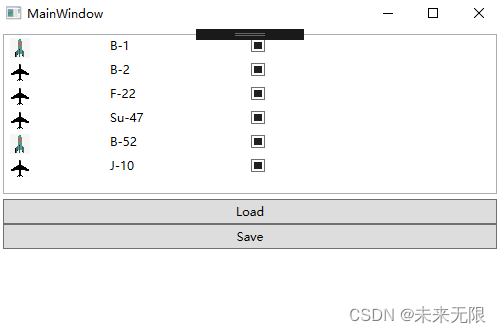
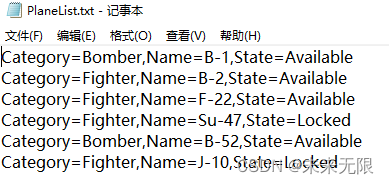
运行程序并单击CheckBox更改飞机的State,单击Save按钮后打开PlaneList.txt,如下图: