Springboot 集成Shiro后 引入Swagger2被拦截的解决方案
1.引入Shiro和Swagger2的依赖
        <!-- swagger -->
        <dependency>
            <groupId>io.springfox</groupId>
            <artifactId>springfox-swagger2</artifactId>
            <version>2.7.0</version>
        </dependency>
        <!-- swagger ui -->
        <dependency>
            <groupId>io.springfox</groupId>
            <artifactId>springfox-swagger-ui</artifactId>
            <version>2.7.0</version>
        </dependency>
        <!-- swagger2增强版接口文档 -->
        <dependency>
            <groupId>com.github.xiaoymin</groupId>
            <artifactId>knife4j-spring-boot-starter</artifactId>
            <version>2.0.4</version>
        </dependency>
		<!--shiro权限管理-->
        <dependency>
            <groupId>org.apache.shiro</groupId>
            <artifactId>shiro-spring-boot-web-starter</artifactId>
            <version>1.8.0</version>
        </dependency>
2.配置对应配置类
2.1Swagger2配置类
@Configuration
@EnableSwagger2
public class SwaggerConfig {

    @Bean
    public Docket webApiConfig(){

        //添加head参数start
        List<Parameter> pars = new ArrayList<>();

        return new Docket(DocumentationType.SWAGGER_2)
                .groupName("webApi")
                .apiInfo(webApiInfo())
                .select()
                .apis(RequestHandlerSelectors.basePackage("com.xxxxx.controller"))//这里设置要扫描的包名
                .build()
                .globalOperationParameters(pars);

    }

    private ApiInfo webApiInfo(){

        return new ApiInfoBuilder()
                .title("xxx-API文档")
                .description("本文档描述了zzz接口定义")
                .version("1.0")
                .contact(new Contact("name", "url", "email"))//文档联系人配置
                .build();
    }

}
2.2 shiro配置拦截处理
		//一定使用LinkedHashMap!!!!
        Map<String, String> filterRuleMap = new LinkedHashMap<>();
        // 放行swagger2相关访问
        filterRuleMap.put("/swagger-ui.html", "anon");
        filterRuleMap.put("/swagger/**", "anon");
        filterRuleMap.put("/swagger-resources/**", "anon");
        filterRuleMap.put("/v2/**", "anon");
        filterRuleMap.put("/webjars/**", "anon");
        filterRuleMap.put("/configuration/**", "anon");
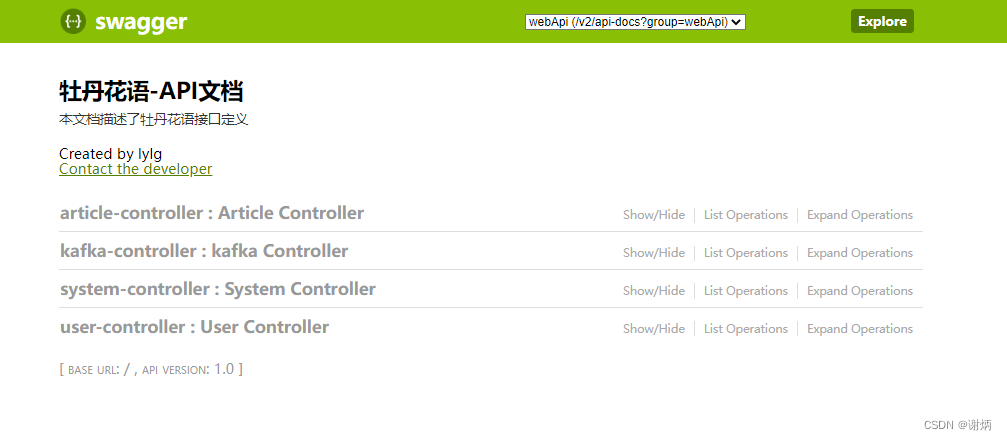
3.运行效果
版权声明:本文为ni9zhe原创文章,遵循CC 4.0 BY-SA版权协议,转载请附上原文出处链接和本声明。