Life is short,you need Python——Python实现坦克大战(三)
皮卡丘比特:Life is short,you need Python——Python实现坦克大战(三)zhuanlan.zhihu.com
四.项目开始
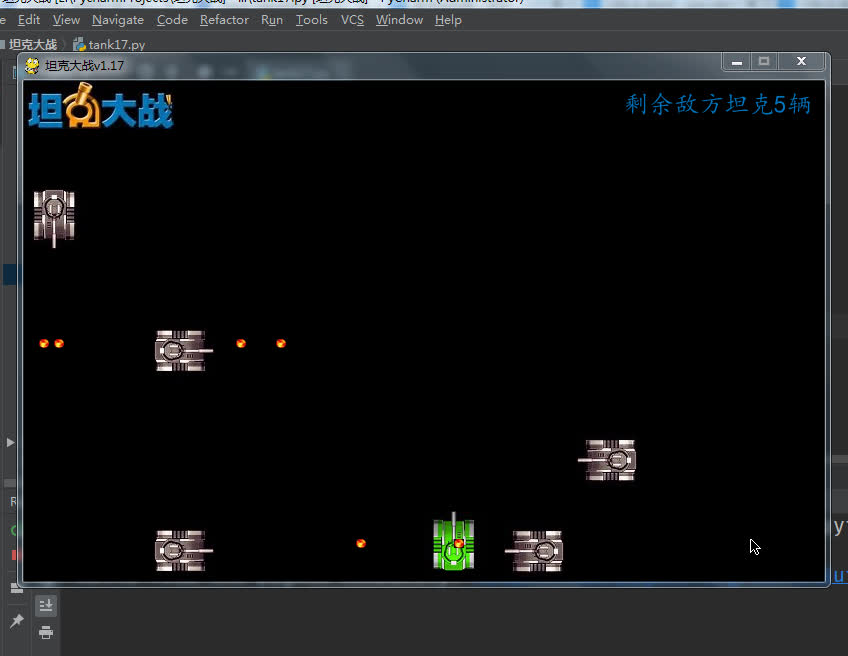
18.实现爆炸效果,并在窗口中显示爆炸效果
素材:图片有点多,一定要注意编号,不然会很难看
好吧,图片像素低于120px,上传不了,有需要可以私聊或评论区,我发给你。
import pygame, time, random, os

_display = pygame.display
COLOR_BLACK = pygame.Color(0, 0, 0)  # 窗口颜色
COLOR_BLUE = pygame.Color(3, 117, 190)  # 窗口左上角文字颜色


class MainGame:
    """主游戏类"""
    window = None  # 游戏主窗口
    SCREEN_WIDTH = 800  # 窗口的宽度
    SCREEN_HEIGHT = 500  # 窗口的高度
    TANK_P1 = None  # 我方坦克
    EnemyTank_list = []  # 存储敌方坦克的数量
    EnemyTank_count = 5  # 要创建的敌方坦克数量
    Bullet_list = []  # 存储我方子弹的列表
    Eneny_bullet_list = []  # 存储敌方坦克的列表
    Explode_list = []  # 存储爆炸效果的列表

    def __init__(self):
        pass

    def startGame(self):
        """开始游戏"""
        _display.init()  # 初始化窗口
        # 创建窗口并加载窗口(借鉴官方文档)
        MainGame.window = _display.set_mode([MainGame.SCREEN_WIDTH, MainGame.SCREEN_HEIGHT])
        MainGame.TANK_P1 = Tank(MainGame.SCREEN_WIDTH // 2, MainGame.SCREEN_HEIGHT - 70)  # 创建我方坦克
        self.creatEnemyTank()  # 创建敌方坦克

        _display.set_caption("坦克大战v1.17")  # 设置游戏的标题
        # 让窗口持续刷新
        while True:
            MainGame.window.fill(COLOR_BLACK)  # 给窗口完成一个填充颜色
            # 在窗口新增“坦克大战”小画布
            MainGame.window.blit(pygame.image.load('img/标题.jpg'), (0, 0))
            # 将绘制文字的小画布粘贴到窗口中
            MainGame.window.blit(self.getTextSurface("剩余敌方坦克{}辆".format(len(MainGame.EnemyTank_list))), (600, 10))
            self.getEvent()  # 在循环中持续完成事件的获取
            # 将我方坦克加入到窗口中
            MainGame.TANK_P1.displayTank()
            # 循环展示敌方坦克
            self.blitEnemyTank()
            # 根据坦克的开关状态调用坦克的移动方法
            if MainGame.TANK_P1 and not MainGame.TANK_P1.stop:
                MainGame.TANK_P1.move()
            # 调用渲染我方子弹列表的方法
            self.blitBullet()
            # 调用渲染敌方子弹列表的方法
            self.blitEnemyBullet()
            # 调用展示爆炸效果的方法
            self.displayExplodes()

            time.sleep(0.02)
            _display.update()  # 窗口的刷新

    def creatEnemyTank(self):
        """创建敌方坦克"""
        top = 100
        for i in range(MainGame.EnemyTank_count):
            left = random.randint(1, 7)  # 每次都随机生成一个left值
            speed = random.randint(2, 4)
            eTank = EnemyTank(left * 100, top, speed)
            MainGame.EnemyTank_list.append(eTank)

    def blitEnemyTank(self):
        """将敌方坦克加入到窗口中"""
        for eTank in MainGame.EnemyTank_list:
            if eTank.live:
                eTank.displayTank()
                eTank.randMove()  # 敌方坦克移动的随机方法
                eBullet = eTank.shot()  # 调用敌方坦克的射击
                if eBullet:  # 如果子弹为None,不加入到列表中
                    MainGame.Eneny_bullet_list.append(eBullet)  # 将子弹存储到敌方子弹列表中
            else:
                MainGame.EnemyTank_list.remove(eTank)

    def blitBullet(self):
        """将我方子弹加入到窗口中"""
        for bullet in MainGame.Bullet_list:
            # 如果子弹还活着,绘制出来,否则,直接从列表中删除子弹
            if bullet.live:
                bullet.displayBullet()
                # 让子弹移动
                bullet.bulletMove()
                # 调用我方子弹与敌方坦克碰撞的方法
                bullet.hitEnemyTank()
            else:
                MainGame.Bullet_list.remove(bullet)

    def blitEnemyBullet(self):
        """将敌方子弹加入到窗口中"""
        for eBullet in MainGame.Eneny_bullet_list:
            # 如果子弹还活着,绘制出来,否则,直接从列表中删除子弹
            if eBullet.live:
                eBullet.displayBullet()
                # 让子弹移动
                eBullet.bulletMove()
            else:
                MainGame.Eneny_bullet_list.remove(eBullet)

    def displayExplodes(self):
        """展示爆炸效果列表"""
        for explode in MainGame.Explode_list:
            if explode.live:
                explode.displayExplode()
            else:
                MainGame.Explode_list.remove(explode)

    def getEvent(self):
        """获取程序运行期间所有的鼠标和键盘事件"""
        eventList = pygame.event.get()  # 获取所有的事件
        # 对事件进行判断处理(1.点击鼠标关闭按钮  2.按下键盘上的某个按键)
        for event in eventList:
            # 判断event.type是否为QUIT,如果是,直接调用程序结束方法
            if event.type == pygame.QUIT:
                self.endGame()
            # 判断事件是否为键盘按键操作,如果是,继续判断按键是哪一个按键,并进行对应的处理
            if event.type == pygame.KEYDOWN:
                # 具体是哪个按键的处理
                if event.key == pygame.K_LEFT:
                    print("坦克向左调头,移动")
                    # 修改坦克方向
                    MainGame.TANK_P1.direction = 'L'
                    MainGame.TANK_P1.stop = False
                    # 完成移动操作(调用坦克的移动方法)
                    # MainGame.TANK_P1.move()
                elif event.key == pygame.K_RIGHT:
                    print("坦克向右调头,移动")
                    # 修改坦克方向
                    MainGame.TANK_P1.direction = 'R'
                    MainGame.TANK_P1.stop = False
                    # 完成移动操作(调用坦克的移动方法)
                    # MainGame.TANK_P1.move()
                elif event.key == pygame.K_UP:
                    print("坦克向上调头,移动")
                    # 修改坦克方向
                    MainGame.TANK_P1.direction = 'U'
                    MainGame.TANK_P1.stop = False
                    # 完成移动操作(调用坦克的移动方法)
                    # MainGame.TANK_P1.move()
                elif event.key == pygame.K_DOWN:
                    print("坦克向下调头,移动")
                    # 修改坦克方向
                    MainGame.TANK_P1.direction = 'D'
                    MainGame.TANK_P1.stop = False
                    # 完成移动操作(调用坦克的移动方法)
                    # MainGame.TANK_P1.move()
                elif event.key == pygame.K_SPACE:
                    print("发射子弹")
                    if len(MainGame.Bullet_list) < 3:
                        # 产生一颗子弹
                        m = Bullet(MainGame.TANK_P1)
                        # 将子弹加入到子弹列表
                        MainGame.Bullet_list.append(m)
                    else:
                        print("子弹数量不足")
                    print("当前子弹的数量为:{}".format(len(MainGame.Bullet_list)))
            if event.type == pygame.KEYUP:
                # 松开的如果是方向键,才更改移动开关的状态
                if (event.key == pygame.K_LEFT) or (event.key == pygame.K_RIGHT)
                        or (event.key == pygame.K_UP) or (event.key == pygame.K_DOWN):
                    # 修改坦克的移动状态
                    MainGame.TANK_P1.stop = True

    def getTextSurface(self, text):
        pygame.font.init()  # 初始化字体模块
        # fontList = pygame.font.get_fonts()  # 查看系统支持的所有字体
        # print(fontList)
        font = pygame.font.SysFont('kaiti', 25)  # 选一个合适的字体
        textSurface = font.render(text, True, COLOR_BLUE)  # 使用对应的字符完成相关内容的绘制
        return textSurface

    def endGame(self):
        """结束游戏"""
        print("谢谢使用")
        exit()  # 结束python解释器


class BaseItem(pygame.sprite.Sprite):
    """作为bullet,tank继承精灵类的桥梁"""

    def __init__(self):
        pygame.sprite.Sprite.__init__(self)


class Tank(BaseItem):
    """坦克类"""

    def __init__(self, left, top):
        self.images = {
            'D': pygame.image.load('img/tank_1_D.jpg'),
            'U': pygame.image.load('img/tank_1_U.jpg'),
            'L': pygame.image.load('img/tank_1_L.jpg'),
            'R': pygame.image.load('img/tank_1_R.jpg'),
        }  # 四个方向,四个图片
        self.direction = 'U'  # 初始方向为上
        self.image = self.images[self.direction]  # 根据方向选择对应的图片
        # 坦克所在的区域  Rect-->
        self.rect = self.image.get_rect()
        # 指定坦克初始化位置分别距x,y轴的位置
        self.rect.left = left
        self.rect.top = top
        # 坦克速度的属性
        self.speed = 5
        # 坦克移动的开关
        self.stop = True
        # live 用来记录坦克是否活着
        self.live = True

    def move(self):
        """坦克的移动"""
        if self.direction == 'L':
            if self.rect.left > 0:
                self.rect.left -= self.speed
        elif self.direction == 'R':
            if self.rect.left + self.rect.height < MainGame.SCREEN_WIDTH:
                self.rect.left += self.speed
        elif self.direction == 'U':
            if self.rect.top > 50:  # 为了不遮蔽上方的标题
                self.rect.top -= self.speed
        elif self.direction == 'D':
            if self.rect.top + self.rect.height < MainGame.SCREEN_HEIGHT:
                self.rect.top += self.speed

    def shot(self):
        """坦克的射击"""
        return Bullet(self)

    def displayTank(self):
        """展示坦克(将坦克绘制到窗口中,使用blit())"""
        # 重新设置坦克的图片
        self.image = self.images[self.direction]
        # 将坦克加载到窗口中
        MainGame.window.blit(self.image, self.rect)


class MyTank(Tank):
    """我方坦克类"""

    def __init__(self):
        pass


class EnemyTank(Tank):
    """敌方坦克类"""

    def __init__(self, left, top, speed):
        super(EnemyTank, self).__init__(left, top)
        # self.live = True
        self.images = {
            'D': pygame.image.load('img/tank_2_D.jpg'),
            'U': pygame.image.load('img/tank_2_U.jpg'),
            'L': pygame.image.load('img/tank_2_L.jpg'),
            'R': pygame.image.load('img/tank_2_R.jpg'),
        }  # 四个方向,四个图片
        self.direction = self.randDirection()  # 随机方向
        self.image = self.images[self.direction]  # 根据方向选择对应的图片
        # 坦克所在的区域  Rect-->
        self.rect = self.image.get_rect()
        # 指定坦克初始化位置分别距x,y轴的位置
        self.rect.left = left
        self.rect.top = top
        # 坦克速度的属性
        self.speed = speed
        # 坦克移动的开关
        self.stop = True
        # 新增步数属性,用来控制敌方坦克随机移动
        self.step = 50

    def randDirection(self):
        num = random.randint(1, 4)
        if num == 1:
            return 'U'
        elif num == 2:
            return 'D'
        elif num == 3:
            return 'L'
        elif num == 4:
            return 'R'

    def randMove(self):
        """随机移动"""
        if self.step == 0:
            self.direction = self.randDirection()
            self.step = 50
        else:
            self.move()
            self.step -= 1

    # def displayEnemyTank(self):
    #     super().displayTank()
    def shot(self):
        num = random.randint(1, 1000)
        if num <= 30:
            return Bullet(self)


class Bullet(BaseItem):
    """子弹类"""

    def __init__(self, tank):
        self.image = pygame.image.load("img/子弹.jpg")  # 图片
        self.direction = tank.direction  # 方向(坦克的方向)
        self.rect = self.image.get_rect()  # 位置
        if self.direction == 'U':
            self.rect.left = tank.rect.left + tank.rect.width / 2 - self.rect.width / 2
            self.rect.top = tank.rect.top - self.rect.height
        elif self.direction == 'D':
            self.rect.left = tank.rect.left + tank.rect.width / 2 - self.rect.width / 2
            self.rect.top = tank.rect.top + tank.rect.height
        elif self.direction == 'L':
            self.rect.left = tank.rect.left - self.rect.width
            self.rect.top = tank.rect.top + tank.rect.height / 2 - self.rect.height - 3
        elif self.direction == 'R':
            self.rect.left = tank.rect.left + tank.rect.height
            self.rect.top = tank.rect.top + tank.rect.height / 2 - self.rect.height - 3
        self.speed = 7  # 速度
        self.live = True  # 记录子弹与屏幕边界碰撞后的状态

    def bulletMove(self):
        """子弹的移动"""
        if self.direction == 'U':
            if self.rect.top > 50:
                self.rect.top -= self.speed
            else:
                self.live = False  # 修改状态值
        elif self.direction == 'D':
            if self.rect.top < MainGame.SCREEN_HEIGHT - self.rect.height:
                self.rect.top += self.speed
            else:
                self.live = False  # 修改状态值
        elif self.direction == 'L':
            if self.rect.left > 0:
                self.rect.left -= self.speed
            else:
                self.live = False  # 修改状态值
        elif self.direction == 'R':
            if self.rect.left < MainGame.SCREEN_WIDTH - self.rect.width:
                self.rect.left += self.speed
            else:
                self.live = False  # 修改状态值

    def displayBullet(self):
        """展示子弹"""
        MainGame.window.blit(self.image, self.rect)

    def hitEnemyTank(self):
        """我方子弹碰撞敌方坦克"""
        for eTank in MainGame.EnemyTank_list:
            if pygame.sprite.collide_rect(eTank, self):
                # 产生一个爆炸效果
                explode = Explode(eTank)
                # 将爆炸效果加入到爆炸效果列表中
                MainGame.Explode_list.append(explode)
                self.live = False
                eTank.live = False


class Explode:
    """爆炸效果类"""

    def __init__(self, tank):
        self.rect = tank.rect
        self.step = 0
        self.images = [pygame.image.load("explode/{}".format(i)) for i in os.listdir(r"./explode")]
        self.image = self.images[self.step]
        self.live = True

    def displayExplode(self):
        """展示爆炸效果"""
        if self.step < len(self.images):
            MainGame.window.blit(self.image, self.rect)
            self.image = self.images[self.step]
            self.step += 1

        else:
            self.live = False
            self.step = 0


class Wall:
    """墙壁类"""

    def __init__(self):
        pass

    def dispalyWall(self):
        """展示墙壁"""
        pass


class Music:
    """音效类"""

    def __init__(self):
        pass

    def play(self):
        """开始播放音乐"""
        pass


MainGame().startGame()
运行效果:
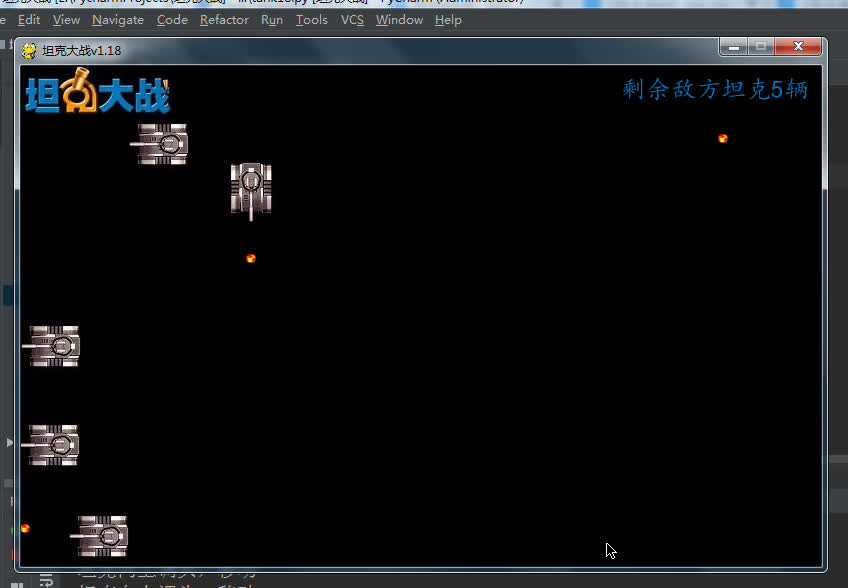
19.敌方子弹与我方坦克的碰撞以及我方坦克爆炸效果的实现
import pygame, time, random, os

_display = pygame.display
COLOR_BLACK = pygame.Color(0, 0, 0)  # 窗口颜色
COLOR_BLUE = pygame.Color(3, 117, 190)  # 窗口左上角文字颜色


class MainGame:
    """主游戏类"""
    window = None  # 游戏主窗口
    SCREEN_WIDTH = 800  # 窗口的宽度
    SCREEN_HEIGHT = 500  # 窗口的高度
    TANK_P1 = None  # 我方坦克
    EnemyTank_list = []  # 存储敌方坦克的数量
    EnemyTank_count = 5  # 要创建的敌方坦克数量
    Bullet_list = []  # 存储我方子弹的列表
    Eneny_bullet_list = []  # 存储敌方坦克的列表
    Explode_list = []  # 存储爆炸效果的列表

    def __init__(self):
        pass

    def startGame(self):
        """开始游戏"""
        _display.init()  # 初始化窗口
        # 创建窗口并加载窗口(借鉴官方文档)
        MainGame.window = _display.set_mode([MainGame.SCREEN_WIDTH, MainGame.SCREEN_HEIGHT])
        MainGame.TANK_P1 = Tank(MainGame.SCREEN_WIDTH // 2, MainGame.SCREEN_HEIGHT - 70)  # 创建我方坦克
        self.creatEnemyTank()  # 创建敌方坦克

        _display.set_caption("坦克大战v1.18")  # 设置游戏的标题
        # 让窗口持续刷新
        while True:
            MainGame.window.fill(COLOR_BLACK)  # 给窗口完成一个填充颜色
            self.getEvent()  # 在循环中持续完成事件的获取
            # 在窗口新增“坦克大战”小画布
            MainGame.window.blit(pygame.image.load('img/标题.jpg'), (0, 0))
            # 将绘制文字的小画布粘贴到窗口中
            MainGame.window.blit(self.getTextSurface("剩余敌方坦克{}辆".format(len(MainGame.EnemyTank_list))), (600, 10))
            if MainGame.TANK_P1 and MainGame.TANK_P1.live:
                # 将我方坦克加入到窗口中
                MainGame.TANK_P1.displayTank()
            else:
                del MainGame.TANK_P1
                MainGame.TANK_P1 = None
            # 循环展示敌方坦克
            self.blitEnemyTank()
            # 根据坦克的开关状态调用坦克的移动方法
            if MainGame.TANK_P1 and not MainGame.TANK_P1.stop:
                MainGame.TANK_P1.move()
            # 调用渲染我方子弹列表的方法
            self.blitBullet()
            # 调用渲染敌方子弹列表的方法
            self.blitEnemyBullet()
            # 调用展示爆炸效果的方法
            self.displayExplodes()

            time.sleep(0.02)
            _display.update()  # 窗口的刷新

    def creatEnemyTank(self):
        """创建敌方坦克"""
        top = 100
        for i in range(MainGame.EnemyTank_count):
            left = random.randint(1, 7)  # 每次都随机生成一个left值
            speed = random.randint(2, 4)
            eTank = EnemyTank(left * 100, top, speed)
            MainGame.EnemyTank_list.append(eTank)

    def blitEnemyTank(self):
        """将敌方坦克加入到窗口中"""
        for eTank in MainGame.EnemyTank_list:
            if eTank.live:
                eTank.displayTank()
                eTank.randMove()  # 敌方坦克移动的随机方法
                eBullet = eTank.shot()  # 调用敌方坦克的射击
                if eBullet:  # 如果子弹为None,不加入到列表中
                    MainGame.Eneny_bullet_list.append(eBullet)  # 将子弹存储到敌方子弹列表中
            else:
                MainGame.EnemyTank_list.remove(eTank)

    def blitBullet(self):
        """将我方子弹加入到窗口中"""
        for bullet in MainGame.Bullet_list:
            # 如果子弹还活着,绘制出来,否则,直接从列表中删除子弹
            if bullet.live:
                bullet.displayBullet()
                # 让子弹移动
                bullet.bulletMove()
                # 调用我方子弹与敌方坦克碰撞的方法
                bullet.hitEnemyTank()
            else:
                MainGame.Bullet_list.remove(bullet)

    def blitEnemyBullet(self):
        """将敌方子弹加入到窗口中"""
        for eBullet in MainGame.Eneny_bullet_list:
            # 如果子弹还活着,绘制出来,否则,直接从列表中删除子弹
            if eBullet.live:
                eBullet.displayBullet()
                # 让子弹移动
                eBullet.bulletMove()
                if MainGame.TANK_P1 and MainGame.TANK_P1.live:
                    eBullet.hitMyTank()  # 调用敌方子弹与我方坦克碰撞的方法
            else:
                MainGame.Eneny_bullet_list.remove(eBullet)

    def displayExplodes(self):
        """展示爆炸效果列表"""
        for explode in MainGame.Explode_list:
            if explode.live:
                explode.displayExplode()
            else:
                MainGame.Explode_list.remove(explode)

    def getEvent(self):
        """获取程序运行期间所有的鼠标和键盘事件"""
        eventList = pygame.event.get()  # 获取所有的事件
        # 对事件进行判断处理(1.点击鼠标关闭按钮  2.按下键盘上的某个按键)
        for event in eventList:
            # 判断event.type是否为QUIT,如果是,直接调用程序结束方法
            if event.type == pygame.QUIT:
                self.endGame()
            # 判断事件是否为键盘按键操作,如果是,继续判断按键是哪一个按键,并进行对应的处理
            if event.type == pygame.KEYDOWN:
                if MainGame.TANK_P1 and MainGame.TANK_P1.live:
                    # 具体是哪个按键的处理
                    if event.key == pygame.K_LEFT:
                        print("坦克向左调头,移动")
                        # 修改坦克方向
                        MainGame.TANK_P1.direction = 'L'
                        MainGame.TANK_P1.stop = False
                        # 完成移动操作(调用坦克的移动方法)
                        # MainGame.TANK_P1.move()
                    elif event.key == pygame.K_RIGHT:
                        print("坦克向右调头,移动")
                        # 修改坦克方向
                        MainGame.TANK_P1.direction = 'R'
                        MainGame.TANK_P1.stop = False
                        # 完成移动操作(调用坦克的移动方法)
                        # MainGame.TANK_P1.move()
                    elif event.key == pygame.K_UP:
                        print("坦克向上调头,移动")
                        # 修改坦克方向
                        MainGame.TANK_P1.direction = 'U'
                        MainGame.TANK_P1.stop = False
                        # 完成移动操作(调用坦克的移动方法)
                        # MainGame.TANK_P1.move()
                    elif event.key == pygame.K_DOWN:
                        print("坦克向下调头,移动")
                        # 修改坦克方向
                        MainGame.TANK_P1.direction = 'D'
                        MainGame.TANK_P1.stop = False
                        # 完成移动操作(调用坦克的移动方法)
                        # MainGame.TANK_P1.move()
                    elif event.key == pygame.K_SPACE:
                        print("发射子弹")
                        if len(MainGame.Bullet_list) < 3:
                            # 产生一颗子弹
                            m = Bullet(MainGame.TANK_P1)
                            # 将子弹加入到子弹列表
                            MainGame.Bullet_list.append(m)
                        else:
                            print("子弹数量不足")
                        print("当前子弹的数量为:{}".format(len(MainGame.Bullet_list)))
            if event.type == pygame.KEYUP:
                # 松开的如果是方向键,才更改移动开关的状态
                if (event.key == pygame.K_LEFT) or (event.key == pygame.K_RIGHT)
                        or (event.key == pygame.K_UP) or (event.key == pygame.K_DOWN):
                    if MainGame.TANK_P1 and MainGame.TANK_P1.live:
                        # 修改坦克的移动状态
                        MainGame.TANK_P1.stop = True

    def getTextSurface(self, text):
        pygame.font.init()  # 初始化字体模块
        # fontList = pygame.font.get_fonts()  # 查看系统支持的所有字体
        # print(fontList)
        font = pygame.font.SysFont('kaiti', 25)  # 选一个合适的字体
        textSurface = font.render(text, True, COLOR_BLUE)  # 使用对应的字符完成相关内容的绘制
        return textSurface

    def endGame(self):
        """结束游戏"""
        print("谢谢使用")
        exit()  # 结束python解释器


class BaseItem(pygame.sprite.Sprite):
    """作为bullet,tank继承精灵类的桥梁"""

    def __init__(self):
        pygame.sprite.Sprite.__init__(self)


class Tank(BaseItem):
    """坦克类"""

    def __init__(self, left, top):
        self.images = {
            'D': pygame.image.load('img/tank_1_D.jpg'),
            'U': pygame.image.load('img/tank_1_U.jpg'),
            'L': pygame.image.load('img/tank_1_L.jpg'),
            'R': pygame.image.load('img/tank_1_R.jpg'),
        }  # 四个方向,四个图片
        self.direction = 'U'  # 初始方向为上
        self.image = self.images[self.direction]  # 根据方向选择对应的图片
        # 坦克所在的区域  Rect-->
        self.rect = self.image.get_rect()
        # 指定坦克初始化位置分别距x,y轴的位置
        self.rect.left = left
        self.rect.top = top
        # 坦克速度的属性
        self.speed = 5
        # 坦克移动的开关
        self.stop = True
        # live 用来记录坦克是否活着
        self.live = True

    def move(self):
        """坦克的移动"""
        if self.direction == 'L':
            if self.rect.left > 0:
                self.rect.left -= self.speed
        elif self.direction == 'R':
            if self.rect.left + self.rect.height < MainGame.SCREEN_WIDTH:
                self.rect.left += self.speed
        elif self.direction == 'U':
            if self.rect.top > 50:  # 为了不遮蔽上方的标题
                self.rect.top -= self.speed
        elif self.direction == 'D':
            if self.rect.top + self.rect.height < MainGame.SCREEN_HEIGHT:
                self.rect.top += self.speed

    def shot(self):
        """坦克的射击"""
        return Bullet(self)

    def displayTank(self):
        """展示坦克(将坦克绘制到窗口中,使用blit())"""
        # 重新设置坦克的图片
        self.image = self.images[self.direction]
        # 将坦克加载到窗口中
        MainGame.window.blit(self.image, self.rect)


class MyTank(Tank):
    """我方坦克类"""

    def __init__(self):
        pass


class EnemyTank(Tank):
    """敌方坦克类"""

    def __init__(self, left, top, speed):
        super(EnemyTank, self).__init__(left, top)
        # self.live = True
        self.images = {
            'D': pygame.image.load('img/tank_2_D.jpg'),
            'U': pygame.image.load('img/tank_2_U.jpg'),
            'L': pygame.image.load('img/tank_2_L.jpg'),
            'R': pygame.image.load('img/tank_2_R.jpg'),
        }  # 四个方向,四个图片
        self.direction = self.randDirection()  # 随机方向
        self.image = self.images[self.direction]  # 根据方向选择对应的图片
        # 坦克所在的区域  Rect-->
        self.rect = self.image.get_rect()
        # 指定坦克初始化位置分别距x,y轴的位置
        self.rect.left = left
        self.rect.top = top
        # 坦克速度的属性
        self.speed = speed
        # 坦克移动的开关
        self.stop = True
        # 新增步数属性,用来控制敌方坦克随机移动
        self.step = 50

    def randDirection(self):
        num = random.randint(1, 4)
        if num == 1:
            return 'U'
        elif num == 2:
            return 'D'
        elif num == 3:
            return 'L'
        elif num == 4:
            return 'R'

    def randMove(self):
        """随机移动"""
        if self.step == 0:
            self.direction = self.randDirection()
            self.step = 50
        else:
            self.move()
            self.step -= 1

    # def displayEnemyTank(self):
    #     super().displayTank()
    def shot(self):
        num = random.randint(1, 1000)
        if num <= 30:
            return Bullet(self)


class Bullet(BaseItem):
    """子弹类"""

    def __init__(self, tank):
        self.image = pygame.image.load("img/子弹.jpg")  # 图片
        self.direction = tank.direction  # 方向(坦克的方向)
        self.rect = self.image.get_rect()  # 位置
        if self.direction == 'U':
            self.rect.left = tank.rect.left + tank.rect.width / 2 - self.rect.width / 2
            self.rect.top = tank.rect.top - self.rect.height
        elif self.direction == 'D':
            self.rect.left = tank.rect.left + tank.rect.width / 2 - self.rect.width / 2
            self.rect.top = tank.rect.top + tank.rect.height
        elif self.direction == 'L':
            self.rect.left = tank.rect.left - self.rect.width
            self.rect.top = tank.rect.top + tank.rect.height / 2 - self.rect.height - 3
        elif self.direction == 'R':
            self.rect.left = tank.rect.left + tank.rect.height
            self.rect.top = tank.rect.top + tank.rect.height / 2 - self.rect.height - 3
        self.speed = 7  # 速度
        self.live = True  # 记录子弹与屏幕边界碰撞后的状态

    def bulletMove(self):
        """子弹的移动"""
        if self.direction == 'U':
            if self.rect.top > 50:
                self.rect.top -= self.speed
            else:
                self.live = False  # 修改状态值
        elif self.direction == 'D':
            if self.rect.top < MainGame.SCREEN_HEIGHT - self.rect.height:
                self.rect.top += self.speed
            else:
                self.live = False  # 修改状态值
        elif self.direction == 'L':
            if self.rect.left > 0:
                self.rect.left -= self.speed
            else:
                self.live = False  # 修改状态值
        elif self.direction == 'R':
            if self.rect.left < MainGame.SCREEN_WIDTH - self.rect.width:
                self.rect.left += self.speed
            else:
                self.live = False  # 修改状态值

    def displayBullet(self):
        """展示子弹"""
        MainGame.window.blit(self.image, self.rect)

    def hitEnemyTank(self):
        """我方子弹碰撞敌方坦克"""
        for eTank in MainGame.EnemyTank_list:
            if pygame.sprite.collide_rect(eTank, self):
                # 产生一个爆炸效果
                explode = Explode(eTank)
                # 将爆炸效果加入到爆炸效果列表中
                MainGame.Explode_list.append(explode)
                self.live = False
                eTank.live = False

    def hitMyTank(self):
        """敌方子弹与我方坦克的碰撞"""
        if pygame.sprite.collide_rect(self, MainGame.TANK_P1):
            # 产生爆炸效果,并加入到爆炸效果列表中
            explode = Explode(MainGame.TANK_P1)
            MainGame.Explode_list.append(explode)
            # 修改子弹的状态
            self.live = False
            # 修改我方坦克状态
            MainGame.TANK_P1.live = False


class Explode:
    """爆炸效果类"""

    def __init__(self, tank):
        self.rect = tank.rect
        self.step = 0
        self.images = [pygame.image.load("explode/{}".format(i)) for i in os.listdir(r"./explode")]
        self.image = self.images[self.step]
        self.live = True

    def displayExplode(self):
        """展示爆炸效果"""
        if self.step < len(self.images):
            MainGame.window.blit(self.image, self.rect)
            self.image = self.images[self.step]
            self.step += 1

        else:
            self.live = False
            self.step = 0


class Wall:
    """墙壁类"""

    def __init__(self):
        pass

    def dispalyWall(self):
        """展示墙壁"""
        pass


class Music:
    """音效类"""

    def __init__(self):
        pass

    def play(self):
        """开始播放音乐"""
        pass


MainGame().startGame()
运行效果:
20.我方坦克死亡之后点击ESC按键重生
import pygame, time, random, os

_display = pygame.display
COLOR_BLACK = pygame.Color(0, 0, 0)  # 窗口颜色
COLOR_BLUE = pygame.Color(3, 117, 190)  # 窗口左上角文字颜色


class MainGame:
    """主游戏类"""
    window = None  # 游戏主窗口
    SCREEN_WIDTH = 800  # 窗口的宽度
    SCREEN_HEIGHT = 500  # 窗口的高度
    TANK_P1 = None  # 我方坦克
    EnemyTank_list = []  # 存储敌方坦克的数量
    EnemyTank_count = 5  # 要创建的敌方坦克数量
    Bullet_list = []  # 存储我方子弹的列表
    Eneny_bullet_list = []  # 存储敌方坦克的列表
    Explode_list = []  # 存储爆炸效果的列表

    def __init__(self):
        pass

    def startGame(self):
        """开始游戏"""
        _display.init()  # 初始化窗口
        # 创建窗口并加载窗口(借鉴官方文档)
        MainGame.window = _display.set_mode([MainGame.SCREEN_WIDTH, MainGame.SCREEN_HEIGHT])
        self.creatMyTank()  # 创建我方坦克
        self.creatEnemyTank()  # 创建敌方坦克

        _display.set_caption("坦克大战v1.19")  # 设置游戏的标题
        # 让窗口持续刷新
        while True:
            MainGame.window.fill(COLOR_BLACK)  # 给窗口完成一个填充颜色
            self.getEvent()  # 在循环中持续完成事件的获取
            # 在窗口新增“坦克大战”小画布
            MainGame.window.blit(pygame.image.load('img/标题.jpg'), (0, 0))
            # 将绘制文字的小画布粘贴到窗口中
            MainGame.window.blit(self.getTextSurface("剩余敌方坦克{}辆".format(len(MainGame.EnemyTank_list))), (600, 10))
            if MainGame.TANK_P1 and MainGame.TANK_P1.live:
                # 将我方坦克加入到窗口中
                MainGame.TANK_P1.displayTank()
            else:
                del MainGame.TANK_P1
                MainGame.TANK_P1 = None
            # 循环展示敌方坦克
            self.blitEnemyTank()
            # 根据坦克的开关状态调用坦克的移动方法
            if MainGame.TANK_P1 and not MainGame.TANK_P1.stop:
                MainGame.TANK_P1.move()
            # 调用渲染我方子弹列表的方法
            self.blitBullet()
            # 调用渲染敌方子弹列表的方法
            self.blitEnemyBullet()
            # 调用展示爆炸效果的方法
            self.displayExplodes()

            time.sleep(0.02)
            _display.update()  # 窗口的刷新

    def creatMyTank(self):
        """创建我方坦克"""
        MainGame.TANK_P1 = Tank(MainGame.SCREEN_WIDTH // 2, MainGame.SCREEN_HEIGHT - 70)

    def creatEnemyTank(self):
        """创建敌方坦克"""
        top = 100
        for i in range(MainGame.EnemyTank_count):
            left = random.randint(1, 7)  # 每次都随机生成一个left值
            speed = random.randint(2, 4)
            eTank = EnemyTank(left * 100, top, speed)
            MainGame.EnemyTank_list.append(eTank)

    def blitEnemyTank(self):
        """将敌方坦克加入到窗口中"""
        for eTank in MainGame.EnemyTank_list:
            if eTank.live:
                eTank.displayTank()
                eTank.randMove()  # 敌方坦克移动的随机方法
                eBullet = eTank.shot()  # 调用敌方坦克的射击
                if eBullet:  # 如果子弹为None,不加入到列表中
                    MainGame.Eneny_bullet_list.append(eBullet)  # 将子弹存储到敌方子弹列表中
            else:
                MainGame.EnemyTank_list.remove(eTank)

    def blitBullet(self):
        """将我方子弹加入到窗口中"""
        for bullet in MainGame.Bullet_list:
            # 如果子弹还活着,绘制出来,否则,直接从列表中删除子弹
            if bullet.live:
                bullet.displayBullet()
                # 让子弹移动
                bullet.bulletMove()
                # 调用我方子弹与敌方坦克碰撞的方法
                bullet.hitEnemyTank()
            else:
                MainGame.Bullet_list.remove(bullet)

    def blitEnemyBullet(self):
        """将敌方子弹加入到窗口中"""
        for eBullet in MainGame.Eneny_bullet_list:
            # 如果子弹还活着,绘制出来,否则,直接从列表中删除子弹
            if eBullet.live:
                eBullet.displayBullet()
                # 让子弹移动
                eBullet.bulletMove()
                if MainGame.TANK_P1 and MainGame.TANK_P1.live:
                    eBullet.hitMyTank()  # 调用敌方子弹与我方坦克碰撞的方法
            else:
                MainGame.Eneny_bullet_list.remove(eBullet)

    def displayExplodes(self):
        """展示爆炸效果列表"""
        for explode in MainGame.Explode_list:
            if explode.live:
                explode.displayExplode()
            else:
                MainGame.Explode_list.remove(explode)

    def getEvent(self):
        """获取程序运行期间所有的鼠标和键盘事件"""
        eventList = pygame.event.get()  # 获取所有的事件
        # 对事件进行判断处理(1.点击鼠标关闭按钮  2.按下键盘上的某个按键)
        for event in eventList:
            # 判断event.type是否为QUIT,如果是,直接调用程序结束方法
            if event.type == pygame.QUIT:
                self.endGame()
            # 判断事件是否为键盘按键操作,如果是,继续判断按键是哪一个按键,并进行对应的处理
            if event.type == pygame.KEYDOWN:
                # 点击ESC按键让我方坦克重生
                if event.key == pygame.K_ESCAPE and not MainGame.TANK_P1:
                    # 调用创建我方坦克的方法
                    self.creatMyTank()
                if MainGame.TANK_P1 and MainGame.TANK_P1.live:
                    # 具体是哪个按键的处理
                    if event.key == pygame.K_LEFT:
                        print("坦克向左调头,移动")
                        # 修改坦克方向
                        MainGame.TANK_P1.direction = 'L'
                        MainGame.TANK_P1.stop = False
                        # 完成移动操作(调用坦克的移动方法)
                        # MainGame.TANK_P1.move()
                    elif event.key == pygame.K_RIGHT:
                        print("坦克向右调头,移动")
                        # 修改坦克方向
                        MainGame.TANK_P1.direction = 'R'
                        MainGame.TANK_P1.stop = False
                        # 完成移动操作(调用坦克的移动方法)
                        # MainGame.TANK_P1.move()
                    elif event.key == pygame.K_UP:
                        print("坦克向上调头,移动")
                        # 修改坦克方向
                        MainGame.TANK_P1.direction = 'U'
                        MainGame.TANK_P1.stop = False
                        # 完成移动操作(调用坦克的移动方法)
                        # MainGame.TANK_P1.move()
                    elif event.key == pygame.K_DOWN:
                        print("坦克向下调头,移动")
                        # 修改坦克方向
                        MainGame.TANK_P1.direction = 'D'
                        MainGame.TANK_P1.stop = False
                        # 完成移动操作(调用坦克的移动方法)
                        # MainGame.TANK_P1.move()
                    elif event.key == pygame.K_SPACE:
                        print("发射子弹")
                        if len(MainGame.Bullet_list) < 3:
                            # 产生一颗子弹
                            m = Bullet(MainGame.TANK_P1)
                            # 将子弹加入到子弹列表
                            MainGame.Bullet_list.append(m)
                        else:
                            print("子弹数量不足")
                        print("当前子弹的数量为:{}".format(len(MainGame.Bullet_list)))
            if event.type == pygame.KEYUP:
                # 松开的如果是方向键,才更改移动开关的状态
                if (event.key == pygame.K_LEFT) or (event.key == pygame.K_RIGHT)
                        or (event.key == pygame.K_UP) or (event.key == pygame.K_DOWN):
                    if MainGame.TANK_P1 and MainGame.TANK_P1.live:
                        # 修改坦克的移动状态
                        MainGame.TANK_P1.stop = True

    def getTextSurface(self, text):
        pygame.font.init()  # 初始化字体模块
        # fontList = pygame.font.get_fonts()  # 查看系统支持的所有字体
        # print(fontList)
        font = pygame.font.SysFont('kaiti', 25)  # 选一个合适的字体
        textSurface = font.render(text, True, COLOR_BLUE)  # 使用对应的字符完成相关内容的绘制
        return textSurface

    def endGame(self):
        """结束游戏"""
        print("谢谢使用")
        exit()  # 结束python解释器


class BaseItem(pygame.sprite.Sprite):
    """作为bullet,tank继承精灵类的桥梁"""

    def __init__(self):
        pygame.sprite.Sprite.__init__(self)


class Tank(BaseItem):
    """坦克类"""

    def __init__(self, left, top):
        self.images = {
            'D': pygame.image.load('img/tank_1_D.jpg'),
            'U': pygame.image.load('img/tank_1_U.jpg'),
            'L': pygame.image.load('img/tank_1_L.jpg'),
            'R': pygame.image.load('img/tank_1_R.jpg'),
        }  # 四个方向,四个图片
        self.direction = 'U'  # 初始方向为上
        self.image = self.images[self.direction]  # 根据方向选择对应的图片
        # 坦克所在的区域  Rect-->
        self.rect = self.image.get_rect()
        # 指定坦克初始化位置分别距x,y轴的位置
        self.rect.left = left
        self.rect.top = top
        # 坦克速度的属性
        self.speed = 5
        # 坦克移动的开关
        self.stop = True
        # live 用来记录坦克是否活着
        self.live = True

    def move(self):
        """坦克的移动"""
        if self.direction == 'L':
            if self.rect.left > 0:
                self.rect.left -= self.speed
        elif self.direction == 'R':
            if self.rect.left + self.rect.height < MainGame.SCREEN_WIDTH:
                self.rect.left += self.speed
        elif self.direction == 'U':
            if self.rect.top > 50:  # 为了不遮蔽上方的标题
                self.rect.top -= self.speed
        elif self.direction == 'D':
            if self.rect.top + self.rect.height < MainGame.SCREEN_HEIGHT:
                self.rect.top += self.speed

    def shot(self):
        """坦克的射击"""
        return Bullet(self)

    def displayTank(self):
        """展示坦克(将坦克绘制到窗口中,使用blit())"""
        # 重新设置坦克的图片
        self.image = self.images[self.direction]
        # 将坦克加载到窗口中
        MainGame.window.blit(self.image, self.rect)


class MyTank(Tank):
    """我方坦克类"""

    def __init__(self):
        pass


class EnemyTank(Tank):
    """敌方坦克类"""

    def __init__(self, left, top, speed):
        super(EnemyTank, self).__init__(left, top)
        # self.live = True
        self.images = {
            'D': pygame.image.load('img/tank_2_D.jpg'),
            'U': pygame.image.load('img/tank_2_U.jpg'),
            'L': pygame.image.load('img/tank_2_L.jpg'),
            'R': pygame.image.load('img/tank_2_R.jpg'),
        }  # 四个方向,四个图片
        self.direction = self.randDirection()  # 随机方向
        self.image = self.images[self.direction]  # 根据方向选择对应的图片
        # 坦克所在的区域  Rect-->
        self.rect = self.image.get_rect()
        # 指定坦克初始化位置分别距x,y轴的位置
        self.rect.left = left
        self.rect.top = top
        # 坦克速度的属性
        self.speed = speed
        # 坦克移动的开关
        self.stop = True
        # 新增步数属性,用来控制敌方坦克随机移动
        self.step = 50

    def randDirection(self):
        num = random.randint(1, 4)
        if num == 1:
            return 'U'
        elif num == 2:
            return 'D'
        elif num == 3:
            return 'L'
        elif num == 4:
            return 'R'

    def randMove(self):
        """随机移动"""
        if self.step == 0:
            self.direction = self.randDirection()
            self.step = 50
        else:
            self.move()
            self.step -= 1

    # def displayEnemyTank(self):
    #     super().displayTank()
    def shot(self):
        num = random.randint(1, 1000)
        if num <= 30:
            return Bullet(self)


class Bullet(BaseItem):
    """子弹类"""

    def __init__(self, tank):
        self.image = pygame.image.load("img/子弹.jpg")  # 图片
        self.direction = tank.direction  # 方向(坦克的方向)
        self.rect = self.image.get_rect()  # 位置
        if self.direction == 'U':
            self.rect.left = tank.rect.left + tank.rect.width / 2 - self.rect.width / 2
            self.rect.top = tank.rect.top - self.rect.height
        elif self.direction == 'D':
            self.rect.left = tank.rect.left + tank.rect.width / 2 - self.rect.width / 2
            self.rect.top = tank.rect.top + tank.rect.height
        elif self.direction == 'L':
            self.rect.left = tank.rect.left - self.rect.width
            self.rect.top = tank.rect.top + tank.rect.height / 2 - self.rect.height - 3
        elif self.direction == 'R':
            self.rect.left = tank.rect.left + tank.rect.height
            self.rect.top = tank.rect.top + tank.rect.height / 2 - self.rect.height - 3
        self.speed = 7  # 速度
        self.live = True  # 记录子弹与屏幕边界碰撞后的状态

    def bulletMove(self):
        """子弹的移动"""
        if self.direction == 'U':
            if self.rect.top > 50:
                self.rect.top -= self.speed
            else:
                self.live = False  # 修改状态值
        elif self.direction == 'D':
            if self.rect.top < MainGame.SCREEN_HEIGHT - self.rect.height:
                self.rect.top += self.speed
            else:
                self.live = False  # 修改状态值
        elif self.direction == 'L':
            if self.rect.left > 0:
                self.rect.left -= self.speed
            else:
                self.live = False  # 修改状态值
        elif self.direction == 'R':
            if self.rect.left < MainGame.SCREEN_WIDTH - self.rect.width:
                self.rect.left += self.speed
            else:
                self.live = False  # 修改状态值

    def displayBullet(self):
        """展示子弹"""
        MainGame.window.blit(self.image, self.rect)

    def hitEnemyTank(self):
        """我方子弹碰撞敌方坦克"""
        for eTank in MainGame.EnemyTank_list:
            if pygame.sprite.collide_rect(eTank, self):
                # 产生一个爆炸效果
                explode = Explode(eTank)
                # 将爆炸效果加入到爆炸效果列表中
                MainGame.Explode_list.append(explode)
                self.live = False
                eTank.live = False

    def hitMyTank(self):
        """敌方子弹与我方坦克的碰撞"""
        if pygame.sprite.collide_rect(self, MainGame.TANK_P1):
            # 产生爆炸效果,并加入到爆炸效果列表中
            explode = Explode(MainGame.TANK_P1)
            MainGame.Explode_list.append(explode)
            # 修改子弹的状态
            self.live = False
            # 修改我方坦克状态
            MainGame.TANK_P1.live = False


class Explode:
    """爆炸效果类"""

    def __init__(self, tank):
        self.rect = tank.rect
        self.step = 0
        self.images = [pygame.image.load("explode/{}".format(i)) for i in os.listdir(r"./explode")]
        self.image = self.images[self.step]
        self.live = True

    def displayExplode(self):
        """展示爆炸效果"""
        if self.step < len(self.images):
            MainGame.window.blit(self.image, self.rect)
            self.image = self.images[self.step]
            self.step += 1

        else:
            self.live = False
            self.step = 0


class Wall:
    """墙壁类"""

    def __init__(self):
        pass

    def dispalyWall(self):
        """展示墙壁"""
        pass


class Music:
    """音效类"""

    def __init__(self):
        pass

    def play(self):
        """开始播放音乐"""
        pass


MainGame().startGame()
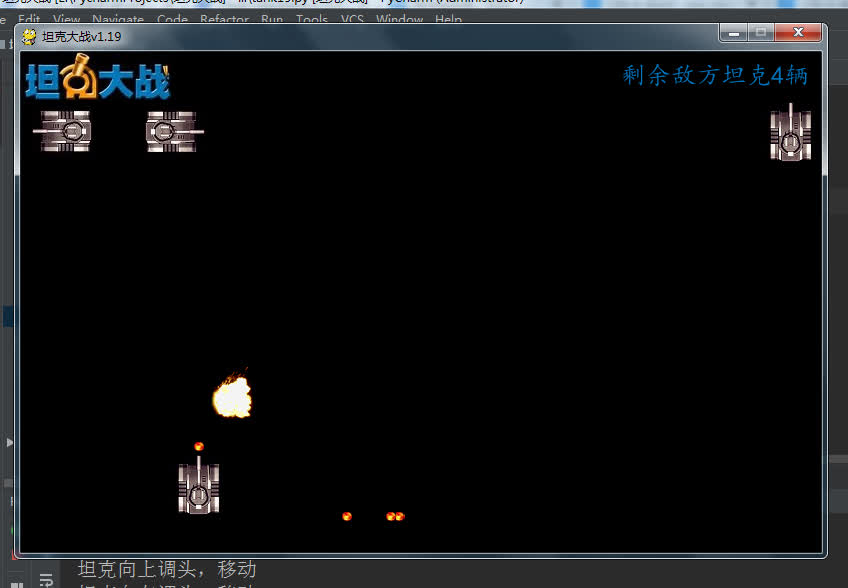
运行效果:
字数上限,新开一篇……
Life is short,you need Python——Python实现坦克大战(五)
皮卡丘比特:Life is short,you need Python——Python实现坦克大战(五)zhuanlan.zhihu.com版权声明:本文为weixin_39593061原创文章,遵循CC 4.0 BY-SA版权协议,转载请附上原文出处链接和本声明。