方案说明
前端工程多数是使用webpack来开发,那么问题来了,是一个前端工程就得搭建一个webpack项目吗?我是觉得没这必要,因为很多是固定不变的,如编译… 只是前端工程对应的业务不相同而已!
先展示一下打包完毕的内容
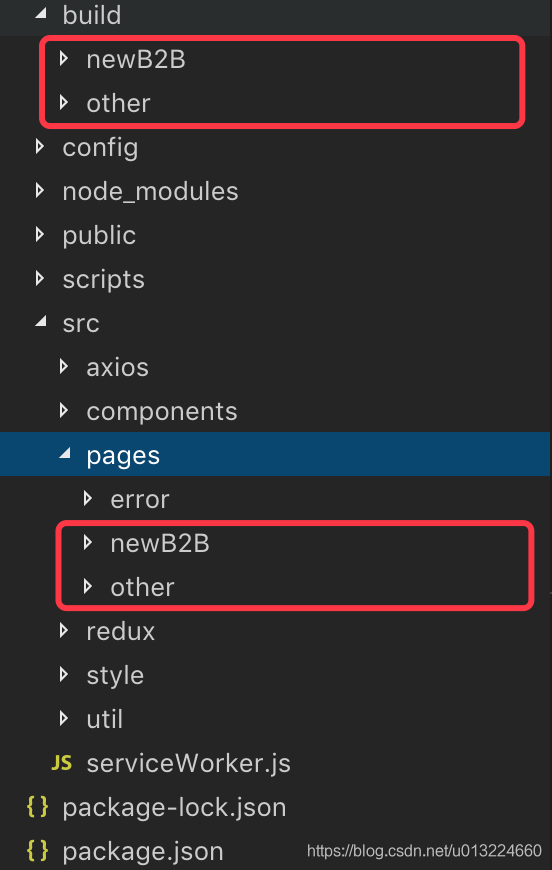
由上图可见,页面工程按模块区分,并放入pages下,最终编译出来对应的目录处于build下,且相关资源也在该目录中,参照下图,看一下other里面包括了什么?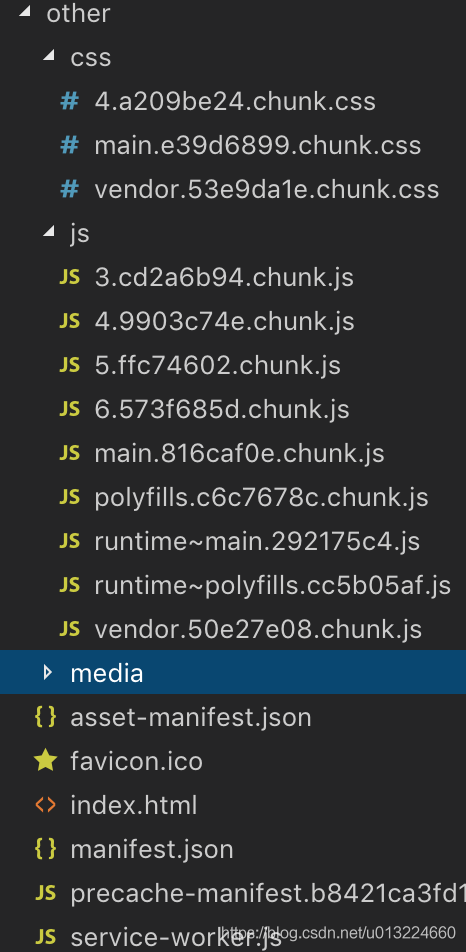
可以看到有入口文件,切割后(按需加载)的资源js等,这就是一个前端工程该用的资源了!
生产环境
看一下生产环境相关的js,
// 命令
npm run build

script/build.js
config/webpack.config.prod.js
可以进入 webpack.config.prod.js 中看,发现目录相关的配置,如入口文件,打包之后的目录都在里面配置好了!针对的是一对一!
那么可以考虑把以下代码作出相应的调整
// module.exports = { ... } 调整为
module.exports = function (pack) {
	return {
		... //这里就是上面的之前导出的对象
		// 添加 entry, 入口文件
		entry: {
			...
			main: paths.resolveApp(`src/pages/${pack}/index.js`)
		},
		// 修改 output.path
		output: {
			path: paths.resolveApp(`build/${pack}`)
		}
	}
}
// 目的是为了多次获取配置,并根据包名决定编译路径,以完成多个模块的分离打包
可以看见上面的 paths.resolveApp 不存在,进入 config/paths.js 加入下面代码
module.exports = {
	...,
	resolveApp
}
接下来要调整 build.js
'use strict';
/*
	1.先读取命令参数,识别当前要打包哪一模块
	2.模块参数不存在,那么就扫描pages下的目录,并查看该目录结构是否拥有相关文件
	命令: npm run build 打包pages下的所有目录且存在index.js入口文件的模块
	      npm run build name=other 先检查该模块是否合理,只编译该模块
*/

// Do this as the first thing so that any code reading it knows the right env.
process.env.BABEL_ENV = 'production';
process.env.NODE_ENV = 'production';

// Makes the script crash on unhandled rejections instead of silently
// ignoring them. In the future, promise rejections that are not handled will
// terminate the Node.js process with a non-zero exit code.
process.on('unhandledRejection', err => {
  throw err;
});

// Ensure environment variables are read.
require('../config/env');

const path = require('path');
const fs = require('fs-extra');
const chalk = require('chalk');
const webpack = require('webpack');
const bfj = require('bfj');
const checkRequiredFiles = require('react-dev-utils/checkRequiredFiles');
const getConfig = require('../config/webpack.config.prod');
const paths = require('../config/paths');
const formatWebpackMessages = require('react-dev-utils/formatWebpackMessages');
const FileSizeReporter = require('react-dev-utils/FileSizeReporter');
const printBuildError = require('react-dev-utils/printBuildError');

const measureFileSizesBeforeBuild =
  FileSizeReporter.measureFileSizesBeforeBuild;
/* const printFileSizesAfterBuild = FileSizeReporter.printFileSizesAfterBuild;
const useYarn = fs.existsSync(paths.yarnLockFile); */

// These sizes are pretty large. We'll warn for bundles exceeding them.
/* const WARN_AFTER_BUNDLE_GZIP_SIZE = 512 * 1024;
const WARN_AFTER_CHUNK_GZIP_SIZE = 1024 * 1024; */

const isInteractive = process.stdout.isTTY;

// Process CLI arguments
const argv = process.argv.slice(2);
const writeStatsJson = argv.indexOf('--stats') !== -1;

// We require that you explicitly set browsers and do not fall back to
// browserslist defaults.
const { checkBrowsers } = require('react-dev-utils/browsersHelper');

packProgress();

// 打包流程
async function packProgress() {
  console.log('Getting package list information...\n');
  // 打包列表
  const packList = [];
  // 一、读取打包模块参数,name={对应src/pages/包名},如果没有name参数,则获取src/pages下拥有index.js入口文件的目录
  //    例如 npm run build name=newB2B
  const packName = process.argv.filter(argv => {
    if(/^name/.test(argv)) return argv;
  })[0];
  if(packName) {
    // 检查包是否正常,1、存在该目录;2、目录下必须有入口文件 - index.js
    const name = packName.replace(/^name=/, '');
    if(!checkRequiredFiles([paths.appHtml, paths.resolveApp(`src/pages/${name}/index.js`)])) {
      console.log(
        chalk.red(
          `\n${packName} does not exist or has no index.js, please check!\n`
        )
      );
      process.exit(1);
    }
    packList.push(name);
  } else {
    // 读取src/pages下的一级目录,且拥有index.js入口文件
    const filePath = paths.resolveApp('src/pages');
    const files = fs.readdirSync(filePath);
    files.forEach((filename) => {
      try {
        const stats = fs.statSync(path.join(filePath, `${filename}/index.js`));
        if(stats.isFile()) packList.push(filename);
      } catch (error) {
        //目录不存在index.js入口,不作打包处理
      }
    });
  }
  // 获取打包列表完毕,开始编译
  for(let i = 0; i < packList.length; i++) {
    await handle(packList[i]);
  }
}

/**
 * 处理包
 * @param {String} name
 */
function handle(pack) {
  return new Promise((resolve) => {
    const buildPath = paths.resolveApp(`build/${pack}`);
    checkBrowsers(paths.appPath, isInteractive)
    .then(() => {
      // First, read the current file sizes in build directory.
      // This lets us display how much they changed later.
      return measureFileSizesBeforeBuild(buildPath);
    })
    .then(previousFileSizes => {
      // Remove all content but keep the directory so that
      // if you're in it, you don't end up in Trash
      fs.emptyDirSync(buildPath);
      // Merge with the public folder
      fs.copySync(paths.appPublic, buildPath, {
        dereference: true,
        filter: file => file !== paths.appHtml,
      });
      // Start the webpack build
      return build(pack, previousFileSizes);
    })
    .then(
      ({ stats, previousFileSizes, warnings }) => {
        if (warnings.length) {
          console.log(chalk.yellow('Compiled with warnings.\n'));
          console.log(warnings.join('\n\n'));
          console.log(
            '\nSearch for the ' +
              chalk.underline(chalk.yellow('keywords')) +
              ' to learn more about each warning.'
          );
          console.log(
            'To ignore, add ' +
              chalk.cyan('// eslint-disable-next-line') +
              ' to the line before.\n'
          );
        } else {
          console.log(chalk.green('Compiled successfully.\n'));
        }

       /* console.log('File sizes after gzip:\n');
        printFileSizesAfterBuild(
          stats,
          previousFileSizes,
          buildPath,
          WARN_AFTER_BUNDLE_GZIP_SIZE,
          WARN_AFTER_CHUNK_GZIP_SIZE
        );
        console.log(); */

        /* console.log('File after build:\n');
        fileDisplay(buildPath, previousFileSizes.root.substr(0, previousFileSizes.root.lastIndexOf('/') + 1));
        console.log('\n'); */
        console.log('File after build:\n');
        readFile(buildPath, previousFileSizes.root.substr(0, previousFileSizes.root.lastIndexOf('/') + 1));
        console.log('\n');

        /* const appPackage = require(paths.appPackageJson);
        const publicUrl = paths.publicUrl;
        const publicPath = config.output.publicPath;
        const buildFolder = path.relative(process.cwd(), paths.appBuild);
        printHostingInstructions(
          appPackage,
          publicUrl,
          publicPath,
          buildFolder,
          useYarn
        ); */
        resolve();
      },
      err => {
        console.log(chalk.red(`Failed to compile ${pack}.\n`));
        printBuildError(err);
        //process.exit(1);
        resolve();
      }
    )
    .catch(err => {
      if (err && err.message) {
        console.log(err.message);
      }
      resolve();
      //process.exit(1);
    });
  });
}

/**
 * 打包
 * @param {String} pack
 * @param {String} previousFileSizes
 */
function build(pack, previousFileSizes) {
  console.log(`Compiling package - ${pack} ...`);

  let compiler = webpack(getConfig(pack));
  return new Promise((resolve, reject) => {
    compiler.run((err, stats) => {
      let messages;
      if (err) {
        if (!err.message) {
          return reject(err);
        }
        messages = formatWebpackMessages({
          errors: [err.message],
          warnings: [],
        });
      } else {
        messages = formatWebpackMessages(
          stats.toJson({ all: false, warnings: true, errors: true })
        );
      }
      if (messages.errors.length) {
        // Only keep the first error. Others are often indicative
        // of the same problem, but confuse the reader with noise.
        if (messages.errors.length > 1) {
          messages.errors.length = 1;
        }
        return reject(new Error(messages.errors.join('\n\n')));
      }
      if (
        process.env.CI &&
        (typeof process.env.CI !== 'string' ||
          process.env.CI.toLowerCase() !== 'false') &&
        messages.warnings.length
      ) {
        console.log(
          chalk.yellow(
            '\nTreating warnings as errors because process.env.CI = true.\n' +
              'Most CI servers set it automatically.\n'
          )
        );
        return reject(new Error(messages.warnings.join('\n\n')));
      }

      const resolveArgs = {
        stats,
        previousFileSizes,
        warnings: messages.warnings,
      };
      if (writeStatsJson) {
        return bfj
          .write(paths.resolveApp(`build/${pack}`) + '/bundle-stats.json', stats.toJson())
          .then(() => resolve(resolveArgs))
          .catch(error => reject(new Error(error)));
      }

      return resolve(resolveArgs);
    });
  });
}

/**
 * 输出路径下相关文件大小
 * @param {String} filePath
 * @param {String} root
 */
function readFile(filePath, root) {
  const files = fs.readdirSync(filePath);
  files.forEach(file => {
    const states = fs.statSync(filePath + '/' + file);
    if(states.isDirectory()) {
      readFile(filePath + '/' + file, root);
    } else {
      let size = Math.floor(states.size / 1024 * 100) / 100 + ' KB';
      size += ' '.repeat(12 - size.length);
      console.log(
        '  ' +
        size +
        '  ' +
        chalk.dim(filePath.replace(root, '') + path.sep) +
        chalk.cyan(file)
      );
    }
  });
}
开发环境
开发环境区分比较简单,一个服务就是针对一个页面模块!
同样,先调整 webpack.config.dev.js
// 类似上面生产环境的配置
// module.exports = { ... } 调整为
module.exports = function (pack) {
	return {
		... //这里就是上面的之前导出的对象
		// 添加 entry, 入口文件
		entry: {
			...
			main: paths.resolveApp(`src/pages/${pack}/index.js`)
		}
	}
}
由于 webpack.config.dev.js 有被 config/webpackDevServer.config.js 引用,所以需要调整下里面内容
// 注释掉这里
// const config = require('./webpack.config.dev');

// 修改 publicPath
publicPath: '/',
修改 start.js
//const config = require('../config/webpack.config.dev'); 改为
const getConfig = require('../config/webpack.config.dev');

// 加入判断包
// 读取打包模块参数,name={对应src/pages/包名},如果没有name参数,则获取src/pages下首个拥有index.js入口文件的目录
//    例如 npm run start name=other
let packName = process.argv.filter(argv => {
  if(/^name/.test(argv)) return argv;
})[0];
if(packName) {
  // 检查包是否正常,1、存在该目录;2、目录下必须有入口文件 - index.js
  packName = packName.replace(/^name=/, '');
  if(!checkRequiredFiles([paths.appHtml, paths.resolveApp(`src/pages/${packName}/index.js`)])) {
    console.log(
      chalk.red(
        `\n${packName} does not exist or has no index.js, please check!\n`
      )
    );
    process.exit(1);
  }
} else {
  // 读取src/pages下的一级目录,且拥有index.js入口文件
  const filePath = paths.resolveApp('src/pages');
  const files = fs.readdirSync(filePath);
  packName = files.find((filename) => {
    try {
      const stats = fs.statSync(path.join(filePath, `${filename}/index.js`));
      if(stats.isFile()) return true;
    } catch (error) {
      //目录不存在index.js入口,不作打包处理
      return false;
    }
  });
}

// 上面代码放置于 const { checkBrowsers } = require('react-dev-utils/browsersHelper'); 之前
执行命令
// 开发环境
npm run start // 读取pages下的所有包,并且取第一个符合规范的模块启动
npm run start name=other // 验证模块,启动other

// 生产环境
npm run build // 读取pages下面所有符合规范的模块,并逐个编译打包到对应目录
npm run build name=other // 验证模块,编译other 到 build/other
验证规则
- 模块目录必须存在
- 目录下存在index.js入口文件
方案说明
前端页面工程以模块的方式放置于pages下,编译完毕后到各自对应的目录,便于区分管理,且不会存在引入不用的内容,提取的公用资源各不相同!使用node.js执行编译任务!
强调:这只是一种处理方式,多多自行研究与分享!
版权声明:本文为u013224660原创文章,遵循CC 4.0 BY-SA版权协议,转载请附上原文出处链接和本声明。