今天只有这一个work,算是一个小程序的说,是用到了
如何进行分层设计程序
文件输入流和输出流的使用
对象,是对象输入流和输出流的使用
熟悉了图形界面及其事件处理
给出的结果运行实例为
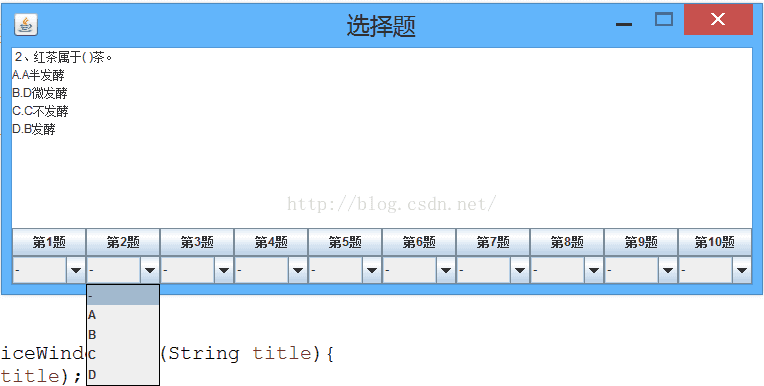
文本区域显示选择题,下面点击第几题,文本区域显示对应题目,选择ABCD,依次完成10道选择题,最后选择保存成绩。
10道题目的获取是从文本文件获得,题目有一定的格式,用#分隔
XXXXXXXXXXXXXXXXX?#A.XXX#B.XXX#C.XXX#D.XXX#B.XXX
首先确定的是两个实体类
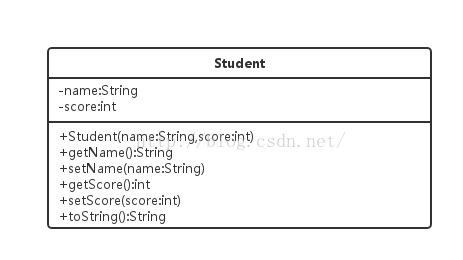
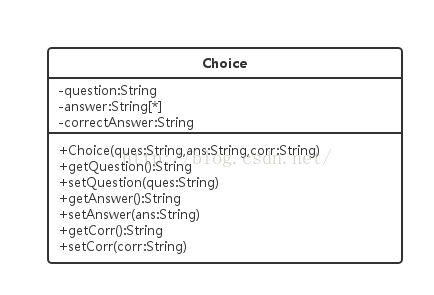
学生类在最后保存成绩的时候用到了,Choice是这次的主角:问题,选项数组,正确答案。
package Java的简易考试系统;
/*
 * 单项选择题实体类*/
public class Choice {
			String question;
			String[] answer;
			String correct;

			public Choice(String q,String[] a,String c){
				super();
				this.question=q;
				this.answer=a;
				this.correct=c;
			}

			public void setQues(String q) {
				this.question=q;
			}

			public String getQues() {
				return question;
			}

			public void setAns(String[] a) {
				this.answer=a;
			}

			public String[] getAns() {
				return answer;
			}

			public void setCorr(String c) {
				this.correct=c;
			}

			public String getCorr() {
				return correct;
			}
}
package Java的简易考试系统;

import java.io.Serializable;

public class Student implements Serializable{
		private String name;
		private int score;

		public Student(String n,int s){
			super();
			this.name=n;
			this.score=s;
		}

		public String getName() {
			return name;
		}

		public void setName(String n) {
			this.name=n;
		}

		public int getScore() {
			return score;
		}

		public void setScore(int s) {
			this.score=s;
		}

		public String toString() {
			return "Student[number="+name+",score="+score+"]";
		}
}
先是单选题的操作类,主要写从文件中读取出题目,放入List类的集合里面。
package Java的简易考试系统;
/*
 * 单选题操作类*/
import java.io.BufferedReader;
import java.io.File;
import java.io.FileNotFoundException;
import java.io.FileReader;
import java.io.IOException;
import java.io.Reader;
import java.util.ArrayList;
import java.util.Arrays;
import java.util.List;
import java.util.Random;

public class ChoiceDao {
			List<Choice> choices=new ArrayList<Choice>();
			int[] rand=new int[4];

			public List<Choice> getAllChoices(){
				try{
					readFromfile();
				}catch(FileNotFoundException e){
					e.printStackTrace();
				}catch (IOException e) {
					e.printStackTrace();
				}
				return choices;
			}

			public void readFromfile() throws IOException {
				Reader r=new FileReader(new File("D:/A-大三-Java学习/choicetest.txt")); 	//创建文件字符输入流
				//使之带有缓冲功能
				BufferedReader br=new BufferedReader(r);

				String choiceString=null;
				String[] choice=new String[6];

				while ((choiceString=br.readLine())!=null){
					choice=choiceString.split("#");

					shuffle();

					choices.add(new Choice(choice[0],new String[]{choice[rand[0]],choice[rand[1]],choice[rand[2]],choice[rand[3]]},choice[choice.length-1]));

				}

			}

			//打乱题目顺序,用到了俩for循环
			private void shuffle(){
				//int[] rand=new int[4];
				Random random=new Random();
				for (int i=0;i<rand.length;i++){
					rand[i]=random.nextInt(4)+1;
					for (int j=0;j<=i-1;j++){
						if (rand[i]==rand[j]){
							i--;
							break;
						}
					}
				}

			}
}
然后看到while里面的split函数了没,很好的将字符串进行分割,放入数组
我在那个add()使用这里当时遇到了问题,一直参数不对,直接add字符串数组,后来才明白怎么add()
还使用了打乱题目顺序的方法,值得学习。
package Java的简易考试系统;
/*
 * 学生操作类*/
public class StudentDao extends ObjectDao{
			//具体实现保存学生
			public static void saveStudent(Student student,String filename){
				saveObject(student, filename);
			}

			public static Student readStudent(String filename) {
				return (Student)readObject(filename);
			}

			public static int getScore(Choice choice,String answer) {
				int score=0;
				String correct=choice.getCorr();
				if ("A".equals(answer))
					score=judge(choice, 0, correct);
				else if ("B".equals(answer))
					score=judge(choice, 1,correct);
				else if ("C".equals(answer))
					score=judge(choice, 2, correct);
				else if ("D".equals(answer))
					score=judge(choice, 3, correct);

				return score;
			}


			private static int judge(Choice c,int i,String coo) {
				String userAnswer=c.getAns()[i];		//难得见到如此表达样子
				if (coo.equals(userAnswer))
					return 2;
				return 0;
			}

}
以上学生类操作,继承了对象操作类
package Java的简易考试系统;

import java.io.File;
import java.io.FileInputStream;
import java.io.FileNotFoundException;
import java.io.FileOutputStream;
import java.io.IOException;
import java.io.ObjectInputStream;
import java.io.ObjectOutputStream;

/*对象保存和读取通用类*/
public class ObjectDao {
			//保存对象
			public static void saveObject(Object ob,String fileName){
				ObjectOutputStream oos=null;
				try {
					FileOutputStream fos=new FileOutputStream(new File("D:/A-大三-Java学习/"+fileName+".txt"));
					oos=new ObjectOutputStream(fos);
					oos.writeObject(ob);
				} catch (FileNotFoundException e) {
					e.printStackTrace();
				} catch (IOException r){
					r.printStackTrace();
				} finally{
					try {
						oos.close();
					} catch (IOException e) {
						e.printStackTrace();
					}
				}

			}

			//读取对象
			public static Object readObject(String fileName){
				ObjectInputStream ois=null;
				Object ob=null;
				try{
					FileInputStream fis=new FileInputStream(new File("D:/A-大三-Java学习/"+fileName+".txt"));
					ois=new ObjectInputStream(fis);
					ob=ois.readObject();
				} catch (FileNotFoundException e){
					e.printStackTrace();
				} catch (IOException e){
					e.printStackTrace();
				} catch (ClassNotFoundException e){
					e.printStackTrace();
				} finally {
					try {
						ois.close();
					} catch (IOException e2) {
						e2.printStackTrace();
					}
				}
				return ob;
			}

}
最终UI设计及其事件处理还是挺小有难度。
package Java的简易考试系统;


import java.awt.Dimension;
import java.awt.GridLayout;
import java.awt.Toolkit;
import java.awt.event.ActionEvent;
import java.awt.event.ActionListener;
import java.awt.event.WindowEvent;
import java.util.ArrayList;
import java.util.List;

import javax.swing.JButton;
import javax.swing.JComboBox;
import javax.swing.JFrame;
import javax.swing.JOptionPane;
import javax.swing.JPanel;
import javax.swing.JTextArea;

public class ChoiceWindowTest extends JFrame{

	private List<Choice> choiceList=new ArrayList<Choice>();
	private JButton[] no=new JButton[10];
	private JComboBox[] choices=new JComboBox[10];
	private ChoiceDao choicedao=new ChoiceDao();
	private Choice choice=null;
	int j=0;
	private int score;

	public static void main(String[] args) {
		new ChoiceWindowTest("选择题");
	}

	public ChoiceWindowTest(String title){
		super(title);
		//设置窗口居中
		Toolkit tk=Toolkit.getDefaultToolkit();
		Dimension d=tk.getScreenSize();
		setSize(d.width/2,d.height/2);
		setLocation(d.width/4, d.height/4);
		//设置窗口大小不可调整
		setResizable(false);
		//创建10行15列的文本域组件
		final JTextArea choiceArea=new JTextArea(10,15);
		choiceArea.setText("请选择题号,然后在相应题号下面作答");
		//设置不可编辑
		choiceArea.setEditable(false);
		//添加到jf容器的中央区域
		this.add(choiceArea);
		//创建2行1列的中央容器
		JPanel timu=new JPanel();
		timu.setLayout(new GridLayout(2, 1));
		//创建1行10列的子容器来存放题号按钮
		JPanel noPanel=new JPanel();
		noPanel.setLayout(new GridLayout(1, 10));
		//创建1行10列的子容器来存放选项下拉
		JPanel choicePanel=new JPanel();
		choicePanel.setLayout(new GridLayout(1, 10));
		//获取所有单选题
		choiceList=choicedao.getAllChoices();
		for (int i=0;i<no.length;i++){
			//创建10个按钮并添加到noPanel
			no[i]=new JButton("第"+(i+1)+"题");
			noPanel.add(no[i]);

			no[i].addActionListener(new ActionListener() {

				@Override
				public void actionPerformed(ActionEvent e) {
						choiceArea.setText(" ");
						if (e.getActionCommand().equals("第10题")){
							j=9;
							choice=choiceList.get(9);
						}
						else{
							//第二题,e.getActionCommand().charAt(1)取出的是字符'2'
							//49是'1','2'-'1'得出应该取得的下标是1
							j=e.getActionCommand().charAt(1)-49;
							choice=choiceList.get(e.getActionCommand().charAt(1)-49);
						}

						//在Area区域追加问题和选项
						choiceArea.append(choice.getQues()+"\n");
						choiceArea.append("A."+choice.getAns()[0]+"\n");
						choiceArea.append("B."+choice.getAns()[1]+"\n");
						choiceArea.append("C."+choice.getAns()[2]+"\n");
						choiceArea.append("D."+choice.getAns()[3]+"\n");

				}
			});
			//创建下拉表并添加到对应的choicePanel
			choices[i]=new JComboBox(new String[]{"-","A","B","C","D"});
			choicePanel.add(choices[i]);
		}
		timu.add(noPanel);
		timu.add(choicePanel);
		this.add(timu,"South");
		//紧凑显示
		this.pack();
		//设置单击”关闭“按钮什么都不做
		//this.setDefaultCloseOperation(JFrame.DO_NOTHING_ON_CLOSE);
		setVisible(true);
	}

	//处理窗口事件
	protected void processWindowEvent(WindowEvent e) {
		super.processWindowEvent(e);
		//如果窗口正在关闭
		if (e.getID()==WindowEvent.WINDOW_CLOSING){
			//弹出确认对话框
			int result=JOptionPane.showConfirmDialog(this, "保存结果吗?\n必须一次性做完所有题\n是 ,覆盖以前结果\n否,不保存任何内容","保存",JOptionPane.YES_NO_CANCEL_OPTION);
			if (result==JOptionPane.YES_OPTION){
				String name=JOptionPane.showInputDialog("请输入您的学号:");
				//计算成绩
				computeScore();
				Student stu=new Student(name, score);
				//保存结果
				StudentDao.saveStudent(stu, name);		//文件名为输入的序号
				JOptionPane.showInternalMessageDialog(this, "成功保存结果","消息",JOptionPane.INFORMATION_MESSAGE);
				System.exit(1);
			} else if (result==JOptionPane.NO_OPTION){
				JOptionPane.showInternalMessageDialog(this, "结果不保存","消息",JOptionPane.INFORMATION_MESSAGE);
				System.exit(1);
			} else if (result==JOptionPane.CANCEL_OPTION){

			}
		}
		else{
			super.processWindowEvent(e);
		}
	}

	//计算得分
	public void computeScore() {
		for (int i=0;i<choices.length;i++){
			Choice ch=choiceList.get(i);
			//获取下拉列表用户选择的答案
			String a=(String)choices[i].getSelectedItem();
			score+=StudentDao.getScore(ch, a);

		}
	}

}
题号的鼠标事件里面,if那里现在也没明白是干什么用的......
哦是获取choiceList对应的下标,就是题号,里面的题,因为10会越界。
发现,一定要搞明白choice和choiceList,这只要明明白白了,很简单的。
遗憾的是,成功保存和不保存那里应该还是有小问题的,并且保存的文件打开显示全是乱码。但这都不影响今天的小锻炼。
版权声明:本文为zy_dream原创文章,遵循CC 4.0 BY-SA版权协议,转载请附上原文出处链接和本声明。