导入依赖
<!--thymeleaf security整合-->
 <dependency>
	<groupId>org.thymeleaf.extras</groupId>
	<artifactId>thymeleaf-extras-springsecurity5</artifactId>
</dependency>


<!--security-->
<dependency>
	<groupId>org.springframework.boot</groupId>
	<artifactId>spring-boot-starter-security</artifactId></dependency>

 <!--thymeleaf-->
 <dependency>
	<groupId>org.thymeleaf</groupId>
	<artifactId>thymeleaf-spring5</artifactId>
</dependency>
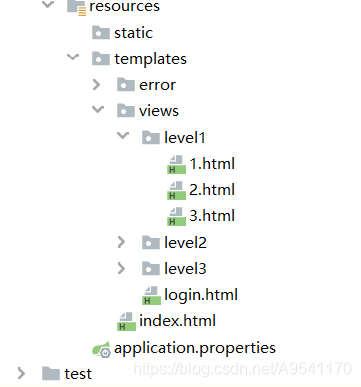
SecurityConfig.java
import org.springframework.security.config.annotation.authentication.builders.AuthenticationManagerBuilder;
import org.springframework.security.config.annotation.web.builders.HttpSecurity;
import org.springframework.security.config.annotation.web.configuration.EnableWebSecurity;
import org.springframework.security.config.annotation.web.configuration.WebSecurityConfigurerAdapter;
import org.springframework.security.crypto.bcrypt.BCryptPasswordEncoder;


@EnableWebSecurity
public class SecurityConfig extends WebSecurityConfigurerAdapter {

    @Override
    protected void configure(HttpSecurity http) throws Exception {
        //首页所有人可以访问,但是功能页面 只能由对应权限的人访问
        http.authorizeRequests()
                .antMatchers("/").permitAll()//首页 所有人都可以访问
                .antMatchers("/level1/**").hasRole("power1")
                .antMatchers("/level2/**").hasRole("power2")//进入level2目录需要第二种权限
                .antMatchers("/level3/**").hasRole("power3");

        //开启功能: 没有对应权限  应该跳转到其他页面(/tologin)定制登陆页面   如果这2个标签的name属性是 username的password的   就可以省略
        http.formLogin().loginPage("/tologin").loginProcessingUrl("/loginUser").usernameParameter("user").passwordParameter("pwd");//403.html

        //开启功能: 可以注销用户 注销跳首页
        http.logout().logoutSuccessUrl("/");

        //开启功能  记住我(cookie)  即使重启浏览器 也可直接访问 而不许需要再输入密码  自定义登陆页的remeberuser必须有一个单选框 他的name是remeberuser
        http.rememberMe().rememberMeParameter("remeberuser");

        http.csrf().disable();//关闭跨域保护,有些get请求会遭到服务器拒绝


    }


    //给对应的用户分发权限
    @Override
    protected void configure(AuthenticationManagerBuilder auth) throws Exception {

        auth.inMemoryAuthentication().passwordEncoder(new BCryptPasswordEncoder())
                .withUser("guest").password(new BCryptPasswordEncoder().encode("123")).roles("power1")
                .and()
                .withUser("user").password(new BCryptPasswordEncoder().encode("123")).roles("power1", "power2") //普通用户 有 2个权限  power1 和power2
                .and()
                .withUser("root").password(new BCryptPasswordEncoder().encode("123")).roles("power1", "power2", "power3");
    }
}
版权声明:本文为A9541170原创文章,遵循CC 4.0 BY-SA版权协议,转载请附上原文出处链接和本声明。