1、腾讯云官网下载demo
在自己小程序里引入如下demo里的几个文件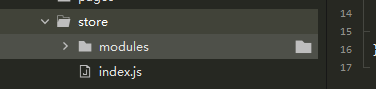
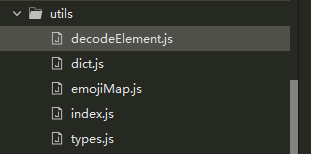
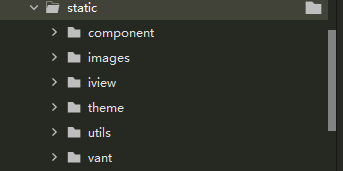
另外下载tim-wx.js及cos-wx-sdk-v5.js和dayjs,可直接放入utils文件夹里,引入时路径正确就可
2、在main.js文件里添加如下内容
//即时通讯内容
import TIM from './utils/tim-wx.js';//根据自己放的路径
import COS from "./utils/cos-wx-sdk-v5.js";
import dayjs from './utils/dayjs.min.js'
 import store from './store/index'
 Vue.prototype.$store = store
 Vue.config.productionTip = false
 //import './utils/zh-cn'
import { isJSON } from './utils'
import { SDKAPPID } from './static/utils/GenerateTestUserSig'
import TYPES from './utils/types'
const tim = TIM.create({
  SDKAppID: //腾讯云官网申请的SDKAppID
})
tim.setLogLevel(1)
wx.$app = tim
wx.$app.registerPlugin({'cos-wx-sdk': COS})
wx.store = store
wx.TIM = TIM
wx.dayjs = dayjs
// dayjs.locale('zh-cn')

let $bus = new Vue()
Vue.prototype.TIM = TIM
Vue.prototype.$type = TYPES
Vue.prototype.$store = store
Vue.prototype.$bus = $bus

tim.on(TIM.EVENT.SDK_READY, onReadyStateUpdate, this)
tim.on(TIM.EVENT.SDK_NOT_READY, onReadyStateUpdate, this)

tim.on(TIM.EVENT.KICKED_OUT, kickOut, this)
// 出错统一处理
tim.on(TIM.EVENT.ERROR, onError, this)

tim.on(TIM.EVENT.MESSAGE_RECEIVED, messageReceived, this)
tim.on(TIM.EVENT.CONVERSATION_LIST_UPDATED, convListUpdate, this)
// tim.on(TIM.EVENT.GROUP_LIST_UPDATED, groupListUpdate, this)
tim.on(TIM.EVENT.BLACKLIST_UPDATED, blackListUpdate, this)
tim.on(TIM.EVENT.NET_STATE_CHANGE, netStateChange, this)
tim.on(TIM.EVENT.MESSAGE_READ_BY_PEER, onMessageReadByPeer)

function onReadyStateUpdate ({ name }) {
  const isSDKReady = (name === TIM.EVENT.SDK_READY)
  if (isSDKReady) {
    wx.$app.getMyProfile().then(res => {
      store.commit('updateMyInfo', res.data)
    })
    wx.$app.getBlacklist().then(res => {
      store.commit('setBlacklist', res.data)
    })
  }
  store.commit('setSdkReady', isSDKReady)
}

function kickOut (event) {
  store.dispatch('resetStore')
  wx.showToast({
    title: '你已被踢下线',
    icon: 'none',
    duration: 1500
  })
  setTimeout(() => {
    wx.reLaunch({
      url: '../login/main'
    })
  }, 500)
}

function onError (event) {
  // 网络错误不弹toast && sdk未初始化完全报错
  if (event.data.message && event.data.code && event.data.code !== 2800 && event.data.code !== 2999) {
    store.commit('showToast', {
      title: event.data.message,
      duration: 2000
    })
  }
}

function checkoutNetState (state) {
  switch (state) {
    case TIM.TYPES.NET_STATE_CONNECTED:
      return { title: '已接入网络', duration: 2000 }
    case TIM.TYPES.NET_STATE_CONNECTING:
      return { title: '当前网络不稳定', duration: 2000 }
    case TIM.TYPES.NET_STATE_DISCONNECTED:
      return { title: '当前网络不可用', duration: 2000 }
    default:
      return ''
  }
}

function netStateChange (event) {
  console.log(event.data.state)
  store.commit('showToast', checkoutNetState(event.data.state))
}

function onMessageReadByPeer (event) {
  console.log(event)
}

function messageReceived (event) {
  for (let i = 0; i < event.data.length; i++) {
    let item = event.data[i]
    if (item.type === TYPES.MSG_GRP_TIP) {
      if (item.payload.operationType) {
        $bus.$emit('groupNameUpdate', item.payload)
      }
    }
    if (item.type === TYPES.MSG_CUSTOM) {
      if (isJSON(item.payload.data)) {
        const videoCustom = JSON.parse(item.payload.data)
        if (videoCustom.version === 3) {
          switch (videoCustom.action) {
            // 对方呼叫我
            case 0:
              if (!store.getters.isCalling) {
                let url = `../call/main?args=${item.payload.data}&&from=${item.from}&&to=${item.to}`
                wx.navigateTo({url})
              } else {
                $bus.$emit('isCalling', item)
              }
              break
            // 对方取消
            case 1:
              wx.navigateBack({
                delta: 1
              })
              break
            // 对方拒绝
            case 2:
              $bus.$emit('onRefuse')
              break
            // 对方不接1min
            case 3:
              wx.navigateBack({
                delta: 1
              })
              break
            // 对方接听
            case 4:
              $bus.$emit('onCall', videoCustom)
              break
            // 对方挂断
            case 5:
              $bus.$emit('onClose')
              break
            // 对方正在通话中
            case 6:
              $bus.$emit('onBusy')
              break
            default:
              break
          }
        }
      }
    }
  }
  store.dispatch('onMessageEvent', event)
}

function convListUpdate (event) {
  store.commit('updateAllConversation', event.data)
}

// function groupListUpdate (event) {
//   store.commit('updateGroupList', event.data)
// }

function blackListUpdate (event) {
  store.commit('updateBlacklist', event.data)
}

// 获取系统信息
// let sysInfo = wx.getSystemInfoSync()
// store.commit('setSystemInfo', sysInfo)
//即时通讯内容结束

new Vue({
  ...App,
  store
}).$mount()
3、引入页面
我只用了这一个聊天页面,所以在pages.json只引入了这两个,检查一下页面内 引入文件的路径是不是和自己放的一致,图片的路径是否一致,以及把一些不需要的功能隐藏一下;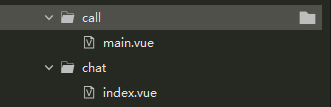
另外把页面里的颜色值换一下如下,可根据base.styl里换成具体颜色值
4、引入组件
把页面用的组件在pages.json里引入一下
(我的项目本身就用了vant,所以vant的路径可能不一样)
	"globalStyle": {
		"navigationBarTextStyle": "black",
		"navigationBarTitleText": "XXX",
		"navigationBarBackgroundColor": "#F5F6FA",
		"backgroundColor": "#fff",
		"usingComponents": {
			"van-button": "/wxcomponents/vant/button/index",
			"van-count-down": "/wxcomponents/vant/count-down/index",
			"van-swipe-cell": "/wxcomponents/vant/swipe-cell/index",
			"van-cell": "/wxcomponents/vant/cell/index",
			"van-cell-group": "/wxcomponents/vant/cell-group/index",
			"van-icon": "/wxcomponents/vant/icon/index",
			"van-popup": "/wxcomponents/vant/popup/index",
			"van-picker": "/wxcomponents/vant/picker/index",
			"van-switch": "/wxcomponents/vant/switch/index",
			"van-overlay": "/wxcomponents/vant/overlay/index",
			 "van-field": "/wxcomponents/vant/field/index",
			"i-input": "/static/iview/input/index",
			"i-avatar": "/static/iview/avatar/index",
			"icon": "/static/component/icon/index",
			"i-row": "/static/iview/row/index",
			"i-col": "/static/iview/col/index",
			"i-icon": "/static/iview/icon/index",
			"i-rate": "/static/iview/rate/index",
			"i-modal": "/static/iview/modal/index"
		}
	}
5、登录
因项目需求是没有登陆界面直接跳转聊天页,所以在跳转页检测是否登录,没有登陆就自动登录,然后点击按钮时跳转(如果有更好的方法可以用自己的)
<template>
	<view class="sss" @click="go">去聊天</view>
</template>

<script>
import { mapState, mapGetters } from 'vuex';
import { genTestUserSig } from '../static/utils/GenerateTestUserSig.js';
import { throttle } from '../utils/index';
export default {
	data() {
		return {
		};
	},
	computed: {
    ...mapState({
		 myInfo: state => state.user.myInfo,
      allConversation: state => state.conversation.allConversation,
      isSdkReady: state => state.global.isSdkReady
    }),
    ...mapGetters(['totalUnreadCount', 'myInfo'])
	},
	onReady: function(e) {},
	onLoad: function() {
		this.handleLogin()
		// console.log(this.TIM.EVENT.SDK_READY)
		if (!this.isSdkReady) {
		  wx.showLoading({ title: '正在同步数据', mask: true })
		}
	},
	watch: {
	  isSdkReady (newVal) {
	    if (newVal) {
	      wx.hideLoading()
	    }
	  }
	},
	methods: {
		go(){
		//跳转
			this.$store.dispatch('checkoutConversation', 'C2Cuser2')
		},
		handleLogin() {
			const userID = 'user1';//本人的userID调接口获取
			// case1: 要登录的用户是当前已登录的用户
			if (this.myInfo.userID && userID === this.myInfo.userID) {
				return;
			}

			// case2: 已经登录了用户,但是和即将登录的用户不一致,则先登出当前登录的用户,再登录
			if (this.myInfo.userID) {
				this.$store.dispatch('resetStore');
				wx.$app.logout().then(() => {
					this.login(userID);
				});
				return;
			}
			// case3: 正常登录流程
			this.login(userID);
		},
		//登录
		login(userID) {
			var that=this
			wx.$app.login({
					userID,
					userSig: genTestUserSig('user1').userSig//这个签名可以让后台生成从后台直接取过来
				}).then(() => {
				//登录后
				})
				.catch(() => {});
		}
	}
};
</script>
版权声明:本文为xuanyuyao原创文章,遵循CC 4.0 BY-SA版权协议,转载请附上原文出处链接和本声明。