1.常见模板引擎
虽然现在都流行前后端分离,但是还是有很多老项目和一些小项目在使用模板引擎进行动态页面开发,常见的模板引擎如JSP、Velocity、Freemarker、Thymeleaf

SpringBoot推荐的Thymeleaf;语法更简单,功能更强大;
2.SpringBoot引入Thymeleaf
Springboot对每个业务场景进行封装,此处只需要引入starter
  <dependency>
		<groupId>org.springframework.boot</groupId>
		<artifactId>spring-boot-starter-thymeleaf</artifactId>
  </dependency>

<!--  切换thymeleaf版本  -->
<properties>
		<thymeleaf.version>3.0.9.RELEASE</thymeleaf.version>
		<!-- 布局功能的支持程序  thymeleaf3主程序  layout2以上版本 -->
		<!-- thymeleaf2   layout1-->
		<thymeleaf-layout-dialect.version>2.2.2</thymeleaf-layout-dialect.version>
</properties>
3.Thymeleaf的使用
官方使用手册:https://www.thymeleaf.org/doc/tutorials/3.0/usingthymeleaf.pdf
常用标签解析顺序及用法:
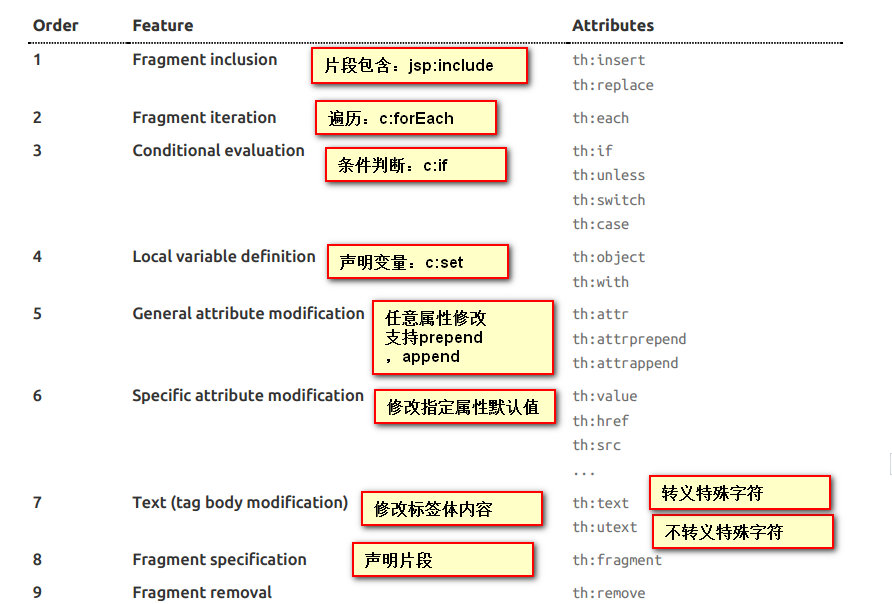
只要我们把HTML页面放在classpath:/templates/,thymeleaf就能自动渲染;
使用:
1、在html页面导入thymeleaf的名称空间
<html lang="en" xmlns:th="http://www.thymeleaf.org">2、使用thymeleaf语法;
<!DOCTYPE html>
<html lang="en" xmlns:th="http://www.thymeleaf.org">
<head>
    <meta charset="UTF-8">
    <title>Title</title>
</head>
<body>
    <h1>成功!</h1>
    <!--th:text 将div里面的文本内容设置为 -->
    <div th:text="${hello}">这是显示欢迎信息</div>
</body>
</html>
4、语法规则
下面摘抄自官网使用手册,具体参考官方使用手册:https://www.thymeleaf.org/doc/tutorials/3.0/usingthymeleaf.pdf
Simple expressions:(表达式语法)
    Variable Expressions: ${...}:获取变量值;OGNL;
    		1)、获取对象的属性、调用方法
    		2)、使用内置的基本对象:
    			#ctx : the context object.
    			#vars: the context variables.
                #locale : the context locale.
                #request : (only in Web Contexts) the HttpServletRequest object.
                #response : (only in Web Contexts) the HttpServletResponse object.
                #session : (only in Web Contexts) the HttpSession object.
                #servletContext : (only in Web Contexts) the ServletContext object.

                ${session.foo}
            3)、内置的一些工具对象:
#execInfo : information about the template being processed.
#messages : methods for obtaining externalized messages inside variables expressions, in the same way as they would be obtained using #{…} syntax.
#uris : methods for escaping parts of URLs/URIs
#conversions : methods for executing the configured conversion service (if any).
#dates : methods for java.util.Date objects: formatting, component extraction, etc.
#calendars : analogous to #dates , but for java.util.Calendar objects.
#numbers : methods for formatting numeric objects.
#strings : methods for String objects: contains, startsWith, prepending/appending, etc.
#objects : methods for objects in general.
#bools : methods for boolean evaluation.
#arrays : methods for arrays.
#lists : methods for lists.
#sets : methods for sets.
#maps : methods for maps.
#aggregates : methods for creating aggregates on arrays or collections.
#ids : methods for dealing with id attributes that might be repeated (for example, as a result of an iteration).

    Selection Variable Expressions: *{...}:选择表达式:和${}在功能上是一样;
    	补充:配合 th:object="${session.user}:
   <div th:object="${session.user}">
    <p>Name: <span th:text="*{firstName}">Sebastian</span>.</p>
    <p>Surname: <span th:text="*{lastName}">Pepper</span>.</p>
    <p>Nationality: <span th:text="*{nationality}">Saturn</span>.</p>
    </div>

    Message Expressions: #{...}:获取国际化内容
    Link URL Expressions: @{...}:定义URL;
    		@{/order/process(execId=${execId},execType='FAST')}
    Fragment Expressions: ~{...}:片段引用表达式
    		<div th:insert="~{commons :: main}">...</div>

Literals(字面量)
      Text literals: 'one text' , 'Another one!' ,…
      Number literals: 0 , 34 , 3.0 , 12.3 ,…
      Boolean literals: true , false
      Null literal: null
      Literal tokens: one , sometext , main ,…
Text operations:(文本操作)
    String concatenation: +
    Literal substitutions: |The name is ${name}|
Arithmetic operations:(数学运算)
    Binary operators: + , - , * , / , %
    Minus sign (unary operator): -
Boolean operations:(布尔运算)
    Binary operators: and , or
    Boolean negation (unary operator): ! , not
Comparisons and equality:(比较运算)
    Comparators: > , < , >= , <= ( gt , lt , ge , le )
    Equality operators: == , != ( eq , ne )
Conditional operators:条件运算(三元运算符)
    If-then: (if) ? (then)
    If-then-else: (if) ? (then) : (else)
    Default: (value) ?: (defaultvalue)
Special tokens:
    No-Operation: _
5.使用示例
@Controller
public class DefaultController {

    @RequestMapping("hello")
    public String sayHello(Map<String,Object> map){
        map.put("hello","<h1>你好</h1>");

        map.put("users", Arrays.asList("张三","李四","王五","赵柳"));
        return "success";
    }


    @GetMapping("/index")
    public String toPage(){
        return "index";
    }
}
<!DOCTYPE html>
<html lang="en" xmlns:th="http://www.thymeleaf.org">
<head>
    <meta charset="UTF-8">
    <title>Title</title>
</head>
<body>
<h3>template的成功</h3>
<!-- 获取后台数据替换标签文本,不转义 -->
<div th:text="${hello}"></div>
<!-- 获取后台数据替换标签文本,转义 -->
<div th:utext="${hello}"></div>

<!-- 遍历users集合,生成多行 -->
<h3 th:text="${user}" th:each="user:${users}"></h3>

<!-- 遍历users集合,生成单行 -->
<h3>
    <span th:each="user:${users}">[[${user}]],</span>
</h3>

</body>
</html>
版权声明:本文为qq_38763540原创文章,遵循CC 4.0 BY-SA版权协议,转载请附上原文出处链接和本声明。