分布式系统中,对于熔断和流控的需求是很基础的,在开源市场中我们选择并不是很多,SpringCloud 全家桶中有hystrix,不过由于hystrix已经停更了那么显然不是一个好的选择,那么比较出名的可能只有阿里开源的Sentinel可以使用了
Sentinel开源版还是阉割了很多功能的,并且二次开发比较繁琐,如果公司有这个预算的话还是建议直接去aliyun购买付费Sentinel服务,一键式傻瓜接入
Sentinel介绍:
资源
资源是 Sentinel 的关键概念。它可以是 Java 应用程序中的任何内容,例如,由应用程序提供的服务,或由应用程序调用的其它应用提供的服务,甚至可以是一段代码。在接下来的文档中,我们都会用资源来描述代码块。
只要通过 Sentinel API 定义的代码,就是资源,能够被 Sentinel 保护起来。大部分情况下,可以使用方法签名,URL,甚至服务名称作为资源名来标示资源。
规则
围绕资源的实时状态设定的规则,可以包括流量控制规则、熔断降级规则以及系统保护规则。所有规则可以动态实时调整。
Springboot2 接入 Sentinel:(上面的配置包含了gateway网关,以及普通应用接入需要的pom引入)
        <alibaba.sentinel.version>1.8.0</alibaba.sentinel.version>
        <alibaba.sentinel.cloud.version>2.1.2.RELEASE</alibaba.sentinel.cloud.version>

        <dependency>
            <groupId>com.alibaba.csp</groupId>
            <artifactId>sentinel-api-gateway-adapter-common</artifactId>
            <version>${alibaba.sentinel.version}</version>
        </dependency>
        <dependency>
            <groupId>com.alibaba.csp</groupId>
            <artifactId>sentinel-dubbo-adapter</artifactId>
            <version>${alibaba.sentinel.version}</version>
        </dependency>
        <dependency>
            <groupId>com.alibaba.csp</groupId>
            <artifactId>sentinel-spring-cloud-gateway-adapter</artifactId>
            <version>${alibaba.sentinel.version}</version>
        </dependency>
        <dependency>
            <groupId>com.alibaba.cloud</groupId>
            <artifactId>spring-cloud-alibaba-sentinel-gateway</artifactId>
            <version>${alibaba.sentinel.cloud.version}</version>
        </dependency>
        <dependency>
            <groupId>com.alibaba.cloud</groupId>
            <artifactId>spring-cloud-starter-alibaba-sentinel</artifactId>
            <version>${alibaba.sentinel.cloud.version}</version>
        </dependency>
        <dependency>
            <groupId>com.alibaba.csp</groupId>
            <artifactId>sentinel-core</artifactId>
            <version>${alibaba.sentinel.version}</version>
        </dependency>
        <dependency>
            <groupId>com.alibaba.csp</groupId>
            <artifactId>sentinel-annotation-aspectj</artifactId>
            <version>${alibaba.sentinel.version}</version>
        </dependency>
        <dependency>
            <groupId>com.alibaba.csp</groupId>
            <artifactId>sentinel-web-servlet</artifactId>
            <version>${alibaba.sentinel.version}</version>
        </dependency>
        <dependency>
            <groupId>com.alibaba.csp</groupId>
            <artifactId>sentinel-parameter-flow-control</artifactId>
            <version>${alibaba.sentinel.version}</version>
        </dependency>
        <dependency>
            <groupId>com.alibaba.csp</groupId>
            <artifactId>sentinel-transport-simple-http</artifactId>
            <version>${alibaba.sentinel.version}</version>
        </dependency>
如果需要改变Sentinel的日志记录路径,那么必须在发布的启动脚本中加上参数指名:-Dcsp.sentinel.log.dir=XXX
通过上面步骤,基本上客户端已经完成了接入Sentinel服务端的步骤,相对来说还是比较简单的,但是这些都只是基本接入,数据源的持久化以及多节点心跳检测的问题都还未优化
下面说下Sentinel管理后台的接入步骤:
1.去github上面下载sentinel源码

这部分代码copy出来稍加配置改动就可以了
Docker容器客户端多节点部署,源代码心跳检测会出现机器数量缺失部分节点,解决方案:
客户端启动时使用一个定时异步线程池,每15秒执行一次心跳检测线程就可以了
public class SentinelMachineRunnable implements Runnable {
    private static final String APPNAME = System.getenv("APPNAME");
    private static final String ENV = System.getenv("envID");
    private static final String PODIP = System.getenv("POD_IP");
    private String sentinel_address;
    private static String hostName = "";
    protected static final Logger log = LoggerFactory.getLogger( SentinelMachineRunnable.class );

    public SentinelMachineRunnable(String sentinel_address) {
        this.sentinel_address = sentinel_address;
    }

    @Override
    public void run() {
        //网关的心跳检测发送有点特殊,type值不一样,所以需要排除gateway应用做兼容
        if (!Constants.ENV.equalsIgnoreCase( "local" ) && !Constants.APPNAME.contains( "gateway" )) {
            if ("".equals( hostName )) {
                InetAddress addr = null;
                try {
                    addr = InetAddress.getLocalHost();
                } catch (UnknownHostException e) {
                    log.error( "SentinelMachineRunnable is error", e );
                }
                hostName = addr.getHostName();
            }
            Map<String, Object> param = new HashMap<>();
            param.put( "appType", 0 );
            param.put( "hostname", hostName );
            param.put( "ip", Constants.PODIP );
            param.put( "port", 8719 );
            param.put( "version", System.currentTimeMillis() );
            param.put( "v", "1.7.2" );
            Result<?> sentinelResult = null;
            try {
                String result = HttpClientUtil.doPost( "http://" + sentinel_address + "/registry/machine", param );
                sentinelResult = JSON.parseObject( result, Result.class );
                if (Optional.ofNullable( sentinelResult ).isPresent()) {
                    if (!sentinelResult.isSuccess()) {
                        log.warn( "SentinelMachineRunnable is error,result is {},sentinel_address is {},param is {},appname is {},ip is {},env is {}",
                                sentinelResult, sentinel_address, param, Constants.APPNAME, Constants.PODIP, Constants.ENV );
                    }
                }
            } catch (Exception e) {
                log.warn( "SentinelMachineRunnable is error,result is {},sentinel_address is {},param is {},appname is {},ip is {},env is {},exception is {}",
                        sentinelResult, sentinel_address, param, Constants.APPNAME, Constants.PODIP, Constants.ENV, e.getMessage() );
            }
        }
    }
}
数据源持久化解决方案:
1.官方建议持久化方案是Nacos做配置中心,但是我们才用了Apollo,如果所有配置都想持久化对Sentinel的后台二开工作量还是比较大的,原生持久化设计流程如下图

这种方式二开改造比较麻烦,还需要处理apoolo的token,部分公司可能堆token的签发还会有很多权限拦截比较麻烦
2.鉴于上面一种方式在我们公司比较难弄,我们持久化改造成下面流程了
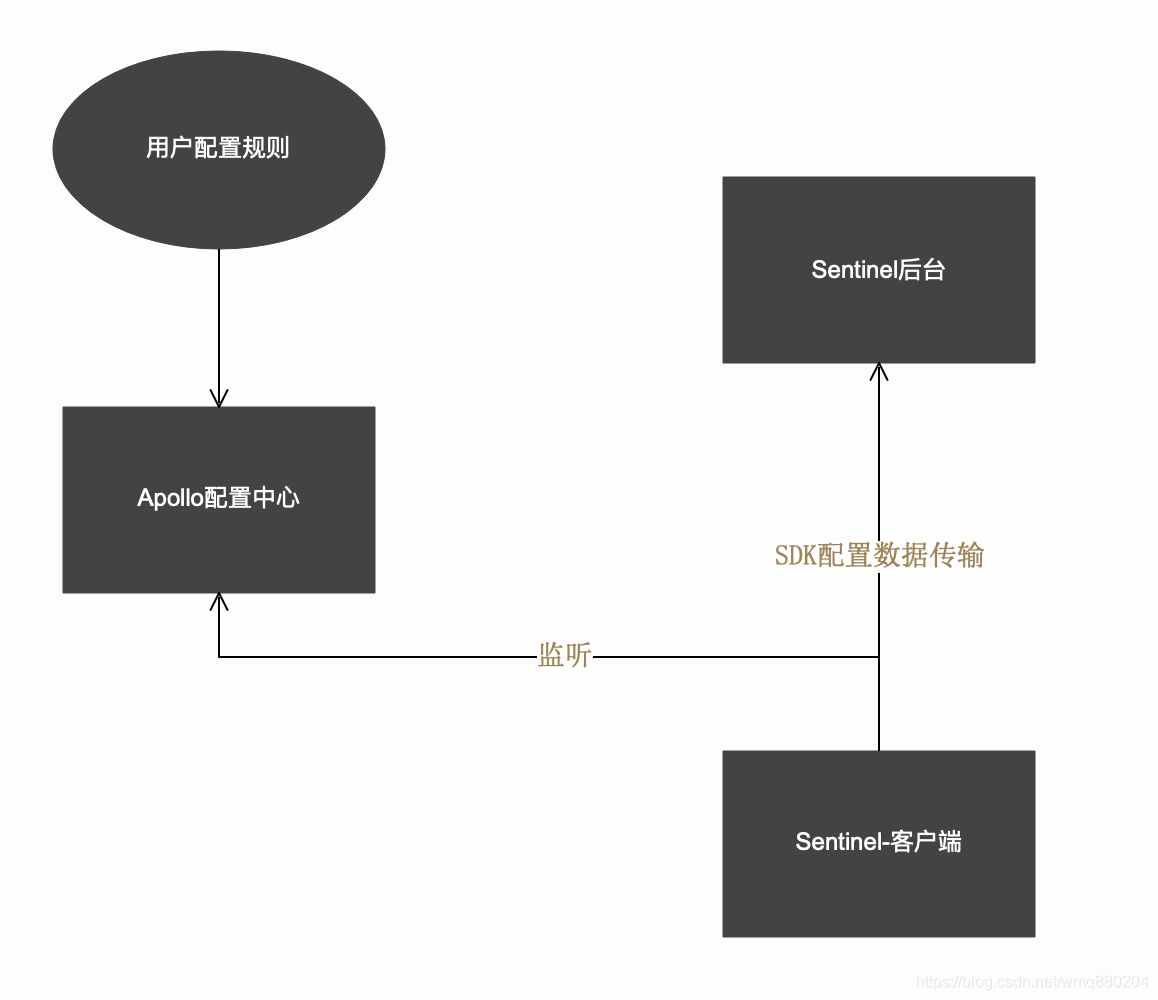
核心代码如下:
@Configuration
public class SentinelConfigHotChange implements EnvironmentAware {
    private static final String DEFAULT = "default";
    private static final String SENTINEL_SIT_NAMESPACE = "仓储物流组.sit";
    private static final String SENTINEL_UAT_NAMESPACE = "仓储物流组.uat";
    private static final String SENTINEL_PROD_NAMESPACE = "仓储物流组.prod";
    private static final String RT_EXCEPTION = "spring.cloud.sentinel.re.config";
    private static final String GATEWAY_CONFIG = "spring.cloud.sentinel.gateway.config";
    private static final Map<String, Config> APOLLO_SENTINEL_CONFIG_NAMESPACE = new HashMap<>();
    @Value("${spring.profiles.active:local}")
    private String profile;
    private Binder binder;
    private Environment evn; //获取配置文件的配置信息
    @ApolloConfig
    private Config applicationConfig;
    protected static final Logger log = LoggerFactory.getLogger( SentinelConfigHotChange.class );

    /**
     * <p>Title:根据profile判断apollo需要监听的namespace</p>
     * <p>Description:动态判断监听对象</p>
     *
     * @return java.lang.String
     * @throws
     * @author QIQI
     * @params []
     * @date 2019-12-11 12:33
     */
    public void initApolloListenerConfig() {
        if (APOLLO_SENTINEL_CONFIG_NAMESPACE.isEmpty()) {
            APOLLO_SENTINEL_CONFIG_NAMESPACE.put( DEFAULT, applicationConfig );
            if (profile.equalsIgnoreCase( "local" )) {
                APOLLO_SENTINEL_CONFIG_NAMESPACE.put( profile, ConfigService.getConfig( SENTINEL_SIT_NAMESPACE ) );
            } else if (profile.equalsIgnoreCase( "sit" )) {
                APOLLO_SENTINEL_CONFIG_NAMESPACE.put( profile, ConfigService.getConfig( SENTINEL_SIT_NAMESPACE ) );
            } else if (profile.equalsIgnoreCase( "uat" )) {
                APOLLO_SENTINEL_CONFIG_NAMESPACE.put( profile, ConfigService.getConfig( SENTINEL_UAT_NAMESPACE ) );
            } else if (profile.equalsIgnoreCase( "prod" )) {
                APOLLO_SENTINEL_CONFIG_NAMESPACE.put( profile, ConfigService.getConfig( SENTINEL_PROD_NAMESPACE ) );
            } else {
                APOLLO_SENTINEL_CONFIG_NAMESPACE.put( profile, ConfigService.getConfig( SENTINEL_SIT_NAMESPACE ) );
            }
        }
    }

    /**
     * <p>Title:采用手动注册方式监听配置</p>
     * <p>Description:因为需要动态监听,不能使用注解形式</p>
     *
     * @return void
     * @throws
     * @author QIQI
     * @params []
     * @date 2019-12-11 13:20
     */
    private void addApolloConfigChangeListener() {
        applicationConfig.addChangeListener( (configChangeEvent) -> {
            if (configChangeEvent.isChanged( RT_EXCEPTION ) || configChangeEvent.isChanged( GATEWAY_CONFIG )) {
                try {
                    flushSentinelConfig();
                } catch (Exception e) {
                    log.warn( "addApolloConfigChangeListener is error", e );
                }
            }
        } );
        APOLLO_SENTINEL_CONFIG_NAMESPACE.get( profile ).addChangeListener( (configChangeEvent) -> {
            try {
                if (configChangeEvent.isChanged( RT_EXCEPTION ) || configChangeEvent.isChanged( GATEWAY_CONFIG ))
                    flushSentinelConfig();
                log.info( "addApolloConfigChangeListener SENTINEL_ADD_LISTENER ------->" );
            } catch (Exception throwables) {
                log.warn( "addApolloConfigChangeListener is error", throwables );
            }
        } );
    }

    /**
     * <p>Title:热刷新数据源,重置shardingjdbc</p>
     * <p>Description:</p>
     *
     * @return void
     * @throws
     * @author QIQI
     * @params []
     * @date 2020/05/27 19:54
     */
    private void flushSentinelConfig() throws Exception {
        log.info( "addApolloConfigChangeListener flushSentinelConfig ------->" );
        Config config;
        if (APOLLO_SENTINEL_CONFIG_NAMESPACE.get( DEFAULT ).getPropertyNames().contains( RT_EXCEPTION ) ||
                APOLLO_SENTINEL_CONFIG_NAMESPACE.get( DEFAULT ).getPropertyNames().contains( GATEWAY_CONFIG )) {
            config = APOLLO_SENTINEL_CONFIG_NAMESPACE.get( DEFAULT );
        } else {
            config = APOLLO_SENTINEL_CONFIG_NAMESPACE.get( profile );
        }
        getRtAndExceptionRule( config );
        getGatewayRule( config );
    }

    public void initSentinelConfig() {
        initApolloListenerConfig(); //初始化apollo的注入config的namespace信息
        addApolloConfigChangeListener(); //手动初始化监听器
    }

    //网关 熔断策略规则
    private void getGatewayRule(Config config) {
        if (!"".equals( config.getProperty( GATEWAY_CONFIG, "" ) )) {
            List<GatewayRuleConfig> gatewayRuleConfigs = JSON.parseArray( config.getProperty( GATEWAY_CONFIG, "" ), GatewayRuleConfig.class );
            Set<GatewayFlowRule> rules = new HashSet<>();
            for (GatewayRuleConfig gatewayRuleConfig : gatewayRuleConfigs) {
                GatewayFlowRule rule = new GatewayFlowRule();
                BeanUtils.copyProperties( gatewayRuleConfig,rule );
                rules.add( rule );
            }
            log.info( "SentinelRule apolloHotChange getGatewayRule [{}]", rules );
            GatewayRuleManager.loadRules( rules );
        }else
            GatewayRuleManager.loadRules(null);
    }

    //RT、EXCEPTION 熔断策略规则
    private void getRtAndExceptionRule(Config config) {
        if (!"".equals( config.getProperty( RT_EXCEPTION, "" ) )) {
            List<ReRuleConfig> reRuleConfigs = JSON.parseArray( config.getProperty( RT_EXCEPTION, "" ), ReRuleConfig.class );
            List<DegradeRule> rules = new ArrayList<>();
            for (ReRuleConfig reRuleConfig : reRuleConfigs) {
                DegradeRule rule = new DegradeRule();
                BeanUtils.copyProperties( reRuleConfig,rule );
                rule.setLimitApp( "default" );
                rules.add( rule );
            }
            log.info( "SentinelRule apolloHotChange getRtAndExceptionRule [{}]", rules );
            DegradeRuleManager.loadRules( rules );
        }else
            DegradeRuleManager.loadRules( null );
    }

    @Override
    public void setEnvironment(Environment environment) {
        this.evn = environment;
        // 绑定配置器
        binder = Binder.get( evn );
    }
}
@Slf4j
@Configuration
public class SentinelInitConfig {
@Autowired
private SentinelConfigHotChange sentinelConfigHotChange;
@Value("${spring.cloud.sentinel.transport.dashboard}")
private String sentinel_address;
@Value("${spring.cloud.sentinel.re.config:[]}")
private String reConfig;
@Value("${spring.cloud.sentinel.gateway.config:[]}")
private String gatewayConfig;
private static final ScheduledExecutorService SCHEDULED_EXECUTOR_SERVICE = Executors.newScheduledThreadPool( 1 );
@PostConstruct
public void initSystemConfig() {
//RT、EXCEPTION 熔断策略规则
if (!reConfig.equals( "[]" )) {
getRtAndExceptionRule();
}
//网关流控
if (!gatewayConfig.equals( "[]" )) {
getGatewayRule();
}
registerStateChangeObserver();
//心跳发送自研扩展方式
SentinelMachineRunnable sentinelMachineRunnable = new SentinelMachineRunnable( sentinel_address );
SCHEDULED_EXECUTOR_SERVICE.scheduleAtFixedRate( sentinelMachineRunnable, 1000, 10000, TimeUnit.MILLISECONDS );
sentinelConfigHotChange.initSentinelConfig();
}
/**
* <p>Title:熔断器事件监听</p>
* <p>Description:</p>
* @author QIQI
* @params []
* @return void
* @throws
* @date 2020/10/10 14:00
*/
private static void registerStateChangeObserver() {
EventObserverRegistry.getInstance().addStateChangeObserver( "logging",
(prevState, newState, rule, snapshotValue) -> {
if (newState == CircuitBreaker.State.OPEN) {
log.info( "registerStateChangeObserver:{} -> OPEN at {},snapshotValue = {},rule is {}", prevState.name(),
TimeUtil.currentTimeMillis(), snapshotValue, rule );
} else {
log.error( "registerStateChangeObserver:{} -> {} at {},rule is {}", prevState.name(), newState.name(),
TimeUtil.currentTimeMillis(), rule );
log.error( "registerStateChangeObserver:" + String.format( "%s -> %s at %d", prevState.name(), newState.name(),
TimeUtil.currentTimeMillis() ) );
}
} );
}
//RT、EXCEPTION 熔断策略规则
private void getRtAndExceptionRule() {
List<ReRuleConfig> reRuleConfigs = JSON.parseArray( reConfig, ReRuleConfig.class );
if (Optional.ofNullable( reRuleConfigs ).isPresent()) {
List<DegradeRule> rules = new ArrayList<>();
for (ReRuleConfig reRuleConfig : reRuleConfigs) {
DegradeRule rule = new DegradeRule();
BeanUtils.copyProperties( reRuleConfig,rule );
rule.setLimitApp( "default" );
rules.add( rule );
}
log.info( "SentinelRule init getRtAndExceptionRule [{}]", rules );
DegradeRuleManager.loadRules( rules );
}
}
//网关流控
private void getGatewayRule() {
List<GatewayRuleConfig> gatewayRuleConfigs = JSON.parseArray( gatewayConfig, GatewayRuleConfig.class );
if (Optional.ofNullable( gatewayRuleConfigs ).isPresent()) {
Set<GatewayFlowRule> rules = new HashSet<>();
for (GatewayRuleConfig gatewayRuleConfig : gatewayRuleConfigs) {
GatewayFlowRule rule = new GatewayFlowRule();
BeanUtils.copyProperties( gatewayRuleConfig,rule );
rules.add( rule );
}
log.info( "SentinelRule init getGatewayRule [{}]", rules );
GatewayRuleManager.loadRules( rules );
}
}
}