首先看我的div布局:
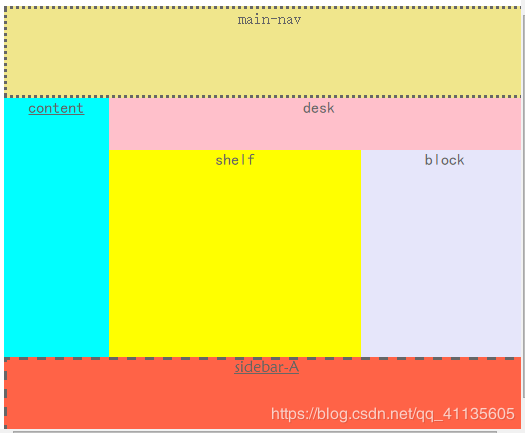 图片有6个div有序排列,位置上下左右不一。
方法1:最简单的做法是设置每个div的width:px;height:px;
比如:
width:1200px;
height:800px;
但是这种方法在不同尺寸的电脑上就无法完全显示div或者div不能充满整个页面。
方法2:设置div的width:%;height:%;**
比如:
width:20%;
height:60%;
这种方法无论对于不同的电脑尺寸都能全屏显示,本文就选用这种方法。
step1:
建立HTML,添加代码如下:
My First Web Demo!step2:
建立CSS文件,添加代码如下:
#page-container
{
//clear:both;
overflow: hidden;
width: 100%;
height:100%;
position: relative;
margin: auto;
>
margin: auto;
background: red;
text-align: center;
}
html,body
{
margin: auto;
height:100%;
width:100%;
font-family:Sans-serif;
font-size: 16px;
color: #666666;
background: #ffffff;
}
.hidden {display: none;}
#main-nav
{
background: khaki;
/*position:absolute;会导致main-nav高度不符*/
height:20%;
width:100%;
border-style: dotted;/*点线*/
overflow: hidden;
}
#multi
{
background: black;
height:60%;
width:100%;
float:auto;
font-family: "黑体";
text-decoration: underline;
}
#content
{
background:cyan ;
clear: both;
height:100%;
width:20%;
float:left;
font-family: "黑体";
text-decoration: underline;
border-style:none;
}
#footer
{
background: green;
width:80%;
height:100%;
float:right;
}
#desk
{
clear: both;
margin:auto;
background: pink;
width:100%;
height:20%;
}
#shelf
{
background: yellow;
float:left;
width:60%;
height:80%;
//border-style:solid;
}
#block
{
clear: both;
background: lavender ;
float:right;
width:40%;
height:80%;
//border-style:solid;
}
#sidebar-a
{
clear:both;
background: tomato;
height:20%;
text-decoration: underline;
font-family: "华文新魏";
border-style:dashed; /*虚线*/
}