报错信息:
1.
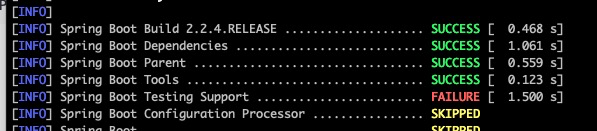
[ERROR] Failed to execute goal org.apache.maven.plugins:maven-compiler-plugin:3.8.1:compile (default-compile) on project spring-boot-test-support: Compilation failure
[ERROR] No compiler is provided in this environment. Perhaps you are running on a JRE rather than a JDK?
2. 下载不下来jar包,一直卡着下不下来的情况更换maven配置文件中的下载地址(电脑默认下载的maven和你自己下载的maven有可能不是同一个)
我下载的maven地址:/Users/youshang/software/apache/apache-maven-3.6.3/conf/settings.xml
电脑默认下载的maven地址:/Users/youshang/.m2/wrapper/dists/apache-maven-3.5.4-bin/4lcg54ki11c6mp435njk296gm5/apache-maven-3.5.4/conf/settings.xml
编辑电脑默认maven地址,将里面的settings.xml修改为阿里的下载地址
    <mirror>
      <id>alimaven</id>
      <name>aliyun maven</name>
      <url>http://maven.aliyun.com/nexus/content/groups/public/</url>
      <mirrorOf>central</mirrorOf>
    </mirror>
构建第一步:
git clone https://github.com/spring-projects/spring-boot.git第二步:
想要构建快一点可以选择屏蔽一些项目,比如Springboot中的test项目之类的
.....非常抱歉最后我用idea自己构建的时候又没出现过那个情况了而且还没办法复现。。。。
我使用的构建全部命令
#克隆远程分支代码
git clone git@gitee.com:liaojuhui/learing-spring-boot.git

#进入项目
cd learing-spring-boot

#本地 新建/切换 到learning-spring-boot 并且依赖于 tag 版本为 v2.2.4.RELEASE
git checkout -b learning-spring-boot v2.2.4.RELEASE

#构建项目,并且跳过测试
./mvnw clean install -DskipTests -Pfast
版权声明:本文为qq_40694145原创文章,遵循CC 4.0 BY-SA版权协议,转载请附上原文出处链接和本声明。