linux安装Mysql8.0
文章目录
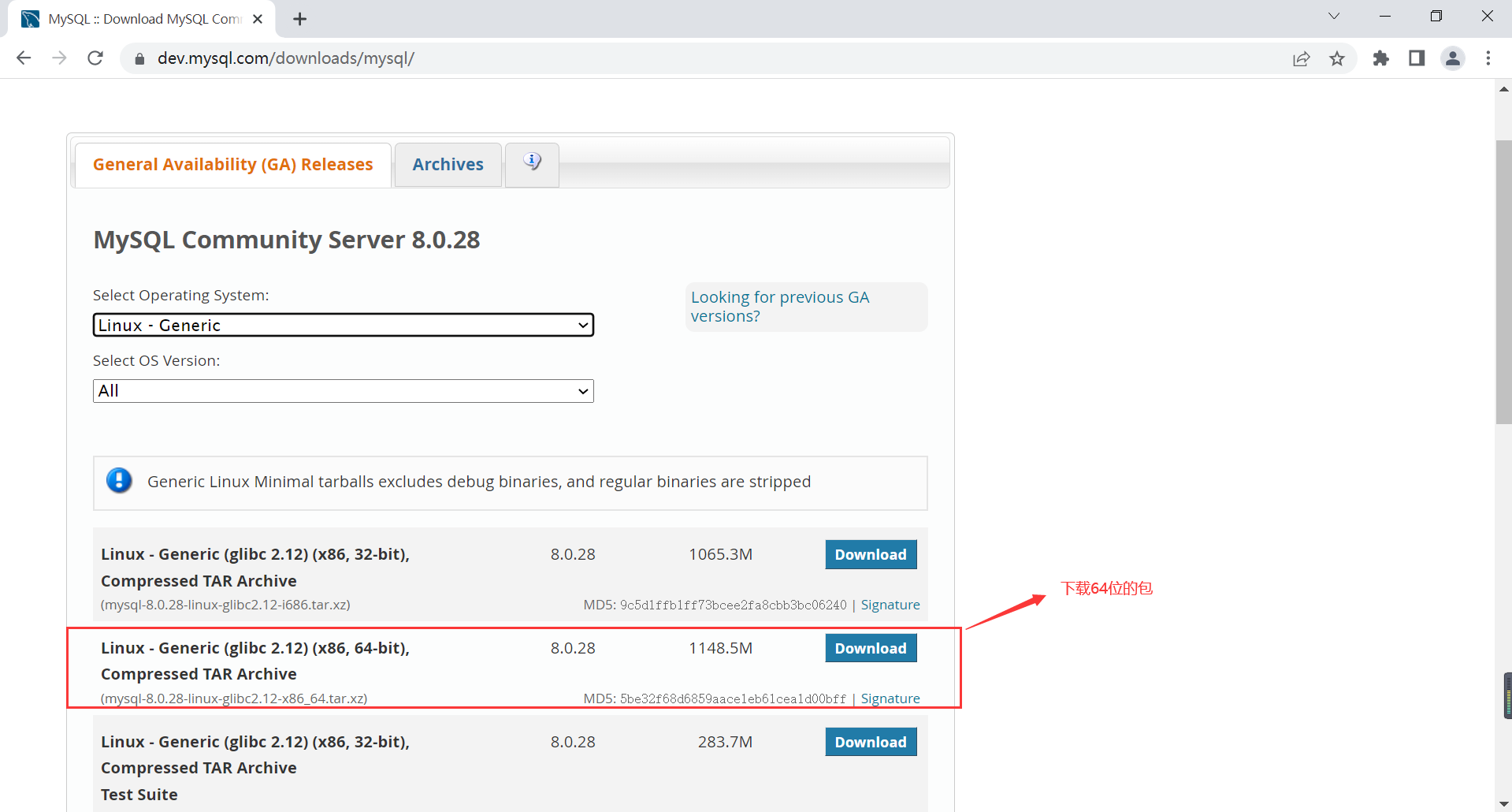
1、下载压缩包
[root@bogon ~]# wget https://dev.mysql.com/get/Downloads/MySQL-8.0/mysql-8.0.28-linux-glibc2.12-x86_64.tar.xz
[root@bogon ~]# tar -xf mysql-8.0.28-linux-glibc2.12-i686.tar.xz -C /usr/local/
[root@bogon ~]# cd /usr/local/
[root@bogon local]# mv mysql-8.0.28-linux-glibc2.12-i686/ mysql-8.0.28
2、清理环境
检查是否安装自带的mariadb
[root@bogon local]# rpm -aq mariadb*
mariadb-libs-5.5.56-2.el7.x86_64
[root@bogon local]# yum remove -y `rpm -aq mariadb*`
3、创建mysql用户
[root@bogon local]# groupadd mysql
[root@bogon local]# useradd -r -g mysql mysql
4、 创建mysqldata目录
[root@bogon local]# mkdir /usr/local/mysql-8.0.28/data
[root@bogon local]# chown mysql:mysql /usr/local/mysql-8.0.28/
[root@bogon local]# chmod 750 /usr/local/mysql-8.0.28/
5、配置my.cnf
[root@bogon mysql-8.0.28]# vi /etc/my.cnf
[root@bogon mysql-8.0.28]# cat /etc/my.cnf
[mysqld]
basedir=/usr/local/mysql-8.0.28
datadir=/usr/local/mysql-8.0.28/data
port=3306
socket=/tmp/mysql.sock
character_set_server=utf8
lower_case_table_names=1
log-error=/usr/local/mysql-8.0.28/data/mysql.log
pid-file=/usr/local/mysql-8.0.28/data/mysql.pid
[mysql]
default-character-set = utf8
6、初始化mysql
[root@bogon mysql-8.0.28]# ./bin/mysqld --initialize --user=mysql --basedir=/usr/local/mysql-8.0.28/ --datadir=/usr/local/mysql-8.0.28/data/-bash: ./bin/mysqld: /lib/ld-linux.so.2: bad ELF interpreter: No such file or directory
出现报错,安装yum -y install glibc.i686
安装完成后,继续报错

[root@bogon mysql-8.0.28]# ./bin/mysqld --initialize --user=mysql --basedir=/usr/local/mysql-8.0.28/ --datadir=/usr/local/mysql-8.0.28/data/./bin/mysqld: error while loading shared libraries: libaio.so.1: cannot open shared object file: No such file or directory
安装yum -y install zlib.i686 --setopt=protected_multilib=false <!--setpot参数处理多个库共存冲突-->,依然报错

[root@bogon mysql-8.0.28]# ./bin/mysqld --initialize --user=mysql --basedir=/usr/local/mysql-8.0.28/ --datadir=/usr/local/mysql-8.0.28/data/./bin/mysqld: error while loading shared libraries: libaio.so.1: cannot open shared object file: No such file or directory

安装
[root@bogon mysql-8.0.28]# yum install -y libaio.so.1
发现还是报错

继续安装libnuma.so.1
[root@bogon mysql-8.0.28]# yum -y install libnuma.so.1 --setopt=protected_multilib=false

新报错:./bin/mysqld: error while loading shared libraries: libstdc++.so.6: cannot open shared object file: No such file or directory

安装缺失的软件
[root@bogon mysql-8.0.28]# yum whatprovides libstdc++.so.6
Loaded plugins: fastestmirror
Loading mirror speeds from cached hostfile
libstdc++-4.8.5-44.el7.i686 : GNU Standard C++ Library
Repo        : base
Matched from:
Provides    : libstdc++.so.6
[root@bogon mysql-8.0.28]# yum -y install libstdc++-4.8.5-44.el7.i686 --setopt=protected_multilib=false

安装反复报错,最后找到安装这个

此时继续执行mysqld --initialize还是包缺少i686组件错误,后来不断安装各种缺少的组件,发来发现这样子不是办法,估计后面缺少上百个这样子的组件,这样子一个个安装不知道什么时候才能结束,后来我继续到网上查找方法,终于找到一个安装所有32位程序需要组件的方法:
安装yum -y install xulrunner.i686
[root@bogon mysql-8.0.28]# ./bin/mysqld --initialize --user=mysql --basedir=/usr/local/mysql-8.0.28/ --datadir=/usr/local/mysql-8.0.28/data/

[root@bogon mysql-8.0.28]#
执行成功,在这个位置查看密码:/usr/local/mysql-8.0.28/data/mysql.log
[root@bogon mysql-8.0.28]# cat /usr/local/mysql-8.0.28/data/mysql.log
2022-04-20T08:39:29.003424Z 0 [System] [MY-013169] [Server] /usr/local/mysql-8.0.28/bin/mysqld (mysqld 8.0.28) initializing of server in progress as process 19622
2022-04-20T08:39:29.005799Z 0 [Warning] [MY-013242] [Server] --character-set-server: 'utf8' is currently an alias for the character set UTF8MB3, but will be an alias for UTF8MB4 in a future release. Please consider using UTF8MB4 in order to be unambiguous.
2022-04-20T08:39:29.020335Z 1 [System] [MY-013576] [InnoDB] InnoDB initialization has started.
2022-04-20T08:39:30.090854Z 1 [System] [MY-013577] [InnoDB] InnoDB initialization has ended.
2022-04-20T08:39:33.697798Z 6 [Note] [MY-010454] [Server] A temporary password is generated for root@localhost: l3XMt.f4q>Ya
7、配置mysql环境变量
vi /etc/profile
添加如下
MYSQL_HOME="/usr/local/mysql-8.0.28"
PATH="$PATH:$MYSQL_HOME/bin"
[root@bogon mysql-8.0.28]# source /etc/profile
8、配置mysql的server
[root@bogon ~]# cd /usr/local/mysql-8.0.28/support-files/
[root@bogon support-files]# cp mysql.server /etc/init.d/mysqld
使用service mysql start开启
使用service mysql stop关闭
启动mysql:
[root@tomcat mysql-8.0.28]# service mysqld start
Starting MySQL.. SUCCESS!
[root@bogon mysql-8.0.28]# mysql -uroot -p'l3XMt.f4q>Ya'
mysql: [Warning] Using a password on the command line interface can be insecure.
Welcome to the MySQL monitor.  Commands end with ; or \g.
Your MySQL connection id is 8
Server version: 8.0.28

Copyright (c) 2000, 2022, Oracle and/or its affiliates.

Oracle is a registered trademark of Oracle Corporation and/or its
affiliates. Other names may be trademarks of their respective
owners.

Type 'help;' or '\h' for help. Type '\c' to clear the current input statement.

mysql>

修改mysql的密码
mysql> alter user 'root'@'localhost' identified with mysql_native_password by 'your password';
Query OK, 0 rows affected (0.00 sec)

mysql> flush privileges;
Query OK, 0 rows affected (0.00 sec)

[root@bogon mysql-8.0.28]# service mysqld stop
Shutting down MySQL. SUCCESS!
[root@tomcat mysql-8.0.28]# service mysqld start
Starting MySQL.. SUCCESS!
[root@bogon mysql-8.0.28]#
开机自启动设置
方法一:配置mysql的开启自启
[root@bogon support-files]# chmod +x /etc/rc.d/init.d/mysqld
[root@bogon support-files]# chkconfig --add mysqld
方法二:在/etc/rc.d/rc.local添加/etc/init.d/mysqld start
[root@bogon support-files]# cat /etc/rc.d/rc.local
#!/bin/bash
# THIS FILE IS ADDED FOR COMPATIBILITY PURPOSES
#
# It is highly advisable to create own systemd services or udev rules
# to run scripts during boot instead of using this file.
#
# In contrast to previous versions due to parallel execution during boot
# this script will NOT be run after all other services.
#
# Please note that you must run 'chmod +x /etc/rc.d/rc.local' to ensure
# that this script will be executed during boot.

touch /var/lock/subsys/local

/etc/init.d/mysqld start
/sbin/ntpdate cn.pool.ntp.org
添加执行权限
[root@bogon support-files]# chmod +x /etc/rc.d/rc.local
远程连接
使用Workbench等远程工具连接时报如下错误:
无法加载身份验证插件“ caching_sha2_password”

Authentication plugin 'caching_sha2_password' cannot be loaded:

dlopen(/usr/local/mysql/lib/plugin/caching_sha2_password.so, 2): image
将MySQL 8.0配置为以mysql_native_password模式运行,则可能能够解决此问题。
创建用户授予所有权限
mysql> create user '用户名'@'%' identified with mysql_native_password by 'your password';
Query OK, 0 rows affected (0.01 sec)

mysql> grant all privileges on *.* to '用户名'@'%';
Query OK, 0 rows affected (0.00 sec)

mysql> flush privileges;
Query OK, 0 rows affected (0.01 sec)
版权声明:本文为qq_45272030原创文章,遵循CC 4.0 BY-SA版权协议,转载请附上原文出处链接和本声明。