一、问题描述
最近开发使用到Qt,在ubuntu18上用PySide2进行编写,环境为anaconda创建的虚拟环境,采用pip install PySide2安装的,运行程序时对QMediaPlayer的组件报了下列错误:
qt.qpa.plugin: Could not load the Qt platform plugin "xcb" in "" even though it was found.
This application failed to start because no Qt platform plugin could be initialized. Reinstalling the application may fix this problem.

Available platform plugins are: eglfs, minimal, minimalegl, offscreen, vnc, xcb.
二、问题解决
这个问题的报出有很多种情况,具体要打开QT的Debug模式查看输出,能搜到的解决办法都是安装依赖库什么的,也有查到说要使用解码器什么的,于是把ffmpeg、mpv、FAV什么的都装了一通,但对我来说不起作用,于是查看具体错误原因如下:
在终端里export QT_DEBUG_PLUGINS=1,表示查看debug输出,关键错误信息是最后一段话的内容
Got keys from plugin meta data ("xcb")
QFactoryLoader::QFactoryLoader() checking directory path "/home/wnj/anaconda3/envs/ugv/bin/platforms" ...
Cannot load library /home/wnj/anaconda3/envs/ugv/plugins/platforms/libqxcb.so: (/home/wnj/anaconda3/envs/ugv/plugins/platforms/../../lib/libQt5XcbQpa.so.5: symbol _ZN11QFontEngine14bitmapForGlyphEj6QFixedRK10QTransform version Qt_5_PRIVATE_API not defined in file libQt5Gui.so.5 with link time reference)
QLibraryPrivate::loadPlugin failed on "/home/wnj/anaconda3/envs/ugv/plugins/platforms/libqxcb.so" : "Cannot load library /home/wnj/anaconda3/envs/ugv/plugins/platforms/libqxcb.so: (/home/wnj/anaconda3/envs/ugv/plugins/platforms/../../lib/libQt5XcbQpa.so.5: symbol _ZN11QFontEngine14bitmapForGlyphEj6QFixedRK10QTransform version Qt_5_PRIVATE_API not defined in file libQt5Gui.so.5 with link time reference)"
qt.qpa.plugin: Could not load the Qt platform plugin "xcb" in "" even though it was found.
This application failed to start because no Qt platform plugin could be initialized. Reinstalling the application may fix this problem.

Available platform plugins are: eglfs, minimal, minimalegl, offscreen, vnc, xcb.

Aborted (core dumped)
Cannot load library /home/wnj/anaconda3/envs/ugv/plugins/platforms/libqxcb.so: (/home/wnj/anaconda3/envs/ugv/plugins/platforms/../../lib/libQt5XcbQpa.so.5: symbol和Qt_5_PRIVATE_API not defined in file libQt5Gui.so.5 with link time reference这句话表明是在查找的路径plugins/platforms和lib下都找不到这个静态库,于是到该目录下(虚拟环境根目录)查看确实没有这个静态库文件。
但这个文件实际上应该被PySide2包含的,只是被装到了site-packages里面,因此用pip show PySide2查看pyside的安装目录,在目录下发现了这些需要的静态库: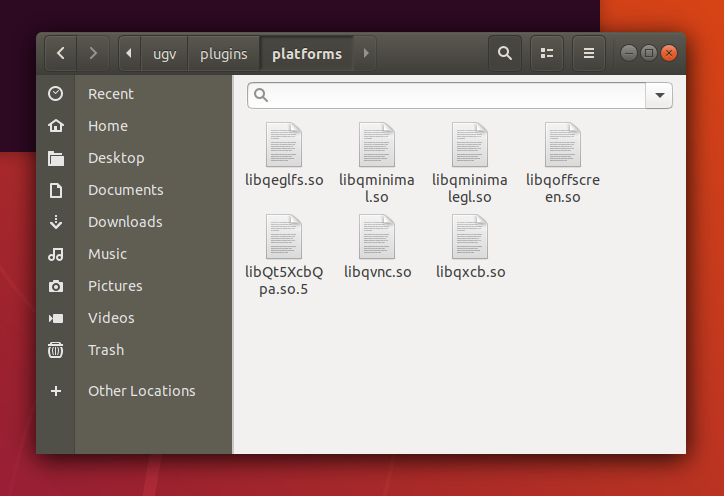 因此,问题就在于程序索引到的库路径错误了,解决方法如下:
在bashrc里声明路径(具体按照你的按照路径来):
# pyqt
export QT_QPA_PLATFORM_PLUGIN_PATH=/home/wnj/anaconda3/envs/ugv/lib/python3.6/site-packages/PySide2/Qt/plugins/platforms
在终端中
source ~/.bashrc后再次运行程序就通过了。
这个问题存在很久我都没有解决,一开始盲目按照网上指导装依赖库什么的,后面仔细查看输出了又试了很多LD_LIBRARY_PATH的写法,都没有成功,最后还是在QT论坛上找了半天才发现这个办法,有相关的问题困扰欢迎与我交流~