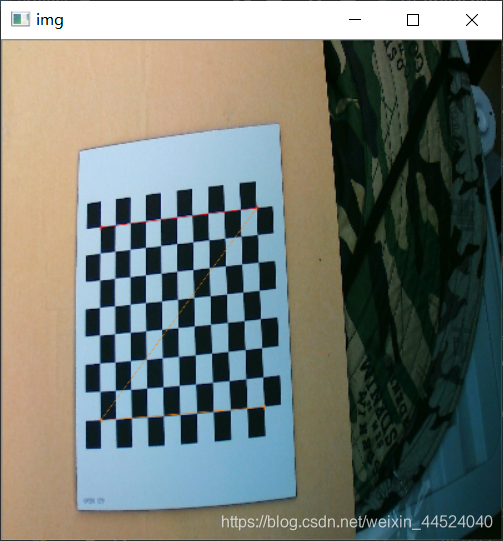

import cv2
import numpy as np
import glob
# 阈值
criteria = (cv2.TERM_CRITERIA_EPS + cv2.TERM_CRITERIA_MAX_ITER, 30, 0.001)
# print(cv2.TERM_CRITERIA_EPS,'',cv2.TERM_CRITERIA_MAX_ITER)

#w h分别是棋盘格模板长边和短边规格(角点个数)
w = 11
h = 8

imgpoints = [] # 在图像平面的二维点

img = cv2.imread('D:\\ML\\Project_python\\zjk\\qi\\WIN_20191007_10_39_33_Pro.jpg')
gray = cv2.cvtColor(img,cv2.COLOR_BGR2GRAY)
ret, corners = cv2.findChessboardCorners(gray, (w,h))
# 如果找到足够点对,将其存储起来
corners3 = np.array([])
if ret == True:
    #精确找到角点坐标
    corners2 = cv2.cornerSubPix(gray,corners,(11,11),(-1,-1),criteria)
    corners3 = np.array([corners[0],corners[10],corners[77],corners[87]])
    # 将角点在图像上显示
    cv2.drawChessboardCorners(img, (2,2), corners3, ret)
    print(corners3)
    # cv2.imshow('findCorners',img)
    # cv2.waitKey()
# cv2.destroyAllWindows()

# print('四个点的坐标是:\n',corners3)
point = np.reshape(corners3,(4,2))
print(point)

dst = np.array([[200, 200],
                [400, 200],
                [200, 400],
                [400, 400]], dtype = "float32")
M = cv2.getPerspectiveTransform(point, dst)
print('变换矩阵是', M)
warped = cv2.warpPerspective(img, M, (1000, 1000))

img = cv2.resize(img,(400,400))
cv2.imshow('img',img)
cv2.imshow('fin',warped)
cv2.waitKey()
cv2.destroyAllWindows()
改进后
效果
import cv2
import numpy as np

def point2matrix(left,right):
    point_convert = np.vstack([np.hstack([left,right]),[1,1]])
    return point_convert

#找到标定绿色线直线轮廓,并且拟合出直线,返回直线与图片的左边和右边的交点
def findGreen(src):
    # 转换为浮点数进行计算
    fsrc = np.array(src, dtype=np.float32) / 255.0
    (b, g, r) = cv2.split(fsrc)
    gray = 2 * g - b - r
    # 求取最大值和最小值
    (minVal, maxVal, minLoc, maxLoc) = cv2.minMaxLoc(gray)
    # 计算直方图
    # hist = cv2.calcHist([gray], [0], None, [256], [minVal, maxVal])
    # plt.plot(hist)
    # plt.show()
    # 转换为u8类型,进行otsu二值化
    gray_u8 = np.array((gray - minVal) / (maxVal - minVal) * 255, dtype=np.uint8)
    (thresh, bin_img) = cv2.threshold(gray_u8, -1.0, 255, cv2.THRESH_OTSU)
    # cv2.imshow('bin_img', bin_img)
    # 得到彩色的图像
    (b8, g8, r8) = cv2.split(src)
    color_img = cv2.merge([b8 & bin_img, g8 & bin_img, r8 & bin_img])
    #找到线的轮廓并拟合出直线
    img, contour, hier = cv2.findContours(bin_img, cv2.RETR_TREE, cv2.CHAIN_APPROX_SIMPLE)
    rows, cols = color_img.shape[0:2]
    [vx, vy, x, y] = cv2.fitLine(contour[0], cv2.DIST_L2, 0, 0.01, 0.01)
    lefty = int((-x * vy / vx) + y)
    righty = int(((cols - x) * vy / vx) + y)
    cv2.line(src, (cols - 1, righty),(0, lefty), (0, 0, 255), 2)
    return np.array([[0, lefty]]).T,np.array([[cols - 1, righty]]).T

#找到棋盘角点,并且返回棋盘的最外面的四个角点
def findCorner(src,w,h):
    #角点检测精度阈值
    criteria = (cv2.TERM_CRITERIA_EPS + cv2.TERM_CRITERIA_MAX_ITER, 30, 0.001)
    #灰度化处理,找到角点
    gray = cv2.cvtColor(src,cv2.COLOR_BGR2GRAY)
    ret, corners = cv2.findChessboardCorners(gray, (w,h))
    corners3 = np.array([])
    if ret == True:
        #精确找到角点坐标
        corners2 = cv2.cornerSubPix(gray,corners,(11,11),(-1,-1),criteria)
        #找出角点的四个最外侧的点
        corners3 = np.array([corners2[0],corners2[0+(w-1)],corners2[-1-(w-1)],corners2[-1]])
        # 将角点在图像上显示
        cv2.drawChessboardCorners(src, (2,2), corners3, ret)
        cv2.imshow('findCorners',src)
    #corner3的类型是(4,1,2)
    point = np.reshape(corners3,(4,2))
    return point

def perspective_transformation(src,point,line_point):
    '''
    src--原图像
    point--棋盘检测出来的角点坐标
    line_point--拟合出的直线与图片的两个交点组成的齐次矩阵
    Perspective_M--透视变换矩阵 3×3
    rotation_M--旋转变换矩阵2×3
    line_point_rotation--对拟合出的直线与图片的两个交点组成的齐次矩阵再进行旋转变换后的点
    '''
    # 定义要投影到另一个面的四点矩阵,一定要设置为float32类型,因为矩阵乘法会有小数产出
    benchmark = np.array([[300, 575],
                          [300, 300],
                          [500, 575],
                          [500, 300]], dtype = "float32")
    # 得到透视变换的矩阵
    Perspective_M = cv2.getPerspectiveTransform(point, benchmark)
    # print('变换矩阵是', M)
    # 透视变换整个src图片
    warped = cv2.warpPerspective(src, Perspective_M, (1200, 900))

    # 拟合出的直线与图片的两个交点组成的齐次矩阵进行坐标的转换
    c = np.dot(Perspective_M,line_point)
    cx = c[0]/c[2]
    cy = c[1]/c[2]

    # line_point_convert 是转换后的直线两点,line_point_convert_k是透视变换后的直线的斜率
    line_point_convert = np.array([cx,cy])
    line_point_convert_k = (cy[1]-cy[0])/(cx[1]-cx[0])
    # print("转换后的两个坐标矩阵是:\n",line_point_convert)

    # 得到旋转矩阵rotation_M,并且旋转旋转透视变换后的图片,使得图片的直线处与图像坐标平行
    rotation_M = cv2.getRotationMatrix2D(((1200, 900)), line_point_convert_k*180/np.pi,1)
    rotation = cv2.warpAffine(warped, rotation_M, (1200, 900))

    # 将透视变换后的两个点进行旋转变换后的坐标,横坐标第一行是x,第二行y
    line_point_rotation = np.dot(rotation_M,np.vstack([line_point_convert,np.array([[1,1]])]))
    print("旋转后的坐标矩阵是:\n",line_point_rotation)

    # cv2.imshow('fin',warped)
    # cv2.imshow('rotation',rotation)
    # 找到合适的部分进行图片的截取
    ROI_Perspective_rotation = rotation[0:int(np.min(line_point_rotation[1])),int(np.min(line_point_rotation[0])):int(np.max(line_point_rotation[0]))]
    cv2.imshow('ROI_Perspective_rotation',ROI_Perspective_rotation)
    cv2.waitKey()

    return line_point_rotation, rotation_M, Perspective_M

if __name__ == '__main__':
    '''
    image--输入图像
    left_point,right_point--拟合出的直线与图片的两个交点
    point_corner--棋盘的最外面的四个角点
    left_right_matrix--拟合出的直线与图片的两个交点组成的齐次矩阵
    '''
    corner_num_long = int(input('请输入棋盘长边的角点个数:'))   # 我这里棋盘的长边×短边 = 11 × 8
    corner_num_width = int(input('请输入棋盘长边的角点个数:'))  # 我这里棋盘的长边×短边 = 11 × 8
    image = cv2.imread('D:\\ML\\Project_python\\zjk\\qi\\Inkedjiao3_LI.jpg')
    left_point, right_point = findGreen(image)
    left_right_matrix = point2matrix(left_point, right_point)
    point_corner = findCorner(image, corner_num_long, corner_num_width)
    perspective_transformation(image,point_corner,left_right_matrix)
    cv2.destroyAllWindows()
透视变换后的结果返回到原来的图中


import cv2
import numpy as np
import matplotlib.pyplot as plt

def four_point_rotation_to_four_point_in_src(perspective_matrix, rotation_matrix, four_point_ROI_rotation):
    '''
    four_point_ROI_rotation->rotation_matrix = four_point_ROI_perspect
    four_point_ROI_perspect->perspective_matrix = four_point_ROI
    :return four_point_ROI
    '''
    four_point_ROI_rotation = np.vstack([four_point_ROI_rotation,np.array([[1, 1, 1, 1]])])
    perspective_matrix_inverse = np.mat(perspective_matrix).I

    rotation_matrix = np.vstack([rotation_matrix, np.array([[0, 0, 1]])])
    # rotation_matrix是2×3的矩阵,在最后一行加一个 0,0,1

    rotation_matrix_inverse = np.mat(rotation_matrix).I
    print('======')

    four_point_ROI_perspect = np.dot(rotation_matrix_inverse, four_point_ROI_rotation)
    print('旋转后的坐标矩阵是:\n', four_point_ROI_rotation)
    four_point_ROI = np.dot(perspective_matrix_inverse, four_point_ROI_perspect)
    four_point_ROI_x = four_point_ROI[0]/four_point_ROI[2]
    four_point_ROI_y = four_point_ROI[1]/four_point_ROI[2]
    four_point_ROI_2_4 = np.vstack([four_point_ROI_x,four_point_ROI_y])
    print('透视变换后的矩阵是:\n',four_point_ROI)
    print("最终四点矩阵是",four_point_ROI_2_4)

    return four_point_ROI_2_4

# 变换为齐次矩阵
def point2matrix(left,right):
    point_convert = np.vstack([np.hstack([left, right]), [1, 1]])
    return point_convert

# 找到标定绿色线直线轮廓,并且拟合出直线,返回直线与图片的左边和右边的交点
def findGreen(src):
    '''
    找到标定绿色线直线轮廓,并且拟合出直线,返回直线与图片的左边和右边的交点
    '''
    # 转换为浮点数进行计算
    fsrc = np.array(src, dtype=np.float32) / 255.0
    (b, g, r) = cv2.split(fsrc)
    gray = 2 * g - b - r
    # 求取最大值和最小值
    (minVal, maxVal, minLoc, maxLoc) = cv2.minMaxLoc(gray)
    # 计算直方图
    hist = cv2.calcHist([gray], [0], None, [256], [minVal, maxVal])
    plt.plot(hist)
    # plt.show()
    # 转换为u8类型,进行otsu二值化
    gray_u8 = np.array((gray - minVal) / (maxVal - minVal) * 255, dtype=np.uint8)
    (thresh, bin_img) = cv2.threshold(gray_u8, -1.0, 255, cv2.THRESH_OTSU)
    # cv2.imshow('bin_img', bin_img)
    # 得到彩色的图像
    (b8, g8, r8) = cv2.split(src)
    color_img = cv2.merge([b8 & bin_img, g8 & bin_img, r8 & bin_img])
    # 找到线的轮廓并拟合出直线
    img, contour, hier = cv2.findContours(bin_img, cv2.RETR_TREE, cv2.CHAIN_APPROX_SIMPLE)
    rows, cols = color_img.shape[0:2]
    [vx, vy, x, y] = cv2.fitLine(contour[0], cv2.DIST_L2, 0, 0.01, 0.01)
    lefty = int((-x * vy / vx) + y)
    righty = int(((cols - x) * vy / vx) + y)
    cv2.line(src, (cols - 1, righty), (0, lefty), (0, 0, 255), 2)
    # cv2.circle(src, (0, lefty),20,(0, 255, 255))
    # cv2.circle(src, (cols - 1, righty), 20, (0, 255, 255))
    # cv2.imshow('src', src)
    # cv2.waitKey()
    # cv2.destroyAllWindows()
    return np.array([[0, lefty]]).T, np.array([[cols - 1, righty]]).T

# 找到棋盘角点,并且返回棋盘的最外面的四个角点
def findCorner(src,w,h):
    # 角点检测精度阈值
    criteria = (cv2.TERM_CRITERIA_EPS + cv2.TERM_CRITERIA_MAX_ITER, 30, 0.001)
    # 灰度化处理,找到角点
    gray = cv2.cvtColor(src, cv2.COLOR_BGR2GRAY)
    ret, corners = cv2.findChessboardCorners(gray, (w, h))
    corners3 = np.array([])
    if ret == True:
        # 精确找到角点坐标
        corners2 = cv2.cornerSubPix(gray, corners, (11, 11), (-1, -1), criteria)
        # 找出角点的四个最外侧的点
        corners3 = np.array([corners2[0], corners2[0+(w-1)], corners2[-1-(w-1)], corners2[-1]])
        # 将角点在图像上显示
        # cv2.drawChessboardCorners(src, (2, 2), corners3, ret)
        # cv2.imshow('findCorners', src)
        # cv2.waitKey()
        # cv2.destroyAllWindows()
    # corner3的类型是(4,1,2)
    point = np.reshape(corners3, (4, 2))
    return point

def perspective_transformation(src, point, line_point):
    '''
    返回透视变换和旋转变换的两个矩阵
    src--原图像
    point--棋盘检测出来的角点坐标
    line_point--拟合出的直线与图片的两个交点组成的齐次矩阵
    Perspective_M--透视变换矩阵 3×3
    rotation_M--旋转变换矩阵 2×3
    line_point_rotation--对拟合出的直线与图片的两个交点组成的齐次矩阵再进行旋转变换后的点
    透视变换和旋转变换均变换到 1200×900 的矩阵上
    '''
    # 定义要投影到另一个面的四点矩阵,一定要设置为float32类型,因为矩阵乘法会有小数产出
    benchmark = np.array([[300, 575],
                          [300, 300],
                          [500, 575],
                          [500, 300]], dtype="float32")
    # 得到透视变换的矩阵
    perspective_M = cv2.getPerspectiveTransform(point, benchmark)
    # print('变换矩阵是', M)
    # 透视变换整个src图片
    warped = cv2.warpPerspective(src, perspective_M, (1200, 900))

    # 拟合出的直线与图片的两个交点组成的齐次矩阵进行坐标的转换
    c = np.dot(perspective_M, line_point)
    cx = c[0]/c[2]
    cy = c[1]/c[2]
    print('cx', cx, '\ncy', cy)
    # line_point_convert 是转换后的直线两点,line_point_convert_k是透视变换后的直线的斜率
    line_point_convert = np.array([cx, cy])

    # cv2.circle(warped, (int(round(cx[0])), int(round(cy[0]))), 20, (0, 255, 255))
    # cv2.circle(warped, (int(round(cx[1])), int(round(cy[1]))), 20, (0, 255, 255))
    # cv2.imshow('warped',warped)
    # cv2.waitKey()
    # cv2.destroyAllWindows()

    line_point_convert_k = (cy[1]-cy[0])/(cx[1]-cx[0])
    # print("转换后的两个坐标矩阵是:\n",line_point_convert)

    # 得到旋转矩阵rotation_M,并且旋转旋转透视变换后的图片,使得图片的直线处与图像坐标平行
    rotation_M = cv2.getRotationMatrix2D((1200, 900), line_point_convert_k*180/np.pi, 1)
    rotation = cv2.warpAffine(warped, rotation_M, (1200, 900))

    # 将透视变换后的两个点进行旋转变换后的坐标,横坐标第一行是x,第二行y
    line_point_rotation = np.dot(rotation_M, np.vstack([line_point_convert, np.array([[1, 1]])]))

    # cv2.circle(rotation,
    #            (int(round(line_point_rotation[0][0])), int(round(line_point_rotation[1][0])))
    #            , 20, (0, 255, 255))
    # cv2.circle(rotation,
    #            (int(round(line_point_rotation[0][1])), int(round(line_point_rotation[1][1])))
    #            , 20, (0, 255, 255))
    # print("旋转后的坐标矩阵是:\n", line_point_rotation)
    # cv2.imshow('rotation', rotation)
    # cv2.waitKey()
    # cv2.destroyAllWindows()

    find_four_point_M = [[0, 0],
                         [500, 500]]
    find_another_two_point_up = line_point_rotation - find_four_point_M
    find_four_point = np.hstack([line_point_rotation, find_another_two_point_up])

    # print('另外两个点:',find_another_two_point_up)
    print('四个点',find_four_point)

    cv2.circle(rotation,
               (int(round(find_four_point[0][0])), int(round(find_four_point[1][0])))
               , 20, (0, 255, 255))
    cv2.circle(rotation,
               (int(round(find_four_point[0][1])), int(round(find_four_point[1][1])))
               , 20, (0, 255, 255))
    cv2.circle(rotation,
               (int(round(find_four_point[0][2])), int(round(find_four_point[1][2])))
               , 20, (0, 255, 255))
    cv2.circle(rotation,
               (int(round(find_four_point[0][3])), int(round(find_four_point[1][3])))
               , 20, (0, 255, 255))
    cv2.imshow('find_four_point', rotation)
    cv2.waitKey()
    cv2.destroyAllWindows()

    # # 找到合适的部分进行图片的截取
    # ROI_Perspective_rotation = rotation[0:int(np.min(line_point_rotation[1])),
    #                                     int(np.min(line_point_rotation[0])):int(np.max(line_point_rotation[0]))]
    # cv2.imshow('ROI_Perspective_rotation', ROI_Perspective_rotation)
    # cv2.waitKey()

    return rotation_M, perspective_M,find_four_point

if __name__ == '__main__':
    '''
    image--输入图像
    left_point,right_point--拟合出的直线与图片的两个交点
    point_corner--棋盘的最外面的四个角点
    left_right_matrix--拟合出的直线与图片的两个交点组成的齐次矩阵
    rotation_matrix--旋转变换矩阵2×3
    perspective_matrix--透视变换矩阵 3×3
    '''
    corner_num_long = 11 # int(input('请输入棋盘长边的角点个数:'))   # 我这里棋盘的长边×短边 = 11 × 8
    corner_num_width = 8 # int(input('请输入棋盘长边的角点个数:'))  # 我这里棋盘的长边×短边 = 11 × 8
    image = cv2.imread('D:\\ML\\Project_python\\zjk\\qi\\Inkedjiao3_LI.jpg')# 读取地面的棋盘
    left_point, right_point = findGreen(image)# 用绿色包装喷杆,找到喷杆直杆线图片的交点
    left_right_matrix = point2matrix(left_point, right_point)# 变换为齐次矩阵
    point_corner = findCorner(image, corner_num_long, corner_num_width)# 找到棋盘四点矩阵
    rotation_matrix, perspective_matrix,four_point_ROI_rotation = \
        perspective_transformation(image, point_corner, left_right_matrix)# 进行透视变换
    point_ROI = four_point_rotation_to_four_point_in_src(perspective_matrix, rotation_matrix, four_point_ROI_rotation)
    cv2.circle(image, (1711,43), 20, (0, 255, 255))
    image = cv2.resize(image, (1080,720))
    cv2.imshow('img',image)
    cv2.waitKey()
    cv2.destroyAllWindows()
版权声明:本文为weixin_44524040原创文章,遵循CC 4.0 BY-SA版权协议,转载请附上原文出处链接和本声明。