AngularJs的增删改查,排序,全选全不选,批量删除
<script type="text/javascript" src="../js/angular.min.js"></script>
         <script type="text/javascript">
            var app=angular.module("myApp",[]);
            app.controller("myCon",function($scope){
                $scope.users=[{
                    name:"张三",
                    age:20,
                    city:"北京",
                    dates:"2017-02-12 14:23:35",
                    check:false
                },{
                    name:"李四",
                    age:35,
                    city:"上海",
                    dates:"2017-04-18 16:34:34",
                    check:false
                },{
                    name:"王五",
                    age:32,
                    city:"河北",
                    dates:"2017-07-23 09:12:02",
                    check:false
                }];

                //用户名模糊查询
                $scope.sele="";

                //点击添加显示用户信息框
                $scope.isShow=false;
                $scope.addUser=function(){
                    if($scope.isShow){
                        $scope.isShow=false;
                    }else{
                        $scope.isShow=true;
                    }
                }

                //单个删除
                $scope.del=function($index){
                    $scope.users.splice($index,1);
                }

                //添加数据
                $scope.addName="";
                $scope.addAge="";
                $scope.addCity="";
                $scope.baocun=function(){
                    var addAll={
                        name:$scope.addName,
                        age:parseInt($scope.addAge),
                        city:$scope.addCity,
                        dates:new Date()
                    };
                    $scope.users.push(addAll);
                }

                //全选
                $scope.all= function (sel) {
                    for(var i=0;i<$scope.users.length;i++){
                      if(sel===true){
                          $scope.users[i].state=true;
                      }else {
                          $scope.users[i].state=false;
                      }
                    }
                };

                //批量删除
                $scope.delAll=function(){
                    var isSel=[];
                    for(index in $scope.users){
                        if($scope.users[index].state){
                            isSel.push($scope.users[index]);
                        }
                    }
                    for(index in isSel){
                        var name=isSel[index].name;
                        for(index2 in $scope.users){
                            if(name==$scope.users[index2].name){
                                $scope.users.splice(index2,1);
                            }
                        }
                    }
                }

               //修改
                $scope.upDate=function($index){
                    //显示用户信息框
                    $scope.isShow=true;
                    var names=$scope.users[$index].name;
                    var ages=$scope.users[$index].age;
                    var citys=$scope.users[$index].city;
                    //回显,将数据放入输入框中
                    $scope.addName=names;
                    $scope.addAge=ages;
                    $scope.addCity=citys;
                    $scope.xg=$index;
                }

                //修改后保存
                $scope.baocun=function(){
                    var newUser={
                        name:$scope.addName,
                        age:$scope.addAge,
                        city:$scope.addCity,
                        dates:new Date
                    };
                    $scope.users.splice($scope.xg,1,newUser);
                }
            });
        </script>
    </head>
    <body ng-app="myApp" ng-controller="myCon">
        <h4>管理信息</h4><br />
        <center>
            <input type="button" value="批量删除" ng-click="delAll()"/>
            用户名查询<input type="text" ng-model="sele"/>
            <select ng-model="orderAge">
                <option value="">--查询--</option>
                <option value="age">年龄正序查询</option>
                <option value="-age">年龄倒序查询</option>
            </select>
            <input type="button" value="添加" ng-click="addUser()"/>
            <table border="1px solid" cellpadding="10px" cellspacing="0px">
                <thead>
                    <tr>
                        <th><input type="checkbox" ng-model="selectAll" ng-click="all(selectAll)"/></th>
                        <th>姓名</th>
                        <th>年龄</th>
                        <th>城市</th>
                        <th>录入日期</th>
                        <th>操作</th>
                    </tr>
                </thead>
                <tbody>
                    <tr ng-repeat="user in users | filter:{name:sele} | orderBy:orderAge">
                        <td><input type="checkbox" ng-checked="selectAll" ng-model="user.state" ng-click="fanCheck()"/></td>
                        <td>{{user.name}}</td>
                        <td>{{user.age}}</td>
                        <td>{{user.city}}</td>
                        <td>{{user.dates | date:"yyyy-MM-dd hh:mm:ss"}}</td>
                        <td><input type="button" value="修改" ng-click="upDate($index)"/><input type="button" value="删除" ng-click="del($index)"/></td>
                    </tr>
                </tbody>
            </table>
            <div ng-show="isShow" style="margin-top: 30px; text-align: center; border: 1px solid">
                <h4>用户信息</h4>
                姓名<input type="text" ng-model="addName"/><br />
                年龄<input type="text" ng-model="addAge"/><br />
                城市<input type="text" ng-model="addCity"/><br />
                <input type="button" value="保存" ng-click="baocun()" ng-model="xg"/><br />
            </div>
        </center>
    </body>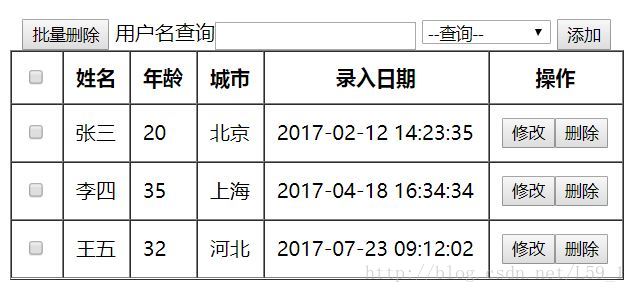
版权声明:本文为L59_1原创文章,遵循CC 4.0 BY-SA版权协议,转载请附上原文出处链接和本声明。