最近迷上了用python写爬虫,一发不可收拾,下面我们来说一下如何实现模拟登录微信公众号平台。
故事起因,由于本人注册了一个公众号,想着如何通过脚本实现像部分用户发送消息呢? 如何实现一键上传材料呢?本来想着激活了开发者模式什么都提供了,结果万万没想到什么都没有。不放弃的我想着既然再公众号平台能做的事,我为啥不能通过爬虫来模拟登录,然后做一系列的操作。那么开始开始今天操作-模拟登录公众号平台。
模拟实属不易,中间也遇到一些问题,但是不放弃的我终于将这关抗过来了,那么我们迎接今天的主角 微信公众号平台 https://mp.weixin.qq.com
- 工具:Fiddler Google 浏览器
- 语言:python
不管模拟什么,都需要经过登录页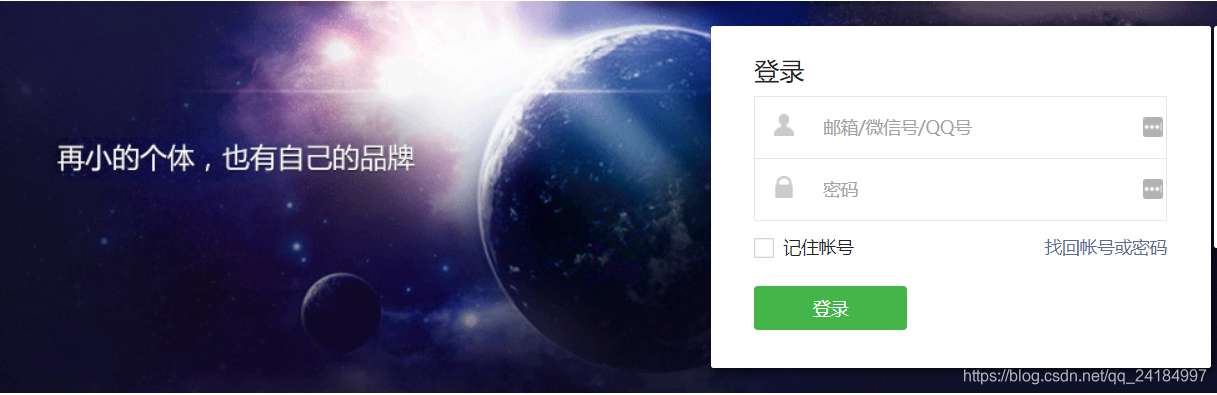
输入账号密码,点击登录我们通过 Fiddler 工具注意了两个比较特殊的接口:
- 地址:https://mp.weixin.qq.com/cgi-bin/bizlogin?action=startlogin
- 参数:
username= xxxxxxxxxxx 账号
pwd=xxxxxxxxxxxxxxxxxxx 通过MD5 加密后的字符串
imgcode= 验证码 ,后续如果登录频繁可能会触发验证码,我目前没遇到过输入验证码的情况,但是可能别人会遇到,下面我会把获取验证码的接口列出来
f=json&userlang=zh_CN&redirect_url=&token=&lang=zh_CN&ajax=1 后面这些不是主角就不一一说了 - 返回值:{“base_resp”:{“err_msg”:“ok”,“ret”:0},“redirect_url”:"/cgi-bin/bizlogin?action=validate&lang=zh_CN&account=1379960679%40qq.com"}
返回了一个重定向的地址,就是上图的第二个接口 https://mp.weixin.qq.com/cgi-bin/bizlogin?action=validate&lang=zh_CN&account=1379960679%40qq.com&token=
通过上述输入账号密码登录后,来到了一个扫描的阶段,通过扫描二次确定增加了一定的安全性,也增加了我爬取的难度,不管什么你要扫二维码那我就把二维码下载下来,本地扫描嘛,二维码扫描这关避免不了的,如果有那位大神能越过扫描二维码这步,请收下我的膝盖,大神带带我。那么我们开始第二步
下载二维码,本地扫描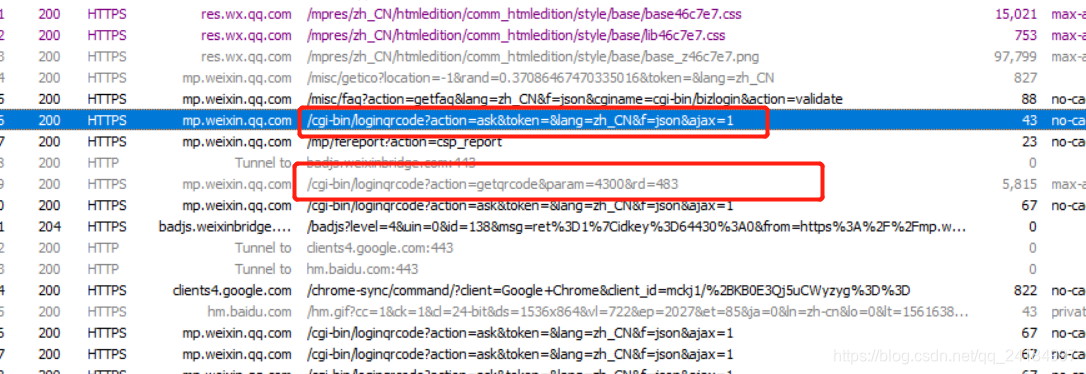
从图中标记的两个接口很清楚的知道它们的作用:
- 接口1: https://mp.weixin.qq.com/cgi-bin/loginqrcode?action=getqrcode¶m=4300&rd=483
这个是获取二维码接口,一开始我以为rd这个参数是通过上述接口获取的值,但是发现每次刷新这个值都会变,那么就肯定不是服务器传过来的值,因为没发现有接口去服务器调用返回这个值。那个我大概猜测是个随机数,后面通过测试应该就是一个随机数,这个参数可选 - 接口2:https://mp.weixin.qq.com/cgi-bin/loginqrcode?action=ask&token=&lang=zh_CN&f=json&ajax=1
接口2:通过工具发现这个接口每隔一秒就调用一次向服务器询问,是否已经通过扫描二维码登录?如果已经正确扫描过,状态就返回为1

扫描成功后,我们就跳到了管理页面,我们模拟登录的过程就结束了。通过上述接口我们获取token,后续将使用token进行一系列的操作
- 接口: https://mp.weixin.qq.com/cgi-bin/bizlogin?action=login
- 参数:userlang=zh_CN&redirect_url=&token=&lang=zh_CN&f=json&ajax=1
- 返回值: {“base_resp”:{“err_msg”:“ok”,“ret”:0},“redirect_url”:"/cgi-bin/home?t=home/index&lang=zh_CN&token=1502993366"} 获取正则表达式获取token
讲完了模拟登录的过程,接下来我们通过代码实现
首先:我们初始化参数:
    def __init__(self):
        self.session = requests.session()
        self.headers = {
            'User-Agent': 'Mozilla/5.0 (Windows NT 10.0; Win64; x64) AppleWebKit/537.36 (KHTML, like Gecko) Chrome/75.0.3770.80 Safari/537.36',
            'Referer': 'https://mp.weixin.qq.com/'
        }
        self.QRImgPath = os.path.split(os.path.realpath(__file__))[0] + os.sep + 'webWeixinQr.jpg'
        self.username = "账号"
        self.password = "密码."
账号密码登录
    def weixin_login(self):
        url = "https://mp.weixin.qq.com/cgi-bin/bizlogin?action=startlogin"
        params = {
            'username': self.username,
            'pwd': CommonUtil.md5(self.password),
            'imgcode': '',
            'f': 'json'
        }
        response = self.session.post(url, data=params, headers=self.headers, verify=False)
        if response.status_code == 200:
            target = response.content.decode('utf-8')
            print(target)
            self.get_weixin_login_qrcode()
下载二维码
def get_weixin_login_qrcode(self):
url = "https://mp.weixin.qq.com/cgi-bin/loginqrcode?action=getqrcode¶m=4300"
response = self.session.get(url, headers=self.headers, verify=False)
with open(self.QRImgPath, 'wb') as f:
f.write(response.content)
f.close()
# 打开二维码
if sys.platform.find('darwin') >= 0:
os.subprocess.call(['open', self.QRImgPath]) # 苹果系统
elif sys.platform.find('linux') >= 0:
os.subprocess.call(['xdg-open', self.QRImgPath]) # linux系统
else:
os.startfile(self.QRImgPath) # windows系统
print('请使用微信扫描二维码登录')
检查是否成功扫描二维码登录,通过开启一个子线程,每隔10秒去调用一次,如果状态返回成功就调用最终的登录接口
    def check_login(self):
        while True:
            url = "https://mp.weixin.qq.com/cgi-bin/loginqrcode?action=ask&token=&lang=zh_CN&f=json&ajax=1"
            response = self.session.get(url, headers=self.headers, verify=False)
            json = jsons.loads(response.text)
            if json["status"] == 1:
                self.login()
                break
            time.sleep(10)
最终的登录接口获取token
    def login(self):
        url = "https://mp.weixin.qq.com/cgi-bin/bizlogin?action=login"
        data = {
            'f': 'json',
            'ajax': 1,
            'random': random.random()
        }
        response = self.session.post(url, data=data, headers=self.headers, verify=False)
        # {"base_resp":{"err_msg":"ok","ret":0},"redirect_url":"/cgi-bin/home?t=home/index&lang=zh_CN&token=1502993366"}
        json = jsons.loads(response.text)
        redirect_url = json["redirect_url"]
        self.token = redirect_url[redirect_url.rfind("=") + 1:len(redirect_url)]
主方法
if __name__ == '__main__':
    wechat = WechatLogin()
    wechat.weixin_login()
    _thread.start_new_thread(wechat.check_login(), ("Thread-1", 2,))
完成模拟登录,获取了token,后续就可以实现 上传素材,给用户发送消息,群发等一系列的功能,今天就写到这里,源码我已经上传到 github 有问题就 提Issues 谢谢大家的支持
版权声明:本文为qq_24184997原创文章,遵循CC 4.0 BY-SA版权协议,转载请附上原文出处链接和本声明。