上一篇中我们学习了使用微服务中的Consul 注册发现来整合SpringBootAdmin 进行监控等操作,这一篇我们来学习Zookeeper注册中心整合SpringBootAdmin。
Zookeeper介绍
ZooKeeper 是 Apache 软件基金会的一个软件项目,它为大型分布式计算提供开源的分布式配置服务、同步服务和命名注册。
ZooKeeper 的架构通过冗余服务实现高可用性。
Zookeeper 的设计目标是将那些复杂且容易出错的分布式一致性服务封装起来,构成一个高效可靠的原语集,并以一系列简单易用的接口提供给用户使用。
一个典型的分布式数据一致性的解决方案,分布式应用程序可以基于它实现诸如数据发布/订阅、负载均衡、命名服务、分布式协调/通知、集群管理、Master 选举、分布式锁和分布式队列等功能。
Zookeeper 教程 Zookeeper教程
建议对Zookeeper 不熟悉的先看看教程,安装下载等。
本环境在 Windows 上面,所以以Windows为主。
Windows启动 zk service 双击 zkServer.cmd
如果出现 闪退的,这里要注意了,
zoo.cfg 的配置要改一下,可能是本地环境的问题\ 改成\ 而且 dataLogDir去掉不要。
# The number of milliseconds of each tick
tickTime=2000
# The number of ticks that the initial
# synchronization phase can take
initLimit=10
# The number of ticks that can pass between
# sending a request and getting an acknowledgement
syncLimit=5
# the directory where the snapshot is stored.
# do not use /tmp for storage, /tmp here is just
# example sakes.
dataDir=E:\\tools\\apache-zookeeper-3.6.3-bin\\data
# the port at which the clients will connect
然后启动,默认端口是 2181.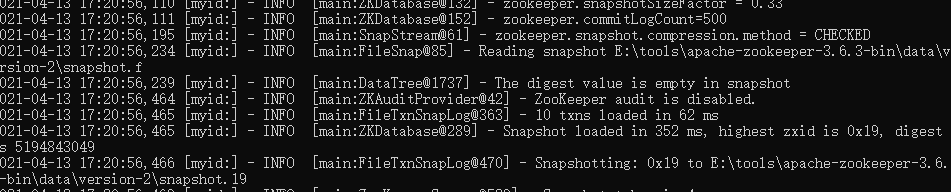
Zookeeper 整合SpringBootAdmin
Spring Cloud 整合 Zookeeper 请看官网: Spring Cloud Zookeeper
创建一个SpringBoot项目,加入Zookeeper等依赖。
pom.xml
<?xml version="1.0" encoding="UTF-8"?>
<project xmlns="http://maven.apache.org/POM/4.0.0" xmlns:xsi="http://www.w3.org/2001/XMLSchema-instance"
         xsi:schemaLocation="http://maven.apache.org/POM/4.0.0 https://maven.apache.org/xsd/maven-4.0.0.xsd">
    <modelVersion>4.0.0</modelVersion>
    <parent>
        <groupId>org.springframework.boot</groupId>
        <artifactId>spring-boot-starter-parent</artifactId>
        <version>2.3.0.RELEASE</version>
        <relativePath/> <!-- lookup parent from repository -->
    </parent>
    <groupId>com.example</groupId>
    <artifactId>spring-boot-admin-sample-zookeeper</artifactId>
    <version>0.0.1-SNAPSHOT</version>
    <name>spring-boot-admin-sample-zookeeper</name>
    <description>Demo project for Spring Boot</description>
    <properties>
        <java.version>1.8</java.version>
        <!-- spring-cloud 版本 如果 出现 与 springboot 版本不一致的情况 请查看 https://spring.io/projects/spring-cloud#overview-->
        <spring-cloud.version>Hoxton.SR8</spring-cloud.version>
    </properties>
    <dependencies>
        <dependency>
            <groupId>org.springframework.cloud</groupId>
            <artifactId>spring-cloud-starter-zookeeper-discovery</artifactId>
        </dependency>

        <!-- spring-boot-admin 服务端-->
        <dependency>
            <groupId>de.codecentric</groupId>
            <artifactId>spring-boot-admin-starter-server</artifactId>
            <exclusions>
                <exclusion>
                    <groupId>io.projectreactor.netty</groupId>
                    <artifactId>reactor-netty</artifactId>
                </exclusion>
            </exclusions>
            <version>2.3.0</version>
        </dependency>

        <dependency>
            <groupId>io.projectreactor.netty</groupId>
            <artifactId>reactor-netty</artifactId>
            <version>0.9.10.RELEASE</version>
        </dependency>

        <dependency>
            <groupId>org.springframework.boot</groupId>
            <artifactId>spring-boot-starter-web</artifactId>
        </dependency>

        <dependency>
            <groupId>org.springframework.boot</groupId>
            <artifactId>spring-boot-starter-security</artifactId>
        </dependency>

        <!-- end::dependency-eureka[] -->
        <dependency>
            <groupId>org.jolokia</groupId>
            <artifactId>jolokia-core</artifactId>
        </dependency>

        <dependency>
            <groupId>org.springframework.cloud</groupId>
            <artifactId>spring-cloud-context</artifactId>
        </dependency>

        <dependency>
            <groupId>org.springframework.boot</groupId>
            <artifactId>spring-boot-starter-test</artifactId>
            <scope>test</scope>
        </dependency>
    </dependencies>
    <dependencyManagement>
        <dependencies>
            <dependency>
                <groupId>org.springframework.cloud</groupId>
                <artifactId>spring-cloud-dependencies</artifactId>
                <version>${spring-cloud.version}</version>
                <type>pom</type>
                <scope>import</scope>
            </dependency>
        </dependencies>
    </dependencyManagement>

    <build>
        <plugins>
            <plugin>
                <groupId>org.springframework.boot</groupId>
                <artifactId>spring-boot-maven-plugin</artifactId>
            </plugin>
        </plugins>
    </build>
</project>
yml配置:
spring:
  application:
    name: zookeeper-example
  cloud:
    config:
      enabled: false
    zookeeper:
      connect-string: localhost:2181
      discovery:
        metadata:
          management.context-path: /foo
          health.path: /ping
          user.name: admin
          user.password: admin
  profiles:
    active:
      - secure
management:
  endpoints:
    web:
      exposure:
        include: "*"
      path-mapping:
        health: /ping
      base-path: /foo
  endpoint:
    health:
      show-details: ALWAYS
server:
  port: 8083
---
spring:
  profiles: insecure

---
spring:
  profiles: secure
  security:
    user:
      name: "admin"
      password: "admin"
启动类配置
加入以下注解:
@EnableDiscoveryClient
@EnableAdminServer
@SpringBootApplication
@EnableDiscoveryClient
@EnableAdminServer
public class SpringBootAdminSampleZookeeperApplication {

    public static void main(String[] args) {
        SpringApplication.run(SpringBootAdminSampleZookeeperApplication.class, args);
    }


    @Profile("insecure")
    @Configuration(proxyBeanMethods = false)
    public static class SecurityPermitAllConfig extends WebSecurityConfigurerAdapter {

        private final AdminServerProperties adminServer;

        public SecurityPermitAllConfig(AdminServerProperties adminServer) {
            this.adminServer = adminServer;
        }

        @Override
        protected void configure(HttpSecurity http) throws Exception {
            http.authorizeRequests((authorizeRequests) -> authorizeRequests.anyRequest().permitAll())
                    .csrf((csrf) -> csrf.csrfTokenRepository(CookieCsrfTokenRepository.withHttpOnlyFalse())
                            .ignoringRequestMatchers(
                                    new AntPathRequestMatcher(this.adminServer.path("/instances"),
                                            HttpMethod.POST.toString()),
                                    new AntPathRequestMatcher(this.adminServer.path("/instances/*"),
                                            HttpMethod.DELETE.toString()),
                                    new AntPathRequestMatcher(this.adminServer.path("/actuator/**"))));
        }

    }

    @Profile("secure")
    @Configuration(proxyBeanMethods = false)
    public static class SecuritySecureConfig extends WebSecurityConfigurerAdapter {

        private final AdminServerProperties adminServer;

        public SecuritySecureConfig(AdminServerProperties adminServer) {
            this.adminServer = adminServer;
        }

        @Override
        protected void configure(HttpSecurity http) throws Exception {
            SavedRequestAwareAuthenticationSuccessHandler successHandler = new SavedRequestAwareAuthenticationSuccessHandler();
            successHandler.setTargetUrlParameter("redirectTo");
            successHandler.setDefaultTargetUrl(this.adminServer.path("/"));

            http.authorizeRequests((authorizeRequests) -> authorizeRequests
                    .antMatchers(this.adminServer.path("/assets/**")).permitAll()
                    .antMatchers(this.adminServer.path("/login")).permitAll().anyRequest().authenticated())
                    .formLogin((formLogin) -> formLogin.loginPage(this.adminServer.path("/login"))
                            .successHandler(successHandler))
                    .logout((logout) -> logout.logoutUrl(this.adminServer.path("/logout")))
                    .httpBasic(Customizer.withDefaults())
                    .csrf((csrf) -> csrf.csrfTokenRepository(CookieCsrfTokenRepository.withHttpOnlyFalse())
                            .ignoringRequestMatchers(
                                    new AntPathRequestMatcher(this.adminServer.path("/instances"),
                                            HttpMethod.POST.toString()),
                                    new AntPathRequestMatcher(this.adminServer.path("/instances/*"),
                                            HttpMethod.DELETE.toString()),
                                    new AntPathRequestMatcher(this.adminServer.path("/actuator/**"))));
        }

    }

}
配置成功后,启动zk,然后在启动项目,如果能正常访问,获取到实例那么就是整合成功了。
启动的配置也是一样的,比如日志配置,邮箱配置,记住登录等,在前面已经有了,自己可以去试着去玩玩。
完整实例代码,GitHub: SpringBootAmdinDemo
有问题下方讨论,一起学习。