参考文章:https://blog.csdn.net/weixin_44601948/article/details/108502580
参考网站:http://www.webgl3d.cn/Three.js/
1. 安装three
npm i three
npm i three-obj-mtl-loader
npm i orbitcontrols
2. 引用
import * as THREE from "three";
import { OBJLoader, MTLLoader } from "three-obj-mtl-loader";
import OrbitControls from "three-orbitcontrols";
3. 代码
 init() {
      let that = this;
      this.windowHalfX = window.innerWidth / 2;
      this.windowHalfY = window.innerHeight / 2;

      let divs = document.createElement("div");
      this.container = document.querySelector(".Modal");
      this.container.appendChild(divs);
      // 场景
      this.scene = new THREE.Scene();
      // 相机
      this.camera = new THREE.PerspectiveCamera(
        45,
        window.innerWidth / window.innerHeight,
        1,
        1000
      );
      this.camera.position.z = 1.5;
      // 灯光
      var light = new THREE.AmbientLight("#deebf7", 0.9); // soft white light
      this.scene.add(light);
      // 渲染器
      this.renderer = new THREE.WebGLRenderer();
      this.renderer.setSize(window.innerWidth, window.innerHeight);
      this.renderer.setClearColor(0xffffff, 1); //设置背景颜色
      divs.appendChild(this.renderer.domElement);

      var onProgress = function (xhr) {
        if (xhr.lengthComputable) {
          var percentComplete = (xhr.loaded / xhr.total) * 100;
          console.log(Math.round(percentComplete, 2) + "% downloaded");
        }
      };
      var onError = function (xhr) {
        console.log(xhr);
      };

      var MTLLoaders = new MTLLoader();
      var OBJLoaders = new OBJLoader();

      var textureLoader = new THREE.TextureLoader();
      MTLLoaders.load(
        "/static/model/xxx.mtl",
        (materials) => {
          console.log(materials);
          materials.preload();
          // OBJLoaders.setMaterials(materials)
          OBJLoaders.load(
            "/static/model/xxx.obj",
            (object) => {
              console.log(object);
              // 设置旋转中心点
              object.children[0].geometry.computeBoundingBox();
              object.children[0].geometry.center();
              object.scale.set(3, 3, 3);
              object.position.y = 0;
              // this.scene.add(materials);
              this.scene.add(object);
              this.renderer.render(this.scene, this.camera);
              // requestAnimationFrame(anime);

              // textureLoader.load(
              //   "https://xxxxxxxxx/18559677286/mesh.png",
              //   (texture) => {
              //     console.log(texture, object);
              //     object.children[0].material.map = texture;
              //     // object.children[1].material.map = texture;
              //     object.children[0].material.needsUpdate = true;
              //     // object.children[1].material.needsUpdate = true;
              //     this.scene.add(object);
              //     this.renderer.render(this.scene, this.camera);
              //   }
              // );
            },
            onProgress,
            onError
          );
        }
      );

      window.addEventListener("resize", onWindowResize, false);
      const controls = new OrbitControls(this.camera, this.renderer.domElement);
      controls.enableDamping = true;
      controls.dampingFactor = 0.25;
      controls.enableZoom = false;
      controls.addEventListener("change", render); //监听鼠标、键盘事件

      function onWindowResize() {
        windowHalfX = window.innerWidth / 2;
        windowHalfY = window.innerHeight / 2;
        this.camera.aspect = window.innerWidth / window.innerHeight;
        this.camera.updateProjectionMatrix();
        this.renderer.setSize(window.innerWidth, window.innerHeight);
      }

      function render() {
        that.camera.lookAt(that.scene.position);
        that.renderer.render(that.scene, that.camera);
      }
      render();
    },
完整代码如图: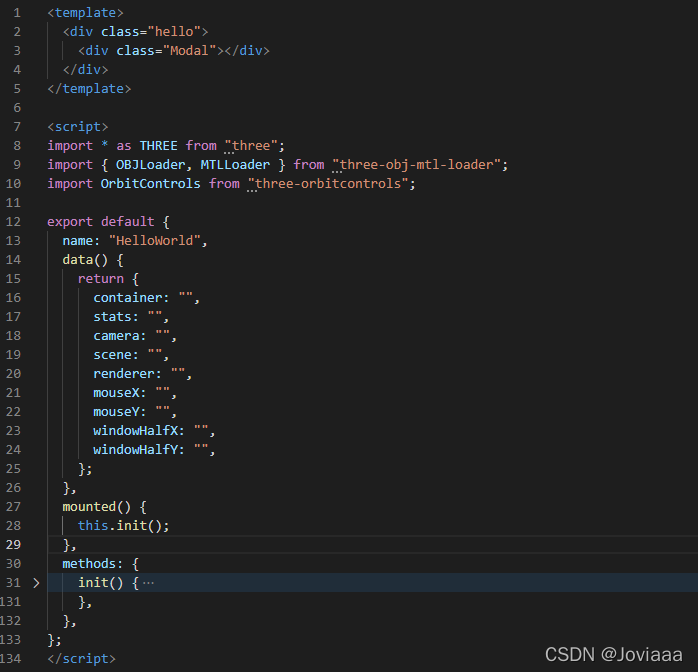
4. 发现报错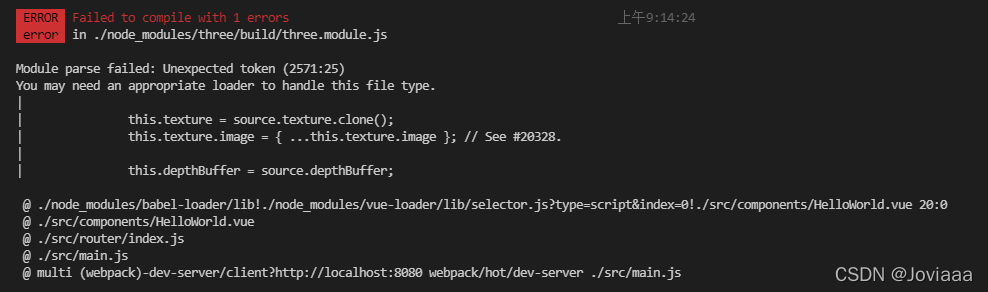
解决方法参考:https://blog.csdn.net/ShyLoneGirl/article/details/121707953
 // 将 threejs 切换到 128 版本
 npm install three@0.128 --save-dev
版权声明:本文为MrJovia原创文章,遵循CC 4.0 BY-SA版权协议,转载请附上原文出处链接和本声明。