“如果你觉得孤单就转圈吧,一圈,两圈,三圈......你会发现全世界都围着你转~”
介绍
dirsearch是一个基于python的命令行工具,用于暴力扫描页面结构,包括网页中的目录和文件。
dirsearch下载地址: GitHub - maurosoria/dirsearch: Web path scanner
运行环境:必须安装python3.7或更高版本
一、Dirsearch是什么?
Dirsearch是一个用于探测WEB服务器下的敏感文件/目录的命令行工具。
二、安装和使用
1.安装
1.1选择以下安装选项之一:
- 使用 git 安装:(推荐
git clone https://github.com/maurosoria/dirsearch.git --depth 1) - 使用 ZIP 文件安装:在此处下载
- 使用 Docker 安装:(更多信息可以在这里找到
docker build -t "dirsearch:v0.4.3" .) - 使用 PyPi 安装:或
pip3 install dirsearchpip install dirsearch - 使用 Kali Linux 安装:(已弃用)
sudo apt-get install dirsearch
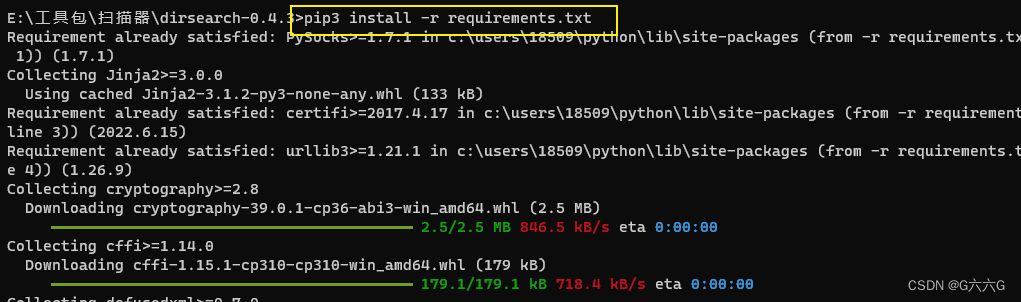
1.2下载zip包,解压后进入控制台,输入下面命令进行安装依赖:
pip3 install -r requirements.txt //安装依赖
python dirsearch.py -h //查看帮助
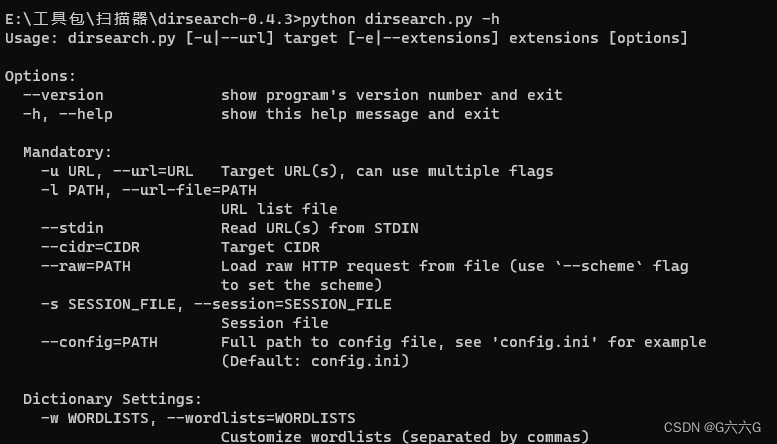
帮助信息的简单翻译:
-h, --help 显示此帮助消息并退出Mandatory:-u URL, --url=URL URL目标-L URLLIST, --url-list=URLLIST URL列表目标-e EXTENSIONS, --extensions=EXTENSIONS 以逗号分隔的扩展列表(示例:php、asp)-E, --extensions-list 使用公共扩展的预定义列表Dictionary Settings:-w WORDLIST, --wordlist=WORDLIST 自定义单词表(用逗号分隔)-l, --lowercase-f, --force-extensions 强制扩展每个单词表条目(如DirBuster)常规设置:-s DELAY, --delay=DELAY 请求之间的延迟(浮点数)-r, --recursive 递归暴力-R RECURSIVE_LEVEL_MAX, --recursive-level-max=RECURSIVE_LEVEL_MAX 最大递归级别(子目录)(默认值:1[仅限根目录+1目录])--suppress-empty, --suppress-empty--scan-subdir=SCANSUBDIRS, --scan-subdirs=SCANSUBDIRS 扫描给定-u |--url的子目录(分开逗号)--exclude-subdir=EXCLUDESUBDIRS, --exclude-subdirs=EXCLUDESUBDIRS 在递归过程中排除下列子目录扫描(用逗号分隔)-t THREADSCOUNT, --threads=THREADSCOUNT 线程数-x EXCLUDESTATUSCODES, --exclude-status=EXCLUDESTATUSCODES 排除状态代码,用逗号分隔(例如:301,500个)--exclude-texts=EXCLUDETEXTS 用逗号分隔的文本排除响应(示例: "Not found", "Error")--exclude-regexps=EXCLUDEREGEXPS 按regexp排除响应,用逗号分隔(示例:"Not foun[a-z]{1}", "^Error$")-c COOKIE, --cookie=COOKIE--ua=USERAGENT, --user-agent=USERAGENT 用户代理-F, --follow-redirects --遵循重定向-H HEADERS, --header=HEADERS 页眉,--页眉=页眉要添加的标题 (example: --header "Referer:example.com" --header "User-Agent: IE")--random-agents, --random-user-agents 随机代理,--随机用户代理连接设置:--timeout=TIMEOUT 连接超时--ip=IP 将名称解析为
2.使用方法
命令总结:
python3 dirsearch.py -e php,txt,zip -u https://target //简单的查看网址目录和文件python3 dirsearch.py -e php,txt,zip -u https://target -w db/dicc.txt //使用文件拓展名为php,txt,zip的字典扫描目标urlpython3 dirsearch.py -e php,txt,zip -u https://target -w db/dicc.txt --recursive -R 2python3 dirsearch.py -e php,txt,zip -u https://target -w db/dicc.txt --recursive -R 4 --scan-subdirs=/,/wp-content/,/wp-admin/python3 dirsearch.py -e php,txt,zip -u https://target -w db/dicc.txt --exclude-texts=This,AndThatpython3 dirsearch.py -e php,txt,zip -u https://target -w db/dicc.txt -H "User-Agent: IE"python3 dirsearch.py -e php,txt,zip -u https://target -w db/dicc.txt -t 20python3 dirsearch.py -e php,txt,zip -u https://target -w db/dicc.txt --random-agentspython3 dirsearch.py -e php,txt,zip -u https://target -w db/dicc.txt --json-report=reports/target.jsonpython3 dirsearch.py -e php,txt,zip -u https://target -w db/dicc.txt --simple-report=reports/target-paths.txtpython3 dirsearch.py -e php,txt,zip -u https://target -w db/dicc.txt --plain-text-report=reports/target-paths-and-status.js
个人常用命令:
python dirsearch.py -u http://xxxx //日常使用
python dirsearch.py -u http://xxxx -r //递归扫描,不过容易被检测
python dirsearch.py -u http://xxxx -r -t 30 //线程控制请求速率
python dirsearch.py -u http://xxxx -r -t 30 --proxy 127.0.0.1:8080 //使用代理
总结
以上就是今天要讲的内容,本文演示了如何使用有效的Web目录暴力破解工具Dirsearch来扫描和搜索用户可能看不到的隐藏Web目录。这是渗透测试中的第一个非常重要的任务。
####################
免责声明:工具本身并无好坏,希望大家以遵守《网络安全法》相关法律为前提来使用该工具,支持研究学习,切勿用于非法犯罪活动,对于恶意使用该工具造成的损失,和本人及开发者无关。
####################