问题
在写python代码的时候,想用burp代理查看网络请求包的内容,发现新版的burp会返回http2,以及python的requests库不支持http2协议的问题
软件版本
python 3.9.2
Burp Suite Professional v2021.3.2
思考
requests库不支持http2
- 用新版本的burp,设置里关掉http2(没找到修改的地方)
- 用旧版本burp(貌似2020.04后的就有http2)
- python用httpx库写代码(但以前的脚本都是用requests的,存在兼容问题)
(后来我回去用v1.7.26的burp就没有这个问题,我就说以前就没遇到过这样的问题嘛)
过程
先来看看requests库的代码
访问http的网站
import requests

url = "http://www.example.com"
proxies = {"http":"http://127.0.0.1:8080"}
#proxies = {"http":"127.0.0.1:8080"} 也可以这么写,老写法
req = requests.get(url,proxies=proxies)

requests库使用的是HTTP/1.1
burp请求和返回都是HTTP/1.1
接着访问https的网站
import requests
requests.packages.urllib3.disable_warnings()

url = "https://www.baidu.com"
headers = {"User-Agent":"Mozilla/5.0 (Windows NT 10.0; WOW64) AppleWebKit/537.36 (KHTML, like Gecko) Chrome/86.0.4240.198 Safari/537.36"}
proxies = {"https":"https://127.0.0.1:8080"}
#proxies = {"https":"127.0.0.1:8080"} 也可以这么写,老写法
#proxies = {"https":"http://127.0.0.1:8080"} 神奇的是,这么写也是对的,burp可以拦截到包
req = requests.get(url,headers=headers,proxies=proxies,verify=False)
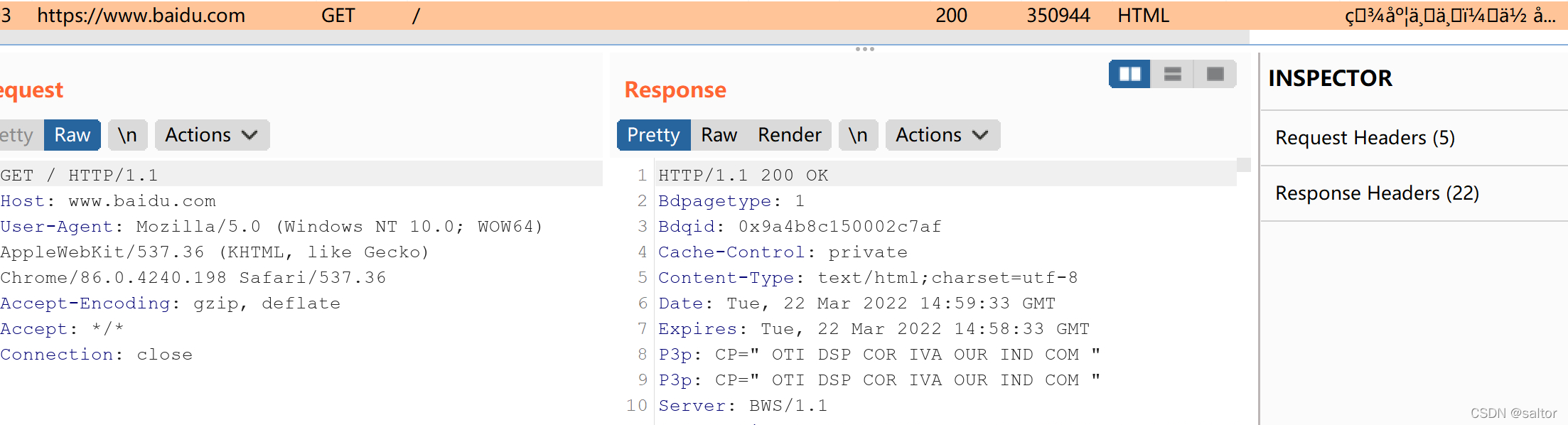
访问百度
requests库使用的是HTTP/1.1
burp请求和返回都是HTTP/1.1
在这里,代理的写法可以是
proxies = {"https":"https://127.0.0.1:8080"}
这样写也对…
proxies = {"https":"http://127.0.0.1:8080"}
好,问题来了。
访问某个网站
import requests
requests.packages.urllib3.disable_warnings()

url = "https://lunai.la"
headers = {"User-Agent":"Mozilla/5.0 (Windows NT 10.0; WOW64) AppleWebKit/537.36 (KHTML, like Gecko) Chrome/86.0.4240.198 Safari/537.36"}
proxies = {"https":"https://127.0.0.1:8080"}
req = requests.get(url,headers=headers,proxies=proxies,verify=False)
运行报错
requests.exceptions.ConnectionError: ('Connection aborted.', UnknownProtocol('HTTP/2'))
未知的协议HTTP/2,requests库解析不了HTTP/2
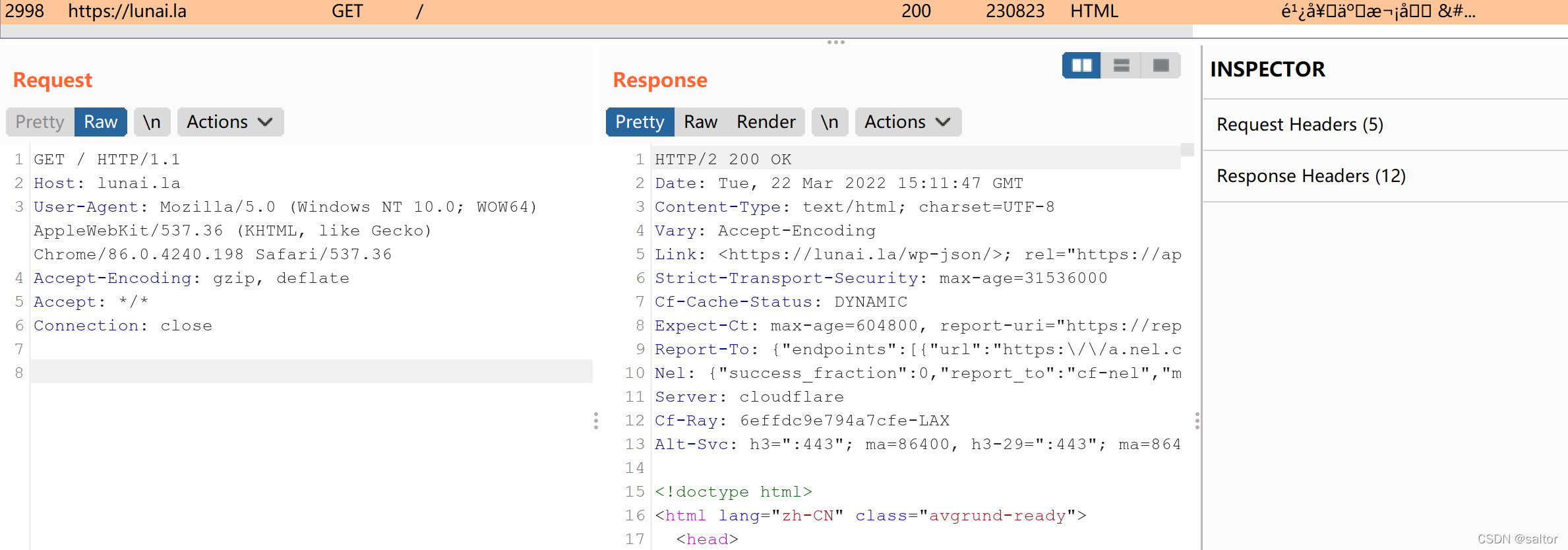
可以看到,requests请求用的HTTP/1.1的包,经过burp代理后,返回的是HTTP/2的包,给到requests库的时候它就解析不了了。
burp里面proxy–>Options–>Miscellaneous有两个强制使用HTTP/1.0的选项并没有什么用,返回的依旧是HTTP/2


特意用虚拟机安装回旧版本的burp看看,用的v1.7.26的版本,结果一切正常,请求和返回都是HTTP/1.1。


那这个就肯定是burp的问题了,我还以为是网站强制使用HTTP/2呢,用旧版本burp没事,用新的就有问题。看了下,貌似burp是2020.04的版本后就开始有HTTP/2了,所以这之前的版本应该都没问题。
查了下requests不支持解析HTTP/2,要用到一个新的库httpx
那就试试吧
pip install httpx
pip install httpx[http2]
用法基本和requests一致
import httpx

url = "https://lunai.la"
headers = {"User-Agent":"Mozilla/5.0 (Windows NT 10.0; WOW64) AppleWebKit/537.36 (KHTML, like Gecko) Chrome/86.0.4240.198 Safari/537.36"}
proxies = {"https://":"http://127.0.0.1:8080"} #注意代理写法不同了,要加冒号和斜杠

with httpx.Client(headers=headers,proxies=proxies,verify=False,http2=True) as client:
    req = client.get(url)
    print(req.text)
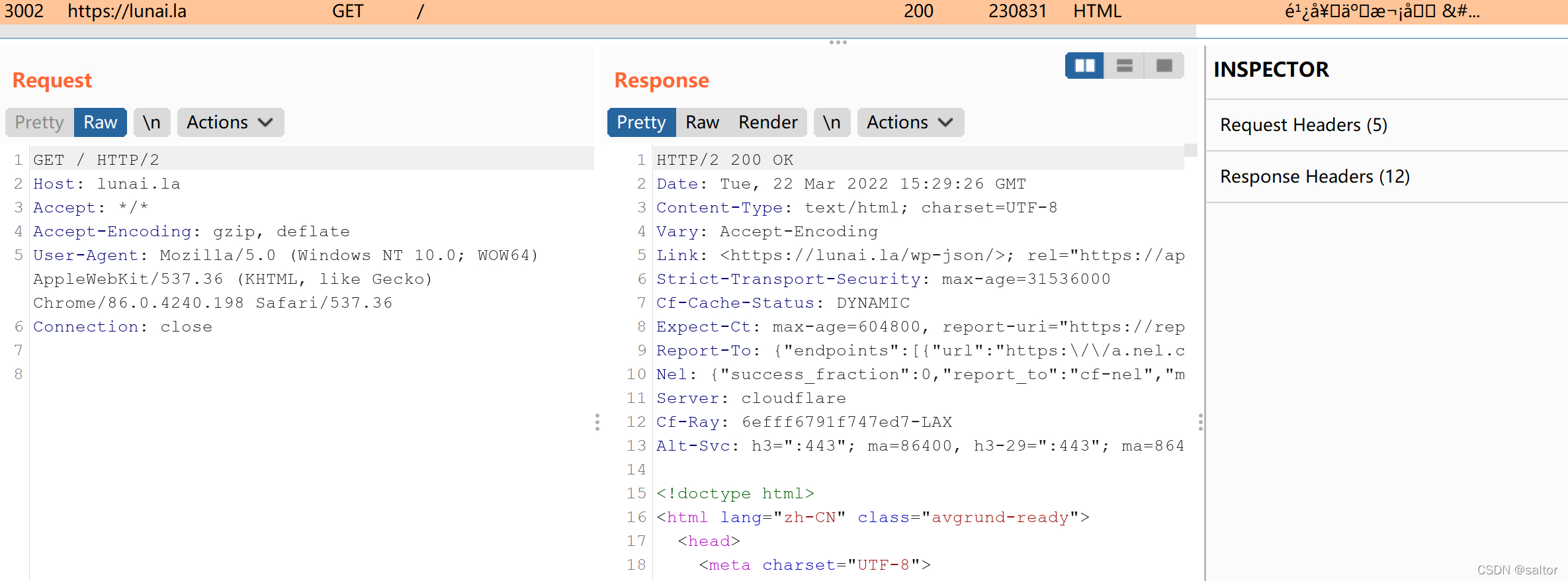
httpx请求用的是HTTP/2,返回的也是HTTP/2,httpx库解析正常
在Client()里才有http2这个参数,直接写httpx.get是没有的
这里代理的写法不一样了,要加上冒号和斜杠
proxies = {"https://":"http://127.0.0.1:8080"}
#proxies = {"https":"http://127.0.0.1:8080"} 这样写是错的
还有一个问题
为什么前面是https后面是http呢
如果用proxies = {"https://":"https://127.0.0.1:8080"}的话,会报错
httpx.ConnectError: [SSL: WRONG_VERSION_NUMBER] wrong version number (_ssl.c:1123)
网上找的就只有一个答案
pip install requests==2.19.1

pip install certifi==2018.8.13
说是安装特定的requests库和certifi库就能解决。然而,并没有什么用。
这个proxies = {"https://":"http://127.0.0.1:8080"}还是后来试出来的,所以这就是为什么我觉得很神奇的写法。
我大概理解为(只是方便我记住而已)
前面的https://是给python用的,后面的http://127.0.0.1:8080是给burp用的
所以前面requests库写成proxies = {"https":"http://127.0.0.1:8080"}也是可以用的
结论
在要给代码加代理使用,而burp返回的是HTTP/2的包时,要么就用回旧版本的burp(2020.04之前的),要么就用httpx库来写。
代理的写法是proxies = {"https://":"http://127.0.0.1:8080"},前后是不一致的。
这个是burp的bug,不知道最新的版本有没有解决。